
the automations I created do not work
the automations I created do not work

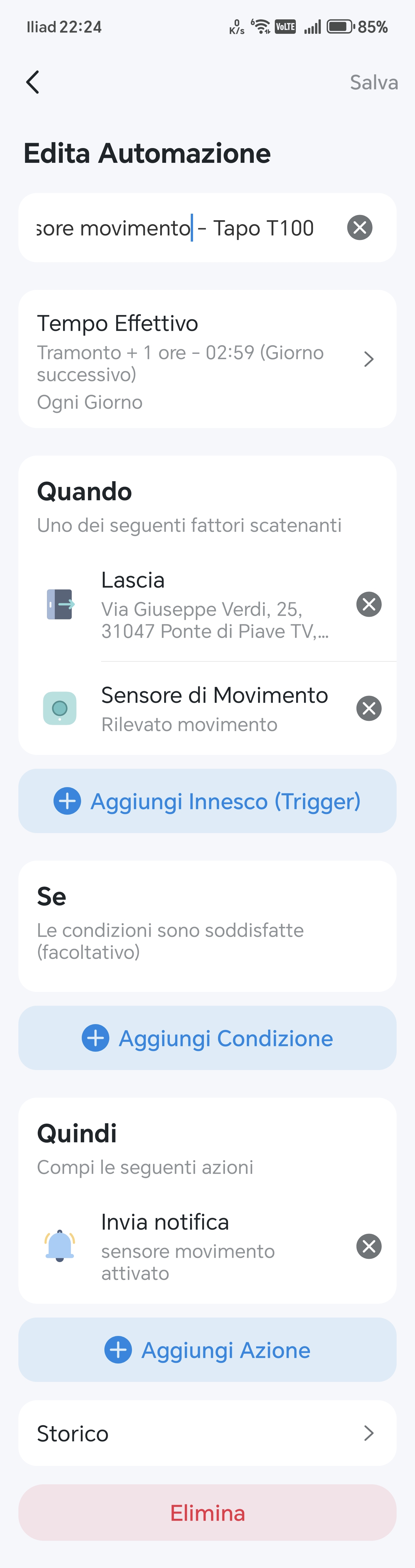
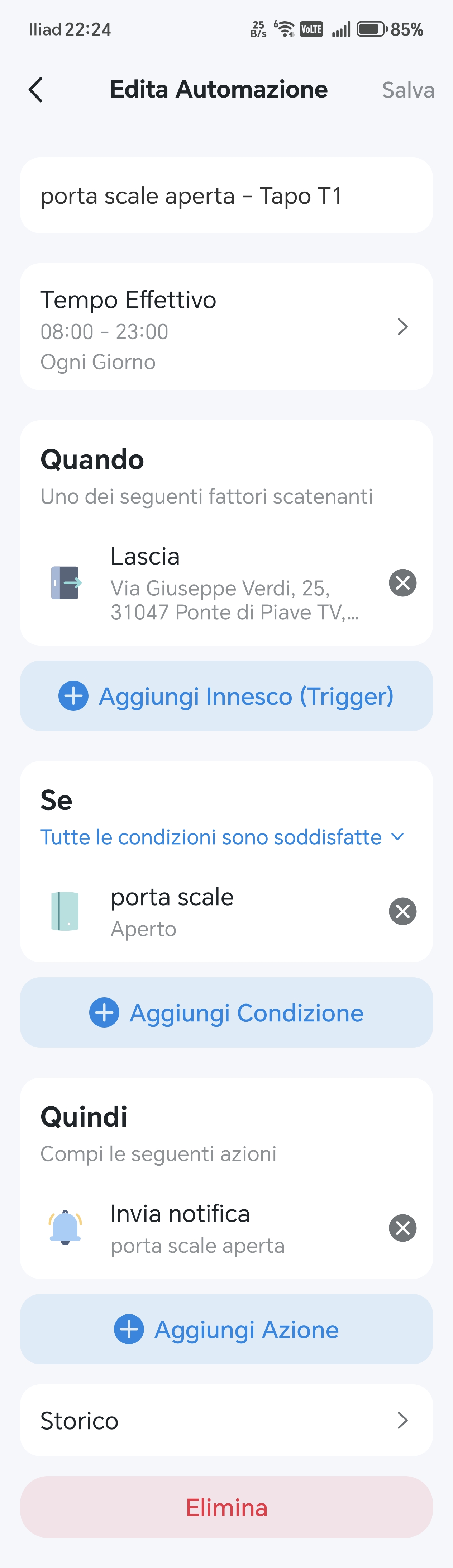
1) I have set up the following automation (Tapo T110): Every day, between 8 and 23, when I am away from home, if the staircase door is open then send me a notification.
2) I also set up another automation (Tapo T100): every day, 1 hour after sunset, when I am away from home, if
smart motion sensor detects motion then send me a notification.
However, both automations do not work, they always send notifications.
Where am I wrong?
- Copy Link
- Subscribe
- Bookmark
- Report Inappropriate Content


Since we haven’t received any updates from you for a while, here’s a summary of our suggestions regarding the issue you reported.
Based on your description, the issue seems to be strongly related to the geofencing feature. There are a few important points that should be checked first:
- If the “Leave Home” automation works normally but the “Arrive Home” automation does not, please verify that the “Arrive Home” automation has been configured correctly. In particular, make sure that 'This Phone/Tablet' is enabled in the Trigger setting. If it is not enabled, the system will not know where to obtain the location information or which location data should be used to run the automation, so the rule will not take effect.
- If neither geofencing automation is working, then all related settings should be reviewed. This includes not only the automation configuration itself, but also the location permissions granted to the Tapo app in your phone’s system settings. For more detailed troubleshooting steps, please refer to Q4 in the related article. General Questions about Tapo/Kasa Geofencing
If all settings have been confirmed to be correct and the geofencing automations still fail to work properly, then further investigation by the support team may be required. Click here to contact TP-Link technical support team.
- Copy Link
- Report Inappropriate Content
Did you disable the sensor's own notification feature? You may check it in their Device Settings page.
Additionally, your automation settings seem a bit odd. Did you know that when you add multiple conditions under “When,” the automation will run if ANY one of them is met? For example, in your first setup, the automation will trigger — sending a notification — whenever you leave home or when the motion sensor detects movement. This means even if you’re at home, movements detected by the sensor can still activate the automation and send a notification. Is that what you intended?
- Copy Link
- Report Inappropriate Content
I would like that when I am not at home and 1 hour after sunset Tapo would send me a notification that the sensor has detected movement
- Copy Link
- Report Inappropriate Content
gulluwing_1- wrote
I would like that when I am not at home and 1 hour after sunset Tapo would send me a notification that the sensor has detected movement
To achieve the scenario you described, you’ll need to set up two separate automation rules. For example, to receive a notification when motion is detected only after you’ve left home or after sunset, you can configure them like this:
Rule A – Motion notification
- Trigger: when the sensor detects motion → Action: send notification.
- Effective time: as needed
Rule B – Enable Condition
- Trigger: 1. when you leave home; 2. 1 hour after sunset
- Action: enable Rule A
- Effective time: Always.
This way, Rule A will only run when you’re away or after it’s been dark for an hour, ensuring you only get motion notifications during those times.
- Copy Link
- Report Inappropriate Content
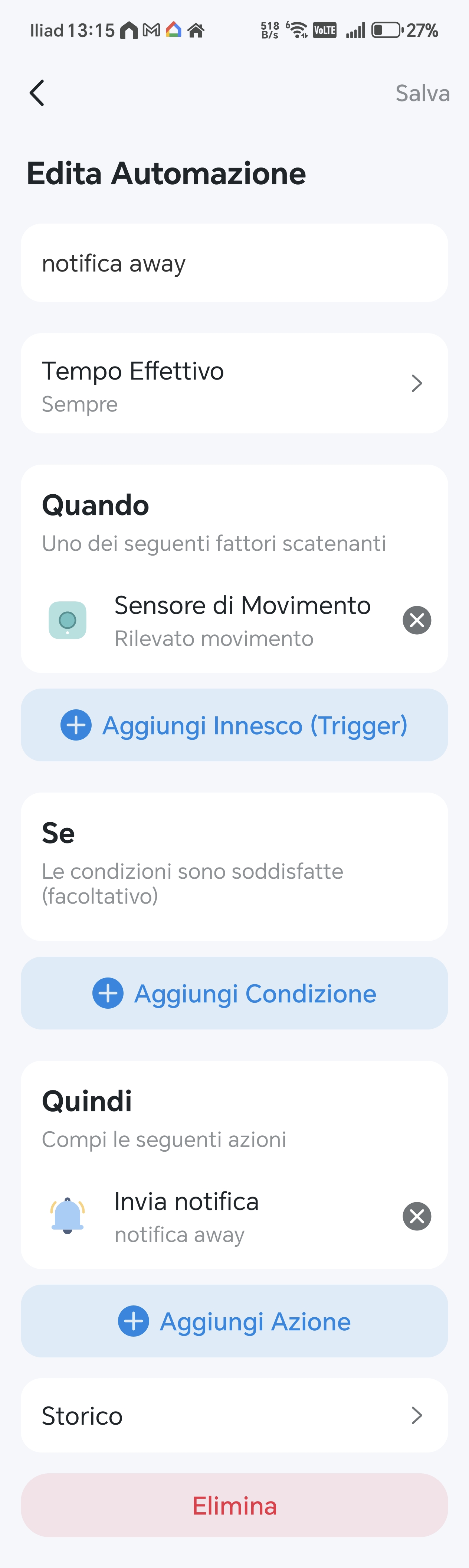
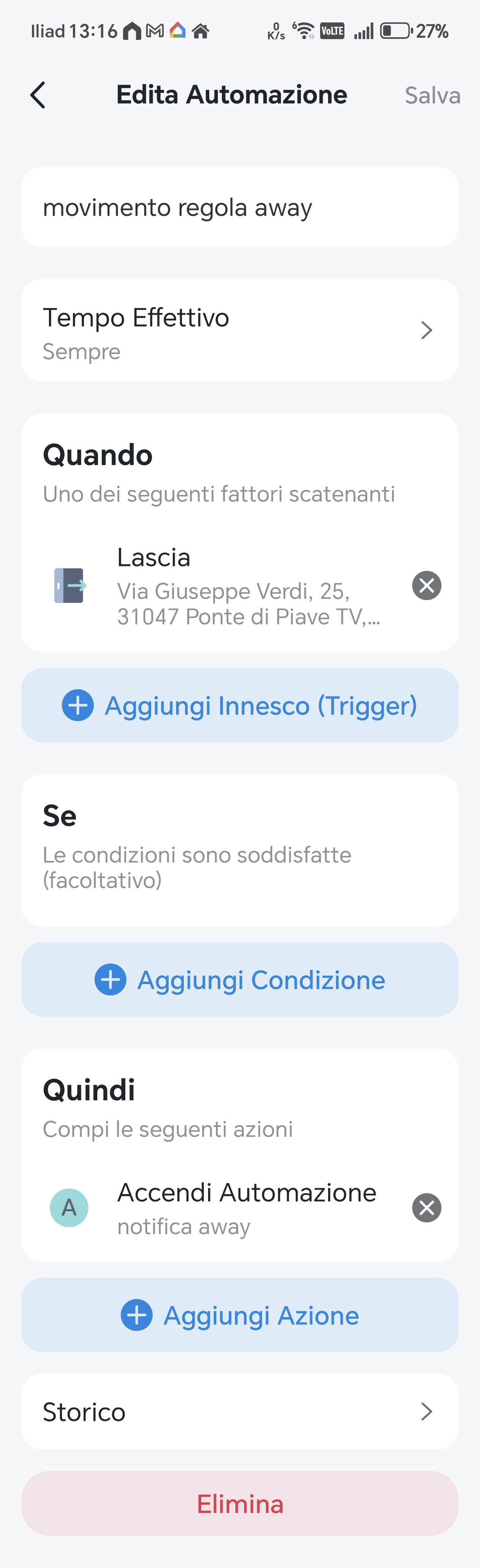
@Wayne-TP I have filled out the following automations as per your advice but they send notifications whether I am away or at home, what am I doing wrong?
- Copy Link
- Report Inappropriate Content
@gulluwing_1- Did you disable the notification feature on the sensor itself? You can check it on their Device Settings page.
- Copy Link
- Report Inappropriate Content
- Copy Link
- Report Inappropriate Content
Did you disable the automation when you arrived home? Perhaps you will need another automation -- disable the sensor automation after you arrive home.
- Copy Link
- Report Inappropriate Content
@Wayne-TP To sum up:
A) when Motion sensor detect Movement---send notification
B)when I'm away from home---activate action A
C) when I'm at home---disable action A
With this configuration, notifications come whether I am at home or I am away
By now I am sure that Tapo's automations do not work. My automation is very simple and yet it doesn't work
- Copy Link
- Report Inappropriate Content
@gulluwing_1- If I have to deactivate an automation when I get home they shouldn't be called automation: are you kidding?
either you don't understand anything about automations or you are making me answer from the artificial deficiency.You're treating me like a fool!! You're not serious
- Copy Link
- Report Inappropriate Content
gulluwing_1- wrote
@Wayne-TP To sum up:
A) when Motion sensor detect Movement---send notification
B)when I'm away from home---activate action A
C) when I'm at home---disable action A
With this configuration, notifications come whether I am at home or I am away
By now I am sure that Tapo's automations do not work. My automation is very simple and yet it doesn't work
From the latest screenshots you shared, there are only two rules shown:
1. The sensor sends a notification when motion is detected (always active).
2. The sensor automation is enabled when you leave home.
Since I can’t see whether a third rule exists, such as one to disable the sensor automation when you arrive home — it’s reasonable to assume that without it, the automation would remain active when you return. That would explain why you’re still receiving sensor notifications even after arriving home.
Well, now it looks like you’re not that case after all. Let’s focus on your current setup.
Please also make sure that your rule C (arrive home → disable sensor automation) is set to Always under its effective time. If you’ve scheduled it for specific hours, it’s possible that arriving outside that window could prevent the rule from running, meaning the sensor notification automation would stay enabled.
Additionally, I recommend double-checking whether the sensor’s own built‑in notification feature is turned off. You can find this in the sensor’s device page under Device Settings → Notification. Did you delete or disable the automations you set in the first place, the one that has sunrise/sunset settings?
Try disabling Rule A and see if you still receive notifications. If you don’t, then the issue likely lies with the geofencing feature — it suggests the automation wasn’t disabled when you arrived home. Also, just curious, if you manually disable Rule A first, does it still enable automatically when you leave home? Check Q4 in this article for the troubleshooting suggestions for this case. General Questions about Tapo/Kasa Geofencing
- Copy Link
- Report Inappropriate Content
Information
Helpful: 0
Views: 720
Replies: 15
Voters 0
No one has voted for it yet.