
New Feature Download SD Card Videos Remotely – Now Rolling Out to Supported Cameras


One of the most‑requested features is finally here, Remote SD Card Video Download is now rolling out! 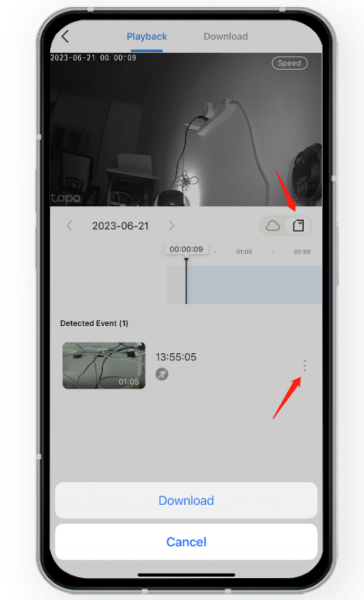
You can now upgrade select camera models to the latest firmware and download detection clips stored on the camera’s SD card — remotely. Whether you’re at work, on vacation, or just away from home, sharing important video moments is easier than ever.
📚 How to Download Videos from Your Tapo Camera or Doorbell
This feature will be added to more models through firmware updates. To verify if your device supports it, please monitor for new firmware releases. All key additions are documented in the firmware release notes.
How to check for the latest firmware for your device?
- Visit your regional TP‑Link official website.
- Search for your product model.
- Go to the Support page for your device.
- Select the correct hardware version.
- Look for the Firmware Release Notes section — that’s where update details and supported features are listed.
Take Tapo C310(US) V2.80 for example:
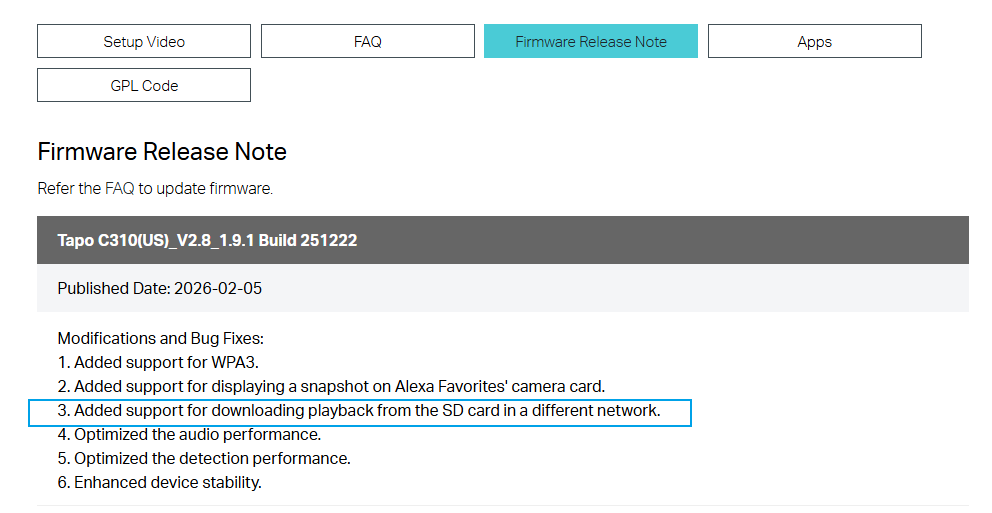
 Tips: If you find no recent firmware for your product on the official website and no update is prompted on the device itself, or if the latest available update’s notes do not mention this feature, it likely indicates the feature is not yet supported. You are welcome to contact our support team for a final confirmation, especially if you suspect the online information may not be fully up to date. Contact Technical Support
Currently Supported Models (April 2026)
Tapo C220 (EU/US/JP) V2 - Firmware version 1.2.1 Build 251221
Tapo C310 (EU/US/JP) V2 - Firmware version 1.9.1 Build 251222
Tapo C320WS (EU/US) V2 - Firmware version 1.5.3 Build 260304
TC65 (EU) V1 - Firmware version 1.9.1 Build 251222
Tapo C660 KIT (EU/US) V1 - Firmware version 1.1.7 Build 251226
TC72 (EU) V2 - Firmware version 1.2.1 Build 251221
TC92 KIT V1 - Firmware version 1.1.7 Build 251226
Note: This list is not updated in real-time. For the most accurate information regarding support for your specific model, please check the recent firmware release notes or contact our support team.

