
H110 IR remote buttons change names and icons some time after pairing

H110 IR remote buttons change names and icons some time after pairing

H110 IR remote buttons change names and icons some time after pairing
Thursday
Model: Tapo H110  
Hardware Version: V1
Firmware Version: 1.4.4 Build 251031 Rel.111523

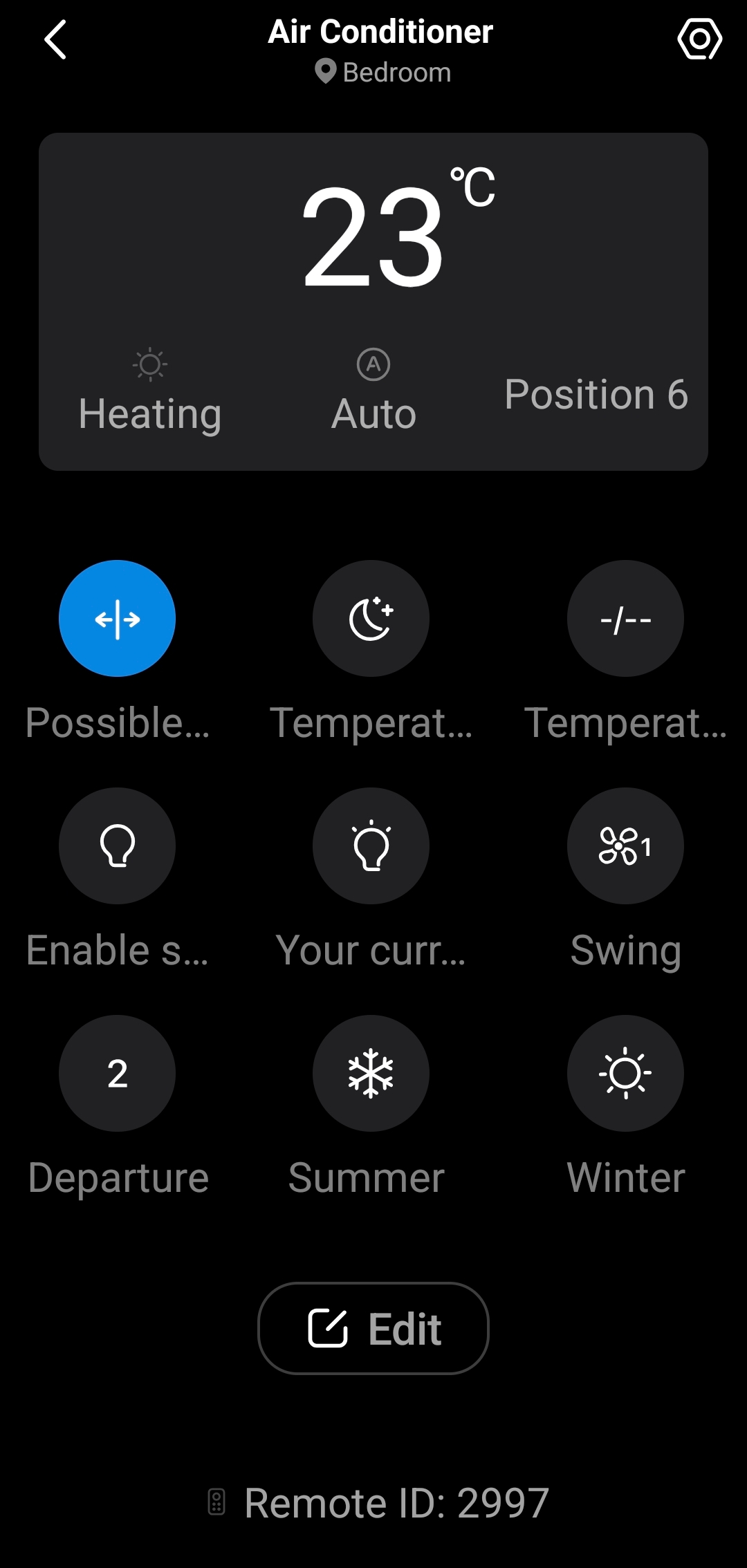
I bought the HUB about 2 weeks ago. I paired two IR remotes. One for my fan and one for my air conditioner. Everything was working fine for the first few days. Today both of my remotes controls buttons changed names and icons inside the control panel each remote. The icons and the names do not correspond to the actual functions and they are completely random. This happened even after I paired the remote contros agai .

0
0
#1
2 Reply
Re:H110 IR remote buttons change names and icons some time after pairing
Thursday

  @billpap15 


Are you saying the changes will happen immediately after a reconfiguration?


Your case is unusual, so it's best to reach out to the support team directly for further investigation. Contact Technical Support

CES 2026 Meet TP-Link AI Assistant and More New Products!
1
1
#2
Re:H110 IR remote buttons change names and icons some time after pairing
Thursday

  @Wayne-TP 

No, the remote works just fine for a few days and then all of a sudden all the controls for both of my appliances change to something random. This has happened two times already and I have paired the devices 2 time to get then fixed. 

0
0
#3