Vacuum slipping and unable to mop after firmware update

Vacuum slipping and unable to mop after firmware update

Vacuum slipping and unable to mop after firmware update
2026-05-09 04:36:53 - last edited a week ago
Model: Tapo RV30 Max Plus  
Hardware Version: V1
Firmware Version: Latest

My RV30 Max Plus is unable to mop after update , the problem seems to be the wheel slipping when the mop is too wet, but I didn't have this issue before the firmware update came in.

  0      
0
#1
Options
1 Accepted Solution
Re:Vacuum slipping and unable to mop after firmware update-Solution
2026-05-20 08:07:51 - last edited a week ago

Weiyi wrote

  @Wayne-TP 


Dry mop is fine, once water is involve it starts to have this issue

  @Weiyi 


At this point, I recommend contacting your local TP-Link support for further assistance. Contact Technical Support They’ll be able to check if the device needs testing or maintenance.

CES 2026 Meet TP-Link AI Assistant and More New Products!
Recommended Solution
  0  
0
#8
Options
8 Reply
Re:Vacuum slipping and unable to mop after firmware update
2026-05-11 07:12:37

  @Weiyi 


Can you be more specific? Is the robot vacuum unable to move at all (or just circling in a small area), or is its cleaning path messy?


What happens if you use a dry mop?

CES 2026 Meet TP-Link AI Assistant and More New Products!
  0  
0
#2
Options
Re:Vacuum slipping and unable to mop after firmware update
2026-05-11 07:44:46

Hi  @Wayne-TP 


The vacuum get stuck there, sometimes it moves Abit more sometimes it just stuck there. Without mopping the vacuuming is fine without issues

  0  
0
#3
Options
Re:Vacuum slipping and unable to mop after firmware update
2026-05-11 08:15:30 - last edited 2026-05-11 08:16:09


Caption

Weiyi wrote

Hi  @Wayne-TP 


The vacuum get stuck there, sometimes it moves Abit more sometimes it just stuck there. Without mopping the vacuuming is fine without issues

  @Weiyi 

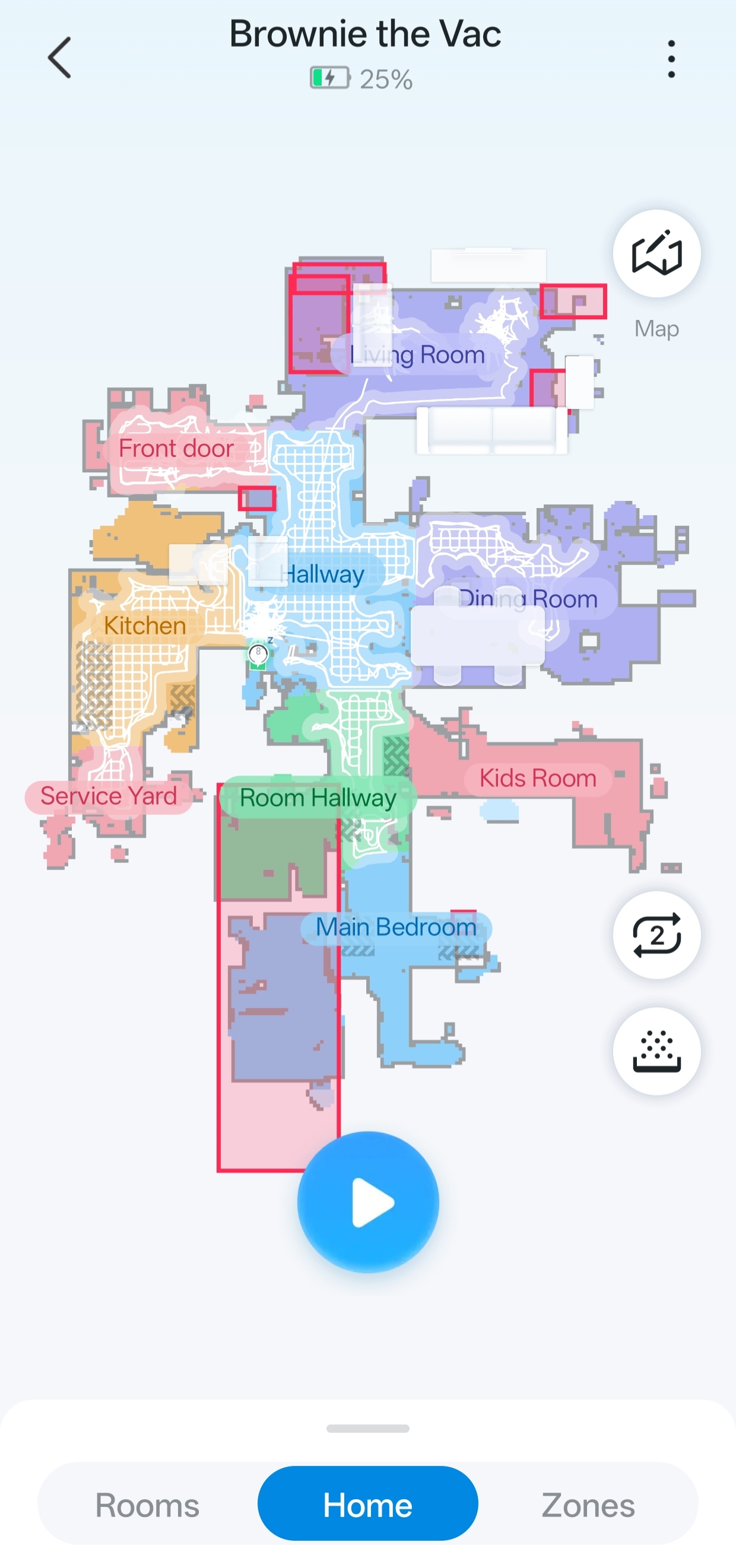
The living rooms is what happens when mopping gets turned on, the rest of the rooms that was vacuumed are all without mopping 

  0  
0
#4
Options
Re:Vacuum slipping and unable to mop after firmware update
2026-05-15 08:29:14 - last edited 2026-05-15 08:29:28

  @Weiyi


It's still not working and essentially I have a vacuum that has the moo function and can't mop🥹

  0  
0
#5
Options
Re:Vacuum slipping and unable to mop after firmware update
2026-05-18 09:41:45

Weiyi wrote

Hi  @Wayne-TP 


The vacuum get stuck there, sometimes it moves Abit more sometimes it just stuck there. Without mopping the vacuuming is fine without issues

  @Weiyi  Even when using a dry mop?

CES 2026 Meet TP-Link AI Assistant and More New Products!
  0  
0
#6
Options
Re:Vacuum slipping and unable to mop after firmware update
2026-05-19 12:07:49

  @Wayne-TP 


Dry mop is fine, once water is involve it starts to have this issue

  0  
0
#7
Options
Re:Vacuum slipping and unable to mop after firmware update-Solution
2026-05-20 08:07:51 - last edited a week ago

Weiyi wrote

  @Wayne-TP 


Dry mop is fine, once water is involve it starts to have this issue

  @Weiyi 


At this point, I recommend contacting your local TP-Link support for further assistance. Contact Technical Support They’ll be able to check if the device needs testing or maintenance.

CES 2026 Meet TP-Link AI Assistant and More New Products!
Recommended Solution
  0  
0
#8
Options
Re:Vacuum slipping and unable to mop after firmware update
2026-05-25 06:36:57

  @Wayne-TP 


Noted I will go ahead and contact my local service centre for the issue.


Thank you

  0  
0
#9
Options