Where the fault is coming from? C410 or A201 ?

Where the fault is coming from? C410 or A201 ?

Where the fault is coming from? C410 or A201 ?
Saturday
Model: Tapo C410   Tapo A201  
Hardware Version: V1
Firmware Version: 1.2.1

Hi,


I opened the https://community.tp-link.com/en/smart-home/forum/topic/853028?utm_source=Subscription&utm_medium=email


Unable to find a solution, I plugged the camera into the charger.


C410: Version EU/1.0, Firmware: 1.2.1

A201: Version UN/2.20

I bought them separately!


The TAPO app correctly shows the power indicator arrow, but there's no icon when I plug in the A201.


Now, with beautiful sunshine, I removed the camera and the solar panel and placed them in direct sunlight on the table.

Nothing happens; the C410 battery isn't charging!


How can I tell if the problem lies with the C410 or the A201?


Thanks for a solution.

  0      
0
#1
Options
3 Reply
Re:Where the fault is coming from? C410 or A201 ?
Monday

  @AndyHu 


You can find troubleshooting suggestions for this issue here: Tapo Solar Panel fails to charge the Battery Cameras

CES 2026 Meet TP-Link AI Assistant and More New Products!
  0  
0
#2
Options
Re:Where the fault is coming from? C410 or A201 ?
Monday

  @Wayne-TP 

Hi,


I bought them from two different sellers.


The camera never charged with the PV A201, but it works with the charger, though it's really problematic.


Whether I'm recording or not, with all motion detection disabled, and I only watch live footage once or twice for a few seconds, the battery doesn't last three days.

With everything disabled, I get an alert that the battery is draining too quickly and only lasts two or three days.


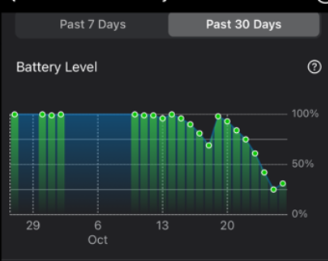
On the battery graph, I see the charge when plugged into the mains, but nothing with the PV.


Unfortunately, that doesn't help me at all.


I'm going to have to buy a USB-C female connector with plug-in terminals because I want to be sure which of the two I need to return to the seller.

Since I bought them online from abroad, TP-Link Hungary states that no manufacturer's warranty is possible, even though EU regulations stipulate that the warranty must be valid in all EU countries.


  0  
0
#3
Options
Re:Where the fault is coming from? C410 or A201 ?
18 hours ago

AndyHu wrote

  @Wayne-TP 

Hi,


I bought them from two different sellers.


The camera never charged with the PV A201, but it works with the charger, though it's really problematic.


Whether I'm recording or not, with all motion detection disabled, and I only watch live footage once or twice for a few seconds, the battery doesn't last three days.

With everything disabled, I get an alert that the battery is draining too quickly and only lasts two or three days.


On the battery graph, I see the charge when plugged into the mains, but nothing with the PV.


Unfortunately, that doesn't help me at all.


I'm going to have to buy a USB-C female connector with plug-in terminals because I want to be sure which of the two I need to return to the seller.

Since I bought them online from abroad, TP-Link Hungary states that no manufacturer's warranty is possible, even though EU regulations stipulate that the warranty must be valid in all EU countries.


  @AndyHu 


It’s important to note that the camera’s PIR sensor will still wake the camera up when it detects activity, even if motion detection and recording are turned off. This waking process itself consumes battery power. So, if your device is facing a busy area with frequent movement, faster battery drain is to be expected.


To check if the solar panel is charging the camera, look at the Battery Level chart on the camera’s Battery Status page. If the bar for the day you connected the solar panel is highlighted in green, it means the camera received a charge that day. Please note: The green highlight simply means the camera was charged that day; it doesn’t specify the source. The charge could have come from either the solar panel or from being plugged into an AC adapter. Therefore, to verify the solar panel’s performance, you need to look at the data from a day when the solar panel was connected and there was sufficient sunlight.


Additionally, please double-check if the solar panel was installed with proper waterproofing—look for any signs of water damage or stains around the connection points. If it wasn’t installed correctly, water could leak in and potentially damage the hardware. How to connect Tapo Solar Panel to compatible Tapo devices with proper Waterproof Gasket


Regarding the warranty, TP-Link does not offer a global warranty indeed. For the specific details about coverage in your case,  I recommend continuing the discussion with your local TP-Link support team.


CES 2026 Meet TP-Link AI Assistant and More New Products!
  0  
0
#4
Options