
Under Consideration 4 way switch

Release a kasa four way smart switch product, or add functionality for two three way switch products to implement a four way solution.
- Copy Link
- Subscribe
- Bookmark
- Report Inappropriate Content
I have a 4 way switch. I tried to install the Kasa 3 Way Switch in 2 of the switches. I setup WiFi and paired the light. I had one of
my hallway lights that came on but very dimm. I could not get the kids them to turn on or off with app or on any of the 3 switches.
Here is the weird thing.
Switch 1 downstairs has 4 wires.
Black, White, Red, Green
Installation was a breeze but still not working.
Switch 2 Master Bedroom has
Black, Black, Red, Green (these 4 were used in old switch but there were more in junction box)
I had 2 whites that were together with wire nut
I had 1 white and 1 black that were together with wire nut.
I tried to connect the new 3 way to this switch.
I put black to black. I used the black and red as the travelers, I connected green to ground, I connected white to the two whites that were wire nut together.
Switch 3 I did not touch. It does have multiple wires like Switch 2.
How do I got about configuring my 3 way Kasa Swirch to work?
Thanks in advance.
- Copy Link
- Report Inappropriate Content

- Copy Link
- Report Inappropriate Content
hoping for clarification on the 4-way (or 5-way) switch setup using HS210kit at 3-way switch locations.
The hs210 has 2 traveller poles, and 1 dual pole for line/load. Did you only connect a single traveller to each hs210 in your 4-way config with a traditional 4 way switch in the middle?
thanks
- Copy Link
- Report Inappropriate Content
CONFIRMED WORKING FOR BOTH 4 AND 5 WAY INSTALLATIONS IN MY HOUSE.
I can confirm that a single HS210 kit (with 2 switches in it) worked for both my 4 and 5 way switch configurations. They should be installed in the "3-way" switch boxes present in each configuration. I'm not positive which boxes those are or exactly the layout of the wiring as my electrician installed them for me, but an electrican can tell you. Basically the 2 boxes with the least wires in each case. For the other switch locations you use normal dumb switches (the Kasa switches will know the on/off state from the presence of power at one of the switches).
A KEY POINT: In order for this to work correctly, you have to set the switches as a pair in the software. This means you only add ONE SWITCH initally, and then you must choose the "installing 2 switches" option during the set up of that first switch. It will then have you go to the second switch and hold the button down till the red light flashes. Once this is done, the two switches show up as a single switch in the software. They are then able to communicate back and forth if they see power and thus mark the switch as on or off. If you fail to do this, you will have a number of issues related to turning the lights on and off programatically. If you do this wrong and you see two switches listed in the software, you must go back and delete both switches and start over.
Great job TP-Link for such a flexible product.
- Copy Link
- Report Inappropriate Content
@board4mic So at the risk of sounding obtuse, the 1 regular 4-way and 2 Kasa 3-way swicthes works exactly as one would hope:
The app knows if the light is on/off
The app correctly turns on or off as per request/
Any switch can change the state at any time
Correct?
And thus, in the case you wanted to have 4 or more stations, all the addditional switches would be 4-way?
- Copy Link
- Report Inappropriate Content
- Copy Link
- Report Inappropriate Content

@board4mic What happened when you installed the 2nd 3-way switch? My guess would be the app recognized the light being on or off.
- Copy Link
- Report Inappropriate Content

Thank you, that is very helpful!
- Copy Link
- Report Inappropriate Content
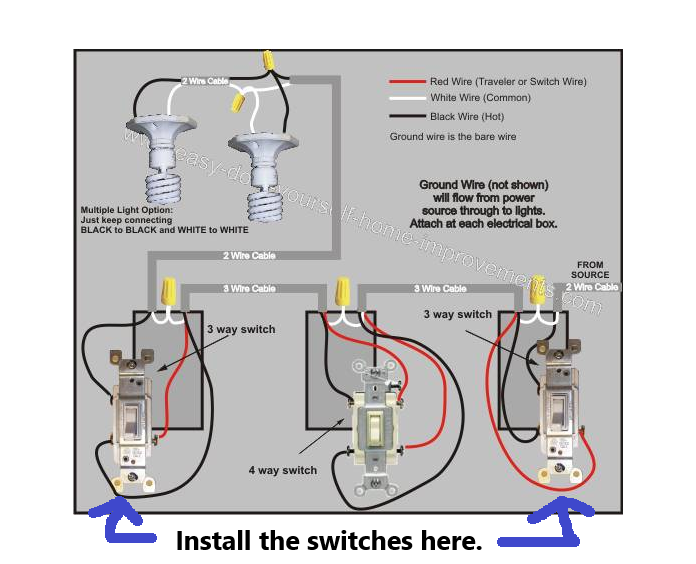
when wiring a 4 way light, you have to use two 3-way switches (HS-210 kit) and one 4-way switch. the 4-way switch solely has 2 traveler wires coming into it and 2 travelers going out of it. i replaced the two 3-way switches with the TP link HS-210 switches. i left the center 4-way switch as it was. i've included a diagram to help clarify. so in the picture i replaced the two outside switches.

- Copy Link
- Report Inappropriate Content
Board4mic,
Can you clarify the setup you used, are all three switches in the 4-way circuit the TP-Link smart 3-way switches? Or just two of them with a standard switch at one of the locations?
- Copy Link
- Report Inappropriate Content
Information
Helpful: 40
Views: 163012
Replies: 153
Voters 28
















