
Archer GE800 reset itself last night.

I've never had a TP-LINK router prior to this GE800 I got 5 months ago. Sometime last night it must have reset itself to factory default. Is this happening to anyone else? I've never had a router reset itself without any action from me.
I have my router turn off and on every night, maybe this caused it? It shouldn't.
- Copy Link
- Subscribe
- Bookmark
- Report Inappropriate Content


Hello All
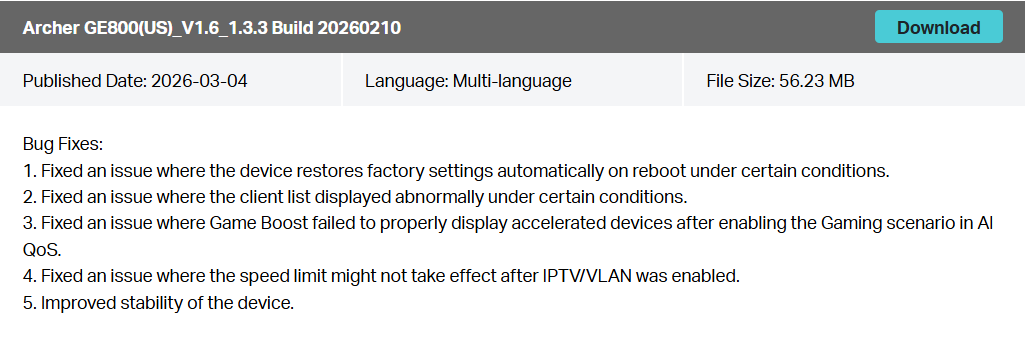
There is a new official firmware for Archer GE800 V1/V1.60 to address the reported unexpected behavior. Please check and update your router to this latest version and observe if you still have any issues:
https://www.tp-link.com/us/support/download/archer-ge800/v1.60/#Firmware
- Copy Link
- Report Inappropriate Content
Hello @Issaquah425, thank you for posting on the TP-Link Community.
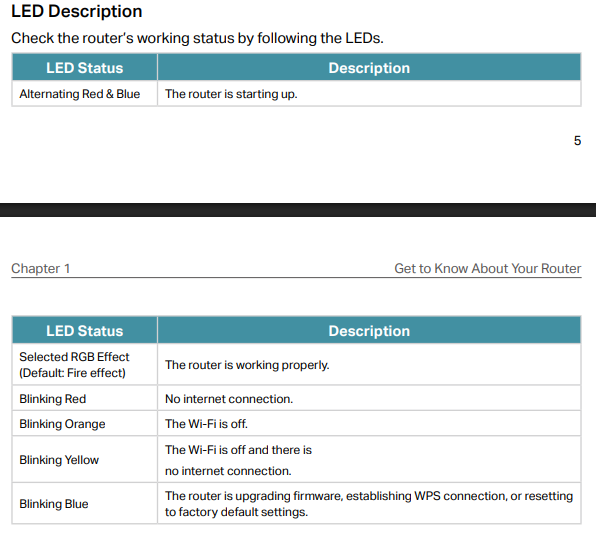
How did you find the GE800 reset itself to factory default? Are the wireless SSIDs restored to their defaults, or is there any observation from the LED status?
Have you reconfigured it to connect back online now? What is the current firmware version?
- Copy Link
- Report Inappropriate Content
@Kevin_Z I woke up and saw that my phone was connected to wifi but no internet. I opened the wifi settings to find that it was connected to a generic tplink ssid. All my SSID were gone.
I opened my tether app and it found a device....my router.
I went ahead and reconfigured it later on thru the tether app with my old wifi ssid and password so my iot devices could reconnect.
- Copy Link
- Report Inappropriate Content
Thank you very much for the details, and I'm happy to hear you got it working well now.
I currently have no idea why that abnormal or unexpected behavior occurred, but I want to confirm whether you enabled auto-update on the GE800. I wonder if the GE800 detected a new firmware and there was a power outage, or if some other abnormality occurred during the auto-upgrade, which caused the device to reset itself to factory default.
BTW, what is the current firmware version of the GE800 now?
- Copy Link
- Report Inappropriate Content
Firmware. 1. 3.2. Build 20250929 rel. 49558
Maybe it failed to update like you mentioned? Then again I just checked and it says my firmware is up to date.
Is that a new firmware?
- Copy Link
- Report Inappropriate Content
Yes. 1.3.2. Build 20250929 rel. 49558 is the latest official version.
You may monitor device connectivity for a longer period and let us know if you see any abnormal behavior.
- Copy Link
- Report Inappropriate Content

Exact same thing happened to me this morning. Woke up to my IoT devices not responding to commands and turns out the entire system had factory reset.
Same build and version of firmware (which is how i ended up here).
- Copy Link
- Report Inappropriate Content
hoski0999 wrote
Exact same thing happened to me this morning. Woke up to my IoT devices not responding to commands and turns out the entire system had factory reset.
Same build and version of firmware (which is how i ended up here).
Thank you for your feedback.
Have you also reconfigured the GE800 and reconnected it to the internet now?
I've reported this unintended behavior to the development team and request that they investigate it.
BTW, were you using the previous official firmware (1.2.5 Build 20250828) when this issue occurred?
- Copy Link
- Report Inappropriate Content
Hello @Issaquah425 @hoski0999, and anyone else who experiences this abnormal or unexpected behavior, please reconfigure the GE800 again to connect it to the internet first. Then export the router's configuration file (Advanced > System > Backup & Restore > Back Up) and save it locally.
If you experience this behavior next time, please send an email to forumsupport.usa@tp-link.com with the following information:
Subject: [Forum Escalation][ID 847816] Archer GE800 reset itself
Forum Nickname: [User Provided]
Thread URL: https://community.tp-link.com/en/smart-home/threads/topic/847816
Model&Version: Archer GE800 V1.6 + Firmware version, such as 1.3.2. Build 20250929 rel. 49558
Description: [User Provided]
Any Other Relevant Information (Config Files): [User Provided] the router's configuration file (all settings remain unchanged during the time)
Once sent, a ticket will be created in our support system, and a member of the team will follow up to gather more information or troubleshoot a cause.
- Copy Link
- Report Inappropriate Content

@Issaquah425 Looks like a similar issue here: https://community.tp-link.com/us/home/forum/topic/852560
I also encountered a few times like this:
* for once, it looks like completely reset (all SSID / passowrds are gone)
* for another time, it lost partial settings
I bet this firmware is such a buggy thing... I doubt whether it actually passed any QA....
- Copy Link
- Report Inappropriate Content

Hi, I had also encounter this issues. After a thunder shock, then suddenly my internet down... Then my router reset to default settings. I think there is some hardware design issues on GE800, but even you had replace the new router, it will also reset.... Regardless the configuration... My suggestion is always do a backup after you modify router setting. So in case happen, can recover. Nothing we can do on this. Even you want submit a RMA, it's also useless... No proof or nothing can be capture from logs since its reset... And it will still occur after replacement... Last time my AX72 had encounter random reboot also. They keep ask me to RMA, like every 1 weeks had 1 RMA request from my site... Then only solution is they provide Hardware update for me. After change from AX72 to AX73, everythings is ok.... But now I had swap to GE800. So im thinking it may also cause by design issues instead software. Or maybe software but since no logs can capture...
- Copy Link
- Report Inappropriate Content
Information
Helpful: 0
Views: 2412
Replies: 25
Voters 0
No one has voted for it yet.