
Archer GE800 reset itself last night.

I've never had a TP-LINK router prior to this GE800 I got 5 months ago. Sometime last night it must have reset itself to factory default. Is this happening to anyone else? I've never had a router reset itself without any action from me.
I have my router turn off and on every night, maybe this caused it? It shouldn't.
- Copy Link
- Subscribe
- Bookmark
- Report Inappropriate Content

Yes. I understand that there is little configuration required when the GE800 is operating in AP Mode.
We've sent you an email to follow up on this issue and may escalate it to our support engineers. Could you please check your email inbox and confirm?
Thank you very much.
- Copy Link
- Report Inappropriate Content

Yes received the email, have already updated to the debug firmware & setup the usb for logging +gave the additional details.
- Copy Link
- Report Inappropriate Content

Some update from my past experience.
I hate to say: it's getting worse and worse over time. I started to back up the config very frequently. I have a weekly reboot schedule so that the route won't go crazy but it makes the router even crazier. On reboots, it lost power (or at least it seems so). The device just won't go back live (the LEDs are off). Sometimes, I had to unplug everything (power button doesn't work) and even waited for 10min to retry. Resets after it actually boots up. I finally got tired of doing this and started RMA.
I received a replacement unit under hardware 1.20. However, it won't recover from any backup files I generated from my previous one. The error message is meaningless so I wonder why bother providing such a broken feature? It's just so useless feature.
- Copy Link
- Report Inappropriate Content
Hey @demonstrate
Is the current hardware version of your Archer GE800 V1.20? It seems I cannot find this specific V1.20 on the website.
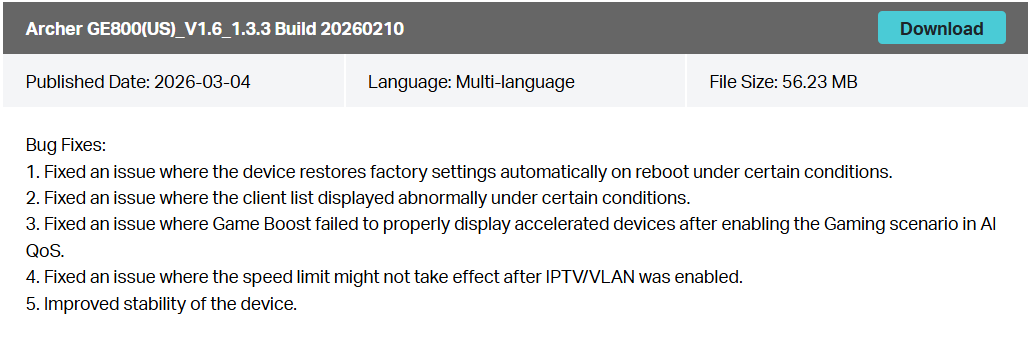
If your GE800's hardware is V1.60, you can check and update to the latest official firmware now:
https://www.tp-link.com/us/support/download/archer-ge800/v1.60/#Firmware
- Copy Link
- Report Inappropriate Content

Hello All
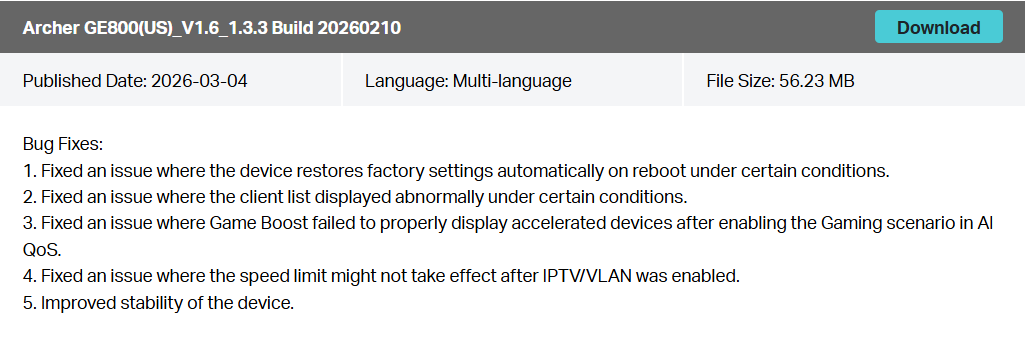
There is a new official firmware for Archer GE800 V1/V1.60 to address the reported unexpected behavior. Please check and update your router to this latest version and observe if you still have any issues:
https://www.tp-link.com/us/support/download/archer-ge800/v1.60/#Firmware
- Copy Link
- Report Inappropriate Content
Information
Helpful: 0
Views: 2405
Replies: 25
Voters 0
No one has voted for it yet.