
WireGuard Server (Archer AX72 Pro) Not Connecting to Client
 This thread has been locked for further replies. You can start a new thread to share your ideas or ask questions.
NOOB here, so trying to figure out what I am doing wrong setting up a WireGuard tunnel.
I have an Archer AX72 Pro and have set it up as a WireGuard Server using all of the standard settings outlined in this article (https://www.tp-link.com/us/support/faq/3772/). I then setup a BE3600 Travel Router as the WireGuard client using the same standard settings. When I plug the travel router into my home modem (Xfinitiy ISP), I can connect to the Archer via the WireGuard and everything appears to work. However, when I take the travel router and connect to a different router or wifi (different internet) the WireGuard will not connect. Below are a few screenshots of the setting. Can someone help me figure out why this is not connecting? I am at a loss.
- Copy Link
- Subscribe
- Bookmark
- Report Inappropriate Content


Hello @DAshford, thank you for posting on the TP-Link Community.
Regarding the WireGuard VPN connection in your described network, I have some questions before I can provide a clear answer.
Are the AX72 Pro and the BE3600 Travel Router (I assume its model is TL-WR3602BE. Correct me if not) in different networks?
When you connect the BE3600 Travel Router/TL-WR3602BE to a different router or wifi (different internet), what is the working mode? Is it the same as when it is connected to the Xfinity ISP modem?
What is the WAN IP address on the BE3600 Travel Router/TL-WR3602BE when it's connected to a different router or wifi (different internet)? Please make sure you still have a public WAN/Internet IP address. Otherwise, the VPN Client won't connect to the server.
- Copy Link
- Report Inappropriate Content
@Kevin_Z Thank you for your questions. Below are the answers to them, but please let me know if you have any more questions. I appoligize for my confusion as I am a noob when it comes to setting up networks like this.
You are correct that the WireGuard is not connecting when they are on different networks. However, it does connect when on the same network. The travel router is set to the same working mode, as a router, in both cases.
I am not seeing a WAN address, but the LAN address is IPv4 LAN IP:192.168.1.1. Can you please tell me where to locate the LAN address in the router interface? Also, I am not sure if I have a public WAN address. How can I determine if it is public or not? I am attaching the WireGuard details.
Note that the endpoint is the internet address of my home internet. Also. I should note I am connected to a wifi currently with the travel router.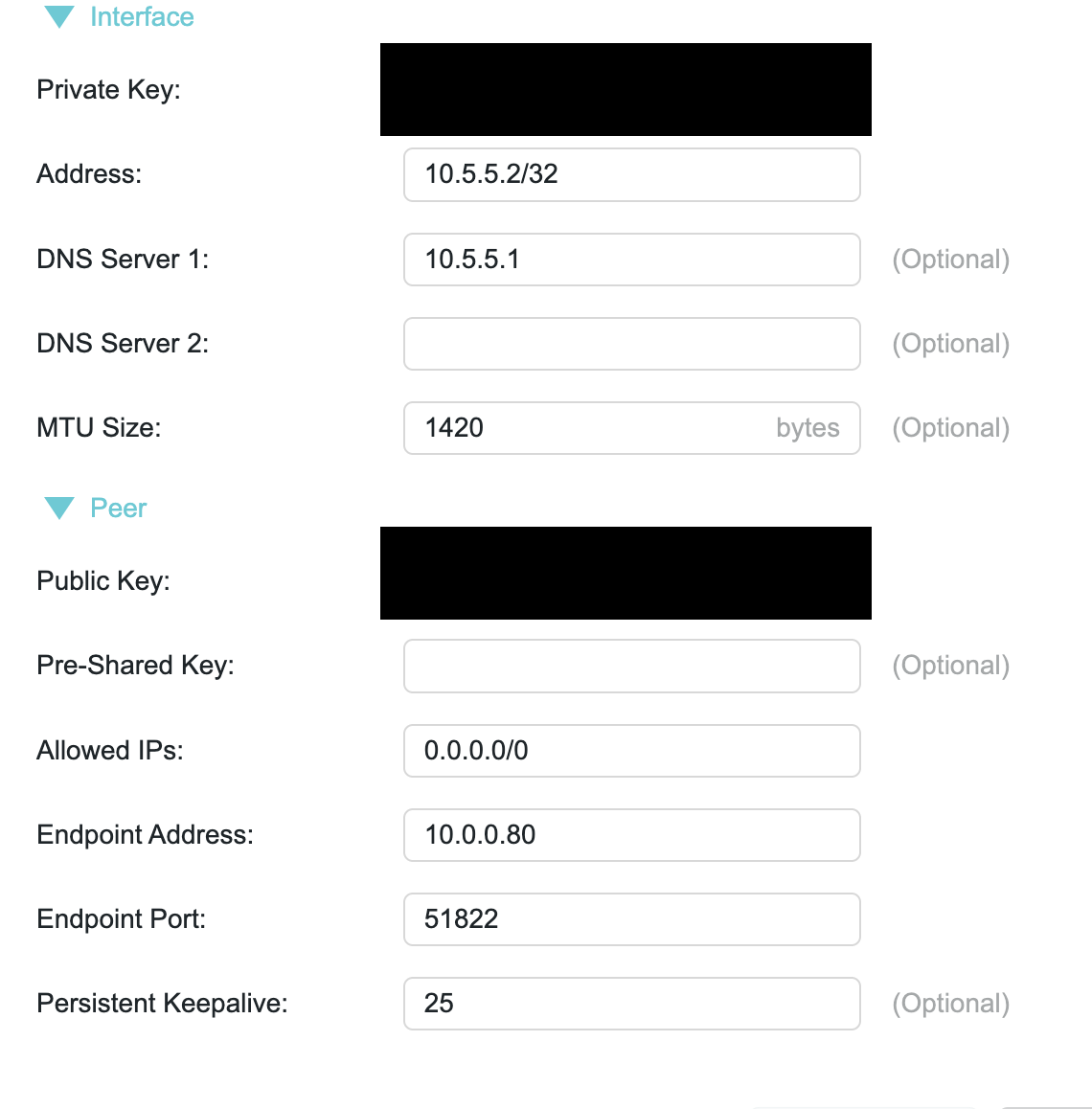
- Copy Link
- Report Inappropriate Content
DAshford wrote
@Kevin_Z Thank you for your questions. Below are the answers to them, but please let me know if you have any more questions. I appoligize for my confusion as I am a noob when it comes to setting up networks like this.
@DAshford That is not a problem. Believe me, you've already done it very well.
DAshford wrote
You are correct that the WireGuard is not connecting when they are on different networks. However, it does connect when on the same network. The travel router is set to the same working mode, as a router, in both cases.
I assume it's not. Generally, when the WR3602BE is working in Router Mode, it cannot connect to the host router wirelessly. It must be connected through the WAN port. When it's connected to the host router via Wi-Fi, I believe it is either in Hotspot Mode (WISP Mode), Range Extender Mode, or Client Mode.
Could you please log in to its web interface to verify the working mode when it is on different networks from the Archer AX72 Pro? If it is not on one of the modes I mentioned above, please try changing to Hotspot Mode (WISP Mode), then check again whether it connects to the WireGuard Server successfully.
DAshford wrote
I am not seeing a WAN address, but the LAN address is IPv4 LAN IP:192.168.1.1. Can you please tell me where to locate the LAN address in the router interface? Also, I am not sure if I have a public WAN address. How can I determine if it is public or not? I am attaching the WireGuard details.
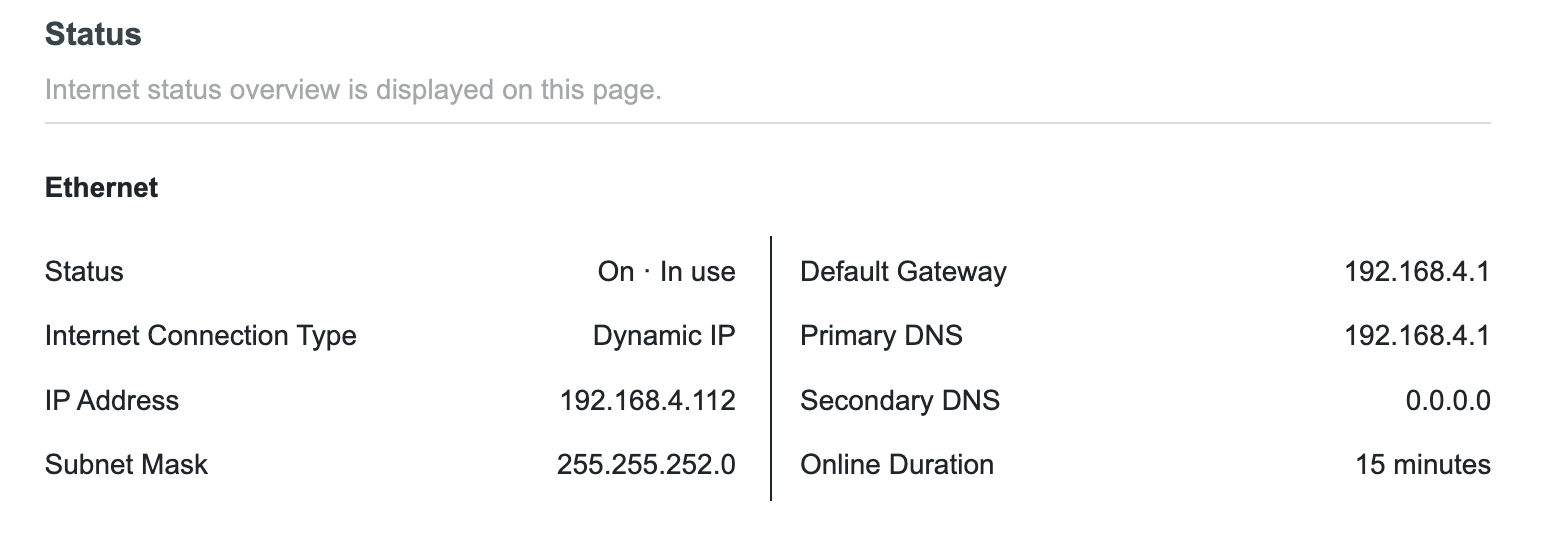
When you go to Advanced > Network > Status page, can you find Ethernet? If yes, please show me a picture.
If you cannot find Ethernet either, please try logging into the web page of the Archer AX72 Pro, go to the Advanced > Network > DHCP Server page, and scroll down to find the DHCP Client List. Show me the IP address for the WR3602BE.
You can use this site to verify whether the IP address on that page is a public one or a private one: https://en.wikipedia.org/wiki/IP_address. The IP addresses outside these are public IPs.
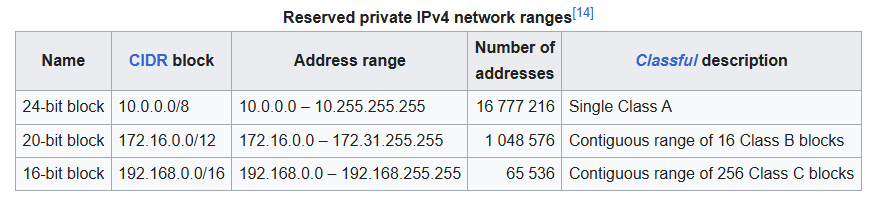
BTW, is the VPN showing connecting on the WR3602BE's web page?
- Copy Link
- Report Inappropriate Content
@Kevin_Z thanks again for your reply. Here are the answers to your questions below :)
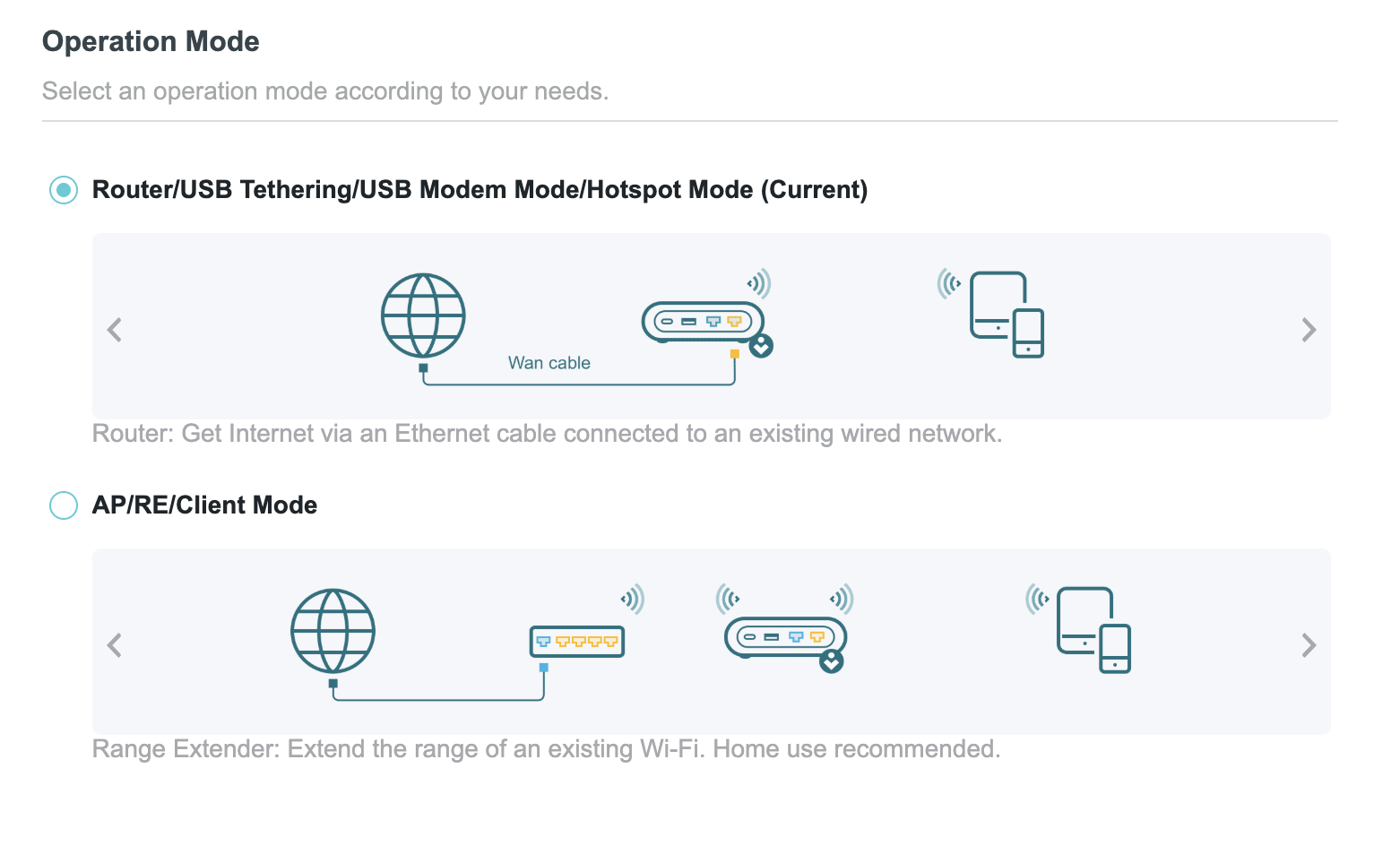
First, I have figured out how to look at the mode and it is running in the Router/USB/Hotspot mode. I currently have the router attached via ethernet cable to a different internet than the Archer router. See image below. Is the correct mode to connect to the WireGuard? When in this mode, it is not connecting to the WireGuard VPN.
I plugged the travel router into an ethernet port now, and below is the ethernet details. This is a different internet than the Archer is connected to. Unfortunately, I am not near the Archer and am not sure how to connect to that router outside of the Tether app. I do not see how to access the DHCP list in the Tether app.
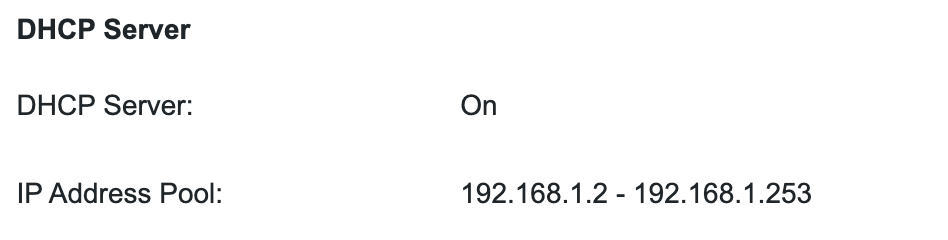
The DHCP server of the travel router is listed below.
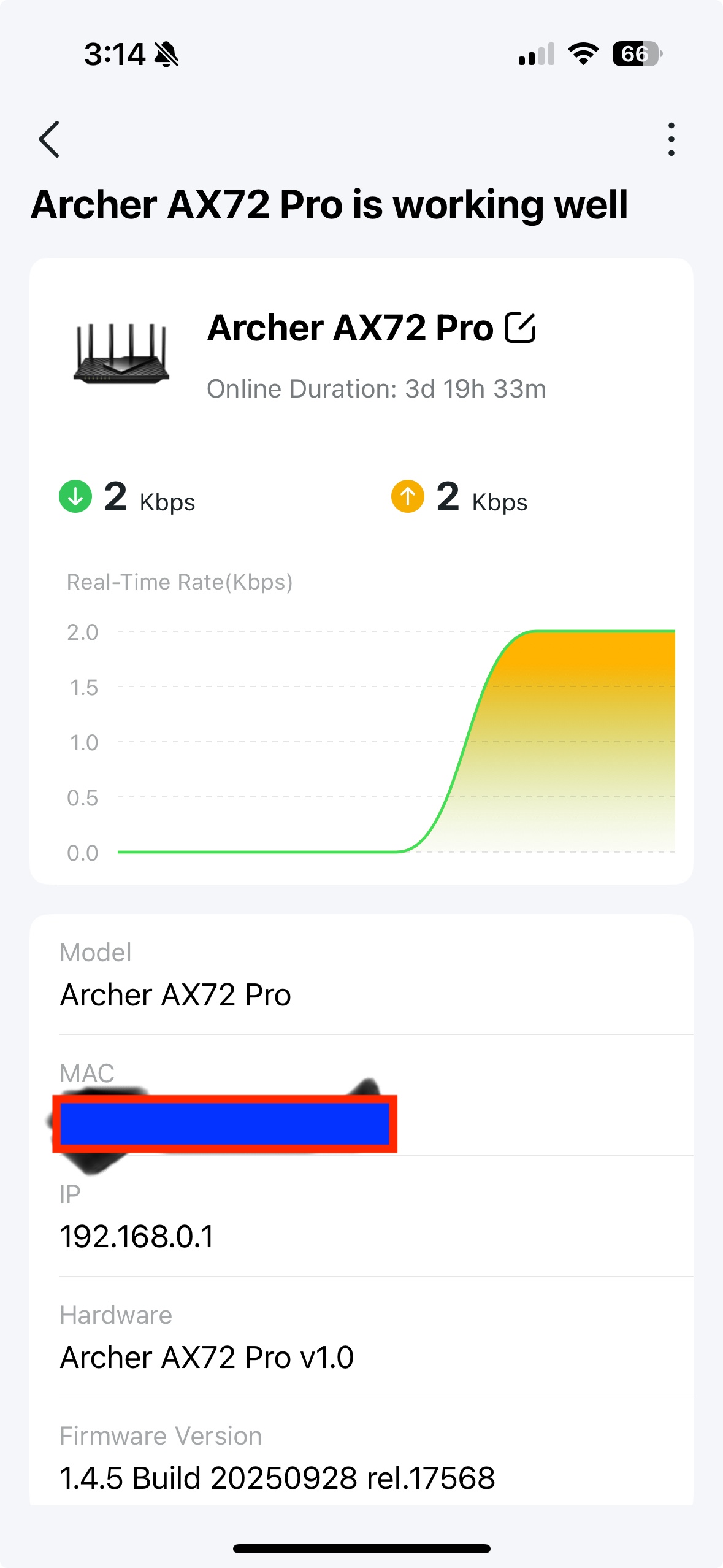
Here is the IP address of the Archer router from the Tether app.
And yes, the VPN is showing as 'connecting' on the VPN Merge page of the travel router, but it never actually connects.

- Copy Link
- Report Inappropriate Content
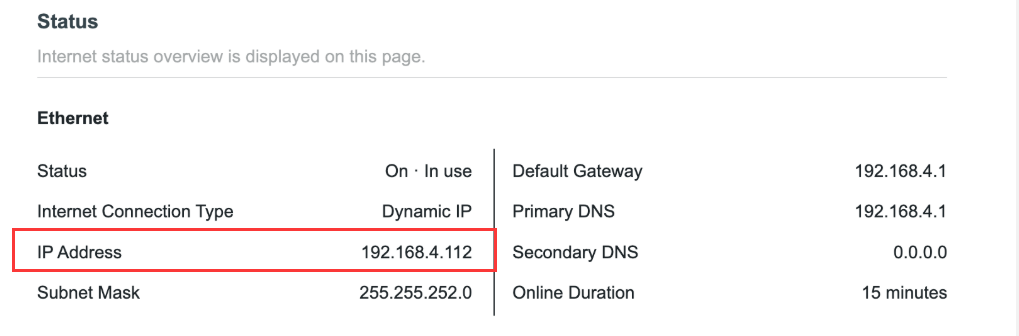
192.168.4.112 is the IP address assigned to the WR3602BE by your internet router. It's a private IP address. This is the reason why it cannot connect to the WireGuard VPN server.
You can check if you have a public WAN/Internet IP address on the internet router that the WR3602BE connects to, then try opening port 51820 for the WR3602BE (192.168.4.112) on that router to see if the WireGuard VPN connects.
If you don't know how to do that, please contact the router support for suggestions.
- Copy Link
- Report Inappropriate Content
@Kevin_Z Thank you again for your detailed response. I will see if I can find a public IP address. Just to make sure I understand this correctly, the internet that the travel router is connected to needs to have a public IP address so it can connect via WireGuard to the home router?
- Copy Link
- Report Inappropriate Content
You're right.
The IP address under Ethernet should be public, then you will be able to connect to the WireGuard server.
- Copy Link
- Report Inappropriate Content
Information
Helpful: 0
Views: 1816
Replies: 7
Voters 0
No one has voted for it yet.