
BE700 repeatedly drops two wired devices from client list

Ever since I got the BE700 Pro in July I have had an issue with it periodically dropping two particular wired clients from its client list, causing them to disconnect from the network and the client disappears from the DHCP list. If I unplug the Ethernet cable from the affected client and then reconnect it, this restores the connection - for a while. One of the clients is a Windows PC, the other is a Synology DS925+ NAS. As best as I can tell, no other wired clients are affected. I can sometimes go a day or more without an issue, then it will happen multiple times within an hour or two.
I contacted TP-Link support about this a couple of months ago and they gave me an unreleased firmware (from July) that reduced the frequency of the problem, but did not eliminate it. After a while, support responses just led me in circles and I gave up. Each device is connected to the router via a TP-Link gigabit switch, but other devices on those switches do not disconnect. I have since run new Cat6 wiring, new patch cords and even tried new switches - nothing helped. I did not have this problem with my previous router.
I do have pihole running on a Raspberry Pi Zero2W, connected by Ethernet to the router, and another instance on the NAS. At present, I have the router using the Pi as the primary DNS and Quad9 as secondary. In an attempt to see if pihole was the culprit I changed the NAS to use external DNS servers (Cloudflare and Quad9) so it would not be using pihole at all. The PC is using the router for DNS. I have convinced myself that pihole is not responsible for the issue.
There does not seem to be any specific activity tied to the connection drop. The heaviest usage is when one of my PCs does a daily backup to the NAS, but it rarely disconnects during this process.
Other than this extremely aggravating issue, the BE700 Pro is performing well, which is why this is so frustrating. What else can I do?
- Copy Link
- Subscribe
- Bookmark
- Report Inappropriate Content


Hello @holmes4
Thank you for posting on the TP-Link Community.
Could you please provide the support ticket ID for reference?
Also, what is the brand and model of the previous router?
What if you delete the PiHole DNS settings on the BE700 Pro and let it use the DNS assigned by your ISP/modem? Will it improve the current situation? I would suggest simplifying the network topology to rule out the reason for this abnormal or unexpected behavior.
You can reset the BE700 Pro to factory defaults, reconfigure it from scratch to connect to the internet, connect the gigabit switch to one of its LAN ports, then connect the PC to the switch, and monitor whether the PC stays stably online. If so, connect the NAS to the switch as well. During this process, don't manually configure the PiHole DNS on the BE700 Pro, and don't connect the Raspberry Pi Zero2W either.
- Copy Link
- Report Inappropriate Content
@Kevin_Z Sorry for the delay in responding - my post was held for moderation for so long I thought it would never show up. (Unsure why it was held - I've been a member here for years.)
Anyway, to answer your questions:
Ticket ID: TKID251048676
Previous router: Plume Superpod AX
DNS is not the issue. The issue is that the router completely forgets that the client exists, as evidenced by the client display list in the router admin panel. I have since replaced every component (switch and Ethernet cable) in the setup other than the router, wondering if something there was amiss. But no, the problem still occurs.
With my PC, I can bring it back online by disconnecting and reconnecting the Ethernet cable, but for the NAS I have to reboot the router - disconnecting/reconnecting the cable or even rebooting the NAS does not do the trick. Instead, I must reboot the router itself. I do have the router set to reboot once a week, but these disconnects happen in between reboots.
Another interesting thing I have observed in the client list is that when the NAS starts its disappear and reappear trick, the client list decides that the NAS is connected by WiFi, which it decidedly is not (doesn't even have that capability). For example:
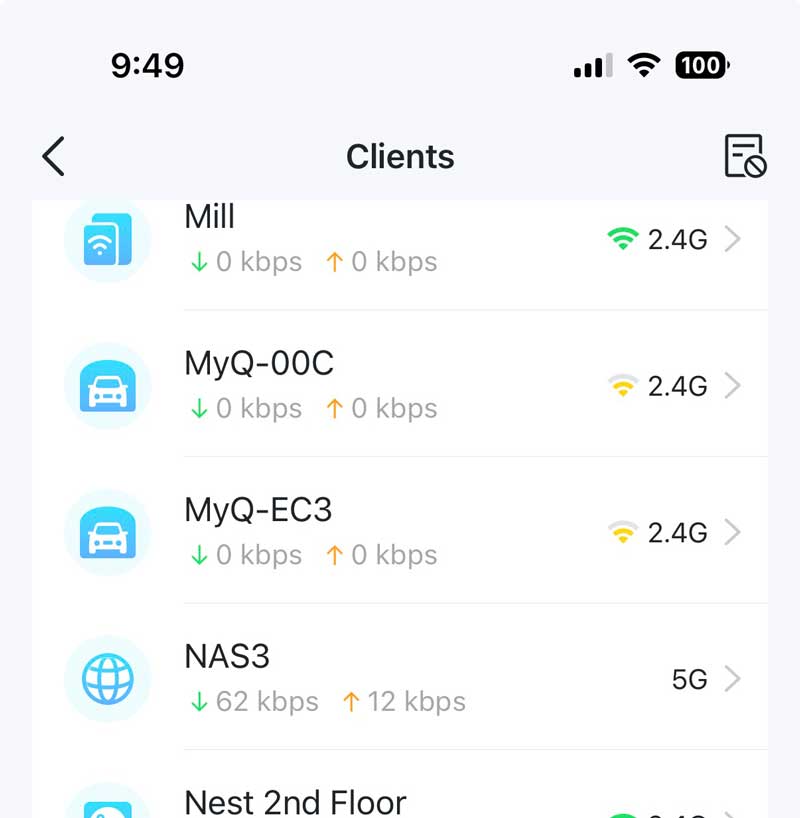
Both the NAS and my PC are connected by Cat6 Ethernet to a TP-Link Gigabit switch (different switches), each connected directly to the router. Other wired devices on those switches are not affected.
- Copy Link
- Report Inappropriate Content
Our officials may not respond to every thread or topic. We encourage users to engage in mutual support and open communication, as peer insights are often more closely aligned with real-world network experiences.
For a prompt response from admins, we recommend tagging the relevant staff members directly. In the Home Networking forum, you can tag @Ryan, @Joseph-TP, and @Kevin_Z. We will respond to your inquiry as soon as we are online and have received the notification through tagging.
Back to the NAS and PC's unintended behavior, have you received an email follow-up from our support engineers? They would be happy to investigate it further and hope you figure it out.
- Copy Link
- Report Inappropriate Content
I'm using a BE700 PRO and it has this problem with one TP-Link HS220 light switch out of a few handful of HS switches in the home and numerous other devices. At first I thought it was VPN related but after doing a factory reset of the light switch are setting it up, it works fine for a few minutes and then gets kicked out of the network. I can do a few reboots or the switch and connect again but then it gets kicked out again. I've also done a handful of reboots on the router and tried various VPN servers after each reboot.
Is there a common explanation for this?
- Copy Link
- Report Inappropriate Content
@holmes4 @Kevin_Z I believe the problem is related to a hidden SSID.
Again, the issue with with my Kasa light switch. So I tried:
1. factory reset the router
2. powered off the modem
3. change the LAN port from the modem
4. manual firmware update
5. factory reset the router again
6. setup the router
7. factory reset the HS220 light switch
8. setup the light switch
None of that worked. I then disabled hidden SSID and it picked up the light switch. However, I then enabled hidden SSID and now my phone cannot connect.
I deleted and reconnected the SSID on the phone while both hidden and unhidden and it did not resolve the problem. That's pretty much where it stands.
- Copy Link
- Report Inappropriate Content
In the end, TP-Link exchanged my router for a new one, though it is the same version 1.6. However, I have not hooked it up as, in the meantime, I bought an Asus RT-BE88U (also WiFi 7) to see if that made a difference - it did, with zero dropouts among all my devices, including the two that gave me headaches. I am skeptical that the hardware itself is at fault, but I no longer want to play this game, and am keeping the Asus router (which to be honest I like a lot better for its feature set and lack of paid subscription for security features.)
So, I am bowing out of this discussion and wish others luck in getting their issues resolved.
- Copy Link
- Report Inappropriate Content
Graveyard wrote
@holmes4 @Kevin_Z I believe the problem is related to a hidden SSID.
Again, the issue with with my Kasa light switch. So I tried:
1. factory reset the router
2. powered off the modem
3. change the LAN port from the modem
4. manual firmware update
5. factory reset the router again
6. setup the router
7. factory reset the HS220 light switch
8. setup the light switch
None of that worked. I then disabled hidden SSID and it picked up the light switch. However, I then enabled hidden SSID and now my phone cannot connect.
I deleted and reconnected the SSID on the phone while both hidden and unhidden and it did not resolve the problem. That's pretty much where it stands.
Hello @Graveyard, thank you very much for adding your specific usage with the BE700 Pro.
Could you please verify the detailed network layout? Is the BE700 Pro your main router? Are there any other EasyMesh devices in the network? I recall you mentioned using the BE550 Pro in other topics. Do you still keep them?
Where and how did you disable the hidden SSID?
Except for the HS220, are all other devices connected to the BE700 Pro's network fine?
Please verify that the firmware versions of the BE700 Pro and HS220 are up to date.
- Copy Link
- Report Inappropriate Content
The BE700 Pro is the main router. The BE550 Pro is the satellite. Currently there are no devices connected to the satellite because it only extends 2.4/5/6Ghz (which are not used by any devices), not Guest/IoT/MLO. I'm not sure if this issue is related to EasyMesh. I still have the problem with the satellite router turned off as none of the extended networks are being used anyway.
As of now, the HS220 connects but now my phone (Pixel 7), does not connect (as mentioned in the prior post). All other devices connect and work fine.
In order to connect my phone, I un-hid the IoT SSID in the BE700 Pro main router. The satellite router does not have any options to configure the networks.
The firmware is up to date:
BE700 Pro
Hardware Version: Archer BE700 Pro v1.0
Firmware Version: 1.1.2 Build 20251022 rel.33842(5553)
BE550 Pro
Hardware Version: Archer BE550 Pro v1.0
Firmware Version: 1.1.2 Build 20251022 rel.33842
HS220
Hardware Version: v1.0
Firmware Version: 1.5.11
- Copy Link
- Report Inappropriate Content
Information
Helpful: 1
Views: 1233
Replies: 8
Voters 1
