Archer BE230 Slow 2.5Gbps Ethernet Speed

Archer BE230 Slow 2.5Gbps Ethernet Speed

Archer BE230 Slow 2.5Gbps Ethernet Speed
Sunday
Tags: #speed
Model: Archer BE230  
Hardware Version: V1
Firmware Version: 1.2.1 Build 20250804 rel.79639(5553)

I have been troubleshooting my internet speed with Xfinity today, I am on their 2Gbps plan.  I am only receiving 700-1100Mbps when connecting via the 2.5Gbps port on the router, however connecting directly to the modem I receive 2300Mbps.


The Ethernet card is a TP-Link TX201.

  0      
  0      
#1
Options
1 Reply
Re:Archer BE230 Slow 2.5Gbps Ethernet Speed
Tuesday

Hello @iFr4g 


Thank you for posting on the TP-Link Community.


When connecting to the modem directly and receiving 2300Mbps, are you also connecting the same PC equipped with the Ethernet card TX201?


What is the model of the modem? Does it also come with 2.5 Gbps LAN ports?


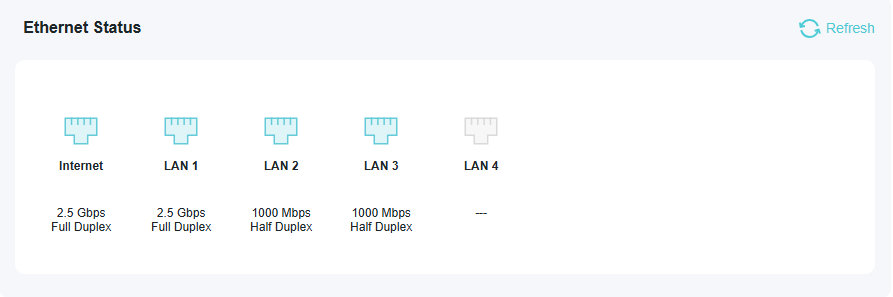
What is the Ethernet status on the BE230's web interface when it's connected to the modem? You can find it under Network Map > Tap the Archer BE230 icon, then scroll down to the bottom of the page, and you will see a picture as follows:

f941d166e03a4427986259ca57cb7405


Make sure you're running the latest driver for the TX201. Test with another PC or device if possible.

Nice to Meet You in Our TP-Link Community. Check Out the Latest Posts: Introducing AI QoS: Elevate Your Gaming Experience on the Archer GE800 Gaming Router! Connect TP-Link Archer BE550 to Germany's DS-Lite (Dual Stack Lite) Internet via WAN Archer GE550 - BE9300 Tri-Band Wi-Fi 7 Gaming Router Archer AX90 New Firmware Added Support for EasyMesh and Ethernet Backhaul If you found a post or response helpful, please click Helpful (arrow pointing upward icon). If you are the author of a topic, remember to mark a helpful reply as the "Recommended Solution" (star icon) so that others can benefit from it.
  1  
  1  
#2
Options