
My TP-Link TL-WR1502X Travel Router is blocking some Pictures of one Website

My TP-Link TL-WR1502X Travel Router is blocking some Pictures of one Website. And it is blocking another Website Sun Country with the following error:
" website needs Additional security check is required" --- I can never get to the website.

If I use the Resort's Internet directly and not going through the Travel Router, I am able to get to the Websites and Display the Photos just fine.
I have tried making sure the Parental Controls and Access Controls are disabled. And Set the Primary DNS to 8.8.8.8 and 2nd to 8.8.4.4
And these have NOT resolved my Problems.....
Any Ideas ?
- Copy Link
- Subscribe
- Bookmark
- Report Inappropriate Content


Thanks! This info helps a lot.
From what I can gather so far, it may be that SunCountry's website (and its implementation of Imperva's Web Application Firewall) are detecting and flagging the double NAT (router behind another router) connection as a false-positive risk to their site. Sometimes websites will simply ask you to perform a CAPTCHA security challenge so you can still gain access.
Given the circumstances in your case, I can think of a couple of things worth trying:
Option 1: Use the MAC Clone feature of the Travel Router to clone your laptop's MAC address.
- Log in to the travel router's web UI, and navigate to Advanced > Network > Internet
- Look for the phrase "Router MAC Address" and click the drop-down menu
- Select "Clone Current Device MAC", if using your laptop, and click SAVE.
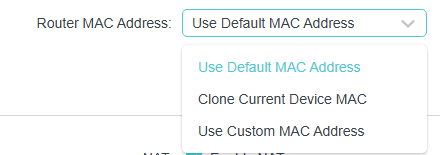
This should make your Travel Router appear to the network as using your laptop's MAC Address, which can help mitigate the false-positive flagging behavior of Web Application Firewalls in scenarios like yours.
Option 2: Use a VPN
- Using a VPN on your laptop (or on the Travel Router itself) should help bypass the Imperva mechanism that is falsely flagging your network connection by encrypting the packet headers of your network traffic. If you don't have any luck with the MAC Clone option above and have an available VPN service or connection at your disposal, this method is another option.
Hopefully one of these methods works so you can access the site(s) you need while staying at the resort.
- Copy Link
- Report Inappropriate Content
Ryan wrote
Thanks for reporting back with your findings — I'm glad one of the proposed solutions worked for you!
As for the other site, as long as you have a functional workaround, that may be your best bet for the time being.
I should mention, that I had to directly install the VPN on my Laptop to get the SunCountry com website to work. If I just installed it on the Travel Router, it does Not work.
Edit: -- And I just tried the website that was blocking pictures, and that one works also as long as the VPN is installed directly on my laptop!
- Copy Link
- Report Inappropriate Content
Do you have a VPN connection set up and active on the Travel Router? Some websites blacklist VPN connections.
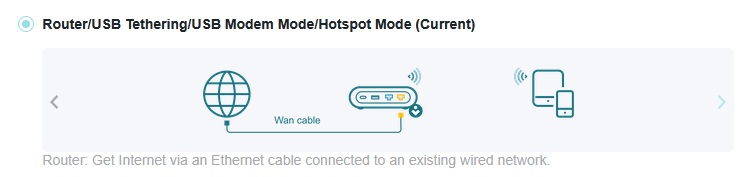
Which operation mode is the Travel Router set up in? How is it connecting to the resort's Internet - over Wi-Fi or via Ethernet?
- Copy Link
- Report Inappropriate Content
Thanks for the Reply !!
No VPN on the Travel Router.
I have the Internet via Ethernet Connection. Here is my Network Map. --- I've only come across 2 Websites that are gving me problems.

- Copy Link
- Report Inappropriate Content
Thanks! This info helps a lot.
From what I can gather so far, it may be that SunCountry's website (and its implementation of Imperva's Web Application Firewall) are detecting and flagging the double NAT (router behind another router) connection as a false-positive risk to their site. Sometimes websites will simply ask you to perform a CAPTCHA security challenge so you can still gain access.
Given the circumstances in your case, I can think of a couple of things worth trying:
Option 1: Use the MAC Clone feature of the Travel Router to clone your laptop's MAC address.
- Log in to the travel router's web UI, and navigate to Advanced > Network > Internet
- Look for the phrase "Router MAC Address" and click the drop-down menu
- Select "Clone Current Device MAC", if using your laptop, and click SAVE.
This should make your Travel Router appear to the network as using your laptop's MAC Address, which can help mitigate the false-positive flagging behavior of Web Application Firewalls in scenarios like yours.
Option 2: Use a VPN
- Using a VPN on your laptop (or on the Travel Router itself) should help bypass the Imperva mechanism that is falsely flagging your network connection by encrypting the packet headers of your network traffic. If you don't have any luck with the MAC Clone option above and have an available VPN service or connection at your disposal, this method is another option.
Hopefully one of these methods works so you can access the site(s) you need while staying at the resort.
- Copy Link
- Report Inappropriate Content
OK, Thanks for your help!
I tried the Mac Clone 'thing' and that did not work.
Then I activated the VPN Surfshark and that worked !!
So, I still have this one website that is not showing me pictures, but since it is the ONLY website that is giving me this problem, I suspect that the website is doing some 'Non - Standard' thing and I don't need this fixed, as I have a work around.
- Copy Link
- Report Inappropriate Content
Thanks for reporting back with your findings — I'm glad one of the proposed solutions worked for you!
As for the other site, as long as you have a functional workaround, that may be your best bet for the time being.
- Copy Link
- Report Inappropriate Content
Ryan wrote
Thanks for reporting back with your findings — I'm glad one of the proposed solutions worked for you!
As for the other site, as long as you have a functional workaround, that may be your best bet for the time being.
I should mention, that I had to directly install the VPN on my Laptop to get the SunCountry com website to work. If I just installed it on the Travel Router, it does Not work.
Edit: -- And I just tried the website that was blocking pictures, and that one works also as long as the VPN is installed directly on my laptop!
- Copy Link
- Report Inappropriate Content
Information
Helpful: 0
Views: 811
Replies: 6
Voters 0
No one has voted for it yet.