
Is the BE68 causing me Network issues?
Is the BE68 causing me Network issues?


Using Windows Explorer set to NETWORK, I can NOT see the USB share on the main Deco. I can only see 2 PC's, not the USB drive (on TP-SHARE)?
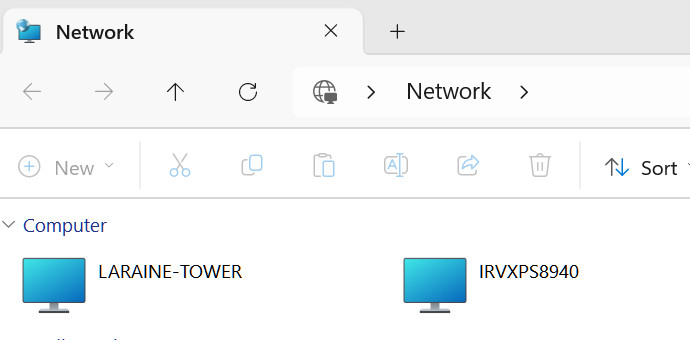
Now if I use \\tp-share as the entry I can see it:
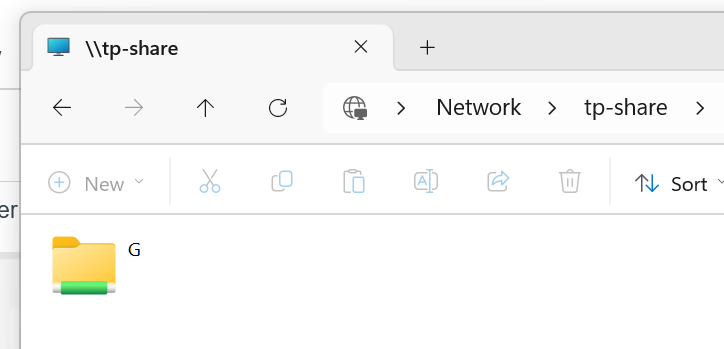
NBTSTAT shows some interesting data:
=========================
PS C:\> nbtstat -a tp-share
Bluetooth Network Connection:
Node IpAddress: [0.0.0.0] Scope Id: []
Host not found.
Wi-Fi:
Node IpAddress: [192.168.68.52] Scope Id: []
NetBIOS Remote Machine Name Table
Name Type Status
---------------------------------------------
TP-SHARE <00> UNIQUE Registered
TP-SHARE <03> UNIQUE Registered
TP-SHARE <20> UNIQUE Registered
☺☻__MSBROWSE__☻<01> GROUP Registered
WORKGROUP <00> GROUP Registered
WORKGROUP <1D> UNIQUE Registered
WORKGROUP <1E> GROUP Registered
MAC Address = 00-00-00-00-00-00
Wi-Fi 4:
Node IpAddress: [0.0.0.0] Scope Id: []
Host not found.
Wi-Fi 5:
Node IpAddress: [0.0.0.0] Scope Id: []
Host not found.
==============================
The Master Browser which is has is no longer in use by MS.
Now just running NBTSTAT on my PC:
=======================
PS C:\> nbtstat -n
Bluetooth Network Connection:
Node IpAddress: [0.0.0.0] Scope Id: []
No names in cache
Wi-Fi:
Node IpAddress: [192.168.68.52] Scope Id: []
NetBIOS Local Name Table
Name Type Status
---------------------------------------------
IRVXPS8940 <20> UNIQUE Registered
IRVXPS8940 <00> UNIQUE Registered
WORKGROUP <00> GROUP Registered
WORKGROUP <1E> GROUP Registered
Wi-Fi 4:
Node IpAddress: [0.0.0.0] Scope Id: []
No names in cache
Wi-Fi 5:
Node IpAddress: [0.0.0.0] Scope Id: []
No names in cache
=======================
Now type Suffix <1E>: This NetBIOS suffix is used specifically by the Computer Browser service. It indicates that the machine is a potential "Browser" on the network.
Since the Deco is on 24/7, and my PC is not, but it was signed on, normally the last device that asks for the Master Browser gets it I recall?
This doesn't seem to be happening at all?
My wife's PC that was turned on before mine doesn't seem to ask for the Master Browser though:
=====================
PS C:\> nbtstat -a laraine-tower
Bluetooth Network Connection:
Node IpAddress: [0.0.0.0] Scope Id: []
Host not found.
Wi-Fi:
Node IpAddress: [192.168.68.52] Scope Id: []
NetBIOS Remote Machine Name Table
Name Type Status
---------------------------------------------
LARAINE-TOWER <00> UNIQUE Registered
WORKGROUP <00> GROUP Registered
LARAINE-TOWER <20> UNIQUE Registered
MAC Address = 90-10-57-BA-2B-0B
Wi-Fi 4:
Node IpAddress: [0.0.0.0] Scope Id: []
Host not found.
Wi-Fi 5:
Node IpAddress: [0.0.0.0] Scope Id: []
Host not found.
=====================
What is 'odd' about that is we are both on Win11 Home 25H2? Only difference, my PC started life out in 2020 with Win10, updated to W11, all the way to 25H2. Wife's PC is new as Mar. of last year and started as W11 Home 24H2 I recall???? Maybe why no Master Browser request...
From above though, it seems the Deco is not honoring the Master Browser Request? Deco, and the 2 PC are on the same Network???
Confused here.
NET VIEW does return some errors too:
===============
PS C:\> net view
System error 6118 has occurred.
The list of servers for this workgroup is not currently available
===============
That would also seem to be the case of the Master Browser List can't be read and I suspect either because it can't access the LAN to get it, or expects it to be on this PC?
Of course NET VIEW of the Deco share works fine:
================
PS C:\> net view \\tp-share
Shared resources at \\tp-share
Share name Type Used as Comment
-------------------------------------------------------------------------------
G Disk
The command completed successfully.
==============
- Copy Link
- Subscribe
- Bookmark
- Report Inappropriate Content

I'm a very very basis user when it comes to networking and I wont lie I only understand a little bit of what you reported here but I know this it shouldn't be this hard to access files on a USB drive for deco users
I didn't even know you could use \\tp-share to see the USB drive,
But it should be as simple as you put your drive into the deco unit and then it should just pop up on your windows pc like any other usb device does
Not even sure if that is possible but if it is then that needs to be the goal from tp-link with this and everything else they do - Make your firmware simple and easy to use.
tp-link right now is the opposite of Sega they are great at making hardware but so so bad at managing firmware and I hope they get that issued sorted out before I stroke out from it lol
- Copy Link
- Report Inappropriate Content


- Copy Link
- Report Inappropriate Content
HelpFixDecoApp wrote
But it should be as simple as you put your drive into the deco unit and then it should just pop up on your windows pc like any other usb device does
It IS and it WAS. Somewhere along the line of Win 11 releases, NET VIEW stopped working. The web is full of complaints of this going back to 2023 even, probably when it started to be a problem.
Please GOOGLE "windows 11 net view" and read some of the links.
MS even made a REGISTRY a registry entry that would block SMB1 that had to be changed to PRIVATE.
MS posted this too for 24H2:
=================
Server Message Block (SMB) protocol changes
SMB signing and encryption
The following changes were made for SMB signing and encryption:
-
SMB signing requirement changes: In Windows 11, version 24H2 on the Home, Pro, Education, and Enterprise editions, SMB signing is now required by default for all connections. SMB signing ensures every message contains a signature generated using session key and cipher suite. The client puts a hash of the entire message into the signature field of the SMB header. If anyone changes the message itself later on the wire, the hash won't match and SMB knows that someone tampered with the data. It also confirms to sender and receiver that they are who they say they are, breaking relay attacks. For more information about SMB signing being required by default, see LINK REMOVED AS TP-LINK does NOT allow external links.
-
SMB client encryption: SMB now supports requiring encryption on all outbound SMB client connections. Encryption of all outbound SMB client connections enforces the highest level of network security and brings management parity to SMB signing, which allows both client and server requirements. With this new option, administrators can mandate that all destination servers use SMB 3 and encryption, and if missing those capabilities, the client won't connect. For more information about this change, see https://aka.ms/SmbClientEncrypt.
-
SMB signing and encryption auditing: Administrators can now enable auditing of the SMB server and client for support of SMB signing and encryption. This shows if a third-party client or server doesn't support SMB encryption or signing. The SMB signing and encryption auditing settings can be modified in Group Policy or through PowerShell.
=================
I made that registry change too and it didn't help.
Interestingly, a freind that uses a TRUE NAS (forgot brand) and uses TP-Link Armada products has NO PROBLEM as Windows Explorer can see his NAS. That is one reason I started looking deeper.
As Ryan posted, SMB1 and 2 is supported on the BE68, so that is not an issue.
- Copy Link
- Report Inappropriate Content
If one were to GOOGLE "why can't I see router's USB drive in Windows Explorer on windows 11?" you'll see this is a common problem and some proposed solutions. Also the Google AI has an answer gathered from those links:
--------------------
network sharing settings, an outdated SMB protocol (like SMB 1.0), firewall issues, or incorrect router configurations, often resolved by enabling SMB 1.0 in Windows Features, adjusting router settings for network discovery, updating router firmware, or accessing it directly via its IP address
--------------------
Again calling SMB1 outdated.
Also more AI suggestions:
----------------------------------
Common Causes & Solutions
- SMB Protocol Issues (Most Common):
- Problem: Windows 11 often disables the older, less secure SMB 1.0 by default, which many routers still use for file sharing.
- Solution: Enable SMB 1.0 in Windows Features: Search for "Turn Windows features on or off," check "SMB 1.0/CIFS File Sharing Support," and restart your PC.
- Router Configuration:
- Problem: USB sharing might be off, or permissions set incorrectly.
- Solution: Log into your router's admin page, check its USB/Storage settings, ensure file sharing is enabled, and verify network discovery/permissions.
- Firewall/Antivirus:
- Problem: Windows Firewall or third-party security software might block network access.
- Solution: Temporarily disable your firewall or add an exception rule for file sharing, or try accessing the drive directly using its IP address (
\\<Router_IP_Address>\sharename).
- Network Discovery:
- Problem: Your PC might not be set to find network devices.
- Solution: In Control Panel > Network and Sharing Center > Advanced sharing settings, turn on "Network discovery" and "File and printer sharing".
- Outdated Firmware:
- Problem: Your router's firmware might be old.
- Solution: Check your router manufacturer's website (e.g., TP-Link, Netgear) for the latest firmware updates for your model
----------------------------------
Of course I've done 1-4, but note #5...
I'd think this would be an EASY recreate? Just get a Router/Deco with the USB capability, set it up, and using a Windows 11 PC and Windows Explorer set to NETWORK in the URL see if you see it.
Otherwise, maybe Aaron can connect again and use Putty and Wireshark to see the data exchanged?
- Copy Link
- Report Inappropriate Content
I've been chatting with the teams about your experience, and from what I've gathered, Windows PCs no longer rely on NetBIOS as their primary means of discovering SMB servers on the LAN. Instead, Windows PCs appear to mainly utilize WS-Discovery to discover SMB servers, with NetBIOS serving only a supplementary role.
As a result, this is now on our teams' radar for testing and potential future development ― though, due to the nature of this function, it may take some time.
Thanks, as always, for your feedback!
- Copy Link
- Report Inappropriate Content
Thanks for working this.
I don't think you can just drop SMB1 on the router/deco?
That is how a Media player works to get the media files off the USB drive. I'm using one on the PC's (VLC and another one) and on my iPad too) and BOTH uses SMB.
The other issue is MS not using SMB for networking ut seems, NET VIEW will not work, but NET VIEW \\TP-SHARE does:
C:\>net view \\tp-share
Shared resources at \\tp-share
Share name Type Used as Comment
-------------------------------------------------------------------------------
G Disk
The command completed successfully.
So SMB might still also be required?
MS created a mixed bag here.
You know how to reach me if you need a tester at some point before release of new F/W.
Of course, this is a product wide problem, not just this model.
- Copy Link
- Report Inappropriate Content
Information
Helpful: 1
Views: 1765
Replies: 16
Voters 1
