Is the BE68 causing me Network issues?

Is the BE68 causing me Network issues?

Is the BE68 causing me Network issues?
Monday
Model: Deco BE68  
Hardware Version: V1
Firmware Version: 1.1.2 Build 20251028 Rel. 66622

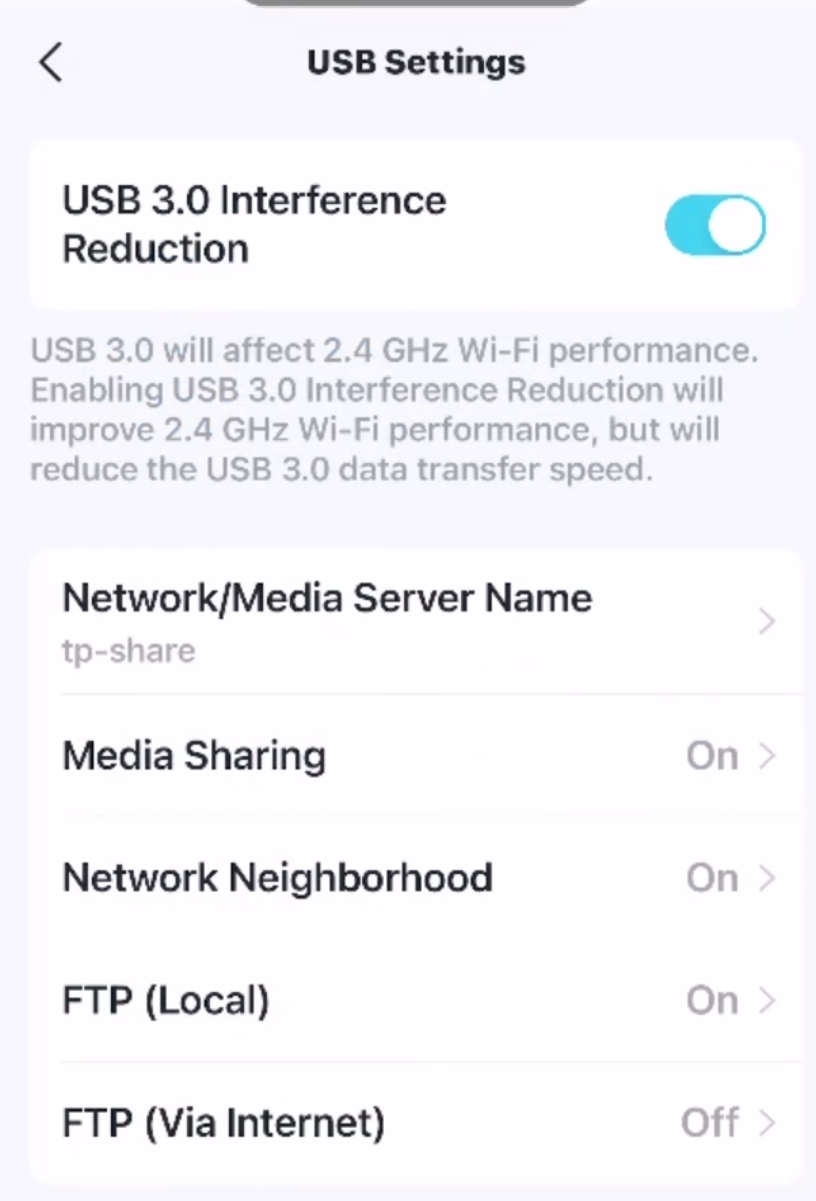
Using Windows Explorer set to NETWORK, I can NOT see the USB share on the main Deco. I can only see 2 PC's, not the USB drive (on TP-SHARE)?
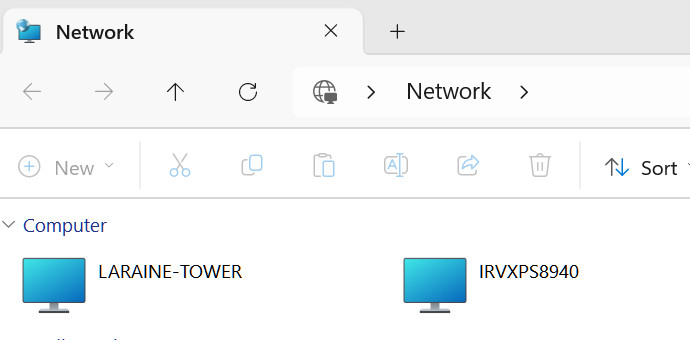
 

02af47ba1ea24e6ab706143891047abc


Now if I use \\tp-share as the entry I can see it:
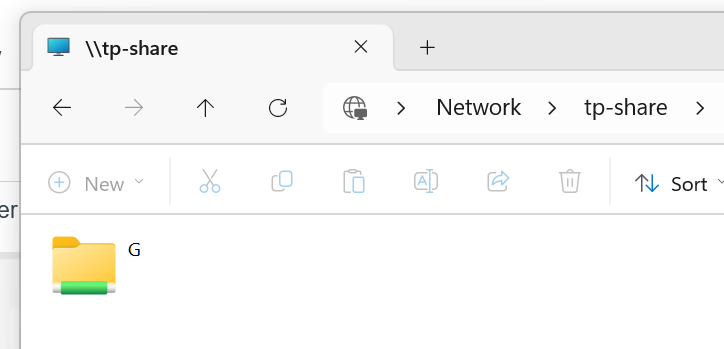
 

be164363d18d44b1a530bd8d313b1933


NBTSTAT shows some interesting data:


=========================

PS C:\> nbtstat -a tp-share

Bluetooth Network Connection:
Node IpAddress: [0.0.0.0] Scope Id: []

    Host not found.

Wi-Fi:
Node IpAddress: [192.168.68.52] Scope Id: []

           NetBIOS Remote Machine Name Table

       Name               Type         Status
    ---------------------------------------------
    TP-SHARE       <00>  UNIQUE      Registered
    TP-SHARE       <03>  UNIQUE      Registered
    TP-SHARE       <20>  UNIQUE      Registered
    ☺☻__MSBROWSE__☻<01>  GROUP       Registered
    WORKGROUP      <00>  GROUP       Registered
    WORKGROUP      <1D>  UNIQUE      Registered
    WORKGROUP      <1E>  GROUP       Registered

    MAC Address = 00-00-00-00-00-00


Wi-Fi 4:
Node IpAddress: [0.0.0.0] Scope Id: []

    Host not found.

Wi-Fi 5:
Node IpAddress: [0.0.0.0] Scope Id: []

    Host not found.

==============================


The Master Browser which is has is no longer in use by MS.


Now just running NBTSTAT on my PC:


=======================

PS C:\> nbtstat -n

Bluetooth Network Connection:
Node IpAddress: [0.0.0.0] Scope Id: []

    No names in cache

Wi-Fi:
Node IpAddress: [192.168.68.52] Scope Id: []

                NetBIOS Local Name Table

       Name               Type         Status
    ---------------------------------------------
    IRVXPS8940     <20>  UNIQUE      Registered
    IRVXPS8940     <00>  UNIQUE      Registered
    WORKGROUP      <00>  GROUP       Registered
    WORKGROUP      <1E>  GROUP       Registered

Wi-Fi 4:
Node IpAddress: [0.0.0.0] Scope Id: []

    No names in cache

Wi-Fi 5:
Node IpAddress: [0.0.0.0] Scope Id: []

    No names in cache

=======================


Now type  Suffix <1E>: This NetBIOS suffix is used specifically by the Computer Browser service. It indicates that the machine is a potential "Browser" on the network.


Since the Deco is on 24/7, and my PC is not, but it was signed on, normally the last device that asks for the Master Browser gets it I recall?


This doesn't seem to be happening at all?


My wife's PC that was turned on before mine doesn't seem to ask for the Master Browser though:


=====================

PS C:\>  nbtstat -a laraine-tower

Bluetooth Network Connection:
Node IpAddress: [0.0.0.0] Scope Id: []

    Host not found.

Wi-Fi:
Node IpAddress: [192.168.68.52] Scope Id: []

           NetBIOS Remote Machine Name Table

       Name               Type         Status
    ---------------------------------------------
    LARAINE-TOWER  <00>  UNIQUE      Registered
    WORKGROUP      <00>  GROUP       Registered
    LARAINE-TOWER  <20>  UNIQUE      Registered

    MAC Address = 90-10-57-BA-2B-0B


Wi-Fi 4:
Node IpAddress: [0.0.0.0] Scope Id: []

    Host not found.

Wi-Fi 5:
Node IpAddress: [0.0.0.0] Scope Id: []

    Host not found.

=====================


What is 'odd' about that is we are both on Win11 Home 25H2? Only difference, my PC started life out in 2020 with Win10, updated to W11, all the way to 25H2. Wife's PC is new as Mar. of last year and started as W11 Home 24H2 I recall???? Maybe why no Master Browser request...


From above though, it seems the Deco is not honoring the Master Browser Request? Deco, and the 2 PC are on the same Network???


Confused here.


NET VIEW does return some errors too:


===============

PS C:\> net view
System error 6118 has occurred.

The list of servers for this workgroup is not currently available

===============


That would also seem to be the case of the Master Browser List can't be read and I suspect either because it can't access the LAN to get it, or expects it to be on this PC?


Of course NET VIEW of the Deco share works fine:


================

PS C:\> net view \\tp-share
Shared resources at \\tp-share


Share name  Type  Used as  Comment

-------------------------------------------------------------------------------
G           Disk
The command completed successfully.

==============


  1      
  1      
#1
Options
14 Reply
Re:Is the BE68 causing me Network issues?
Monday

  @IrvSp @Ryan @Carl 


There have been a lot of user in the past who had issues accesing their USB drive using deco. Could this be the root cause? 

Need help with the Deco app, setup, Ethernet backhaul, network switch or rolling back firmware? Router or AP mode? https://community.tp-link.com/us/home/forum/topic/699816?page=1
  0  
  0  
#2
Options
Re:Is the BE68 causing me Network issues?
Yesterday

  @HelpFixDecoApp 

HelpFixDecoApp wrote

  @IrvSp @Ryan @Carl 


There have been a lot of user in the past who had issues accesing their USB drive using deco. Could this be the root cause? 


Not all Deco's if they do? I've had a few here, X55 and BE65 that I recall worked fine.


I assume holding onto the MSBrowser is a function of the F/W.


I've had some issues and had exchanged email with ones you referenced, but not on this specific issue and also ahd Support connnect to this Deco. Was looking for a different problem and confirmed I had it. Nothing major though. Small issue.


This has been a 'nagging' issue tor me. Well before Win11 25H2 even. I just decided I'm going to 'dig around' and see if I can find some reason, and the above I think it not usual for one to see?


MS has depricated NET VIEW actually, but while NET VIEW doesn't work, NET VIEW \\SHARE_NAME does.

  0  
  0  
#3
Options
Re:Is the BE68 causing me Network issues?
Yesterday

Hey  @IrvSp 


I will say I'm not the most versed in the technicalities of network sharing at this level, so I did send this up the chain to engineering.


However, I'm definitely trying to educate myself a bit more on the subject, and have a few questions.

When you used "nbtstat -a tp-share", does this mean that you targeted the share itself, and the Deco is the Master Browser?


Also, what did you mean by "The Master Browser which is has is no longer in use by MS"?


If you haven't already, I'd suggest checking out this FAQ: Can't access my USB drive plugged into TP-Link router

  0  
  0  
#4
Options
Re:Is the BE68 causing me Network issues?
Yesterday

  @Ryan


Ryan wrote


When you used "nbtstat -a tp-share", does this mean that you targeted the share itself, and the Deco is the Master Browser?


Since I know the name of the share on the Deco itself from the USB settings in the Deco app, I used that name to look at it. 


Using the Share name of the 2 PC's got me the results for those PC's.


Ryan wrote


Also, what did you mean by "The Master Browser which is has is no longer in use by MS"?


Here is what Google AI says about it:


=========

Yes, Microsoft has deprecated the

Computer Browser service (which relies on the Master Browser protocol) due to its age, insecurity (using legacy SMBv1), and high network traffic, disabling it by default in modern Windows versions like Windows 10 and 11, recommending its removal to enhance security and reduce noise on the network. 

=========


There is a good chance the Deco F/W is not using SMB2 even?


By the way, SAMBA works fine using VLC for instance.


NET VIEW is basically gone as well as it requires the Master Browser list,


Google AI has this to say about it:


=============

Yes, Microsoft has deprecated various old networking commands and protocols, including shifting away from NTLM and features like

net view, favoring modern, more secure alternatives like Kerberos and PowerShell cmdlets (e.g., Get-NetComputer) for network discovery and management, with the goal of enhancing security and standardizing on newer technologies across Windows. While net view might still function on older systems, it's considered legacy and its behavior isn't guaranteed in newer Windows versions as it relies on older protocols being phased out. 

 
Why net view is deprecated/phased out:
 
  • Security Concerns: Older protocols like NTLM (often used by net view) have weak security implementations compared to modern standards like Kerberos, leading Microsoft to deprecate them.
  • Modernization: Microsoft is pushing developers and administrators towards modern .NET, PowerShell, and newer Windows features for better performance, security, and management.
  • Feature Removal: Commands like net view are often replaced by more powerful and scriptable PowerShell cmdlets (like Get-NetComputer) and are removed in favor of these newer tools in current Windows versions. 
  •  
What to use instead:
 
  • PowerShell: Use Get-NetComputer for discovering computers on the network, or Get-NetNeighbor for local network info.
  • Modern Protocols: Rely on Kerberos for authentication instead of NTLM.
  • WebView2: For web browser controls in applications, use the modern WebView2

=============


Of course, the above PowerShell cmdlet is not in Powershell and is for Active Directory:


========

The
Get-NetComputer cmdlet is a function within the third-party PowerView PowerShell script, which is a tool used for Active Directory (AD) enumeration during security assessments (e.g., penetration testing). It is not a standard, built-in Microsoft PowerShell cmdlet.  

========


  0  
  0  
#5
Options
Re:Is the BE68 causing me Network issues?
Yesterday

  @IrvSp I gave up on USB drives on WiFi enabled routers.  At least on the BE95 there's an option to throttle 3.0 speed to decrease noise on 2.4 GHz band.  I was trying to prove to someone over on the ASUS forum that there is a known concern and had to plug in the USB to get the option to show.  I left it there...  A day or so later my Sensi Lite thermostat went offline, which usually requires me to pull it from the wall and reconnect it to WiFi.  After I ejected and pulled the USB, walked back to the thermostat (which has a clear line of site around 10 ft away, it had already reconnected).


It's been like that for me when I used it, need to enter the share "directory" into File Explorer to access.  Are you no longer able to open the drive?  (That's what happened to ASUS router SMB/SAMBA)...

  0  
  0  
#6
Options
Re:Is the BE68 causing me Network issues?
Yesterday

  @jzchen 


BE68 has that same USB 3.0 setting:


50eb14bf8ad9441e9427ae2163f7d807


I've tried it both ways, can't see any change or difference?


I did have some other problems, device dropping off.Support got involved and it was determined in the iWatch doing that it was an iOS problem and Apple was notified by support for Apple to fix.


Along the way they did know of another problem they were working on, IoT devices not responding to the Deco/Router's TCP/IP request to see if they were still connected. Specifically in my case, our Keurig Coffee Maker that uses WiFi to set the brewing specifications for each capsule (QR code read, goes back to Keurig server to get the proper time, temperature, and pressure for each capsule being used.


Once the Coffee Maker loses LAN connection I do have a problem getting it reconnected... involves powering it off and on a few times, and rebooting the Deco's.


Suspect your Thermostat has a similar problem... and I recall it was explained to me the Deco doesn't know when it disconnected or that it is connected so I just leaves it connected... and that creates a reconnect problem.


USB has not always been a problem. However, as a Beta Tester I've had different Routers and Deco's in use. As well as MS Windows versions and releases over the years.


Can't recall when it last worked, but the problem is not new.


Yes, using the Share Name in Explorer works, and does NET USE which I've used when I had some major file coping to do. We use that USB drive to save an occasional Acronis Back-up on each PC to it, and copy over new pictures from our iPhones to the Picture folder on the USB drive.


You can Google "microsoft smb1 support" and read all about it.


You csn see what SMB version you are running in PS:


==============

PS C:\> Get-WindowsOptionalFeature -Online -FeatureName SMB1Protocol

FeatureName      : SMB1Protocol
DisplayName      : SMB 1.0/CIFS File Sharing Support
Description      : Support for the SMB 1.0/CIFS file sharing protocol, and the Computer Browser protocol.
RestartRequired  : Possible
State            : Enabled
CustomProperties :
                   ServerComponent\Description : Support for the SMB 1.0/CIFS file sharing protocol, and the Computer
                   Browser protocol.
                   ServerComponent\DisplayName : SMB 1.0/CIFS File Sharing Support
                   ServerComponent\Id : 487
                   ServerComponent\Type : Feature
                   ServerComponent\UniqueName : FS-SMB1
                   ServerComponent\Deploys\Update\Name : SMB1Protocol

==============


The main problem I feel is SMB1 which MS has decided shouldn't be used. Use SMB2 instead, but I don't think the F/W has moved up to that?


By the way, the Internet is full of reports of NEW VIEW not working. Just Google this, "Net view not working windows 11"


Most of it it appears relates to SMB1 and the Master Browser function.


Google this too, "windows 11 master browser" and it is a common problem.


Bottom line, MS has removed some services and features, and in some cases, like SMB1 you can manually override MS's default. However, nothing is guaranteed to work right it seems.


  0  
  0  
#7
Options
Re:Is the BE68 causing me Network issues?
Yesterday

  @IrvSp @Ryan @Carl 


Can we test @IrvSp theory and have the engineers make a beta firmware for only their deco model and HW version that switches SMB1 to SMB2 and see if it fixes the issues? 

Need help with the Deco app, setup, Ethernet backhaul, network switch or rolling back firmware? Router or AP mode? https://community.tp-link.com/us/home/forum/topic/699816?page=1
  0  
  0  
#8
Options
Re:Is the BE68 causing me Network issues?
Yesterday

  @HelpFixDecoApp 


HelpFixDecoApp wrote

  @IrvSp @Ryan @Carl 


Can we test @IrvSp theory and have the engineers make a beta firmware for only their deco model and HW version that switches SMB1 to SMB2 and see if it fixes the issues? 


You might be jumping too fast here?


It IS possible that the Deco IS using SMB2? I have not figured out how to check that out?


Now I can connect the USB share to my PC using NET USE X: \\tp-share\g and then run in PowerShell  Get-SmbConnection:


PS C:\Users\ispal> Get-SmbConnection

ServerName ShareName UserName         Credential                           Dialect NumOpens
---------- --------- --------         ----------                           ------- --------
tp-share   g         IRVXPS8940\ispal MicrosoftAccount\is 3.1.1   1
tp-share   IPC$      IRVXPS8940\ispal MicrosoftAccount\is 3.1.1   0


Supposedly that dialect shows the SMB connection?


From a Google search:


Method 2: Use Windows PowerShell (For connected shares)

 
  1. Open PowerShell as Admin: Search for "PowerShell," right-click, and select "Run as administrator".
  2. Check Connections: Type Get-SmbConnection and press Enter.
  3. Identify Dialect: Look at the "Dialect" column. It will show the SMB version (e.g., 2.02, 3.02) for any active connections to shares, including your router's


So it says SMB 3.1.1, but I am not sure either? It might also be USB version?


Further complicating this is that I added a connection to my wife's D drive:


PS C:\Users\ispal> Get-SmbConnection

ServerName    ShareName UserName         Credential                           Dialect NumOpens
----------    --------- --------         ----------                           ------- --------
laraine-tower d         IRVXPS8940\ispal MicrosoftAccount\is 3.1.1   1
laraine-tower IPC$      IRVXPS8940\ispal MicrosoftAccount\is 3.1.1   0
tp-share      g         IRVXPS8940\ispal MicrosoftAccount\is 3.1.1   1


It also reads as the same and I KNOW her PC is using SMB1????


Confused here, but I'm sure @Ryan  can find out what is being run on the Deco. 


Also, running SMB2 may not be enough? Suspect of Windows changes may be needed. Google to find NEW VIEW complaints on Win11 as well as LAN sharing. There are many, and many point back to an MS problem.

  0  
  0  
#9
Options
Re:Is the BE68 causing me Network issues?
22 hours ago

  @HelpFixDecoApp 


Not a bad idea and may be worth a shot if Irv is interested in pursuing, but we'd most likely need to get Irv in contact with our support team directly for that level of testing.


@IrvSp 


Based on the info I've been given so far from our support engineers, the fact that you can access the share via \\tp-share indicates the Deco is functioning correctly.


At this stage, they recommend making troubleshooting adjustments on the Windows system(s) — e.g., manually enabling the SMB 1.0/CIFS Client in Windows on the machine(s) to test. Depending on how far you want to take troubleshooting and isolating the behavior, you can try temporarily toggling SMB2/3 off while leaving SMB1 enabled to see whether this forces SMB1.


Another suggestion is mapping \\tp-share manually using the Map Network Drive function in Windows.


I'll follow up with the team to see if I can find out which version is being used on your Deco model.

  0  
  0  
#10
Options
Re:Is the BE68 causing me Network issues?
21 hours ago

  @Ryan, @HelpFixDecoApp,


I'm not sure what to do and even if this is necessary?


I'm sure Support can answer if the BE68 F/W runs SMB1 or SMB2/3?


I don't think the Deco isn't working, I can use Samba, see the settings in the Deco App, and use NET VIEW \\Share_Name to see it. I can use Windows Explorer using for the address \\tp-share as well.


It is just a question of why the Deco thinks/knows it is the Master Browser and doesn't relinquish that to another PC?


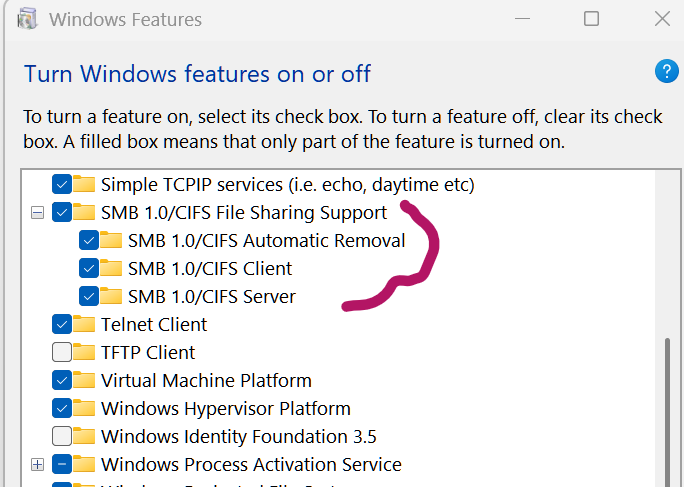
As for all out PC's enabling SMB1, they are and looks like this in the settings:


c521182d060d419492b8168c0264d2f2


I've read the the Server didn't need to be run on the PC, but with it enabled or not it makes no difference. 


SMB2 is enabled on my PC:


PS C:\> Get-SmbServerConfiguration | Select EnableSMB2Protocol

EnableSMB2Protocol
------------------
              True


Actually both SMB1 and SMB2 are enabled:


EnableSMB1Protocol                     : True
EnableSMB2Protocol                     : True

  0  
  0  
#11
Options