
Wi-Fi network and router configuration webpage inaccessible when there is no Internet connection.

I have my Deco X68 set up in router mode and normally everything is working just fine. However, I have noticed that whenever I lose my Internet connection (fiber through ONT), I cannot access any devices on the Wi-Fi network or the router management page from my wired devices. All of my wired devices continue to be able to communicate with each other without Internet connection, with the exception of pulling up the router management page. I am attempting to access the router management page and Wi-Fi connected devices by IP, but they just timeout.
Do I have something misconfigured or is there a way to enable Wi-Fi connectivity in the absence of an Internet connection? I have searched on this community and the Internet but I'm not finding any information about this.
- Copy Link
- Subscribe
- Bookmark
- Report Inappropriate Content

No, you cannot typically configure a TP-Link Deco system without an active internet connection. The Deco app requires a TP-Link Cloud account, which needs internet access during initial setup to register and configure the device
Thanks
- Copy Link
- Report Inappropriate Content
I think it's unusual for a router to require an Internet connection in order to be configured. After all, if you cannot configure the router without an Internet connection, it may be impossible to set up the Internet connection in the first place!
But that is not the main issue for me, the main issue is that the Wi-Fi network goes down when the Internet connection is lost. I have been led to understand that this is because the router goes into autosensing mode, and that this issue has been an issue for over three years. After such a long time, perhaps TP Link has no intention of fixing it. If there isn't any solution, I will move to another product that does not suffer from this issue.
- Copy Link
- Report Inappropriate Content
When you get a chance can you please provide the firmware version of your deco units
Thanks.
- Copy Link
- Report Inappropriate Content
Your firmware "may" not support this yet but try anyway to see
Once you set a fixed WAN port through the Deco APP > More > Advanced > WAN Port setting, the Deco will stop automatically detecting which port is connected to your modem or router. Instead, it will always use the specific port you've designated as the WAN port.
Here's how it works:
• Default behavior (no fixed WAN port set): Deco automatically detects which port is connected to your modem or upstream router, so any Ethernet port can function as the WAN port.
• After setting a fixed WAN port: Deco will always use that specific port for the Internet connection and will no longer auto-detect. The other ports will function as LAN ports only.
This gives you more control and stability in your network configuration, especially if you want to ensure a specific high-speed port (like a 2.5G port) is always used for your Internet connection, or to avoid potential issues during Internet outages.
- Copy Link
- Report Inappropriate Content
My firmware is 1.2.5 Build 20240723 Rel. 43655
This is the latest version. The option you have mentioned does not exist in my app.
- Copy Link
- Report Inappropriate Content
So tp-link has a firmware platform chart each platform adds different options and features. Using your firmware we can tell your units are currently on firmware platform 1.7.0 & 1.8.0 as shown below,

Your units wont get that option till they upgrade your firmware to 1.5.x as shown in the chart below.
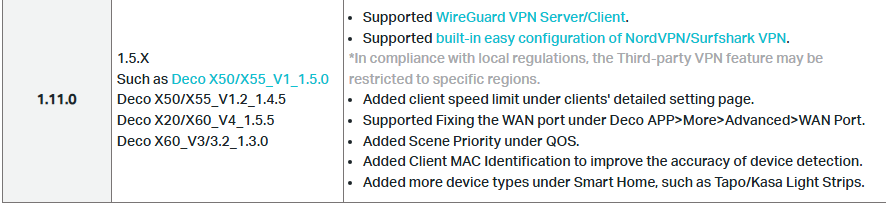
I wish I could provide you an ETA on when that will happen but as I do not work for tp-link i can't provide you on.
- Copy Link
- Report Inappropriate Content
That's okay, thank you for the help. It seems unlikely that TP Link will upgrade the firmware for my model as it's pretty old and this issue has been known for several years. So I will probably switch to a different router.
- Copy Link
- Report Inappropriate Content
Information
Helpful: 0
Views: 124
Replies: 7
Voters 0
No one has voted for it yet.