Enabling QoS Makes Bufferbloat Worse

Enabling QoS Makes Bufferbloat Worse

Enabling QoS Makes Bufferbloat Worse
2026-05-07 01:34:22
Tags: ##Archer BE230 QoS
Model: Archer BE230  
Hardware Version: V2
Firmware Version: 1.3.2 Build 20260212


So I recently got an archer BE230 to replace the router given to me by my isp. Soon after, I realized that I began suffering from bufferbloat whenever something heavy was downloading. I turned on QoS and set the recommended bandwidth limit for QoS with the help of chatGPT. QoS bandwidth: 350/40

Max speeds without QoS: 400/47


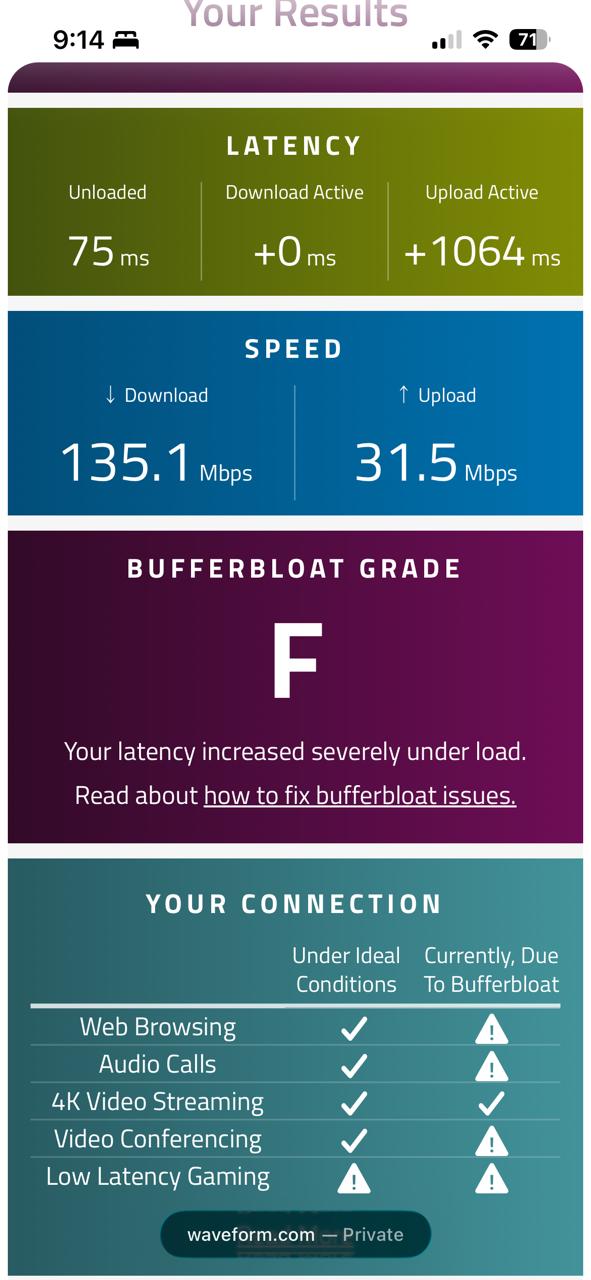
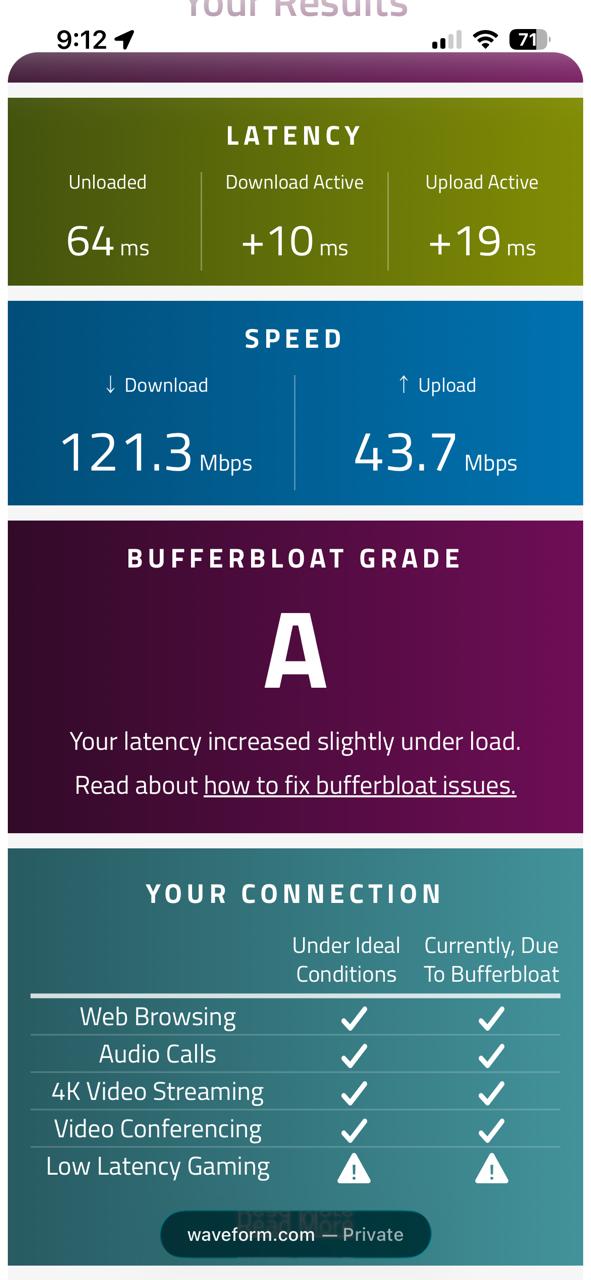
With the QoS bandwidth limit configured, I decided to do a bufferbloat test before and after QoS was enabled. To my suprise the bufferbloat test came back worse after QoS was enabled. I tried playing around with the values I had set for the QoS but to no avail, my download and upload remained high, specifcally my upload which reached 2000ms+ majority of the time.


Before QoS:
 

348d2752a14e419c957bb5d578cab216


After QoS:


ee334c0f2c634b2286d58a2490cb86f2


I've already seen multiple threads talking about this issue, to which a firmware "fix" was released to address this. I'm on the latest firmware as of May 5 2026 and yet this issue persist. For now I saw that it was best to leave QoS disabled. 


The bufferbloat test before QoS looks fine but just wait until til there is a heavy download which skyrockets my ping on my Ps5 when gaming, so im basically stuck in a dilemma between turning QoS on or leaving it off. Please let there be a fix for this or tell me what i'm doing wrong.



  0      
0
#1
Options
5 Reply
Re:Enabling QoS Makes Bufferbloat Worse
2026-05-11 03:08:52

Hello @Sp1cyLem0ns ,

Thank you for your feedback.


It may be due to the latest Official firmware for Archer BE230 not yet including this fix. We have reported this feedback to the relevant department and will update you here on any progress.


Also, you can contact Local Support if needed.

Welcome to Our Community! Get the latest posts: △New Firmware for Archer GE550/GE650 V1 Introduces AI-QoS, EasyMesh IoT Expansion, and More! △New Firmware Releases for Archer BE805 V1/BE450 V1 to Support VPN Merge, New ECO Mode, and More! More posts, please see: △ Get the Ongoing Pre-release Firmware for Wi-Fi Routers Here— Subscribe for Updates! Urgent problems with your Wi-Fi Router, Range Extender, or DSL Modem? Please reach out via private Messages or @Joesph-TP in your new thread directly. Click Or ☆Recommended Solution if the post/answer helps.
  1  
1
#2
Options
Re:Enabling QoS Makes Bufferbloat Worse
2026-05-11 03:50:05

  @Joseph-TP 


Thanks, I appreciate you guys looking into this issue.


  2  
2
#3
Options
Re:Enabling QoS Makes Bufferbloat Worse
3 weeks ago

 Hello @Joseph-TP ,


It's been almost a month since your last update, so I wanted to check whether there has been any progress regarding the fix for the bufferbloat degradation issue on the Archer BE230 when QoS is enabled.


I understand these things can take time, and I'm not sure what the usual firmware update cycle looks like. I just wanted to follow up and make sure the issue is still being tracked.


I'd appreciate any update you may be able to share. 


Thank you. :)

  1  
1
#4
Options
Re:Enabling QoS Makes Bufferbloat Worse
2 weeks ago

  @Sp1cyLem0ns ,

As far as I know, all relevant feedback regarding the Archer BE230 is being actively addressed. However, as you mentioned, we do not yet have a clear timeline for the release of the official firmware to fix it.

We will continue to actively follow up on progress and post an update here whenever there is new information.

Welcome to Our Community! Get the latest posts: △New Firmware for Archer GE550/GE650 V1 Introduces AI-QoS, EasyMesh IoT Expansion, and More! △New Firmware Releases for Archer BE805 V1/BE450 V1 to Support VPN Merge, New ECO Mode, and More! More posts, please see: △ Get the Ongoing Pre-release Firmware for Wi-Fi Routers Here— Subscribe for Updates! Urgent problems with your Wi-Fi Router, Range Extender, or DSL Modem? Please reach out via private Messages or @Joesph-TP in your new thread directly. Click Or ☆Recommended Solution if the post/answer helps.
  1  
1
#5
Options
Re:Enabling QoS Makes Bufferbloat Worse
2 weeks ago

 Thank you for the update @Joseph-TP 

Apart from this issue, I’ve also been experimenting with my router settings and noticed that a 20/40 MHz bandwidth option isn’t available for the 5 GHz band. The available 20/40/80 MHz and 20/40/80/160 MHz modes are clearly aimed at maximizing throughput, but some users (myself included) prefer prioritizing stability and would benefit from a simpler 20/40 MHz option.


I understand this may very well be intentional and not a bug, but I’ve just submitted a feature request about it as well. I wanted to mention it here in case it can be passed along too.


  1  
1
#6
Options