
BE65 – OpenVPN Client Connects but No Internet (Firmware 1.3.2 Build 26040912 Rel. 40631)
BE65 – OpenVPN Client Connects but No Internet (Firmware 1.3.2 Build 26040912 Rel. 40631)

I recently upgraded from a Deco XE75 Pro to a Deco BE65 Pro, and I’m running into a serious issue with the OpenVPN Client feature that wasn’t present on the XE75 Pro.
Setup details
-
Model: Deco BE65 Pro
-
Firmware: 1.3.2 Build 26040912 Rel. 40631
-
VPN Type: OpenVPN Client
-
Client Device: NAS (assigned in the VPN Client List)
-
Using the exact same .ovpn file that worked perfectly on the XE75 Pro
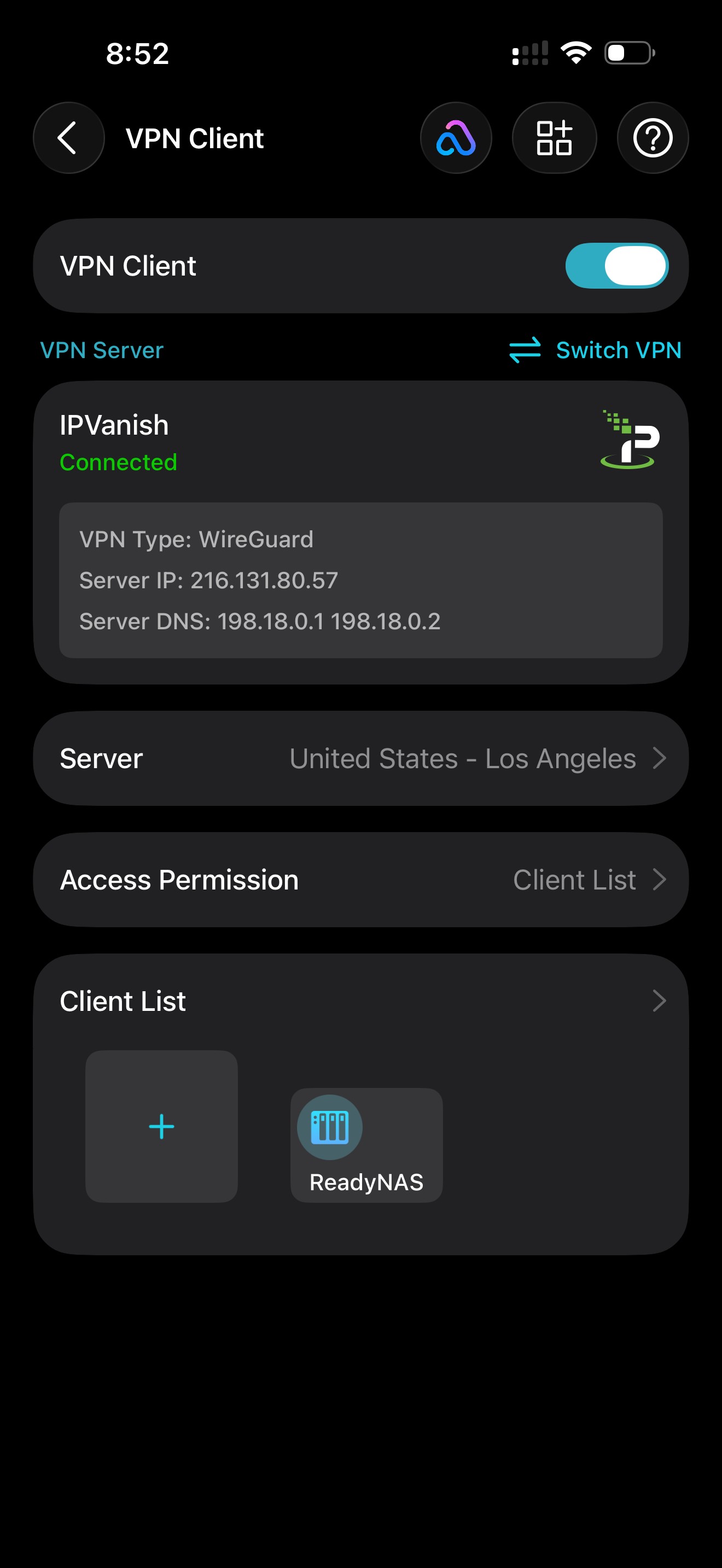
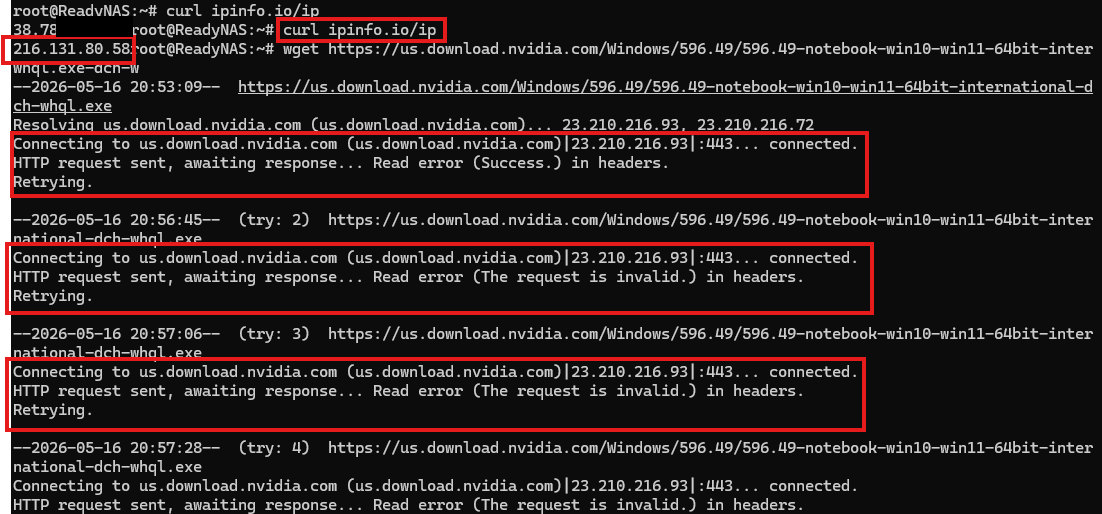
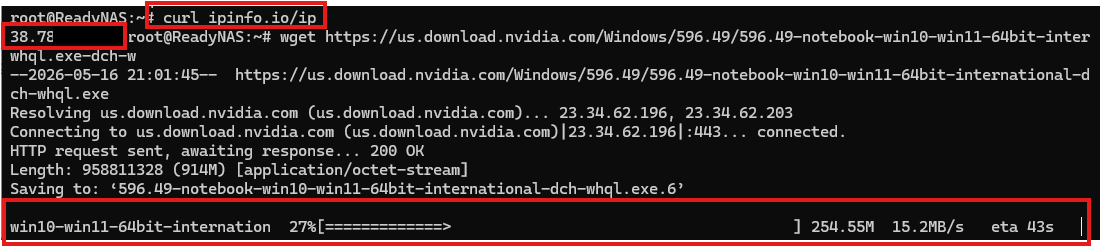
Issue The BE65 Pro establishes the VPN connection successfully. Running curl ipinfo.io/ip from the NAS returns the correct VPN exit IP, which confirms the tunnel is up and DNS resolution works. However, no other internet traffic works through the VPN. The connection is established, but the device has no actual internet access through the tunnel. The same configuration works normally on the XE75 Pro, so this appears to be a routing or NAT issue introduced in the BE65 Pro firmware.
Troubleshooting already attempted
-
Removed and re‑added the NAS to the VPN Client List
-
Rebooted the main Deco and satellites
-
Tested both UDP and TCP configs
-
Disabled IPv6
-
Tried multiple OpenVPN profiles from the provider
-
Verified DNS settings
None of these resolved the issue.
Related reports from other users TP‑Link’s forum blocks direct URLs, so here are the thread references written in a safe format:
-
community dot tp-link dot com → us → home → forum → topic → 652448
-
community dot tp-link dot com → us → home → forum → topic → 610781
-
community dot tp-link dot com → us → home → forum → topic → 620947
-
community dot tp-link dot com → us → home → forum → topic → 608556
All of these describe the same behavior: the VPN tunnel connects, the device gets the correct public IP, but general internet traffic does not route through the VPN.
Request for support I’d like to know whether this is a known issue in the current BE65 Pro firmware, and if so, whether there is a beta firmware or patch available that addresses the VPN routing problem. If it’s not yet tracked, please escalate this to the engineering team. I can provide logs, the OpenVPN config (with credentials removed), and any additional information needed.
This feature worked reliably on the XE75 Pro, so the regression on the BE65 Pro is significant and currently makes the VPN Client unusable for my setup.
Thank you in advance for any guidance or fixes you can provide.
- Copy Link
- Subscribe
- Bookmark
- Report Inappropriate Content

Hi everyone,
I had the same problem after the BE65 upgraded yesterday here in Spain. My set up is 1 x BE65 in router mode (main), 3 x XE75 Pros, 2 x XE75 & 1 x X50 all individually hard wired back to the BE65 through a network switch. Non of my subscribed wire guard VPNs would work including a home to home (UK to Spain) VPN server / client using the wire guard protocol. Non of the fixes detailed above resolved my issue (VPNs showed connected but would not allow streaming TV traffic to pass through). Eventually I FOUND THE FIX. Turn Off Qos at the top of the more tab in the app and hopefully your problems will go away.
Also to be on the safe side I have disabled auto update on my BE65 system located in the UK which for reasons unknown is still running firmware 1.2.0 Build 20250718 Rel. 43949. The server to client using 2 x systems with BE65s as the main router has been rock solid for nearly one year without any dropped connections so I would conclude TP links firmware upgrade definitely caused the problem for me.
- Copy Link
- Report Inappropriate Content
- Copy Link
- Report Inappropriate Content

- Copy Link
- Report Inappropriate Content
- Copy Link
- Report Inappropriate Content
I think I know what the issue is...
If I use the IPVanish Windows Client, the server that I'm using is OPENVPN LAX-C30 with IP 209.107.192.115
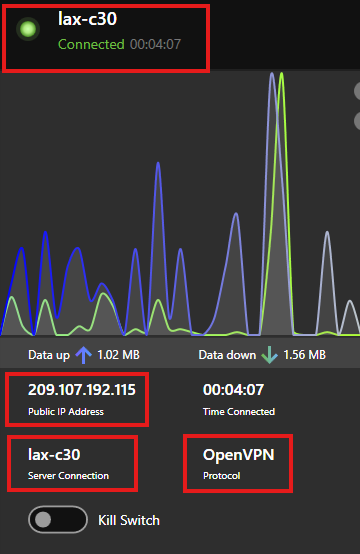
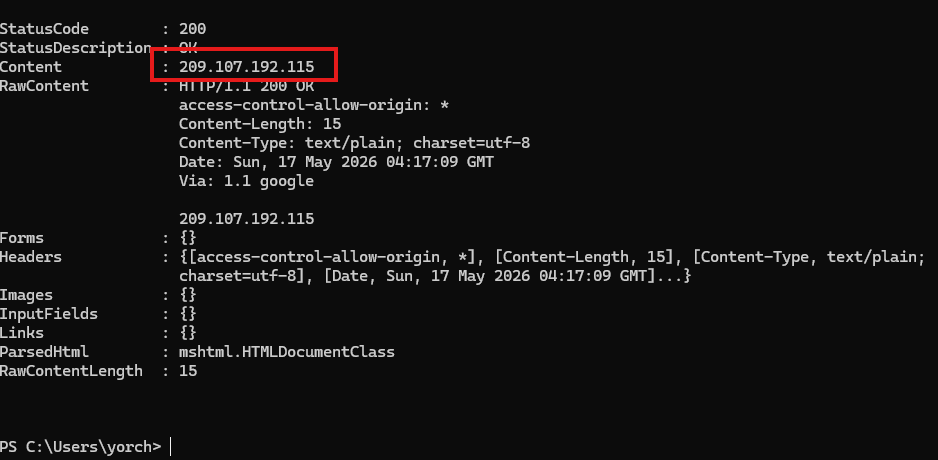
However, if I use the VPN, the TPLink using the same server, I should get the same IP. However, even though the TPlink Deco App shows that the IP is 209.107.192.115, in the client, it shows 209.107.192.116, so it is not showing the correct IP of the VPN server
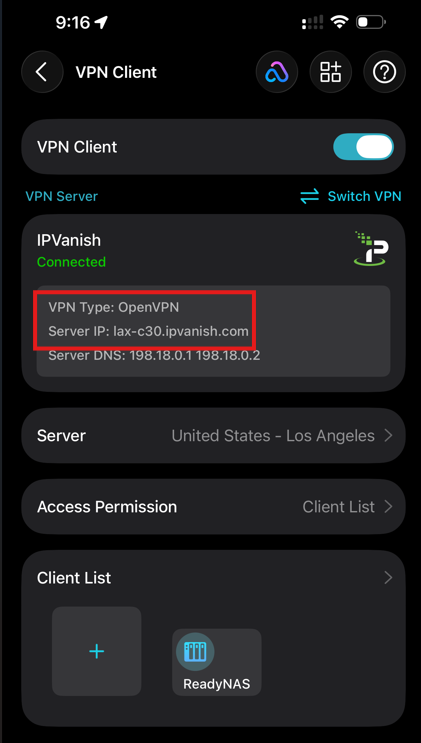
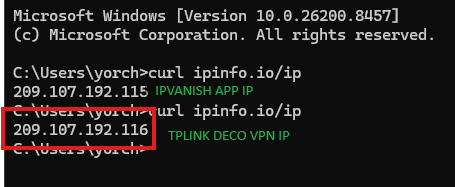
Could this be the issue? IP is totally incorrect. The same happens with WireGuard in my previous post. YOU CAN SEE THE IP IS OFF BY THE LAST DIGIT
Thank you!
- Copy Link
- Report Inappropriate Content
While we wait for Ryan there are a few things you can try.
Common Issues with TP-Link Deco OpenVPN & FixesDeco routers sometimes have DNS handling quirks with OpenVPN:
- Go to your Deco App → More → Advanced → DNS (or WAN settings) and manually set DNS to:
- Primary: 8.8.8.8
- Secondary: 8.8.4.4 (Google)
or - 1.1.1.1 / 1.0.0.1 (Cloudflare)
- Make sure IPv6 is disabled on the Deco (or on client devices) — IPv6 is a common source of leaks.
To make sure there are no leaks do the following.
Step-by-Step DNS Leak Test (Do this from a device connected to the Deco Wi-Fi)
- Connect to the Deco VPN (LAX-C30) and confirm your public IP is still one of the 209.107.192.x addresses.
- Run the test on these sites (open in a browser):
- dnsleaktest → Click Standard Test first, then Extended Test.
- ipleak (also checks WebRTC)
- browserleaks (very detailed)
- What to look for in the results:
- Good (no leak): Only DNS servers belonging to IPVanish (or generic ones like Cloudflare/Quad9 if pushed). The location should show Los Angeles / United States, matching your VPN server. No mention of your real ISP's DNS servers.
- Bad (leak): You see your real ISP's DNS servers (e.g., Comcast, AT&T, Spectrum, etc.) or your real home location.
- Copy Link
- Report Inappropriate Content
@HelpFixDecoApp Thanks for the response. I already had Google’s DNS servers configured, so unfortunately that doesn’t seem to be the issue.
- Copy Link
- Report Inappropriate Content
Additional Troubleshooting Ideas to Try
Here are targeted steps beyond what you've already done (re-adding device, reboots, UDP/TCP toggle, IPv6 off, multiple profiles, DNS checks). Focus on routing/NAT quirks common in mesh VPN client setups.
- Check/Force Policy Routing or Device Assignment Again
- In the Deco app, remove the NAS from the VPN Client List, reboot the whole mesh, then re-add it.
- Try assigning all devices (or the whole network) temporarily to the VPN to see if the issue is per-device PBR.
- Look for any "VPN Client List" or "Routing Policy" advanced options that might be hidden or glitched.
2. MTU/MSS Clamping (Common OpenVPN Routing Killer)
- Edit the .ovpn file and add (or increase priority of):
mssfix 1300
tun-mtu 1400
Or try lower values (e.g., 1200–1350). Re-upload and test.
- Fragmentation or oversized packets can break routing even if control/DNS traffic works.
3. Explicit Route Push / Redirect-Gateway Tweaks
- In the .ovpn, ensure these lines are present (or add them):
redirect-gateway def1
route 0.0.0.0 0.0.0.0 vpn_gateway
- Some providers push routes poorly on router clients. Test with pull-filter ignore "route" + manual routes above.
- Alternative: Add route-nopull and manually specify routes if you only want specific traffic.
4. DNS and Resolver Isolation
- You've set Google DNS on WAN—also try forcing it inside the .ovpn with:
dhcp-option DNS 8.8.8.8
dhcp-option DNS 8.8.4.4
- On the NAS itself, hard-set DNS to the VPN provider's or public ones and disable any local DNS cache/resolver (e.g., systemd-resolved, dnsmasq).
- Test DNS leaks thoroughly from the NAS (not just IP check).
5. Firmware and Rollback Options
- If possible, temporarily downgrade to an earlier version (or test with a different Deco model if you have spares).
- Factory reset the main Deco after firmware changes before re-importing the .ovpn.
6. Test Routing Table on the NAS
- SSH/console into the NAS while connected and run:
ip route show
ip rule show
traceroute 8.8.8.8
tcpdump -i any host 8.8.8.8 -n
- Look for missing default route via the tunnel interface (tun0 or similar), conflicting routes, or traffic going out the wrong interface. Compare to when it worked on the XE75 Pro.
7. NAT/Masquerade and Firewall Rules
- The Deco may not be properly masquerading traffic from LAN devices out the VPN tunnel.
- Test by putting a simple device (e.g., a laptop) directly in the VPN Client List and running the same curl + speed test/browser.
- If the NAS has its own firewall/NAT, temporarily disable it.
8. WireGuard Alternative (Since You Mentioned It)
- The IP-off-by-one observation with WireGuard suggests a possible backend bug in how the Deco handles VPN interface IPs or routing.
- If your provider supports WireGuard, try a fresh config and verify AllowedIPs = 0.0.0.0/0 (or specific routes).
- Test with the official WireGuard app on a client device for comparison.
9. Other Isolation Tests
- Bypass the mesh temporarily: Connect the NAS directly to a PC running OpenVPN (same config) and confirm full functionality.
- Disable any QoS, Parental Controls, or "Optimization" features in the Deco app.
- Test with a different VPN provider/profile to rule out provider-specific push issues.
- Check Deco system logs (if accessible via app or telnet/SSH if enabled) for OpenVPN or routing errors around connection time.
- Try enabling the VPN Client on a satellite unit vs. main Deco (if topology allows).
10. Advanced Workarounds
- Run OpenVPN directly on the NAS (bypassing Deco VPN Client) and set it as the default gateway for traffic.
- Use a small VM/container or cheap router (e.g., GL.iNet) behind the Deco as the VPN endpoint.
- Packet capture on the Deco (if possible) or on the NAS to see where outbound packets are going.
Next Steps Recommendation: Start with MTU tweaks + explicit routes in the .ovpn, then deep-dive the routing table on the NAS. Document exact symptoms (e.g., ping/traceroute behavior, any errors) and reply in the forum thread with logs—TP-Link support often escalates when they see regression details vs. older models.
- Copy Link
- Report Inappropriate Content
Issue has been resolved.
Solution was to factory reset everything.
- Copy Link
- Report Inappropriate Content
Hello, I think I spoke too early. The reset fixed the issue for some days, now is back! Any help It would be appreciated
- Copy Link
- Report Inappropriate Content
First please access the Deco web UI by entering "tplinkdeco.net" in your browser. Navigate to Advanced > System > System Log, select "ALL" in the log type, and save the file to your local computer. Then follow the steps below making sure to attach the logs to the email.
I recommend sending an email to forumsupport.usa@tp-link.com with the following information:
Subject: [Forum Escalation][ID 864300] BE65 – OpenVPN Client Connects but No Internet (Firmware 1.3.2 Build 26040912 Rel. 40631)
Forum Nickname: [User Provided]
Thread URL: https://community.tp-link.com/us/home/forum/topic/864300?moduleId=2424
Model&Version: [User Provided]
Description: [User Provided]
Any Other Relevant Information (Logs, Config Files, Images, etc.): [User Provided]
In the template above please fill in the areas that say [User Provided]. This will open a case with our engineering team, and they will work with you via email.
- Copy Link
- Report Inappropriate Content
Information
Helpful: 0
Views: 1185
Replies: 16
Voters 0
No one has voted for it yet.