
Wi-Fi speeds are fast, but audio and video choppy (MS Teams)

Wi-Fi speeds are fast, but audio and video choppy (MS Teams)

Wi-Fi speeds are fast, but audio and video choppy (MS Teams)
a week ago
Model: Archer AX1800  
Hardware Version: V5
Firmware Version: 1.1.2 Build 20250814 rel.14122(5553)

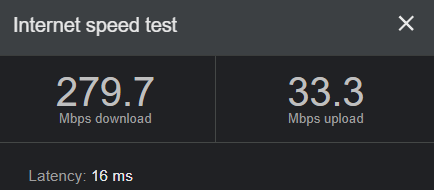
I recently replaced an old Apple AirPort with the Archer AX21 to get more current. I work from home and my office is <10 yards from the router. The speed tests from my work computer seems fast (see below). However, my Teams calls are just about worthless because my audio and video cuts out drastically. Even playing short videos on LinkedIn are staticy and chopped.


The device is on the 5G network, I've activated QoS and prioritized the work laptop, and disabled SIP ALG.


I've also tried Powerline connection via tp-link AV600, and no improvement. 


What do I do to get it working, or do I need to go back to my circa 2016 tech?


  0      
0
#1
Options
1 Reply
Re:Wi-Fi speeds are fast, but audio and video choppy (MS Teams)
a week ago - last edited a week ago

  @tjmac 


Turn off QoS as I find it causes more issues than it solves.


Smart connect off. 
 

limit devices on the 5 ghz network.


If pc is not AX, then set wifi setting to not use it.


Sometimes turning the router 45 degrees or so makes a difference. 
 

be sure firmware is up to date. 
 

if not using WPS, turn it off.


Be sure you do not have backups file transfers going on. 
 

put wifi channels on auto 


power cycle modem, router, and pc. I always power cycle or restart router after router changes to ensure they have been applied.


Do not use vpn unless that is your connection to your office. 

  0  
0
#2
Options
