Most TP-Link routers lack DHCPv6-PD – IPv6 is not working with popular ISPs

The Archer BE11000 Pro (and many other TP-Link routers) do not support DHCPv6 Prefix Delegation (DHCPv6-PD), which is required for IPv6 connectivity with many service providers. Any ISP that requires DHCPv6-PD will make the router unable to receive an IPv6 connection/address. Some of these internet providers are: Verizon Fios, Comcast Xfinity, Spectrum, Cox, CenturyLink/Lumen, Frontier, Google Fiber, Bell Canada, Rogers, Telus, NBN providers, Deutsche Telekom, Orange, and many others).
To support IPv6 with the above internet service providers, the Archer BE11000 Pro firmware and all TP-Link routers need:
- True DHCPv6 client mode (not SLAAC/DHCPv6-lite)
- DHCPv6 Prefix Delegation (PD) support
- Ability to request and accept a /56 delegated prefix
- UI options such as:
- Internet Connection Type: DHCPv6
- Enable DHCPv6-PD
- Delegated Prefix display
- Prefix ID selection
- Display of:
- WAN IPv6 address
- Delegated Prefix
- LAN /64 sub-prefixes
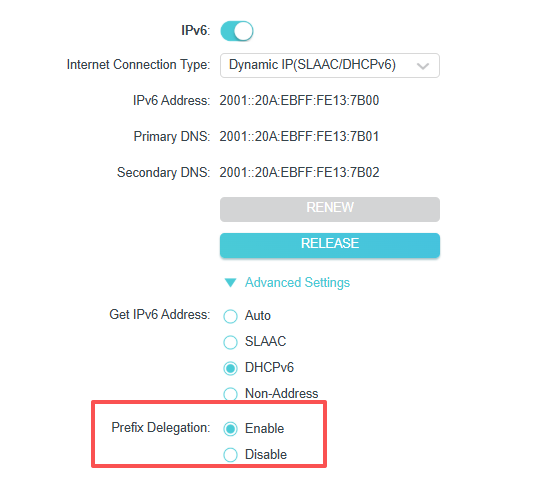
These options exist on other TP-Link models (AX73, AX90, ER605, ER7206, Deco X-series) but are missing on the BE11000 Pro (HW V1) and many more routers.
IPv6 may appear to be available on your device's connected to the internet, however, you are really only using IPv4. IPv4 is not as good because it relies on Network Address Translation (NAT), which forces routers to inspect, rewrite, and track every packet in a state table. Under real-world load (gaming, streaming, downloads), this extra processing can introduce latency spikes, jitter, and packet loss. NAT also breaks inbound connectivity, requiring workarounds such as UPnP, STUN, or relay servers, which add additional delay and complexity. It also is less secure.
To check if this issue affects you, you can check the TP-Link app and go to Internet Connection - IPv6 - And if your routers IPv6 address/Primary DNS/Secondary DNS under IPv6 connection is blank, you have no IPv6. Even if your IPv6 LAN is all filled in.