Adapter Keeps disconnecting

Adapter Keeps disconnecting

Adapter Keeps disconnecting
Monday
Model: Archer TBE550E  
Hardware Version: V1
Firmware Version: V1.60

So im new to threads, I just recently bought the TP-Link WiFi 7 BE9300 PCIe WiFi Card for Desktop PC(Archer TBE550E). The speeds are good on it but it keeps randomly disconnecting me so i have the base with the antennas on my desk and the led goes from solid to breathing which means it disconnected. It happens multiple times a minute and when it happens, most of the time I get disconnected from whatever I am doing and my ping in games shoots up into the thousands. I was wondering if there is any way I can fix this. I also downloaded the latest drivers for this when I set it up like a week ago and my mesh system is the TP-Link Deco BE63 Tri-Band Wifi 7 BE10000
 

My specs are 

Gigabyte b650m d3hp ax

32gb ddr5 ram

Nvidia rtx 4070 

AMD ryzen 5 7600x

  0      
  0      
#1
Options
2 Reply
Re:Adapter Keeps disconnecting
Tuesday

  @1Ethan Might want to check if there are any power savings settings that is causing this.

  1  
  1  
#2
Options
Re:Adapter Keeps disconnecting
Yesterday

  @1Ethan 


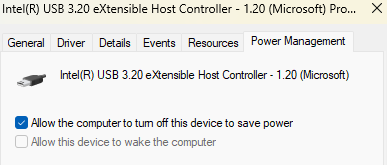
Totally agree with DVair. Windows is kinda notorious for assigning a default setting of "Allow the computer to turn off this device to save power" for peripherals like Wi-Fi adapters and USB hubs.


Here's an example I just pulled from my Device Manager:

 5cdbd58daf9841779c88f23da297f82a

You should be able to find and change this for your TBE550E using these steps:


1. Open the Device Manager (Start -> type in "Device Manager" and open it)

2. Expand "Network adapters"

3. Double-click your TBE550E 

4. Click the "Power Management" tab

5. Uncheck the box shown in the image above, then click "OK"

  0  
  0  
#3
Options