Trouble with access points 2.4ghz

Trouble with access points 2.4ghz

Trouble with access points 2.4ghz
Friday
Model: Archer A7  
Hardware Version:
Firmware Version: 1.2.1 Build 20220714 rel.75573

I have two AC1750 routers. I recently changed the password of both of them to make them more secure and since then it’s been a mess


I have it set up like this-

Upstairs router is primary, has name1 5g and name1 2.4 set up

The second router is in access point mode downstairs and has name2 5g and name2 2.4 g set up


The second router’s 2.4g channel last night just decided to disappear. I have tried restarting everything to no luck. Looking in the tether app it’s telling me everything is working okay, but I am unable to get my nest cam or some other devices to see the network at all, including my phone.


Any advice will be greatly appreciate, this has been driving me nuts. Both are on the latest firmware, and I have tried restarting everything changing their channels

  0      
  0      
#1
Options
1 Reply
Re:Trouble with access points 2.4ghz
Yesterday

  @cojobe 


By the way, if you're using same SSID name for the 2.4 and 5GHz band, you can just enable Smart Connnect feature.

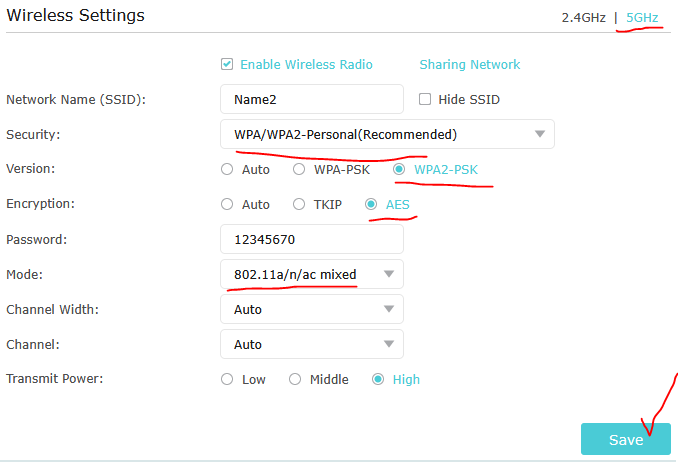
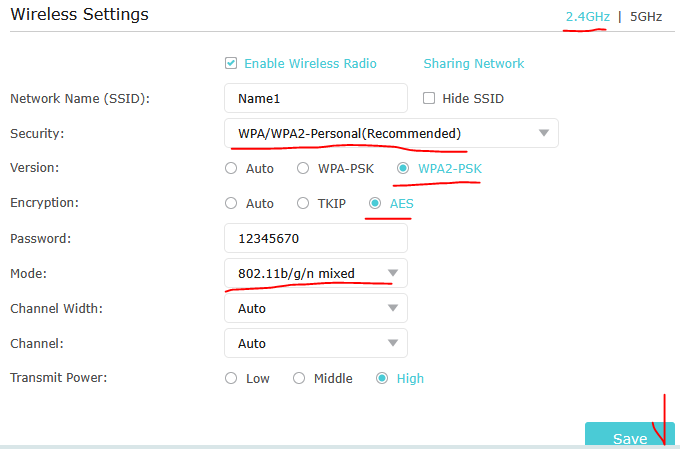
I woud use the Name1 for 2.4 GHz and Name2 for 5GHz SSID on both devices, to destinguish between these two bands.

That's how the wireless settings should look like in this case:


ababe53a75df48a4822096afbe4f833f


08f011c81b3c470fb4883591ce652891


Same goes for the device in AP mode.

If this was helpful click on the arrow pointing upward to make it blue. If this solves your issue, click the star to make it blue and mark the post as a "Recommended Solution".
  0  
  0  
#2
Options