Powerline extender has no internet

Powerline extender has no internet

Powerline extender has no internet
2 weeks ago
Model: TL-WPA7817 KIT  
Hardware Version:
Firmware Version: 1.0.2 Build 20250312 Rel.60879

The powerline LEDs light up on both the adaptor and the extender, except for the internet light. The TP_LINK network appears in my list of Wi-Fi options, but when I select it, I have no internet connection. I've confirmed that the internet is coming through the Ethernet cable by connecting it to my laptop. I've also followed all the troubleshooting suggestions on the website, including rebooting the powerline units and the modem. Yet I am still unable to obtain internet on the extender. Has anyone found out how to overcome this issue. I just bought this unit and hate to have to return it.

  0      
0
#1
Options
1 Reply
Re:Powerline extender has no internet
Tuesday

Hello @JimH1 ,

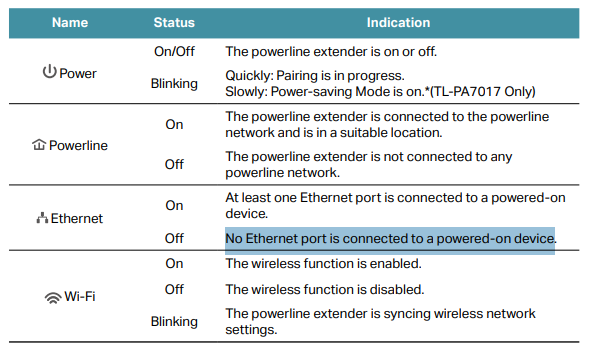
May I confirm which lights are lit up?  Please see the LED explanation as follows:

350b87384d3a4db3a787e230c4854126


 Please work through the following steps:

1. Check the Ethernet light on the powerline adapter (the one connected to your router). If it's not lit, try plugging into a different LAN port on your router, or swap out the Ethernet cable connecting the router to the powerline adapter.

2. Check for router restrictions — make sure your router doesn't have settings like MAC Filtering or Access Control enabled, as these can block the powerline devices from accessing the internet.

3. Restart everything in sequence — power off your router and both powerline devices. Wait 30 seconds, then turn them back on: router first, then the powerline adapter, then the extender.

4. Upgrade the firmware on both powerline devices, as updates can resolve connectivity issues. You can follow this guide: How to upgrade firmware of TP-Link Powerline Adapter — after upgrading, re-pair the devices using: How to secure (pair) the Powerline Network


Welcome to Our Community! Get the latest posts: △New Firmware for Archer GE550/GE650 V1 Introduces AI-QoS, EasyMesh IoT Expansion, and More! △New Firmware Releases for Archer BE805 V1/BE450 V1 to Support VPN Merge, New ECO Mode, and More! More posts, please see: △ Get the Ongoing Pre-release Firmware for Wi-Fi Routers Here— Subscribe for Updates! Urgent problems with your Wi-Fi Router, Range Extender, or DSL Modem? Please reach out via private Messages or @Joesph-TP in your new thread directly. Click Or ☆Recommended Solution if the post/answer helps.
  0  
0
#2
Options