
Troubleshooting What if my Router Speed is capped at 100 Mbps?


This Article Applies to:
TP-Link Routers
Issue Description/Phenomenon:
Some customers may report the speed is limited to 100 Mbps when connected to the TP-Link router, while the speed is much faster and can reach up to 500+ or 900+ Mbps when connecting to the ISP modem directly. If this is what you are experiencing, follow this article to get it resolved.
Troubleshooting Suggestions:
1. Mark certain you are getting a gigabit router, which has gigabit WAN/LAN ports. Some models like Archer C20 and Archer C50 only support 10/100 Mbps WAN/LAN ports, you can find that in the product specifications here and here. If your router only has 10/100 Mbps WAN/LAN ports, you cannot get a higher speed than 100 Mbps, and you need to get a gigabit router.
2. Login to the web GUI of the router, go to Basic > Network Map > click on the Icon for TP-Link router, slide down to the bottom of the page, and you will see the Negotiation Speed of the Ethernet ports in the Ethernet part. You can refer to this article to find more detailed instructions.

3. If the Internet Port Negotiation Speed is not 1000Mbps, go to Advanced > Network > Internet page, choose 1000Mbps Full Duplex, save and reboot the router:

4. If it's still connected at 100 Mbps, try with another Cat5e/6 cable or change the port of your ISP device, where you're connecting the TP-Link router (if possible).
5. If the Internet speed is negotiated correctly at 1000 Mbps, but the LAN gets stuck at 100 Mbps, it is also suggested to try with another Cat5e/6 cable between the router LAN and the client device, try with another client device if that is possible. Follow this thread to troubleshoot further.
6. Try to reset the router to the default factory following the FAQ.
7. Upgrade the router firmware to the latest. You can follow this guide.
If the speed still gets stuck at 100 Mbps after checking all the above, it is suggested to comment below and be sure to provide the following information:
1. Model number, hardware, and firmware version of your TP-Link Router.
2. What troubleshooting have you done, and what are the results? Send us the screenshots about the Negotiation speed.
3. What are the devices that you are testing the LAN speed, and what are the models of the adapters?
4. When did you purchase the TP-Link router, and when did the issue begin to happen?
5. What is the model of the ISP modem that this TP-Link router connects to?
Related Articles:
What if my LAN speed is capped at 100 Mbps
[Solution] Killer Software lower down AX1100's Speed
How to check the negotiation speed of Ethernet ports on the TP-Link Wireless Router?
What should I do if my internet connection is slow?
How to place your wireless router for optimal reception and performance?
- Copy Link
- Subscribe
- Bookmark
- Report Inappropriate Content

@woozle Oh wow. I did not realise that. I thought if it had the up to 600 Mbps advertised speeds, itd be enough.... I see where i have miscalculated and i feel a bit stupid. Guess ill look into hooking up wifi to my PC.
- Copy Link
- Report Inappropriate Content

I just got the archer ax1500 wifi 6 router, when i connect a device to it, it shows my plan speed of 300+mbps but after just a few minutes if i test it, or just the 2nd test at times, it falls to the 150 range and then eventually under 100. This drop is just for my Oneplus 12.
On my laptop on the other hand, even though is has wifi 6e, latest drivers, reflashed the driver as well, reset all my laptop settings as well. It shows 300+ initially but after 5mins at most, it falls to 5mbps for some reason while my phone still shows around 75ish simultaneously/just a min apart.
What can i do to fix this? My previous router worked perfectly but was capped at 100mbps which i was getting exactly full of since over 10 years now.
I have tried all the above suggestions. 5g channel width is 20/40/80
Channel is 44
Mode is 802.11a/n/ac/ax mixed
Wmm enabled
Rts threshold 2304
These i made after consulting tp link customer care. They told me to wait an hour and reset and it should work, didnt.
Firmware is the latest one, 1.2.1 Build 20250724 rel.69183(5553)
Archer AX10 v3.0
- Copy Link
- Report Inappropriate Content
Luci07 wrote
I just got the archer ax1500 wifi 6 router, when i connect a device to it, it shows my plan speed of 300+mbps but after just a few minutes if i test it, or just the 2nd test at times, it falls to the 150 range and then eventually under 100. This drop is just for my Oneplus 12.
On my laptop on the other hand, even though is has wifi 6e, latest drivers, reflashed the driver as well, reset all my laptop settings as well. It shows 300+ initially but after 5mins at most, it falls to 5mbps for some reason while my phone still shows around 75ish simultaneously/just a min apart.
What can i do to fix this? My previous router worked perfectly but was capped at 100mbps which i was getting exactly full of since over 10 years now.
I have tried all the above suggestions. 5g channel width is 20/40/80
Channel is 44
Mode is 802.11a/n/ac/ax mixed
Wmm enabled
Rts threshold 2304
These i made after consulting tp link customer care. They told me to wait an hour and reset and it should work, didnt.
Firmware is the latest one, 1.2.1 Build 20250724 rel.69183(5553)
Archer AX10 v3.0
@Luci07 thanks for posting in the TP-Link community.
Have you tested the speed to check whether you can get a stable 300Mbps by connecting the laptop to the ISP-provided modem, bypassing the Archer AX10?
What is the brand and model of the Wi-Fi 6E adapter on the laptop? When the speed dropped to 5mbps, please check what the link speed of the wireless connection is as per this FAQ, and show me the screenshot.
Additionally, please ensure that you haven't modified any advanced settings on the AX10, such as Speed Limit, to limit the speed of the wireless clients after the factory reset.
- Copy Link
- Report Inappropriate Content
I still have the same problem. To temporarily solve the issue I checked which of my ports were active at 1000Mbps Full Duplex and connected the one I need to run at 100Mbps to that port.
This is clearly a firmware bug that TP-Link should fix. I just upgraded my AX50 to the latest 1.1.2 Build 20251022 rel.69668(4555) but this does not fix the problem.
I suspect my only real solution is to buy a new router, but I have question if I would buy a TP-Link one if they can't fix this problem.
- Copy Link
- Report Inappropriate Content

I have same issues with both AX53 and AX23 Tp-link router
I find out somethings:
- When I use cables like cat6a, cat7, cat8, the internet port will stuck at 100mps. (All cables are new and also tested well with orther different router)
- When I try to use old cables like cat5e and cat6, the rounter internet port speed will come to 1000 mbps.
So I wonder if the TP-Link AX router cant use with high-end cables?
- Copy Link
- Report Inappropriate Content
It's crazy hahahaha what is posible? It has to be a firmware bug; it doesn't make sense that it's the cables. I'm having the same problem with the AX58.
- Copy Link
- Report Inappropriate Content
Yah, I think you right. Firmware is bug or maybe TP-Link hardware is bug with high-end cables :D
- Copy Link
- Report Inappropriate Content
- Copy Link
- Report Inappropriate Content

Hello @EnnnTiii & @JordiRisa
I have noticed your feedback cases and I will reply to you in the separate posts you have created. Please also reply in your individual posts with any details related to your cases.
- Copy Link
- Report Inappropriate Content

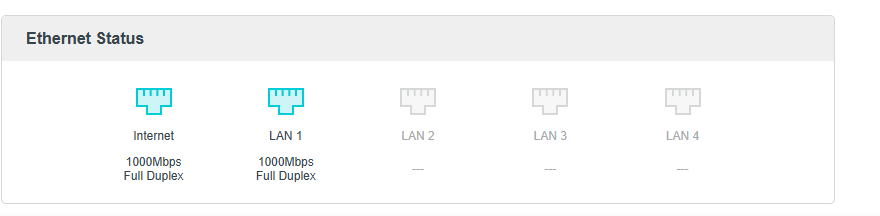
Issue happened after using router for about 3 months, all troubleshooting options were tried nothing seems to work. Cannot manually change duplex speeds as it just refuses to work on anytthing other than auto. Now the kicker, repluging cable makes it go back to 1000... for like an hour. So i do not think this is cable issue. To be sure as last effort i've ordered new cable but from what i've read here changing cables done nothing for people with this issue.
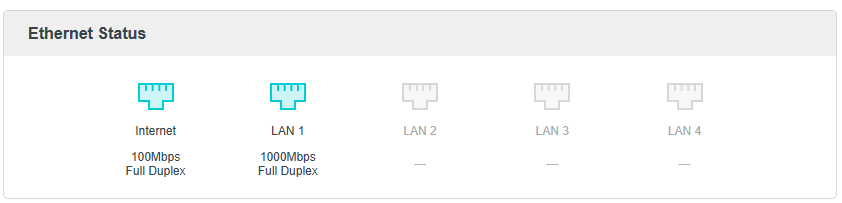
And here after repluging cable
- Copy Link
- Report Inappropriate Content
Information
Helpful: 12
Views: 227870
Replies: 151
Voters 4


