
Dark orange continuously recording, not motion detection..?

This thread has been locked for further replies. You can start a new thread to share your ideas or ask questions.

Dark orange continuously recording, not motion detection..?

This thread has been locked for further replies. You can start a new thread to share your ideas or ask questions.

Dark orange continuously recording, not motion detection..?
2024-06-17 09:44:15 - last edited 2024-07-02 02:38:29
Model: Tapo C100  
Hardware Version:
Firmware Version:


Hi,

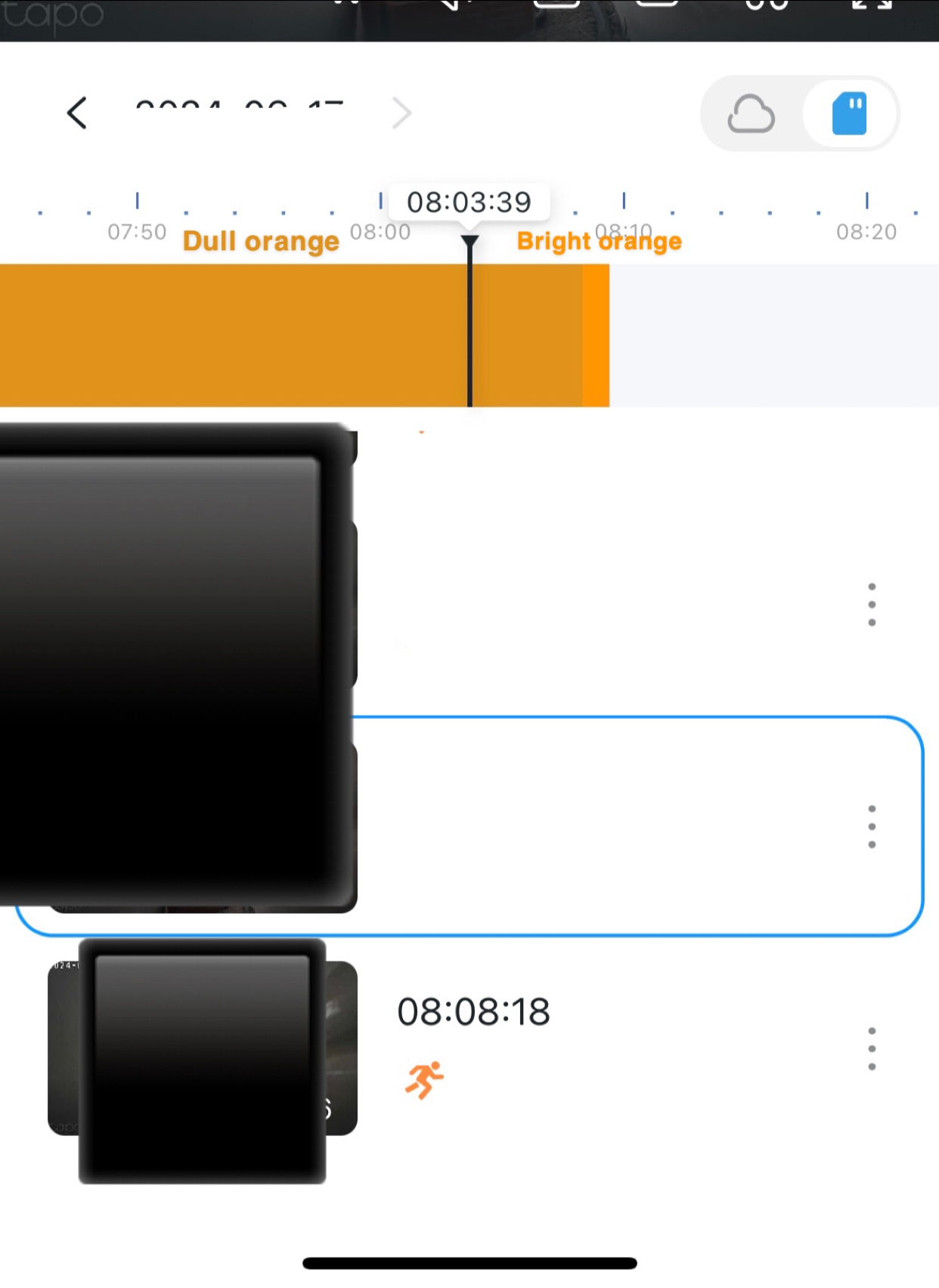
i have the tapo c100 camera. I use a micro sd card and have subscribed to the cloud storage. I have my recording schedule set on continuously record for some hours of the day (shows up as a blue bar) and motion detection for the rest of the day (shows up as a bright orange bar if something has been detected) and sends an alert on my phone. I have noticed a green bar showing up- this is for when a person has been detected and it sends an alert to my phone. All of these get saved on my cloud & sd card- apart from the continuously record which i can only preview on the sd card. 
however, i have noticed that on very rare occasions a darker orange bar appears and continually appears for a few hours even though nothing is saved or my phone is not alerted. It is not motion detection as nothing has been detected and if it was that appears as a bright orange bar, sends a notification to my phone but then changes back to the dark orange bar until it randomly stops. I wanted to know what the issue was here. I have attached an image to explain what i mean. Thanks



  0      
  0      
#1
Options
1 Accepted Solution
Re:Dark orange continuously recording, not motion detection..?-Solution
2024-06-18 08:12:03 - last edited 2024-07-02 02:38:29

  @Cupcake1 

Hi,
Please confirm the following information for the reported issue for further analysis.
1. Refer to the instructions below to collect the camera log and let me know when you have collected it.
How to get the log of Tapo Camera?


2. Confirm the time and date of the dark orange bar appear and disappear. What's your time zone?


3. After the problem occurs, go to the Tapo app>Me>Help & Feedback >Cameras>Feedback>select your camera, tap Next> enter Forum ID 672266: Dark orange continuously recording, not motion detection.., check the 'Add System Logs' and 'Send App Log'>tap Send Feedback to send us the app logs. 
Please let me know after you send the log files to us.


Best Regards 

Recommended Solution
  0  
  0  
#2
Options
1 Reply
Re:Dark orange continuously recording, not motion detection..?-Solution
2024-06-18 08:12:03 - last edited 2024-07-02 02:38:29

  @Cupcake1 

Hi,
Please confirm the following information for the reported issue for further analysis.
1. Refer to the instructions below to collect the camera log and let me know when you have collected it.
How to get the log of Tapo Camera?


2. Confirm the time and date of the dark orange bar appear and disappear. What's your time zone?


3. After the problem occurs, go to the Tapo app>Me>Help & Feedback >Cameras>Feedback>select your camera, tap Next> enter Forum ID 672266: Dark orange continuously recording, not motion detection.., check the 'Add System Logs' and 'Send App Log'>tap Send Feedback to send us the app logs. 
Please let me know after you send the log files to us.


Best Regards 

Recommended Solution
  0  
  0  
#2
Options