
EasyMesh with Ethernet backhaul (2xAX55 + 1xAX58) - Internet connection is lost several times a day

This thread has been locked for further replies. You can start a new thread to share your ideas or ask questions.

EasyMesh with Ethernet backhaul (2xAX55 + 1xAX58) - Internet connection is lost several times a day

This thread has been locked for further replies. You can start a new thread to share your ideas or ask questions.
EasyMesh with Ethernet backhaul (2xAX55 + 1xAX58) - Internet connection is lost several times a day
2025-05-04 21:51:25 - last edited 2025-05-09 01:37:01
Model: Archer AX55   Archer AX58  
Hardware Version: V1
Firmware Version: 1.3.3 Build 20240628 rel.37017(4555)

Hi community,


I have some issues with my newly build Easy Mesh WiFi network with ethernet backhaul.

The configuration is working fine, except the fact that the internet is lost several times a day.

Resetting the main router of the Easy Mesh network solves the issue then.

I have also tried several different settings (DHCP server, RX TX flow control, only 2.4Ghz WiFi,...) but none of them solved the issue completely only the time between the issues changed.


I have 2x AX55 v1 router with firmware 1.3.3 Build 20240628 rel.37017(4555) and 1x AX58 v1 router with firmware 1.4.3 Build 20250314 rel.78903.

All routers are connected by ethernet cable in different locations in my house (1x in the basement, 1x on ground floor, 1x in the attic). 

The Mesh Master is configured to AP mode and the WAN port is not used for the ethernet connections.


The internet connection is provided by an AVM Fritzbox 7560 which is provided by the ISP 1&1 in Germany and via ethernet connected to the Easy Mesh master which is one of the AX55 routers.


My topology:
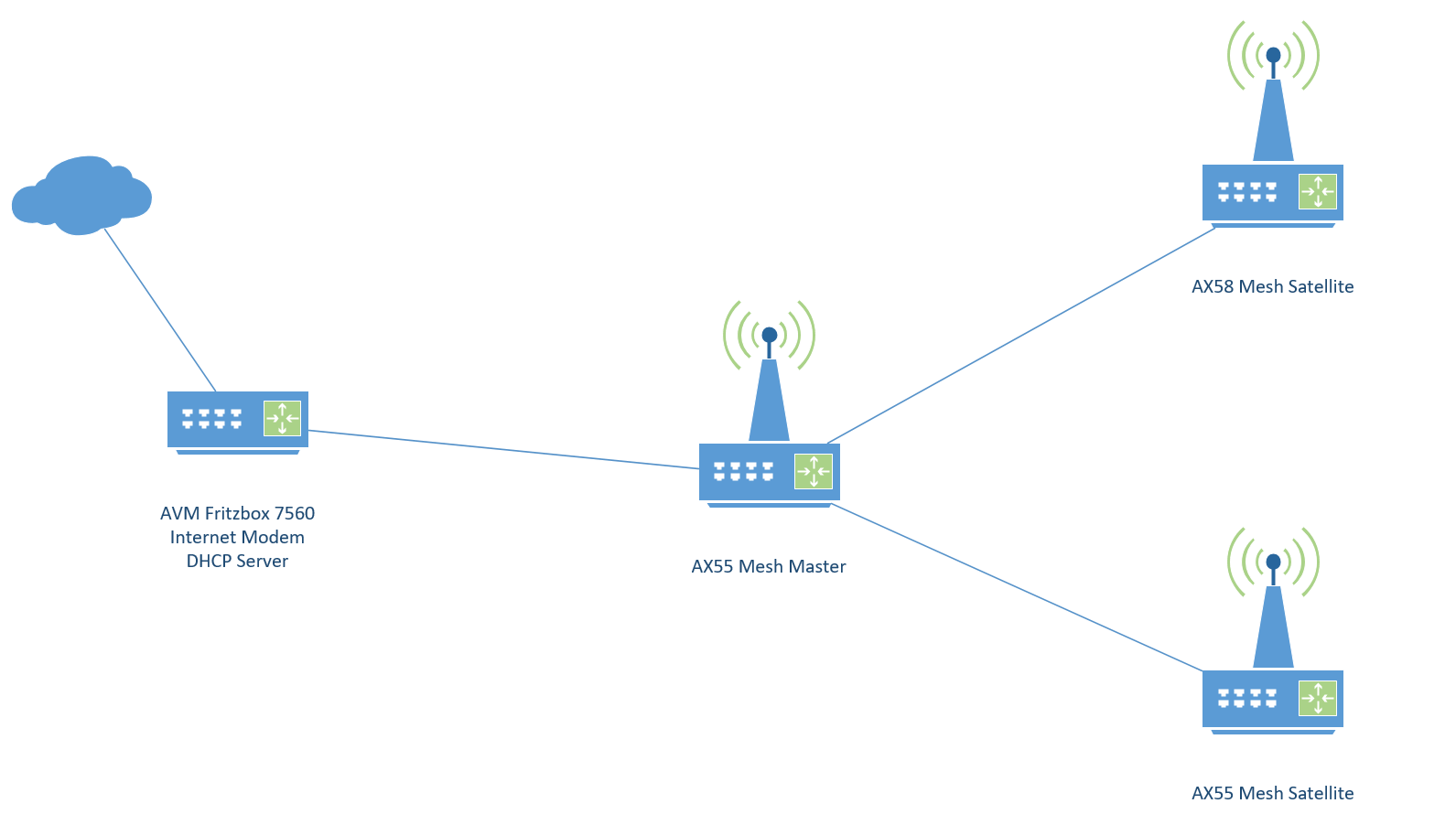
 

It seems like the ethernet connection from AX55 Mesh Master to the Fritzbox is somehow shutting down from time to time.

In the logs of the AX55 Mesh master is mostly nothing visible except for the LED changes.


The internet connection of the Fritzbox is stable. I have checked this via direct ethernet connection to the Fritzbox.


I have seen some similar posts in this forum but found no clear solution.


Looking forward for some help.


Best regards,

Benjamin



  0      
  0      
#1
Options
1 Accepted Solution
Re:EasyMesh with Ethernet backhaul (2xAX55 + 1xAX58) - Internet connection is lost several times a day-Solution
2025-05-07 19:54:15 - last edited 2025-05-09 01:37:01

Hi @Joseph-TP,


thank you for the quick answer.


According to your questions:

- I have not disconnected the ethernet connection between the routers

- Internet was tested via wired connection directly to the Fritz box in parallel.

- WiFi is switched off in the Fritz Box

- LED turned red/orange but I think this only happened if the WAN port was used.

- Rebooting of the Archer main router solved the issues normally


However i think i found the issue on Fritz box side. It seemed that the ethernet ports were somehow faulty when connected to the TP Link Archer AX devices with gigabit speed. 

I have also tried a switch between Fritz box and AX55 Main router but same behavior. When it was connected with 100 Mbit/s it was more stable.

I requested a new Fritz box from ISP (Fritz box 7530 AX) and now it seems working stable also with gigabit speed.

Just changed it today and needs some more testing but looks good.


Best regard,

Benjamin

Recommended Solution
  0  
  0  
#3
Options
4 Reply
Re:EasyMesh with Ethernet backhaul (2xAX55 + 1xAX58) - Internet connection is lost several times a day
2025-05-06 06:38:23

Hi @Benjamin_8,

Thank you for reporting your issue to our community.

When the issue occurs, did you remove the main router from AVM Fritz box 7560 and then test the internet via a wired PC? Is the Wi-Fi of AVM Fritz box 7560 still on?

What is the LED status of Archer routers? Did the internet light turn red?

How did you recover the internet on Archer routers? Rebooting? Or it will turn green itself?


Could you please change DNS of the main router to 8.8.8.8 and 1.1.1.1? Please refer to How to Change the DNS servers on the wireless router

Would you mind changing the operation mode to wireless router mode for a comparison?


Thank you and feel free to reply here if you have any update.

Nice to Meet You in Our TP-Link Community. Check Out the Latest Posts: △Pre-release Firmware for Archer AX50 Introduces New Parental Control Features and Enhancements △Introducing AI QoS: Elevate Your Gaming Experience on the Archer GE800 Gaming Router △Connect TP-Link Archer BE550 to Germany's DS-Lite (Dual Stack Lite) Internet via WAN △Tether KidShield Test Recruitment - Safeguarding Children's Online Experience If you found the post or response helpful, please click Helpful. If an answer solves your problem, click "Recommended Solution" so that others can benefit from it.
  0  
  0  
#2
Options
Re:EasyMesh with Ethernet backhaul (2xAX55 + 1xAX58) - Internet connection is lost several times a day-Solution
2025-05-07 19:54:15 - last edited 2025-05-09 01:37:01

Hi @Joseph-TP,


thank you for the quick answer.


According to your questions:

- I have not disconnected the ethernet connection between the routers

- Internet was tested via wired connection directly to the Fritz box in parallel.

- WiFi is switched off in the Fritz Box

- LED turned red/orange but I think this only happened if the WAN port was used.

- Rebooting of the Archer main router solved the issues normally


However i think i found the issue on Fritz box side. It seemed that the ethernet ports were somehow faulty when connected to the TP Link Archer AX devices with gigabit speed. 

I have also tried a switch between Fritz box and AX55 Main router but same behavior. When it was connected with 100 Mbit/s it was more stable.

I requested a new Fritz box from ISP (Fritz box 7530 AX) and now it seems working stable also with gigabit speed.

Just changed it today and needs some more testing but looks good.


Best regard,

Benjamin

Recommended Solution
  0  
  0  
#3
Options
Re:EasyMesh with Ethernet backhaul (2xAX55 + 1xAX58) - Internet connection is lost several times a day
2025-05-09 01:38:57

Hi@Benjamin_8,

It is good news to hear that your issue can be resolved. 

Please continue to observe the network for a while. Feel free to contact us if you have other questions.

Nice to Meet You in Our TP-Link Community. Check Out the Latest Posts: △Pre-release Firmware for Archer AX50 Introduces New Parental Control Features and Enhancements △Introducing AI QoS: Elevate Your Gaming Experience on the Archer GE800 Gaming Router △Connect TP-Link Archer BE550 to Germany's DS-Lite (Dual Stack Lite) Internet via WAN △Tether KidShield Test Recruitment - Safeguarding Children's Online Experience If you found the post or response helpful, please click Helpful. If an answer solves your problem, click "Recommended Solution" so that others can benefit from it.
  0  
  0  
#4
Options
Re:EasyMesh with Ethernet backhaul (2xAX55 + 1xAX58) - Internet connection is lost several times a day
2025-05-22 21:01:04

Hi @Joseph-TP,


the EasyMesh setup with 2x AX55 and 1x AX58 and ethernet backhaul works pretty good in general.

However sometimes (once a day or every second day) the network is disturbed by the AX58 which is currently still running with beta SW (1.4.3 Build 20250314 rel.78903).

It seems than that the AX58 falls back to some default mode and also provides a DHCP server. The only solution to fix this issue then is to do a power reset of the AX58 satellite router.


Is this issue known? Are there plans to get a stable official firmware for the AX58 with ethernet backhaul EasyMesh support?


Further improvement idea is a time based restart possibility of the satellite routers. Currently this seems only possible for the main router.


Thank you.


Best regards,

Benjamin


  0  
  0  
#5
Options