
Deco X50-5G shows solid red after manual reboot via Deco App
 This thread has been locked for further replies. You can start a new thread to share your ideas or ask questions.
Not sure about the hardware version or firmware version as I already remove the network from the app. Im using the modem as a mesh connected to my main router. I noticed after the reboot, it seems to be stuck in boot loop. The light indicator is showing yellow > off > yellow > off > repeat. Then I tried to unplug the LAN cable, and reboot, it became yellow > green > solid red. I cant do a hard reset as it keeps on boot looping. Im assuming it is doing a firmware upgrade and probably failed.
Can any expert help me? I just bought this model 1 year ago and happy with it but suddenly it became like this after a reboot.
- Copy Link
- Subscribe
- Bookmark
- Report Inappropriate Content


Thank you, and I've saved the picture.
The hardware is V1.0. You are right, and Deco X50-5G should use the HTTP Uboot Method.
In this way, I'm afraid you might need to contact the shop retailer for warranty replacement.
Thanks a lot and best regards.
- Copy Link
- Report Inappropriate Content
Any updates on this?
- Copy Link
- Report Inappropriate Content
Hi, can you record a video clip of the LED status?
You can find the hardware version on the product label next to the barcode, such as V1.0/V1.2
" I'm using the modem as a mesh connected to my main router."
-Did you mean Deco X50-5G is connected to the ISP router via an Ethernet cable, not using SIM cards?
Please plug the Deco into another power socket, then hold the bottom reset pinhole for 1s only to see whether its LED could be back to flashing blue again.
Wait for your reply.
Best regards.
- Copy Link
- Report Inappropriate Content
"-Did you mean Deco X50-5G is connected to the ISP router via an Ethernet cable, not using SIM cards?"
Yes correct.
There is no hardware version below the DECO but i do have serial number.
Let me try your suggestion first and if it still not working, I will record a video.
**UPDATE:
I cant upload a video since it only accepts less than 10MB. Here whats happening, after i plugged in, it will stay solid yellow for like ~40-50seconds and then light indicator disappears and keeps on repeating.
Now, After i press on the reset button, the solid yellow turns green and blinking green for 2-3 times before turning to solid red.
- Copy Link
- Report Inappropriate Content
Hi, thanks for the update.
Did you have any impression of the current firmware of the Deco X50-5G?
The only suggestion I can think of now is firmware recovery:
How to use firmware recovery if the Deco become brick
Could you please send me a clear picture of the bottom product label?
If you bought the Deco a year ago, it is very likely to be v1.0, and you can try to recover to this version:
Deco X50-5G_v1_1.1.7_build_20240809
If the Deco can't get into firmware recovery mode, I'm afraid you might need to contact the local retailer for warranty service.
https://www.tp-link.com/my/support/replacement-warranty/
Thank you very much.
Best regards.
- Copy Link
- Report Inappropriate Content
@David-TP I'm trying to download the tools for method 1 in https://www.tp-link.com/en/support/faq/2958/ but seems like the repository is not found. Can you help to provide the latest URL? Or Should I just follow Method 2 instead?
**UPDATE: I have used method 2 instead. Manage to upgrade the firmware to the version u gave and manual reboot after its done (As instructed in the firmware page). After manual reboot, it still behaves the same way. Yellow > off > Yellow > off.
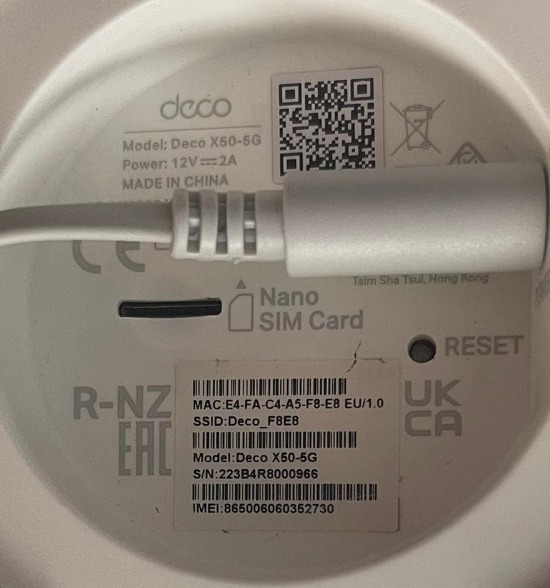
- Copy Link
- Report Inappropriate Content
Thank you, and I've saved the picture.
The hardware is V1.0. You are right, and Deco X50-5G should use the HTTP Uboot Method.
In this way, I'm afraid you might need to contact the shop retailer for warranty replacement.
Thanks a lot and best regards.
- Copy Link
- Report Inappropriate Content
Information
Helpful: 1
Views: 755
Replies: 6
Voters 1