
Early Access Introducing AI QoS: Elevate Your Gaming Experience on the Archer GE800 Gaming Router!
 This thread has been locked for further replies. You can start a new thread to share your ideas or ask questions.

Update on Jan 16th, 2026:
The official version of Archer GE800 V1, 1.3.2 Build 20250929, has been released publicly. Users can check for updates via the router's web interface or through the Tether App to install the latest version manually.
If you cannot find the latest version, please download the firmware from the official website and upgrade it manually:
Archer GE800_V1_1.3.2 Build 20250929
We will manually lock this post to better focus on discussions regarding the new firmware. We also encourage all users to upgrade to the latest firmware for testing and to provide feedback.
--------------------------------------------------------------------------------
Hello Everyone,
We are excited to announce a pre-release firmware update introducing AI QoS (Quality of Service) for the Archer GE800 V1 before its official release. This allows our users to enjoy the ultimate gaming experience in advance.
AI QoS is designed to revolutionize your online gaming experience. Leveraging artificial intelligence, our new feature set transforms how your router manages bandwidth, ensuring seamless performance for all your applications. Here are the key features that make AI QoS a game-changer.
One-Click Acceleration
Say goodbye to complicated setups! With just a single click, you can enjoy lightning-fast performance without the hassle of complex configurations. Get ready to dive into your favorite games instantly.
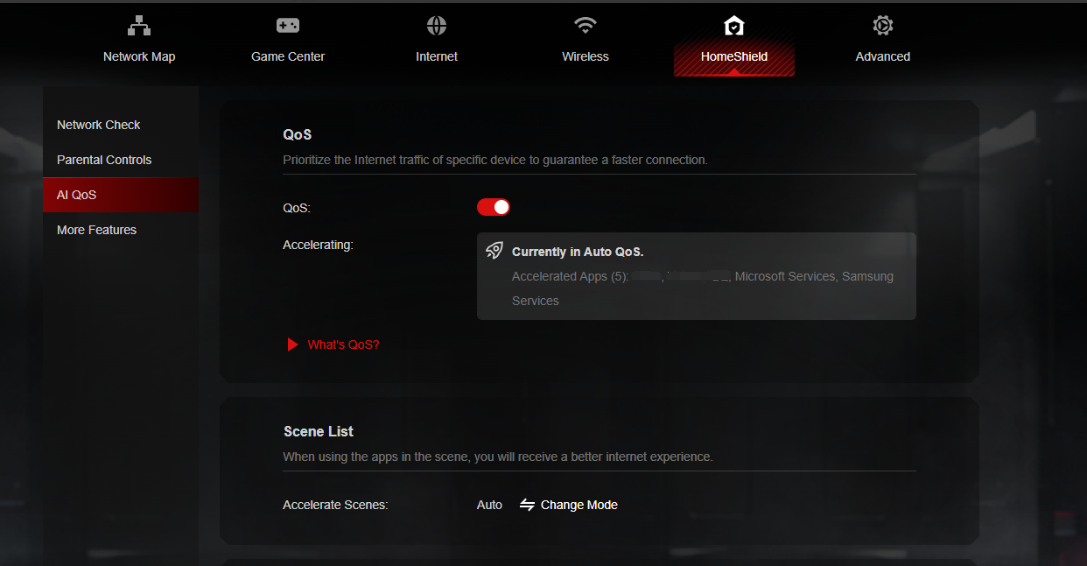
Dynamic Bandwidth Detection
Our advanced technology allows you to instantly assess your available bandwidth. By continuously monitoring network conditions, AI QoS helps prevent congestion, ensuring that your gaming and streaming sessions remain smooth and uninterrupted.
Enhanced QoS Optimization
Experience significantly reduced gaming latency, even in congested network scenarios. AI QoS intelligently optimizes your connection, minimizing lag and providing a competitive edge when it matters most.
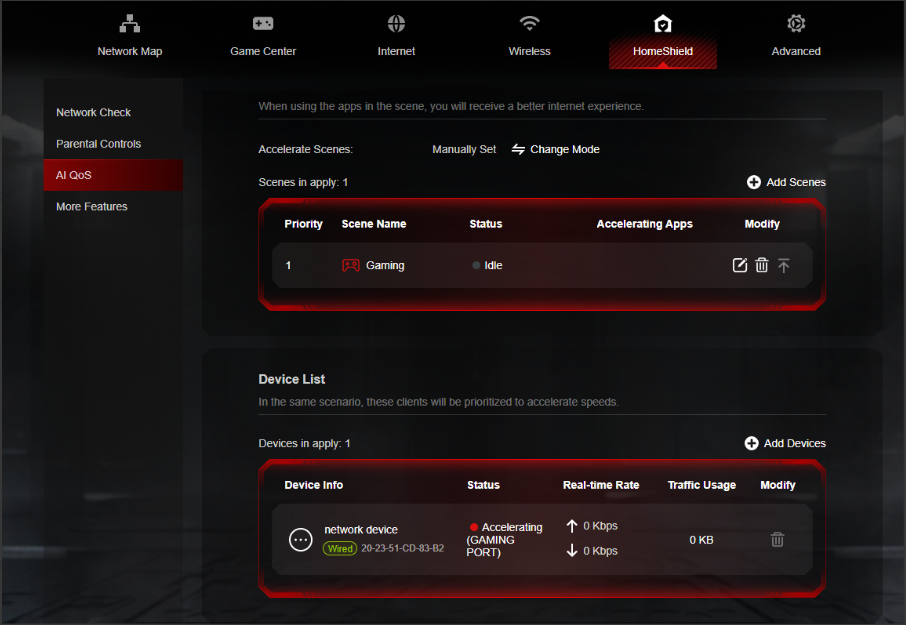
Intelligent Traffic Prioritization
Every application deserves the best performance. With AI QoS, traffic is prioritized intelligently, guaranteeing that all your applications run optimally. Whether you're gaming, streaming, or video conferencing, you can be confident that your experience will be top-notch.
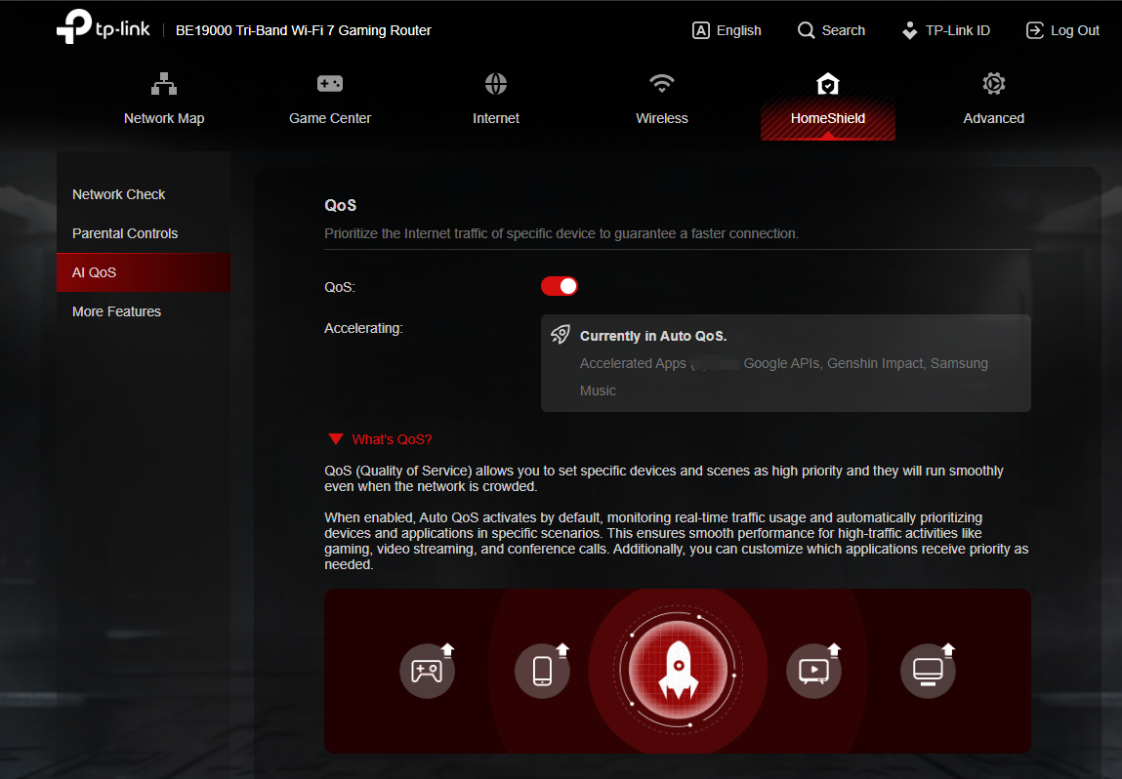
More New Features and Modifications:
This pre-release firmware includes all the new features and modifications mentioned in previous posts below:
Pre-release Firmware for Archer GE800/GE550/GE650v1 Supports EasyMesh in AP Mode, DoH&DoT, ECO Mode
Bug Fixes:
Fixed the issue where enabling Bandwidth Control for the Guest Network will take effect for all networks.
Firmware Download:
Before the Upgrade
(1) Please be sure you have read the Beta Test Agreement before upgrading the pre-release firmware!
(2) For the sake of insurance, it's always recommended to save a copy of the router's Backup Config file before upgrading or downgrading.
(3) This pre-release firmware for Archer GE800 V1 can be applied to all versions (EU/US/AU/CA/etc).
(4) You may follow the guide to upgrade the firmware of your router. How to Upgrade the Firmware on the TP-Link Wi-Fi Routers.
(5) The screenshots in this article are taken from the web GUI of Archer GE800 V1 for reference only.
(6) This version of software can be degraded to the previous official version.
Direct Firmware Download Link
| Archer GE800_V1 | Archer GE800(EU)_V1_1.3.2 Build 20251013 (Updated Pre-release firmware) |
Additional Information
As always, we value your feedback. If somehow you encounter an issue during or after the router firmware upgrade, please comment below with the following info. Your input helps us continue to improve and provide the best products and support.
- Provide a detailed network layout, including how the devices are connected, especially if there are EasyMesh satellite devices.
- Detailed issue description, and provide more information on the specific conditions that seem to trigger the problem.
Thank you for your continued support and for being part of our community.
Update Log
Oct 13th, 2025:
Updated to provide a new pre-release firmware based on the latest 1.3.1 official version.
Jul 4th, 2025:
Updated to provide a new pre-release firmware based on the latest 1.2.1 official version.
Jun 13th, 2025:
Release of the article.
Related Articles
Pre-release Firmware for Archer GE800/GE550/GE650v1 Supports EasyMesh in AP Mode, DoH&DoT, ECO Mode
- Copy Link
- Subscribe
- Bookmark
- Report Inappropriate Content
@Bauhaus I get where you’re coming from, and I fully agree that firmware optimization matters more than raw specs. No argument there. The GE800 clearly has the hardware advantage, but without stable and mature firmware it won’t show its full potential, and that’s exactly what everyone here has been pointing out for months.
But saying the Flint 3 is “better optimized” because it behaves nicer with SQM and QoS doesn’t automatically make it a stronger overall device. It just means its current firmware stack works better for your specific conditions. The GE800 still pushes far higher throughput, stronger radios and more features, but with the obvious drawback that the firmware is still not where it needs to be.
AI QoS and some gaming features definitely need fixing. Nobody denies that. But comparing a router that’s half the hardware and saying it “performs better in most scenarios” feels like a stretch. Bufferbloat tests, QoS behaviour and gaming latencies depend heavily on firmware tuning, not on whether the hardware is weak or strong.
I’m frustrated with the slow progress too, but I also know the GE800 has the headroom to improve once TP-Link actually tightens the firmware. If the Flint 3 is giving you a more stable experience right now, that’s great, but that doesn’t automatically put it in the same class or make the GE800 a bad product. It just shows the firmware team still has work to do, and hopefully they actually listen this time
- Copy Link
- Report Inappropriate Content
I mean, it performs better than the GE800. I am not sure if there is something else to say. I compare both of them regarding performance in real world.
The GE800 feels a beta version as it is. And I am talking about the fact at this instance.
We do not align regarding this matter so there no need for us to discuss it. We gave plenty of feedback on the forum during this summer, and few of us talked with engineers through email. Let's see what they end up doing before the end of the year.
- Copy Link
- Report Inappropriate Content

@Bauhaus @Bau
I hope the engineers at Ge800 TP-Link Router add all comments from us during all conversations below. We are all here to support, and we all do our best as clients from our side. We have given all that we've observed from the last firmware update.
- Copy Link
- Report Inappropriate Content
Bauhaus wrote
I finally received my GL.iNet Flint 3 Wi-Fi 7 router to compare, and with SQM and QoS enabled I’m getting an A+ bufferbloat score something I’ve never achieved before. I can’t get anywhere close to that with the GE800.
I’m also not experiencing ping spikes or unstable packet loss like I do with the GE800 when the Qos is activate. I tested both routers back-to-back to compare, but the GE800 still performs poorly, which is wild.
I’ve tried every available firmware for the GE800, but with no real success.
I honestly don’t understand how a router that costs twice as much performs worse. Clearly the firmware problem is not good enough after more than a year for such expensive device.
Thank you very much for sharing your comparison tests with our GE800 and GL.iNet Flint 3. And another BIG THANKS to @Vendex for sharing your knowledge on networks and network devices.
Regarding Bauhaus's comparison test results, I'm curious how you conducted the tests. Could you please kindly share more details with us?
Are you playing games and downloading large files (via qBittorrent or similar software) on the same computer/device simultaneously? Or are you playing games on device A while downloading large files on device B?
What are the SQM and QoS settings on the GL.iNet Flint 3? If possible, I hope you can also share some screenshots for reference.
- Copy Link
- Report Inappropriate Content
- Copy Link
- Report Inappropriate Content
Sulooo wrote
@Bauhaus @Bau
I hope the engineers at Ge800 TP-Link Router add all comments from us during all conversations below. We are all here to support, and we all do our best as clients from our side. We have given all that we've observed from the last firmware update.
Of course they do! We value your feedback!
Don't hesitate to share your opinion and feedback about your experience with our gaming router.
- Copy Link
- Report Inappropriate Content
@Kevin_Z Hello. This post has been unpinned. What has changed?
- Copy Link
- Report Inappropriate Content
ABC_ChoCo wrote
@Kevin_Z Hello. This post has been unpinned. What has changed?
@ABC_ChoCo No worries. Nothing has changed so far.
- Copy Link
- Report Inappropriate Content
Thank you for the response. I’m on vacation right now, but I’ll send pictures when I get back. 🙂
I play games mostly through GeForce Now and also download games via Steam (mostly play offline) and my wife usually transfer big files on server or adobe cloud for her work, also watch some streaming (neflix, appleTV etc.) When I download a game at the same time, my ping gets really high no matter which mode I choose on the GE800. Strangely, I actually get even higher ping when using Game Boost. (doesn't matter the firmware)
Regarding the Flint 3, I’m using the beta firmware that introduces QoS and SQM last month, and I’ve simply set my upload and download speeds.
Anyway, sorry I was a bit frustrated the other day. Nothing against you or the TP-Link team.
Thanks for your help.
- Copy Link
- Report Inappropriate Content
Thank you so much for getting back to me with your usage scenario while you're on vacation. We appreciate it!
I will definitely report it to the development team and ask them to run similar tests in a real network to evaluate our AI QoS and identify ways to improve it.
When you're back home, I hope you can do some comparison tests again and let us know how the Flint 3 and our GE800 perform in your game world.
- Copy Link
- Report Inappropriate Content
Information
Helpful: 7
Views: 95742
Replies: 521
Voters 7





