
Archer BE550 wifi 6 network not showing up

Archer BE550 wifi 6 network not showing up

Archer BE550 wifi 6 network not showing up
2025-06-21 00:15:53 - last edited 2025-07-08 09:55:20
Model: Archer BE550  
Hardware Version: V1
Firmware Version: 1.1.2 Build 20250317 rel.18331(4341)

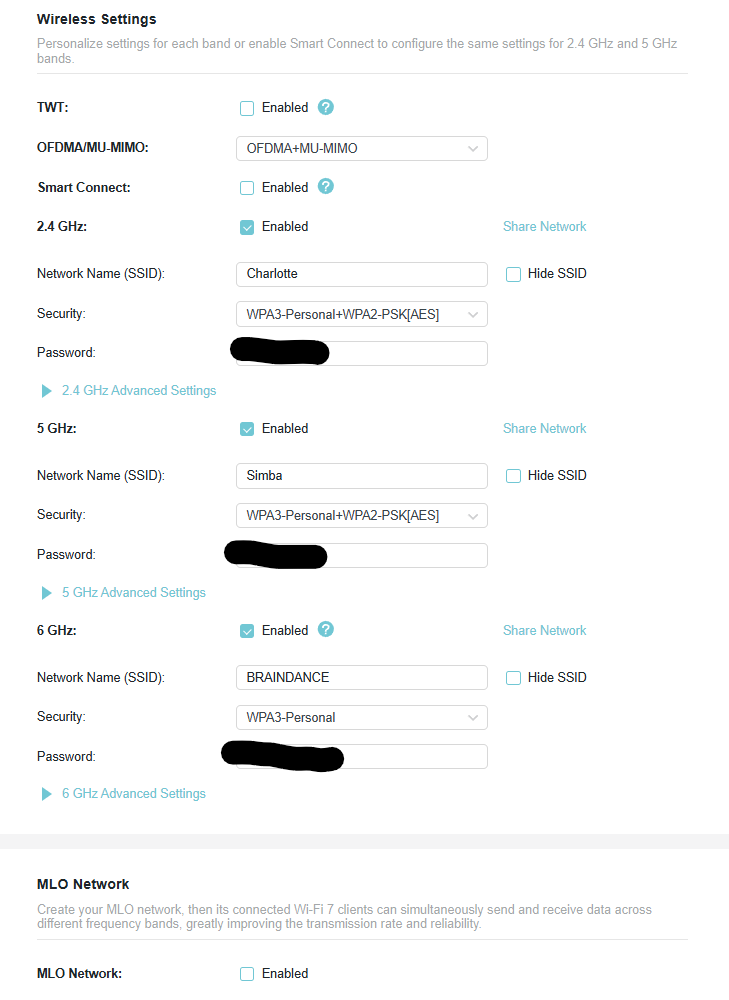
Hi, I am having an issue with my router, the wifi 6 network doesn't show up on my Quest 3, my phone samsung Z flip 5 and my computer (Wifi 6e capable). Sometimes it shows up, most times not.
I bought it 3 days ago, it set in AP mode, I tried to play the settings but nothing seems to work.


Here's my current settings page:
  0      
  0      
#1
Options
1 Accepted Solution
Re:Archer BE550 wifi 6 network not showing up-Solution
2025-06-23 10:30:20 - last edited 2025-07-08 09:55:20

Hi@Black0027,

Thank you for contacting our community.


Have you set up an EasyMesh network for your Archer BE550? What is the satellite unit? If the extender does not support 6 GHz, but the clients you mentioned are connected to it, it may not be able to scan 6 GHz.


Here are some other suggestions:

1. Ensure the 6 GHz network is enabled and not hidden. You can check this in the Tether App > More > Wi-Fi Settings.

2. Ensure your client device supports 6GHz Wi-Fi and that its drivers and system are all up to date.

3. Ensure that you are using the Router and client device in a country that allows Wi-Fi 6E/7 operation. If your Router and client device were not purchased from the same country, Wi-Fi 6E operation may not be available.

You could refer to this article for more detailed instructions: What if my device failed to detect the 6 GHz Wi-Fi Band

Nice to Meet You in Our TP-Link Community. Check Out the Latest Posts: △Pre-release Firmware for Archer AX50 Introduces New Parental Control Features and Enhancements △Introducing AI QoS: Elevate Your Gaming Experience on the Archer GE800 Gaming Router △Connect TP-Link Archer BE550 to Germany's DS-Lite (Dual Stack Lite) Internet via WAN △Tether KidShield Test Recruitment - Safeguarding Children's Online Experience If you found the post or response helpful, please click Helpful. If an answer solves your problem, click "Recommended Solution" so that others can benefit from it.
Recommended Solution
  0  
  0  
#2
Options
1 Reply
Re:Archer BE550 wifi 6 network not showing up-Solution
2025-06-23 10:30:20 - last edited 2025-07-08 09:55:20

Hi@Black0027,

Thank you for contacting our community.


Have you set up an EasyMesh network for your Archer BE550? What is the satellite unit? If the extender does not support 6 GHz, but the clients you mentioned are connected to it, it may not be able to scan 6 GHz.


Here are some other suggestions:

1. Ensure the 6 GHz network is enabled and not hidden. You can check this in the Tether App > More > Wi-Fi Settings.

2. Ensure your client device supports 6GHz Wi-Fi and that its drivers and system are all up to date.

3. Ensure that you are using the Router and client device in a country that allows Wi-Fi 6E/7 operation. If your Router and client device were not purchased from the same country, Wi-Fi 6E operation may not be available.

You could refer to this article for more detailed instructions: What if my device failed to detect the 6 GHz Wi-Fi Band

Nice to Meet You in Our TP-Link Community. Check Out the Latest Posts: △Pre-release Firmware for Archer AX50 Introduces New Parental Control Features and Enhancements △Introducing AI QoS: Elevate Your Gaming Experience on the Archer GE800 Gaming Router △Connect TP-Link Archer BE550 to Germany's DS-Lite (Dual Stack Lite) Internet via WAN △Tether KidShield Test Recruitment - Safeguarding Children's Online Experience If you found the post or response helpful, please click Helpful. If an answer solves your problem, click "Recommended Solution" so that others can benefit from it.
Recommended Solution
  0  
  0  
#2
Options

