
Solution EasyMesh Network Becomes Unstable on Archer AX58 After Updating Firmware to 1.5.2
Solution EasyMesh Network Becomes Unstable on Archer AX58 After Updating Firmware to 1.5.2


This Article Applied to:
Archer AX58(EU)_V1_1.5.2 Build 20250812
Phenomenon:
Some Archer AX58 users have recently reported that updating their Archer AX58(EU)_V1 to 1.5.2 causes their EasyMesh network to become unstable after 8-10 hours of operation. This requires powering off the Archer AX58 and restarting the router to restore the connection.
It was initially reported by DenisG in this thread.
Available Solution:
We want you to know that we understand the inconvenience this change may cause. However, our development team quickly identified the cause and provided a beta firmware. This beta firmware has been verified to address this exception. We recommend downloading and testing it:
| Model | Direct Download Link |
| Archer AX58(EU)_V1 | Archer AX58(EU)_V1_1.5.2 Build20250922(Beta Firmware) |
Note:
- Please be sure you have read the Beta Test Agreement before upgrading the beta firmware!
- For the sake of insurance, it's always recommended to save a copy of the router's Backup Config file before upgrading or downgrading.
- You may follow the guide to upgrade the firmware of your router. How to Upgrade the Firmware on the TP-Link Wi-Fi Routers.
Please don't hesitate to reply with your experience with the Archer AX58 beta firmware.
If you have any additional feedback on the Archer AX58, please leave a reply here. This includes, but is not limited to:
- Complete network topology (with the extender model)
- Specific operational status, etc.
Thank you for your patience and cooperation.
- Copy Link
- Subscribe
- Bookmark
- Report Inappropriate Content
Hello @Martelus ,
Thanks for getting back to us.
So, the network topology now is as below, right?
Main router AX53──switch──Satellite AX58
└───Satellite AX58
What is the Connection status for each AX58 on the EasyMesh Devices list?
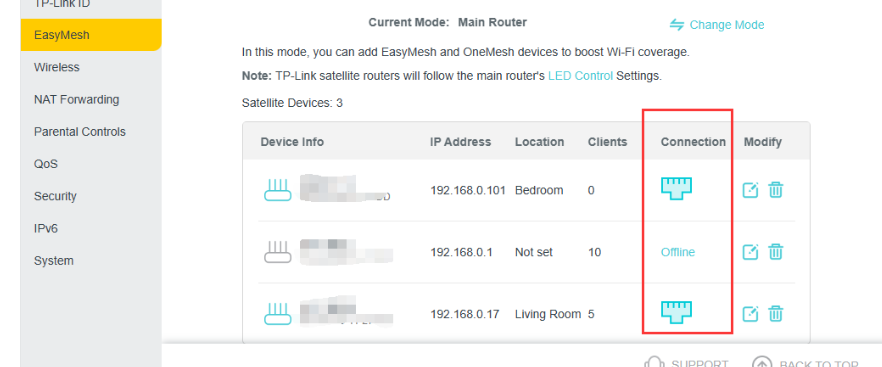
- Copy Link
- Report Inappropriate Content

@Joseph-TP
Hello, yes this the topology of my setup right now.
But it was working for a few day and just hour ago the same AX58 froze again but all the led will still remain green on it and i have to restart it manually.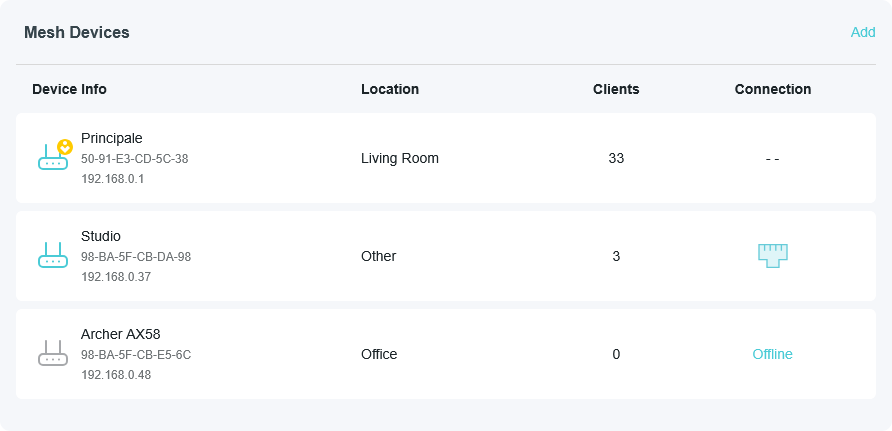
But before that it was like that
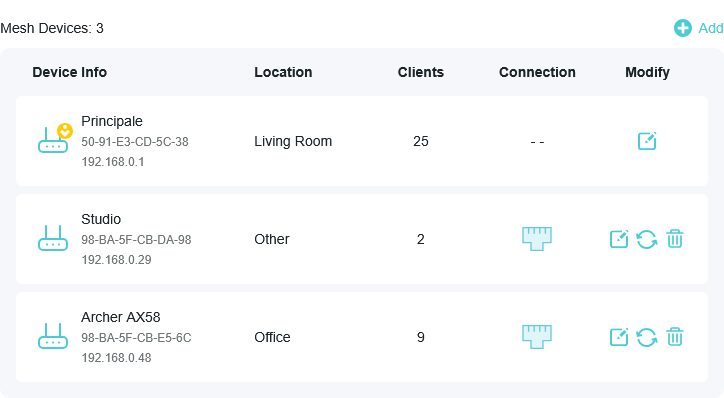
Idk what is going on with that ax58 and i get go back to a old firmware like the 1.4.3 i got a error message.
EDIT :
To complet my message here the log of the faulty AX58 when it crash :
2026-02-05 18:49:12 Led Controller INFO [1308] Start to run LAN_ON
2026-02-05 18:49:04 Time Settings INFO [3616] Service restart
2026-02-05 18:49:01 DHCPC INFO [768] receive ack from server with ip 192.168.0.48, options(serverid=192.168.0.1;lease=7200;subnet=255.255.255.0;dns=192.168.0.1;router=192.168.0.1;)
2026-02-05 18:49:01 DHCPC INFO [768] send select request with options(cliid=01/98:ba:5f:cb:e5:6c:;)
2026-02-05 18:49:01 DHCPC INFO [768] 1/2 lease passed, enter renewing state
2026-02-05 18:48:50 UPnP INFO [1397] Service stop
- Copy Link
- Report Inappropriate Content
Hello @Martelus ,
If the problem consistently occurs with the same Archer AX58 satellite unit, it is recommended that you replace it.
You can contact Local Technical Support for further help.
- Copy Link
- Report Inappropriate Content

@Joseph-TP I had the same issue : newly installed archer AX58 with technicolor cable modem as bridge. the connection kept dropping every 5-8 hours due to archer freezing. I used Gemini to troubleshoot the network installation and finally landed here. the beta firmware has sorted out the issue.
Problem : this means I cannot go into latest firware at the moment and had to disconnect the autoupdate feature.
Is the bug-correction supposed to enter main firmware channel soon ? it's march 1st 2026, 6 months after the beta and bug-correction release.
J.
- Copy Link
- Report Inappropriate Content
Hello @wismer ,
Thanks for contacting our community.
Glad to hear the beta firmware can fix what you have encountered.
Regarding the new official firmware, we have not received any update notifications yet. You can enable automatic updates or keep an eye on firmware releases on the official website.
Best Regards.
- Copy Link
- Report Inappropriate Content
Information
Helpful: 1
Views: 1736
Replies: 15
Voters 0
No one has voted for it yet.