
TPLINK AX50 1.1.1 Build 20250917 rel.63889(4555)
 This thread has been locked for further replies. You can start a new thread to share your ideas or ask questions.
Hi,
With the 1.1.1 Build 20250917 rel.63889(4555) firmware update for the Archer AX50, the 160 MHz option on the 5 GHz band disappears. Also, the bundled OpenVPN settings are dated and should be brought up to current best practices.
Remove/replace:
-
cipher AES-128-CBC → switch to AEAD (AES-GCM).
-
comp-lzo adaptive → compression is obsolete; remove it.
-
float → not needed in most setups.
-
remote-cert-tls server → replace with stricter name verification.
Add/update:
-
data-ciphers AES-256-GCM:AES-128-GCM
-
data-ciphers-fallback AES-128-CBC (optional legacy fallback)
-
auth SHA256
-
verify-x509-name server name
-
Explicit remote <server_address> <port>
-
verb 3 (reasonable logging)
Personal opinion:
It would also be a good idea for TP-Link to include OneMesh support in the Archer AX50, especially considering that lower-end models like the AX10 or AX20 already have it. This would make the AX50 lineup more consistent and appealing for users who want seamless mesh integration without downgrading to less powerful hardware.
Thanks
- Copy Link
- Subscribe
- Bookmark
- Report Inappropriate Content
Also, you previously sent me the firmware, and I was able to roll back to version 1.0.14 successfully.
- Copy Link
- Report Inappropriate Content
Hi @Alohomora,
I see you were able to roll back to 1.0.14, that’s great.
Just wanted to mention that this version is affected by CVE-2025-40634 — a DNS response overflow vulnerability that can be exploited remotely.
Through this flaw, an attacker could modify DNS responses, redirect traffic (phishing), or perform man-in-the-middle attacks.
If you’d like to read the technical details and see the exploit, you can check:
https://github.com/hacefresko/CVE-2025-40634
I upgraded to 1.0.16, since it apparently fixes the issue and has been stable in my case.
I also mentioned it here:
https://community.tp-link.com/mx/home/forum/topic/824772
Just sharing this so you can make an informed decision.
- Copy Link
- Report Inappropriate Content


Hello @Alohomora ,
Thanks for your update. Is everything working now?
- Copy Link
- Report Inappropriate Content
Thanks for contacting our community.
May I know if your network topology diagram is as follows:
ISP modem—router )))((( client devices
(Note: — stands for wired connection,)))((( stands for wireless connection )
Please tell me who your ISP is? What is the model of the ISP modem( or ONT)? What is the type of internet connection on your router: PPPoE or dynamic IP?
We generally do not recommend downgrading the firmware directly after an update.
@SauSje, before the firmware update, did the router also have a wired speed of 1 Gbps? Have you tried different cables for comparison? Please also compare different wired clients.
@Zeromy, could you provide more details about your router and why you want to downgrade the firmware?
- Copy Link
- Report Inappropriate Content

I've got technically only 1 device for the cable connection, this is however a 2.5gigabit switch. So in theory there's about 7 devices with cable connected in my network and about 30+ wireless clients.
My ISP is Ziggo (Dutch Liberty Global), on a 1.1gigabit connection. Using the Ubee UBC1318ZG modem, on dynamic IP.
Everything is CAT8 cables and 2.5gigabit connections (besides the modem and router itself).
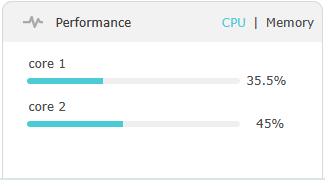
Like I said in my other post, it used to run 1gigabit flawlessly. I reckon the new firmware is using more CPU as I can see one of my cores on the router being fully used when I stress the connection. So whatever you guys did with the algorithm for the new parental controls (idk if you put some low level ai on it or so) is taking up too much CPU cycles, maybe the package analyzer. At least that's how it looks like. (I've got no parental controls enabled btw)
This is idle:
This is when I'm speed testing
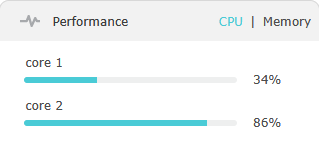
As it shows, one of the cores is almost maxed out during the speedtest. Since this only updates every 10(?) seconds, it's not realtime obviously but it's clear there's an issue with load on the CPU.
I've tried multiple setups, but the 2 most important onces are quite powerful hardware (5800x3D/RTX3080, 2700x/RTX2080) with 2.5gigabit ports, both show the same issue.
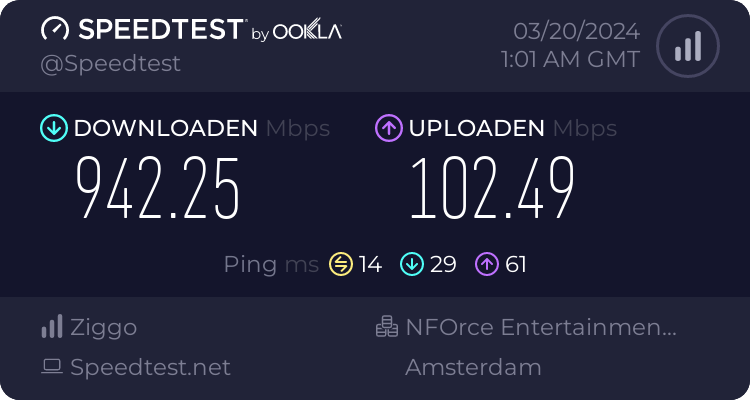
This is the speed that I used to get (this is March this year):
And this is what I currently get, with the exact same setup:
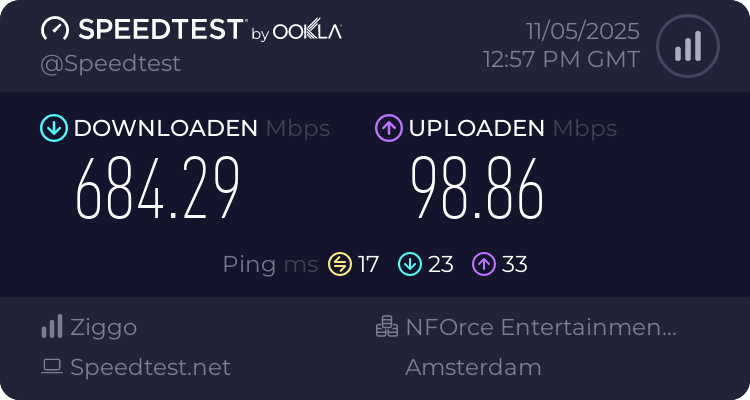
I've confirmed that with the router out of the network, the connection speed is as shown here:
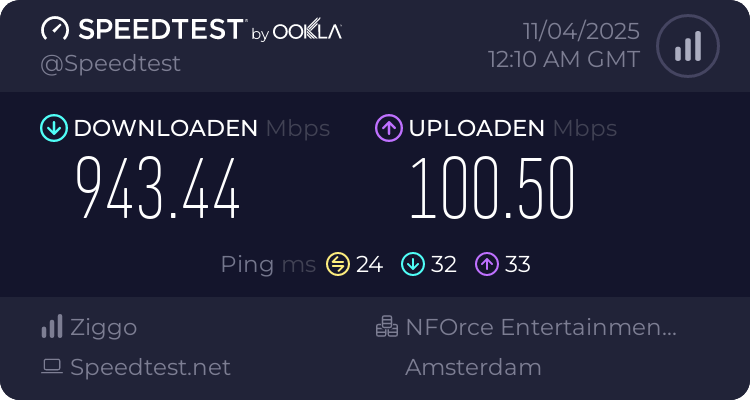
- Copy Link
- Report Inappropriate Content
Hello @SauSje ,
Thanks for your detailed reply.
What clients do you have? Please tell me the models and operating systems of these clients (including the switch).
We would like to escalate your case to the support engineers, and they will follow up on it. If you are willing to conduct further analysis, please check your inbox and respond.
- Copy Link
- Report Inappropriate Content
Information
Helpful: 2
Views: 7181
Replies: 46
Voters 1
