Network Becomes Unstable on Archer AX12 After Updating Firmware to 1.2.1

Network Becomes Unstable on Archer AX12 After Updating Firmware to 1.2.1

Network Becomes Unstable on Archer AX12 After Updating Firmware to 1.2.1
2025-10-21 02:32:14 - last edited 2025-11-27 03:25:18
Model: Archer AX12  
Hardware Version: V1
Firmware Version: 1.2.1 Build 20250729 Rel. 73566

This Article Applied to: 

Archer AX12(EU)_V1_ 1.2.1 Build 20250729


Phenomenon:

Some of our users have reported unstable connectivity after updating their routers Archer AX12(EU)_V1 to 1.2.1. This includes:

1. The WAN is frequently disconnected and usually reconnects automatically after a few minutes.

2. Random disconnections on one of the wireless bands, etc.


Our user Zeragon first reported it in this thread.
 

Available Solution:

After testing, our relevant department has identified the cause and quickly provided a beta firmware. Several users have verified this beta firmware to resolve the unexpected behaviors.
Please download and manually update the beta firmware if you experience any of the unexpected behaviors mentioned above.

Model Direct Download Link
Archer AX12(EU)_V1 Archer AX12(EU)_V1_1.2.2 Build 20250904(Beta Firmware) 


Note: 


If your Archer AX12 experiences other unusual behavior after updating to 1.2.1, please feel free to submit your information here. This includes but is not limited to:

1. Complete network topology;
2. Specific exception details;
3. When the problem started, etc.


Thank you for your feedback and cooperation.

 

Welcome to Community! Get the latest posts: △New Firmware for Archer GE550/GE650 V1 Introduces AI-QoS, EasyMesh IoT Expansion, and More! △New Firmware Releases for Archer BE805 V1/BE450 V1 to Support VPN Merge, New ECO Mode, and More! More posts, please see: △ Get the Ongoing Pre-release Firmware for Wi-Fi Routers Here— Subscribe for Updates! Urgent problems with your Wi-Fi Router, Range Extender, or DSL Modem? Please reach out via private Messages or @Joesph-TP in your new thread directly. Click Or ☆Recommended Solution if the post/answer helps.
6
6
#1
7 Reply
Re:Network Becomes Unstable on Archer AX12 After Updating Firmware to 1.2.1
2026-03-25 15:19:08

  @Joseph-TP Please provide firmware which support eassymesh via Ethernet on AX12

2
2
#2
Re:Network Becomes Unstable on Archer AX12 After Updating Firmware to 1.2.1
Thursday - last edited Thursday

  @Joseph-TP 

Hi!

After upgrading to V1_1.2.1 on my AX12 i've experienced a speed drop down to 22 mbps on a 250 mbps broadband. This is observed only on WiFi, both 2.4g and 5g. Ethernet connection seems to be working fine. QoS is off, ipv6 is off, easymesh is off. Using beta 1.2.2 didn't help.

Regards

0
0
#3
Re:Network Becomes Unstable on Archer AX12 After Updating Firmware to 1.2.1
Yesterday

Hello @silfa ,

Thanks for contacting our community.


Would you mind taking a hard reset for the Archer AX12 and reconfigure it?


Here are some tips to improve your router's wireless speed:
1) Change WiFi channels: Log into the web interface of the router (http://tplinkwifi.net), go to Advanced > Wireless > Wireless Settings. Try different 5GHz Wi-Fi channels to find the best one for your environment, as interference patterns may have changed.
2) Adjust channel width: For 5GHz wireless devices, set the 5GHz channel width to 80MHz or 40MHz to avoid interference. For 2.4GHz devices, set the 2.4GHz channel width to 20MHz.
3) Disable UPNP and SIP ALG: Go to Advanced > NAT Forwarding > UPNP to disable UPNP, then go to Advanced > Security to disable SIP ALG. These features may affect Wi-Fi performance and speedtest results.
4) Try different speedtest servers: Speedtest by Ookla allows you to select different servers • try other servers as some may provide better results.
5) Verify Parental Controls: Open the Tether app and go to Parental Control to ensure no parental control profiles are configured that might be limiting speeds.
6) Check router placement: Make sure the router is properly placed in an open area instead of inside a cabinet or shelf.

Welcome to Community! Get the latest posts: △New Firmware for Archer GE550/GE650 V1 Introduces AI-QoS, EasyMesh IoT Expansion, and More! △New Firmware Releases for Archer BE805 V1/BE450 V1 to Support VPN Merge, New ECO Mode, and More! More posts, please see: △ Get the Ongoing Pre-release Firmware for Wi-Fi Routers Here— Subscribe for Updates! Urgent problems with your Wi-Fi Router, Range Extender, or DSL Modem? Please reach out via private Messages or @Joesph-TP in your new thread directly. Click Or ☆Recommended Solution if the post/answer helps.
0
0
#4
Re:Network Becomes Unstable on Archer AX12 After Updating Firmware to 1.2.1
23 hours ago

Hello @Joseph-TP ,

I've tried 1-6 and nothing helped. However I decided to make one more hard reset but this time I didn't upload my backup config. I reconfigured router from scratch and that worked! Router can fully saturate my bandwidth now.

No idea what is wrong with my old config file since I have literally the same settings now. I have made it on 1.2.1 and pushed it in to 1.2.2 beta.


Thanks for the help and let me know if you want to inspect the config file.


Regards,

Fedor

0
0
#5
Re:Network Becomes Unstable on Archer AX12 After Updating Firmware to 1.2.1
12 hours ago

Hello @silfa ,


If everything is currently stable, I recommend that you continue monitoring the situation for a while longer. Please feel free to share any updates at any time.

Welcome to Community! Get the latest posts: △New Firmware for Archer GE550/GE650 V1 Introduces AI-QoS, EasyMesh IoT Expansion, and More! △New Firmware Releases for Archer BE805 V1/BE450 V1 to Support VPN Merge, New ECO Mode, and More! More posts, please see: △ Get the Ongoing Pre-release Firmware for Wi-Fi Routers Here— Subscribe for Updates! Urgent problems with your Wi-Fi Router, Range Extender, or DSL Modem? Please reach out via private Messages or @Joesph-TP in your new thread directly. Click Or ☆Recommended Solution if the post/answer helps.
0
0
#6
Re:Network Becomes Unstable on Archer AX12 After Updating Firmware to 1.2.1
10 hours ago

  @Joseph-TP 

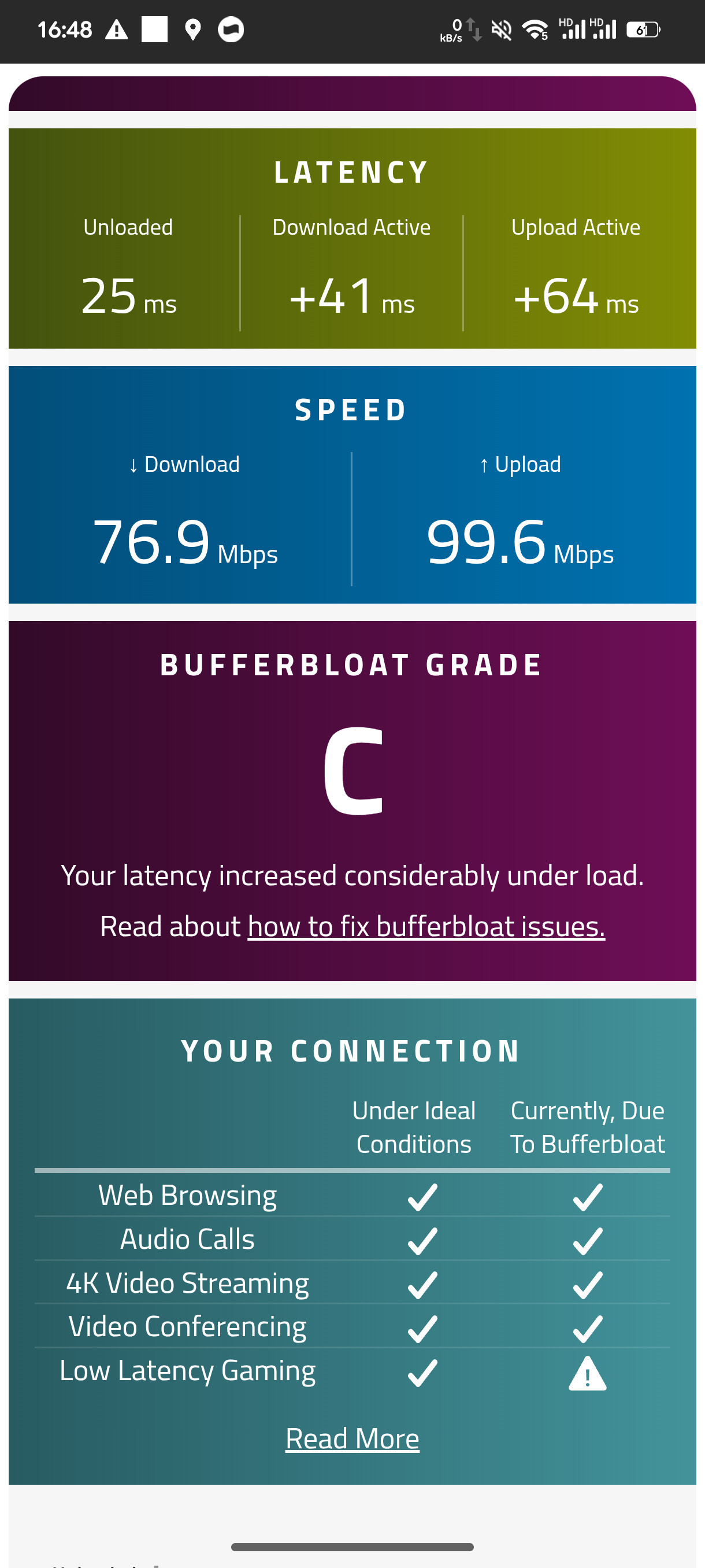
Are you gonna fix this bufferbloat issue on AX-12? Even QoS didn't help a lot also, The firmware requires optimization as significant bufferbloat issues persist even over a LAN Ethernet connection. A firmware update is needed to address the queue management and stabilize latency under high load.


1
1
#7
Re:Network Becomes Unstable on Archer AX12 After Updating Firmware to 1.2.1
9 hours ago

Hi @Skye-Kyou ,


We believe that the issue you are experiencing may be strongly linked to your specific usage scenario. As you can see, other users—such as silfa—have found the anomaly to be resolvable after applying version 1.2.2 beta.
We will continue to follow up on your case in your other post; see here.


Welcome to Community! Get the latest posts: △New Firmware for Archer GE550/GE650 V1 Introduces AI-QoS, EasyMesh IoT Expansion, and More! △New Firmware Releases for Archer BE805 V1/BE450 V1 to Support VPN Merge, New ECO Mode, and More! More posts, please see: △ Get the Ongoing Pre-release Firmware for Wi-Fi Routers Here— Subscribe for Updates! Urgent problems with your Wi-Fi Router, Range Extender, or DSL Modem? Please reach out via private Messages or @Joesph-TP in your new thread directly. Click Or ☆Recommended Solution if the post/answer helps.
0
0
#8