
Solution Resolving Limited Accessibility to Google Services on Specific ISP Networks (Starlink/Launtel)


This Article Applies to:
Deco BE65/BE63/BE11000(EU/US/AU/CA/UK)_V2.0/2.6
Deco BE25(US/EU)_V1.0/V1.6
Deco BE65 Pro(EU/US/AU/CA)_V1.0/V1.6
Deco BE65(EU/US/AU/CA)_V1.0/V1.6
Phenomenon Description:
Recently, there was some feedback that users are experiencing frequent difficulties connecting to Google services(such as Google Calendar, Gmail, YouTube, etc) while using Deco mesh systems on the following ISP networks: Starlink (Global), ISOMEDIA (US), Fastel (US), and Launtel (AU).
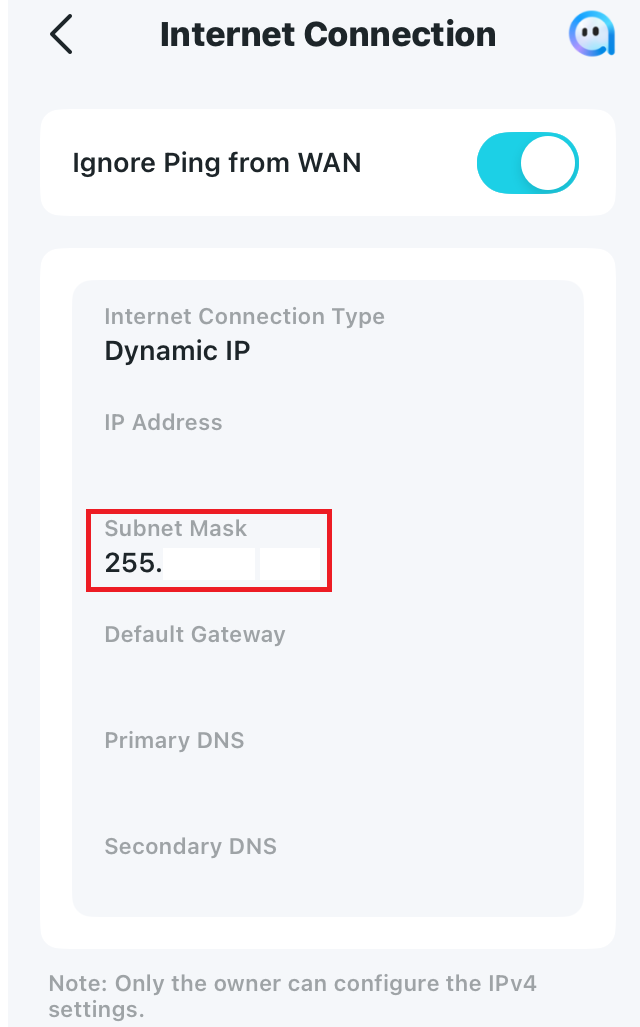
After further troubleshooting, we found that in most cases, the IPV4 WAN subnet mask is often lower than /16, such as 255.192.0.0(/10), 255.0.0.0(/8), or 252.0.0.0(/6), which probably caused the connection issue with Google services.
Available Solutions:
-
Official firmware versions are planned to be released soon to fix this issue.
-
Currently, it is recommended to install the following beta versions as a workaround:
| Deco BE65 Pro_V1.0/1.6 | 1.2.10_build_20251212_Early Access |
| Deco BE65/BE63/BE11000_V2.0/2.6 | 1.2.10_build_20251229_Official |
| Deco BE25_V1.0/V1.6 | 1.1.0_build_20250912_Beta |
| Deco BE65_V1.0/V1.6 | 1.1.1_build_20251209_Beta |
Update Notice:
Please be sure you have read the Beta Test Agreement before upgrading the Pre-release firmware!
How to manually update the firmware via web UI.
-
If you also experienced a similar issue on other Deco models, please comment below with the following details:
- Deco model and current firmware version
- The Internet service provider and IPV4 WAN Subnet mask on the Deco App>More>Internet Connection>IPV4 Subnet Mask
- The web resources that can't be accessed.
- Copy Link
- Subscribe
- Bookmark
- Report Inappropriate Content
Hi, thank you very much for the feedback.
I'll forward your case to the senior engineer to see if they can help further.
By the way, can I have more details about the issue you're having with the Google service? What are the Google services that you can't access?
Since your WAN Subnet mask is /23, it is not supposed to have the reported issue in this post(lower than /16).
Wait for your reply.
Best regards.
- Copy Link
- Report Inappropriate Content

- Copy Link
- Report Inappropriate Content

Hi David.
The problems were strange. My phone or tablet would hang for upto a minute or so when accessing the play store or when I used the google search engine, buy not every time. It never happened before 1.2 and it didn't happen with the beta. All other connections continued without interruptions as far as I could tell.
Thanks,
- Copy Link
- Report Inappropriate Content

I have Deco X50 system in UK Having several Apps including important google elements not working. I almost accosted I lost all 10 yes of google timeline during a switch to a new phone! If i use mobile data everything works, but via wifi on X50 several things don't work. Google, some Microsoft things, a Vitality health app. Maybe more.
This is really so bad I may need to return the system. I paid £170 for a system that I can't use and need to accept a beta version to maybe fix. I work from home so can't risk poor Internet and I don't have even more time to mess around.
Please fix this ASAP.
Many thanks
- Copy Link
- Report Inappropriate Content
I am in UK ISP is EE full fibre
Deco X50 3 modules (2 connect to EE router via LAN)
My EE router has wifi off both Hz
Both router and Deco set to WiFi router mode
Firmware 1.7.1 build 25080612 Rel. 70421
Services affected on wifi, but not via mobile data
Google maps timeline backup simply doesn't work
Google find hub
Vitality health app
Microsoft but can't remember what app
I spent 2 days manually setting up a new phone and loading apps and I encountered quite a few glitches but those are the ones I am certain of.
Cheers
- Copy Link
- Report Inappropriate Content

- Copy Link
- Report Inappropriate Content
Hi, thank you very much for the feedback.
How about the WAN Subnet mask under Deco App>More>Internet Connection>IPV4?
It is also suggested to install the latest 1.8.0 firmware here for Deco X50_v1 to see whether it helps:
Deco X50_V1_1.8.0 Significantly Expanded the Client Connection Details and Added Channel Selection
Wait for your reply.
Best regards.
- Copy Link
- Report Inappropriate Content
Sorry, I am not installing a beta when I rely on it for work.
I have DNS set to Google's. And I've tried lots of setting tweaks already. Nothing makes ma difference. I have spent too long already trying to fix it.
Gemini suggests it something to do with suspicious looking packets from the Google maps backup feature.
I can return the deco within 30 days, so you have about 7 days left to fix this.
Many thanks
- Copy Link
- Report Inappropriate Content
Hi, thanks for the update.
Have you tried to set Deco X50 into Access Point mode on the Deco App>More>Advanced>Operation mode, instead of the default "Wireless router" mode?
"Deco X50 3 modules (2 connect to EE router via LAN)
My EE router has wifi off both Hz
Both router and Deco set to WiFi router mode"
-Usually, in "Wireless router mode", only one Deco can be connected to the front ISP modem/modem router via a LAN cable.
Let's suppose the beta firmware resolved the currently reported issue; 7 days is still very tight to go through the standard official firmware release process.
If you don't prefer using the beta firmware, it is also recommended to reach out to the local technical support for further assistance:
https://www.tp-link.com/uk/support/contact-technical-support/#Hotline-Support
Thank you very much.
Best regards.
- Copy Link
- Report Inappropriate Content

Posted to another thread, but this has resolved the issues I was having on BE63 v2 with WAN drops randomly throughout the day.
One testing note, after upgrading the firmware I noticed in the router logs that the DNS was not using the maually set value I had set in the Deco app. It was using the default from my Xfinity modem. I swapped the value to auto then back to manual and re-entered the dns values and it switched over.
- Copy Link
- Report Inappropriate Content
Information
Helpful: 3
Views: 9474
Replies: 38
Voters 1
