
Tapo C220 not sending ONVIF events.

Similar to this other thread - https://community.tp-link.com/en/smart-home/forum/topic/782952 - I am unable to see ONVIF events with my DVR software (Agent DVR, latest version). In the logs of that app, I see no events when motion occurs
I see no hardware version anywhere on the camera nor packaging. It is newly purchased. I am in the Netherlands
Here is a google drive share of the diagnostic logs (which should contain many motion detections). Also are a couple screengrabs of the AgentDVR connection configurations. Both methods show connected live video but never receive ONVIF events (debug logging enabled within Agent DVR)
Agent DVR project - https://www.ispyconnect.com/download
It is running within a docker container
- Copy Link
- Subscribe
- Bookmark
- Report Inappropriate Content


Hi,
Please confirm the following information about the reported phenomenon.
1. On the Tapo app > camera's Device Settings > Device Info page, you can find the camera's hardware version.
2. On the camera's Device Settings > Detection page, what detection types have you enabled? Can you receive detection notifications in the Tapo app or on your phone?
3. Can you stream the camera's live feed properly on the Agent DVR via ONVIF?
I did not see a Google Drive link in the thread. You may send it to me (@Solla-topee) via a private message.
Best Regards
- Copy Link
- Report Inappropriate Content
Hi,
Please confirm the following information about the reported phenomenon.
1. On the Tapo app > camera's Device Settings > Device Info page, you can find the camera's hardware version.
2. On the camera's Device Settings > Detection page, what detection types have you enabled? Can you receive detection notifications in the Tapo app or on your phone?
3. Can you stream the camera's live feed properly on the Agent DVR via ONVIF?
I did not see a Google Drive link in the thread. You may send it to me (@Solla-topee) via a private message.
Best Regards
- Copy Link
- Report Inappropriate Content
@trousered
Sorry, i see that i did not include the Google Drive link. It now contains a screenshot of the device page. Hardware version is 2.0
https://drive.google.com/drive/folders/1gJYiXzB0gO6MJLA0MfVJHtb5h7KpbumY?usp=sharing
Detection type enabled was only 'motion detection'
Yes, i have no problem viewing live video. You can see the two different profiles and connection urls i used in the google drive assets
- Copy Link
- Report Inappropriate Content
Hi,
Thank you for providing the information. The phenomenon you reported involves not only the Tapo camera but also third-party software Agent DVR. I'll escalate your case to our technical support team, and they will contact you via email to assist you further. I also suggest you contact the technical support team of the Agent DVR for assistance.
Best Regards
- Copy Link
- Report Inappropriate Content

- Copy Link
- Report Inappropriate Content
Hi,
What phenomenon are you experiencing when using the Agent DVR? If you experience the same phenomenon as @trousered, please send us your camera's version info and confirm the information in this post.
Best Regards
- Copy Link
- Report Inappropriate Content
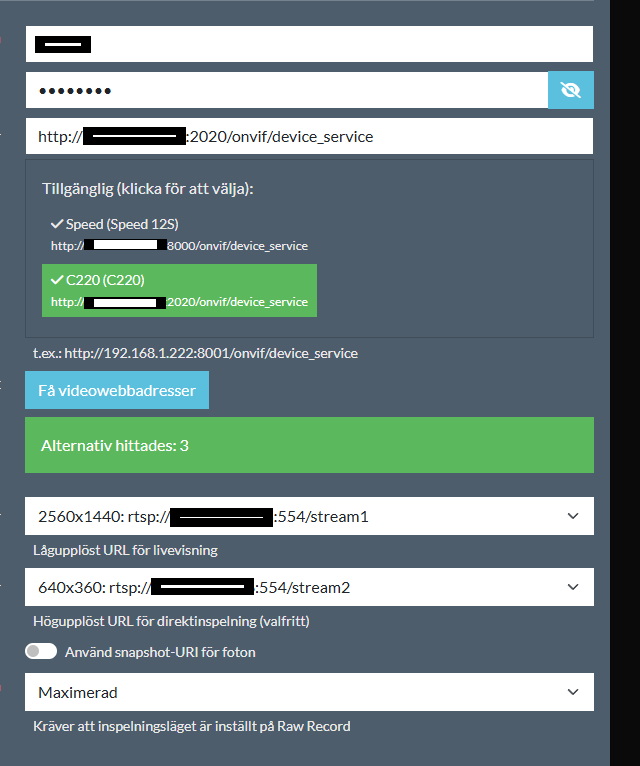
Hi! I bought the camera yesterday so haven't had any issues yet. I posted a tips that works for me with onvif. But im a bit concerned about if i should update firmware or not.I now have 25 fps and it works, i don't want to lose that. What do you say?
C220 2.0
FW:1.02
- Copy Link
- Report Inappropriate Content
Hi,
It's no problem to keep the current firmware if the camera is working fine for you right now.
Best Regards
- Copy Link
- Report Inappropriate Content
Information
Helpful: 0
Views: 670
Replies: 7
Voters 0
No one has voted for it yet.