
D230S1 and H200 Hub goes offline
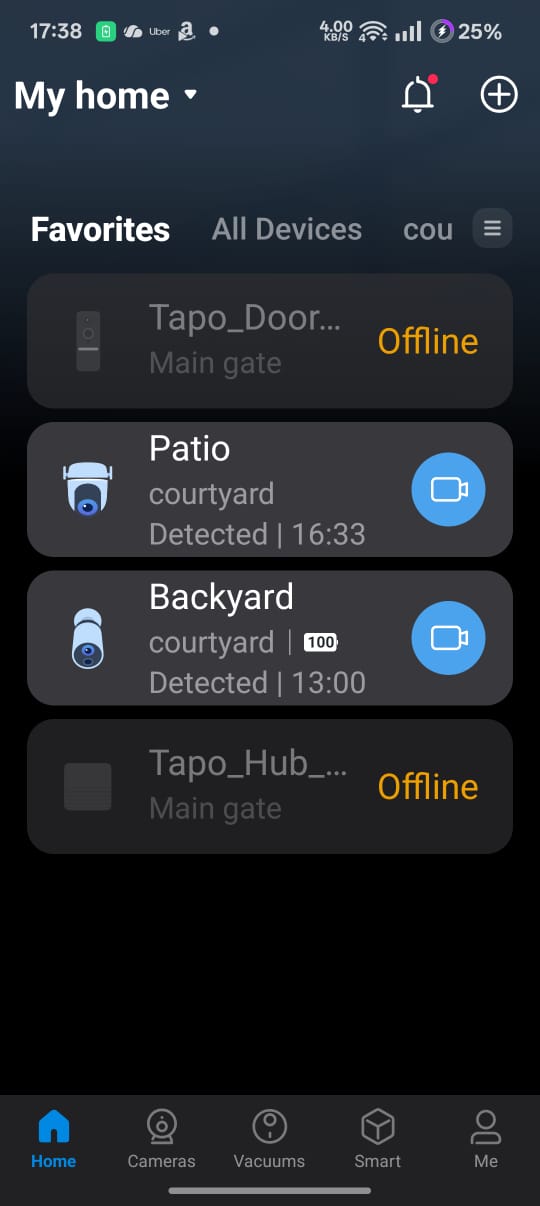
The Tapo app shows my D230S1 and H200 Hub offline. So I removed it from the app and added again, it has worked and showed up both devices for 15 minutes and again went offline.
Although both devices are offline , when I press the doorbell the chime is ringing in the hub, it is communicating. What is the solution?. Isn't it look like a software glitch?
- Copy Link
- Subscribe
- Bookmark
- Report Inappropriate Content
What is the LED status on the doorbell and the hub? If it is solid amber, that means the smart device is disconnected from the cloud server, indicating remote control failure. If you're in this case, refer to Case 2 suggestions in this article for troubleshooting. Cannot use the Tapo app to control my smart devices
Do not enable VPN while using the Tapo app. Keep the app updated, you can try to delete and reinstall the app, see if that helps.
- Copy Link
- Report Inappropriate Content
What is the LED status on the doorbell and the hub? If it is solid amber, that means the smart device is disconnected from the cloud server, indicating remote control failure. If you're in this case, refer to Case 2 suggestions in this article for troubleshooting. Cannot use the Tapo app to control my smart devices
Do not enable VPN while using the Tapo app. Keep the app updated, you can try to delete and reinstall the app, see if that helps.
- Copy Link
- Report Inappropriate Content
@ManeeshKumar I get the same issue too with my d230s1 connected to my H200, it is super annoying. I usually have to unplug and plug back in my H200 in order to get it working again. It is really not ideal some hopefully the Tapo/TP-Link team can sort something out.
I have my H200 running wirelessly, but I have only just changed it to being wired, so maybe that will help..... I'm not sure. Either way, I have tried everything the support team has requested so far, and nothing seems to fix it, sadly. Heres hoping changing it to wired fixes the issue.
- Copy Link
- Report Inappropriate Content
Information
Helpful: 1
Views: 207
Replies: 2


