
Solution What Can I Do If QoS Enabled Causes BufferBloat and High Latency on My Router After Firmware Update?


This Article Applied to:
Archer BE230_V1/V1.20
Archer BE230_V2
Archer GE550_V1
Archer GE400_V1
Archer GE230_V1
Archer GXE75_V1
Archer AX53_V1
Archer AX55_V1
Archer AX55 Pro _V1
Archer AX72_V1
Archer AX72 Pro_V1
Phenomenon:
Some users have reported performance degradation in their routers after enabling QoS following a firmware update.
Specifically, Bufferbloat test scores for both wireless and wired clients have significantly decreased (e.g., from A/B to F). Serbian_Fantom mentioned this unexpected behavior here.
Additionally, a noticeable increase in upload latency may occur, resulting in higher latency and jitter when the network is under heavy load.
Disabling QoS can resolve the performance degradation described above.
We have identified the cause of these unexpected behaviors. Please take a look at the following feasible solutions.
Available Solutions:
Solution 1:
Our development team has provided the following beta firmware to address this unexpected behavior for the models that have already been reported. Please install the beta firmware for your router if you encounter this anomaly.
| Model | Direct Download Links |
| Archer BE230_V1/V1.20 | Archer BE230_V1/1.20_1.2.1 Build 20250821(Beta Firmware) |
| Archer BE230_V2 | Archer BE230_V2_1.1.3 Build 20260127 (Beta Firmware) |
| Archer AX55_V1 | Archer AX55_V1_1.5.11 Build 20260205(Beta Firmware) |
| Archer AX55 Pro_V1 | Archer AX55 Pro_V1_1.4.3 Build 20251202(Beta Firmware) |
| Archer AX72_V1 | Archer AX72_V1_1.4.1 Build 20250918(Beta Firmware) |
| Archer AX72 Pro_V1 | Archer AX72 Pro_V1_1.4.1 Build 20250918(Beta Firmware) |
| Archer GXE75_V1 | Archer GXE75_V1_1.1.1 Build 20251024(Beta Firmware) |
| Archer AX53_V1 | Archer AX53_V1_1.5.4 Build 20251230(Beta Firmware) |
| Archer GE550_V1 | Archer GE550_V1_1.3.0 Build 20260328(Beta Firmware) |
| Archer GE400_V1 | Archer GE400_V1_1.1.2 Build 20260422(Beta Firmware) |
| Archer GE230_V1 | Archer GE230_V1_1.2.1 Build 20260428(Beta Firmware) |
Note:
- Please be sure you have read the Beta Test Agreement before upgrading the beta firmware!
- For the sake of insurance, it's always recommended to save a copy of the router's Backup Config file before upgrading or downgrading.
- You may follow the guide to upgrade the firmware of your router. How to Upgrade the Firmware on the TP-Link Wi-Fi Routers.
Solution 2:
If you don't want to try the beta firmware, you can temporarily disable the QoS feature.
We welcome you to share your experiences with the beta firmware. If the beta firmware doesn't help, please provide details on your router's current operation and any other relevant information. Like the complete network topology, specific exception details, when the problem started, etc.
What if your router model isn't among those mentioned above, but you've also experienced unexpected bufferbloat and high latency after enabling the QoS feature during firmware updates? Please provide your router model, including firmware and hardware versions, for reference: How to find the hardware and firmware version of my TP-Link device?
Thank you for your feedback and support.
Update Logs:
Jan 29th,2026 added Archer BE230_V2 Beta Firmware
Feb 5th,2026 updated Archer AX55_V1 Beta Firmware
Apr 14th,2026 added Archer GE550_V1 Beta Firmware
Apr 28th,2026 added Archer GE400_V1/ Archer GE400_V1 Beta Firmware
- Copy Link
- Subscribe
- Bookmark
- Report Inappropriate Content

@Joseph-TP
My Idle Speed is completely fine and same with idle ping but under any kind of load the latency goes crazy as u can see.

- Copy Link
- Report Inappropriate Content
- Copy Link
- Report Inappropriate Content
- Copy Link
- Report Inappropriate Content

my BE230 V1.2 After installing it, Subsequently, I directly upgraded to the new version 1.2.3 Build 20251209 rel.18810 through the router's web settings page. The router then kept restarting in a loop (all lights on > PWR on > PWR flashing), and my computer could not recognize the router when connected to the network.
- Copy Link
- Report Inappropriate Content
Hello @horng31208 ,
Welcome to our community.
We have not received similar feedback. If possible, please manually downgrade to Archer BE230(US)_V1.20_1.2.1 Build 20250804 first.
For the sake of insurance, it's always recommended to save a copy of the router's Backup Config file before downgrading: How to create and restore from a backup file on your TP-Link Router
- Copy Link
- Report Inappropriate Content
Hello,
I just successfully performed a self-rescue.
The specific steps are as follows:
During startup, I repeatedly pressed the LED, WPS, and WiiFi buttons until the router's power light steadily flashed without repeatedly restarting. Then, I set my computer's IP address to 192.168.0.2 and connected the network cable to any LAN port on the router. Opening a webpage at 192.168.0.1 on my computer didn't display anything until I connected the network cable to the router's WAN port. Only then did the webpage enter rescue mode, and the official firmware was successfully written.
Why are the rescue steps different from those provided by the official website?
Thank you.
- Copy Link
- Report Inappropriate Content
Hello @horng31208 ,
We are still verifying this. I will reply here with any updates.
- Copy Link
- Report Inappropriate Content

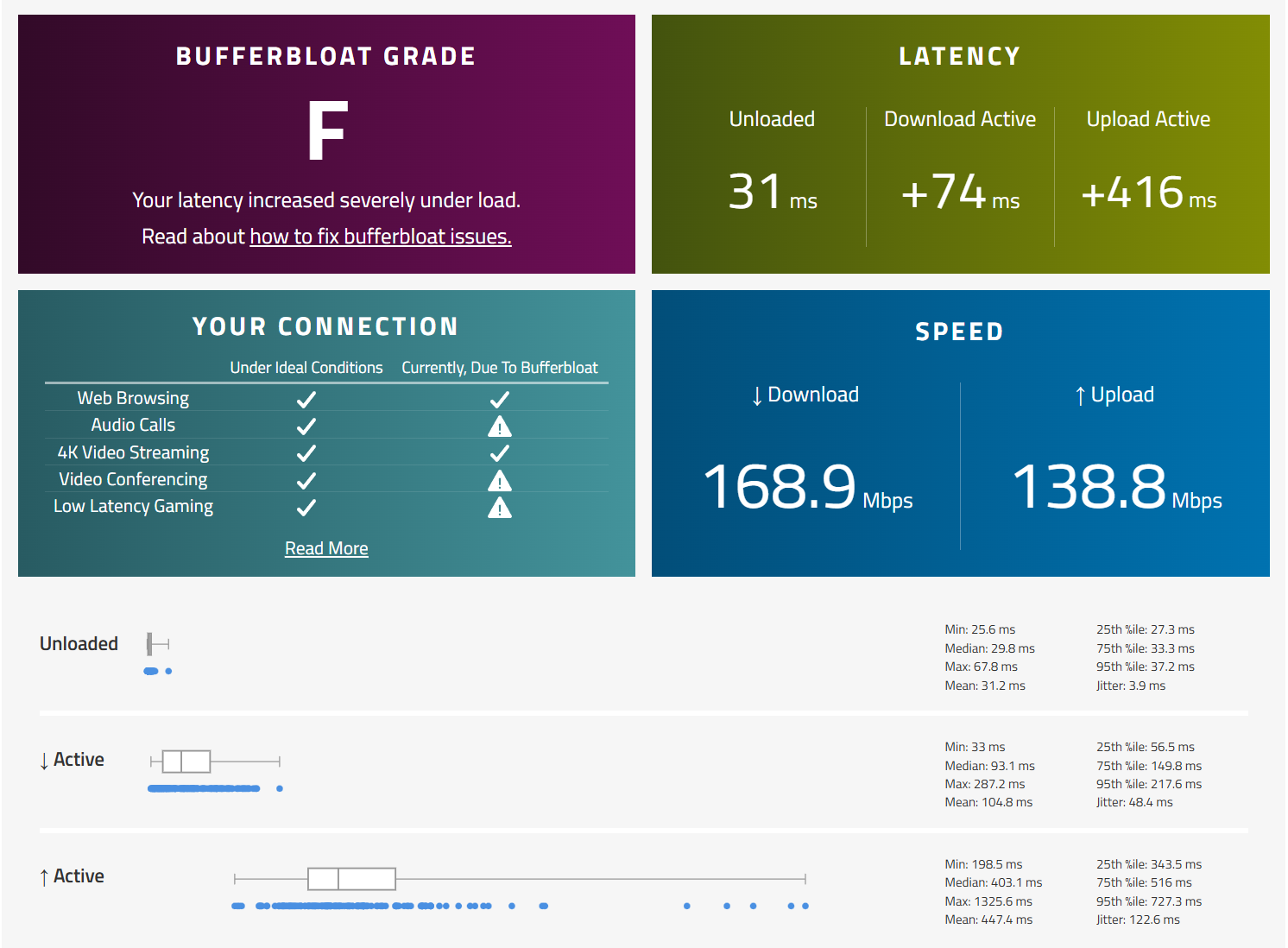
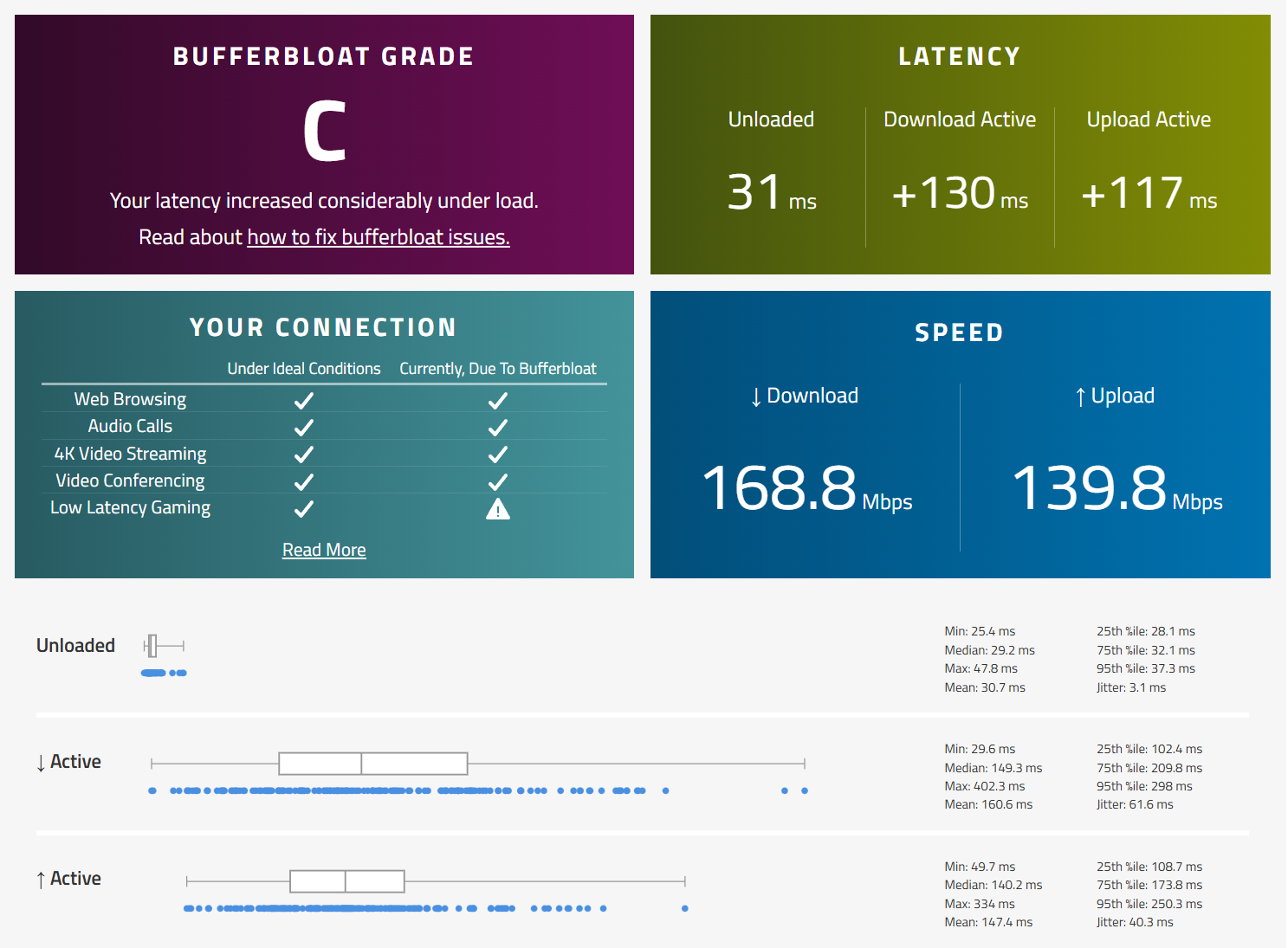
My Archer BE230 v1 has enormous bufferbloat even when the connection is not saturated somehow. When one specific device on the network starts downloading at a speed of ~20 mbps on my 600 mbps connection, the latency on the entire network explodes. Neither firmware version 1.2.3 nor the beta 1.2.1 in this thread has helped. QoS barely affects the issue.
For example, this is on a device that has a wifi card that only supports around ~200mbps. Recall that the connection supports up to around 600mbps:
QoS off:
QoS on:
What to do?
- Copy Link
- Report Inappropriate Content
Hello@osmankara ,
Welcome to our community.
May I know if your network topology diagram is as follows:
ISP modem—BE230)))((( client devices
(Note: — stands for wired connection,)))((( stands for wireless connection )
What is the model of the specific device that you mentioned? Have you set it as a priority? Also, please take a screenshot of the QoS settings of your router.
If you temporarily remove this specific device, will the latency and bufferbloat occur?
Or, if you connect the specific device to the ISP modem, bypass the BE230. Then run the speed test on the modem. Will you get the same test result?
- Copy Link
- Report Inappropriate Content
@Joseph-TP hello
I downloaded this beta firmware for my Archer AX72 US V1 and the QoS is okay, but unfortunately, the download speed has dropped significantly, both on Wi-Fi and Ethernet.

I tried downgrading to the previous firmware version but it says "upload error" everytime, so I'm really worried that it will take a long time for TP-Link to release the official version of this firmware. I still don't understand why no official update was released last year (2025) for the US V1 version of the Archer AX72, since there was a release for the Archer AX72 US V2.- Copy Link
- Report Inappropriate Content
Information
Helpful: 1
Views: 19408
Replies: 91
Voters 0
No one has voted for it yet.