
Solution What Can I Do If QoS Enabled Causes BufferBloat and High Latency on My Router After Firmware Update?


This Article Applied to:
Archer BE230_V1/V1.20
Archer BE230_V2
Archer AX55_V1
Archer AX55 Pro _V1
Archer AX72_V1
Archer AX72 Pro_V1
Archer GXE75_V1
Archer AX53_V1
Phenomenon:
Some users have reported performance degradation in their routers after enabling QoS following a firmware update.
Specifically, Bufferbloat test scores for both wireless and wired clients have significantly decreased (e.g., from A/B to F). Serbian_Fantom mentioned this unexpected behavior here.
Additionally, a noticeable increase in upload latency may occur, resulting in higher latency and jitter when the network is under heavy load.
Disabling QoS can resolve the performance degradation described above.
We have identified the cause of these unexpected behaviors. Please take a look at the following feasible solutions.
Available Solutions:
Solution 1:
Our development team has provided the following beta firmware to address this unexpected behavior for the models that have already been reported. Please install the beta firmware for your router if you encounter this anomaly.
| Model | Direct Download Links |
| Archer BE230_V1/V1.20 | Archer BE230_V1/1.20_1.2.1 Build 20250821(Beta Firmware) |
| Archer BE230_V2 | Archer BE230_V2_1.1.3 Build 20260127 (Beta Firmware) |
| Archer AX55_V1 | Archer AX55_V1_1.5.11 Build 20260205(Beta Firmware) |
| Archer AX55 Pro_V1 | Archer AX55 Pro_V1_1.4.3 Build 20251202(Beta Firmware) |
| Archer AX72_V1 | Archer AX72_V1_1.4.1 Build 20250918(Beta Firmware) |
| Archer AX72 Pro_V1 | Archer AX72 Pro_V1_1.4.1 Build 20250918(Beta Firmware) |
| Archer GXE75_V1 | Archer GXE75_V1_1.1.1 Build 20251024(Beta Firmware) |
| Archer AX53_V1 | Archer AX53_V1_1.5.4 Build 20251230(Beta Firmware) |
Note:
- Please be sure you have read the Beta Test Agreement before upgrading the beta firmware!
- For the sake of insurance, it's always recommended to save a copy of the router's Backup Config file before upgrading or downgrading.
- You may follow the guide to upgrade the firmware of your router. How to Upgrade the Firmware on the TP-Link Wi-Fi Routers.
Solution 2:
If you don't want to try the beta firmware, you can temporarily disable the QoS feature.
We welcome you to share your experiences with the beta firmware. If the beta firmware doesn't help, please provide details on your router's current operation and any other relevant information. Like the complete network topology, specific exception details, when the problem started, etc.
What if your router model isn't among those mentioned above, but you've also experienced unexpected bufferbloat and high latency after enabling the QoS feature during firmware updates? Please provide your router model, including firmware and hardware versions, for reference: How to find the hardware and firmware version of my TP-Link device?
Thank you for your feedback and support.
Update Logs:
Jan 29th, added Archer BE230_V2 Beta Firmware
Feb 5th, updated Archer AX55_V1 Beta Firmware
- Copy Link
- Subscribe
- Bookmark
- Report Inappropriate Content
Hello @Maurooo1 ,
Thanks for your detailed reply.
It seems your situation is no longer directly related to whether QoS is enabled.
- First, ensure your device is close to the router and unobstructed by walls during the speed test.
- Then, correctly set your uplink and downlink bandwidth (ideally 85-95% of your contracted bandwidth).
- Check for Wi-Fi interference (for wireless device speed tests): Try using the 5GHz band and select a relatively uncongested channel. You can use the "WiFi Analyzer" mobile app to check this.
Best Regards.
- Copy Link
- Report Inappropriate Content

Good afternoon, the tests I sent in the photos were done with a network cable. The strange thing is that last night at 2 AM I tested and the download speed was 660 Mbps, but the upload speed is broken on my ISP because it was showing 250 Mbps but with a latency of 60 ms. The download speed was 15 ms. While both download and upload speeds were high, the upload speed was worse at the moment. My ISP says the CM values are fine. The OFDM power level is currently -11 or -10, and channels 25 through 29 are -9, with channel 30 the same as the OFDM. The strange thing is that last night, when the download speed was better, the levels were lower: channels 25 through 29 -7 and the OFDM -8. Even though I have channel 36 configured on my phone with a bandwidth of 160 MHz, I don't know why the download latency is still high. Could this be because it's AC-only? And it's not an AX phone? When I limited the download speed for the phone to only 590 MB, it showed a latency of 60 ms in Speedtest. Something doesn't add up. Thanks again for your help, I hope for more advice.
- Copy Link
- Report Inappropriate Content
Hi @Maurooo1 ,
Thanks for getting back to us.
First, please test at different times: Except for 2 AM, run a Speedtest test again during the evening peak hours (8-11 PM) using a direct Ethernet cable connection to your computer. If latency and speed drop significantly during peak hours, it's likely due to regional network congestion on your ISP's network (especially the upload channel), which your ISP needs to address.
During testing, turn off all other devices and ensure only one computer is connected via Ethernet cable. Temporarily disconnect all other devices on the router (including phones, smart home devices, etc.) to prevent any background devices from consuming upload bandwidth.
Wi-Fi 5 (AC) may have weak interference resistance at 160 MHz bandwidth, which may cause frequent channel switching and latency fluctuations. It is recommended that you manually set your router's 5GHz channel to a non-DFS channel (such as 149, 157, or 161) and reduce the bandwidth from 160 MHz to 80 MHz. Stability should improve significantly; although the maximum speed may decrease, latency will be more stable.
- Copy Link
- Report Inappropriate Content
Hello, good afternoon. With my 600 Mbps mobile connection, which is AC, I get that latency.
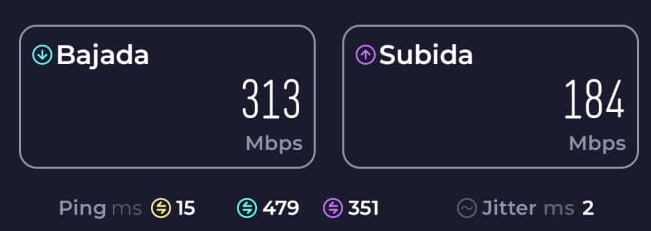
even if I configured the wifi channel this way.
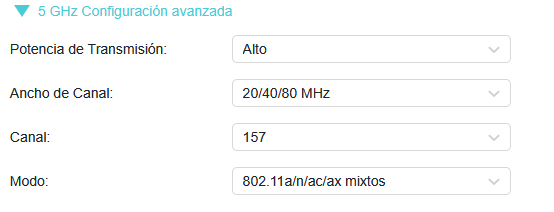
thanks for helping.- Copy Link
- Report Inappropriate Content
Hello @Maurooo1 ,
I'm still a bit confused. From which devices did you get your test data?
To avoid discrepancies, I've roughly summarized your comparative test results:
- With QoS enabled and a download speed of 620 Mbps, the actual download speed is 505 Mbps, the download latency is 11ms, and the bufferbloat level is C.
- With QoS disabled, the actual download speed is 618 Mbps, download latency is 122ms, and bufferbloat level is D.
- Regardless of whether QoS is enabled or disabled, the Cloudflare server test will yield the same results.
On your phone, if it supports the AC protocol, its speed won't increase significantly because the router supports a higher protocol; it will be limited by the phone's protocol speed. May I know the model of your phone?
- Copy Link
- Report Inappropriate Content
Hello again. My phone is a Motorola G52, and I know it's AC, not AX, but could that be the cause of the high latency on any AC phone? I downloaded an app called "Net Analyzer," and the ping is 60 ms or 40 ms on a 5 GHz network.
Here's a screenshot of the test on Cloudflare.
I am currently using cloud DNS, 1.1.1.1 and 1.0.0.1
Test performed on PC with cable
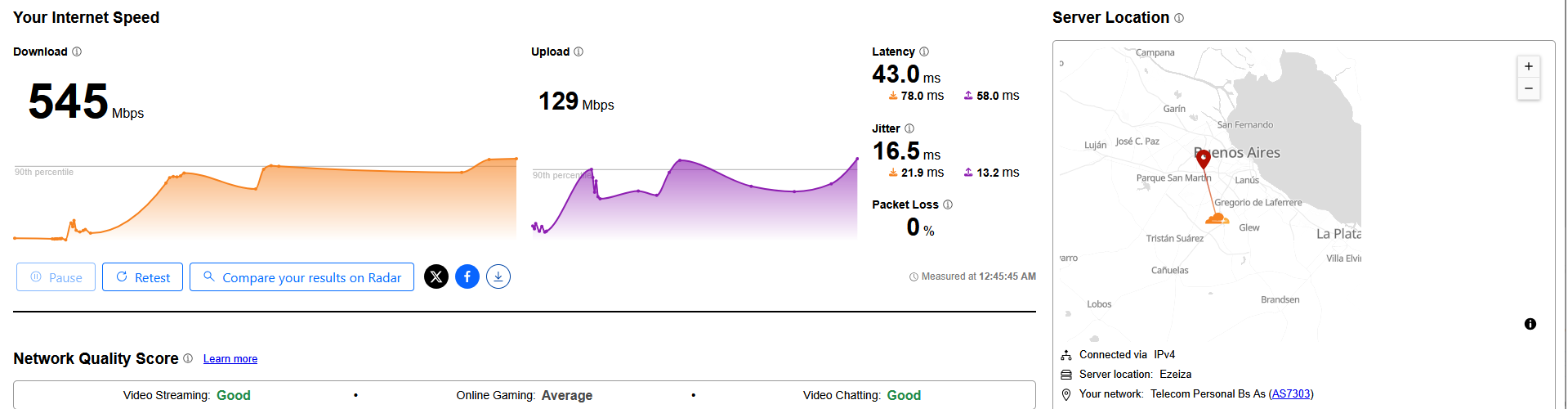
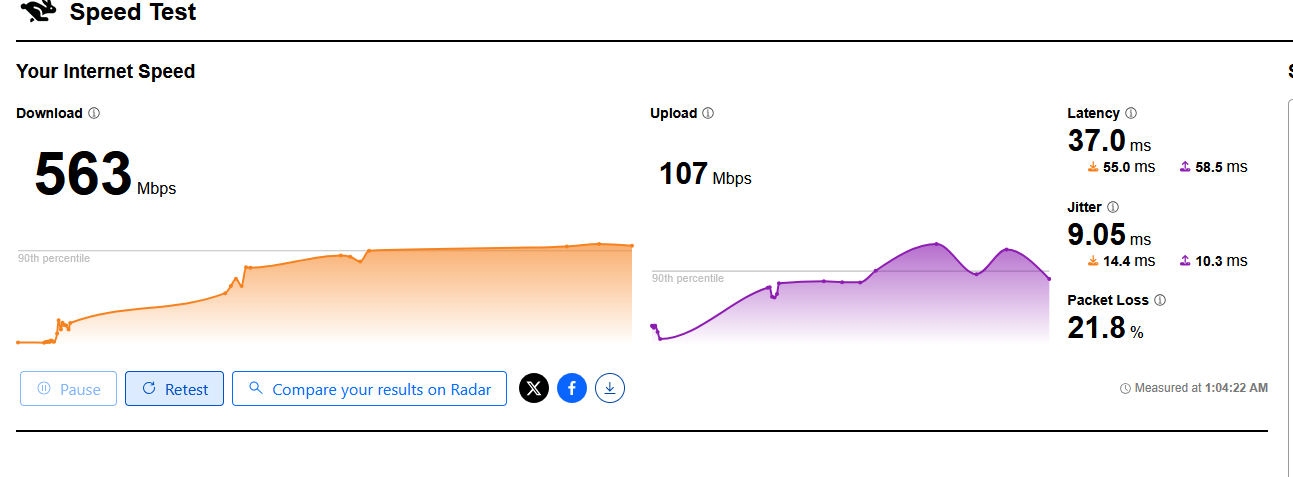
- Copy Link
- Report Inappropriate Content
Hello @Maurooo1,
So you only tested it on a Motorola G52 client, right? If so, it's also possible there's latency on the client side.
Please do comparative testing:
1. Test the router's speed and latency on different devices.
2. Test the Motorola G52's speed and latency on different networks.
- Copy Link
- Report Inappropriate Content
Good afternoon, here's a screenshot of the test performed on the Motorola G52.
https://ibb.co/GQ6ypSJL
- Copy Link
- Report Inappropriate Content
Information
Helpful: 1
Views: 8393
Replies: 58
Voters 0
No one has voted for it yet.