AX72 weird behavior after update

AX72 weird behavior after update

AX72 weird behavior after update
a week ago
Model: Archer AX72  
Hardware Version: V1
Firmware Version: 1.4.5 Build 20250928 rel.17568(4555)

Hi, I have multiple tp-links in eashymesh mode (ethernet backhaul) everything worked relatively well till the recent update: 1.4.5 Build 20250928 rel.17568(4555)

now it shows in:
 

1. TP-Link ID 

Oops...

The device is offline. Please check the WAN and network configuration to make sure the appropriate settings are entered correctly.

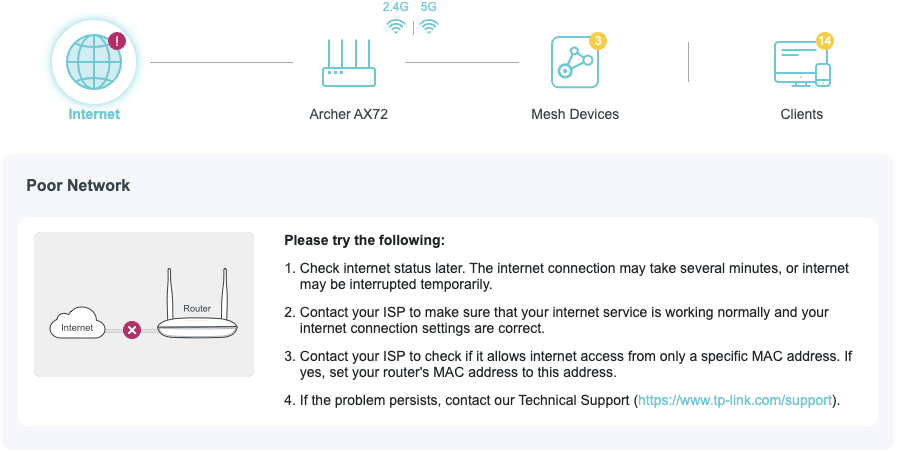
2. Network map -> internet status:

Poor Network

Please try the following:

1.Check internet status later. The internet connection may take several minutes, or internet may be interrupted temporarily.

But internet is ok, mesh works, connection is ok, only router thinks that it isn't connected to internet. I think it caused to the issues that I can't update its own firmware now, and can't update slave routers' firmware. Also my OpenVPN stopped to work since the update.

Thank you for suggestions.

 

  0      
  0      
#1
Options
3 Reply
Re:AX72 weird behavior after update
a week ago - last edited a week ago

Hello @Anatoly314 ,

Welcome to our community.


May I know your whole network topology? For example:

ISP modem—AX72 —Satellite nodes)))((( client devices

(Note: — stands for wired connection,)))((( stands for wireless connection )

Does the Archer AX72 work as the main router? What models, hardware, and firmware versions are your satellite nodes?

If it is OpenVPN server and it stops working after the firmware update, please try re-exporting a new OpenVPN configuration file from the router's web interface. Here are the Steps:

  1. Log in to your router’s web interface.
  2. Navigate to the VPN Server > OpenVPN settings.
  3. Export a new ovpn file.
  4. Use this new file on the VPN client devices.


If there are any error messages, please take screenshots and send them here.

Nice to Meet You in Our TP-Link Community. Check Out the Latest Posts: △Pre-release Firmware for Archer AX50 Introduces New Parental Control Features and Enhancements △Introducing AI QoS: Elevate Your Gaming Experience on the Archer GE800 Gaming Router △Connect TP-Link Archer BE550 to Germany's DS-Lite (Dual Stack Lite) Internet via WAN △Tether KidShield Test Recruitment - Safeguarding Children's Online Experience If you found the post or response helpful, please click Helpful. If an answer solves your problem, click "Recommended Solution" so that others can benefit from it.
  0  
  0  
#2
Options
Re:AX72 weird behavior after update
a week ago

  @Joseph-TP 


  @Anatoly314 

ISP -> Archer AX72 (main) ->  Archer C64 & Archer AX10 (sattelite routes, both connected by wire) 

Firmwares:
Archer AX72: 1.4.5 Build 20250928 rel.17568(4555)

Archer C64: 1.14.30 Build 250729 Rel.74561n(4555)

Archer AX10: 1.3.12 Build 20250828 Rel. 26873

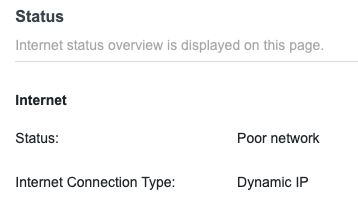
Errors:


It shows that internet connection is poor, but it's ok:


Thanks for suggestion, I will try!

  1  
  1  
#3
Options
Re:AX72 weird behavior after update
a week ago

Hi@Anatoly314 ,

Thanks for getting back to me.

Please also try rebooting the entire network system to see if that helps.

Nice to Meet You in Our TP-Link Community. Check Out the Latest Posts: △Pre-release Firmware for Archer AX50 Introduces New Parental Control Features and Enhancements △Introducing AI QoS: Elevate Your Gaming Experience on the Archer GE800 Gaming Router △Connect TP-Link Archer BE550 to Germany's DS-Lite (Dual Stack Lite) Internet via WAN △Tether KidShield Test Recruitment - Safeguarding Children's Online Experience If you found the post or response helpful, please click Helpful. If an answer solves your problem, click "Recommended Solution" so that others can benefit from it.
  0  
  0  
#4
Options