
Firmware update halved wifi speed
Firmware update halved wifi speed

As the title says the latest firmware for my router halved the wifi speed. I tried turning off multiple things to see if its solved the problem to no avail. If there is a beta firmware update is available please post it here.
- Copy Link
- Subscribe
- Bookmark
- Report Inappropriate Content

While a straight downgrade to the 1.0.x firmware versions is not possible, TP-Link did recently provide a solution for rolling it back.
https://community.tp-link.com/en/home/forum/topic/848526
- Copy Link
- Report Inappropriate Content
@Modan I forgot to mention the latency is also worse and jittery than before
- Copy Link
- Report Inappropriate Content
Hi,
There was a problem in the previous firmware version 1.1.1 that essentially halved the Wi-Fi speed for client devices that support 160 MHz channel width, because the 160 MHz option was missing in the firmware.
https://community.tp-link.com/en/home/forum/topic/845696
But according to the release notes for firmware version 1.1.2. that has been fixed already.
You might want to check if channel width is indeed set to 160 MHz.
- Copy Link
- Report Inappropriate Content
@woozle It is on 160 MHz unless i have to reapply it again.
- Copy Link
- Report Inappropriate Content
Did you previously use firmware version 1.1.1 and now updated to 1.1.2 or did you update from a 1.0.x firmware to version 1.1.2 ?
In case you updated from 1.0.x to 1.1.2, then maybe the following article might still be relavant. https://community.tp-link.com/en/home/forum/topic/848526
- Copy Link
- Report Inappropriate Content
@woozle Yes i upgraded from an older version from 2023, both the QoS and traffic monitor is off for me.
- Copy Link
- Report Inappropriate Content


Hello @Modan ,
THanks for contacting our community.
Is the wired speed normal on the router after the firmware update? Could you try a hard reset and configure the router for comparison?
Note: For insurance, it's always recommended to save a copy of the router's Backup Config file before upgrading or downgrading. How to create and restore from a backup file on your TP-Link Router
Furthermore, were the speed test results from the 5GHz or 2.4GHz band? Please help collect the link speed of the wireless bands:
- Copy Link
- Report Inappropriate Content
@Joseph-TP Wired connections were normal when i plugged in my pc. I did a factory reset and it didn't helped :( Its from the 5 GHz band the 2.4 Ghz one got the right speed.
- Copy Link
- Report Inappropriate Content
Hi @Modan ,
Thanks for getting back.
Could you try a different channel on the 5GHz band? For 5GHz, we recommend using channel 149-165 in Band 4, if your router supports it.
What is the link speed of the 5GHz? I don't mean the actual speed test, you can refer to How to check the associated/link speed on a wireless client.
- Copy Link
- Report Inappropriate Content
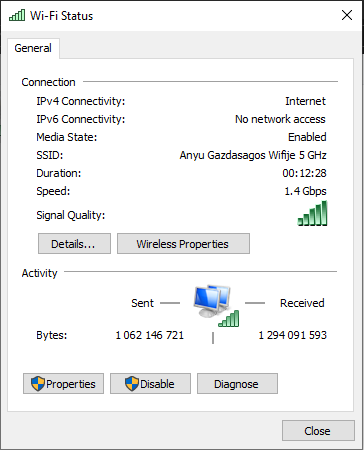
Sorry for the late response.Here is my status window. The wireless speed is still abysmal since the firmware upgrade. Only the 36-128 channels are available for me.I literally tried everything for hours turning off and on different options, full factory reset, nothing worked.
- Copy Link
- Report Inappropriate Content
I guess im screwed. I used TP-Link products for 10+ years, this is the first time that firmware upgrade semi bricked my router.
- Copy Link
- Report Inappropriate Content
Information
Helpful: 0
Views: 1829
Replies: 11
Voters 0
No one has voted for it yet.