
Early Access New Firmware for Archer BE260/Archer BE400 to Support VPN Merge, New ECO Mode, and More


This article applies to:
Archer BE400(US/EU/CA/SG/KR/AU/JP)_V1.0/V1.6
Archer BE400(EU)_V1.20
Archer BE6100(USW)_V1.6
Archer BE6500(US/JP/CA)_V1.0
Archer BE260(US/JP) _V1.0/V1.6
Archer BE5000(US/JP)_V1.0/V1.6
Hello everyone!
We are excited to announce the latest firmware update for Archer BE260, Archer BE400, etc., which introduces a range of new features and enhancements. We look forward to your experience!
We encourage all users to upgrade to the latest firmware and share your feedback with us. Your valuable opinions are crucial to our continued product improvement!
Now, download it and enjoy the new features for your router!
New Features/Enhancements:
1. VPN Merge
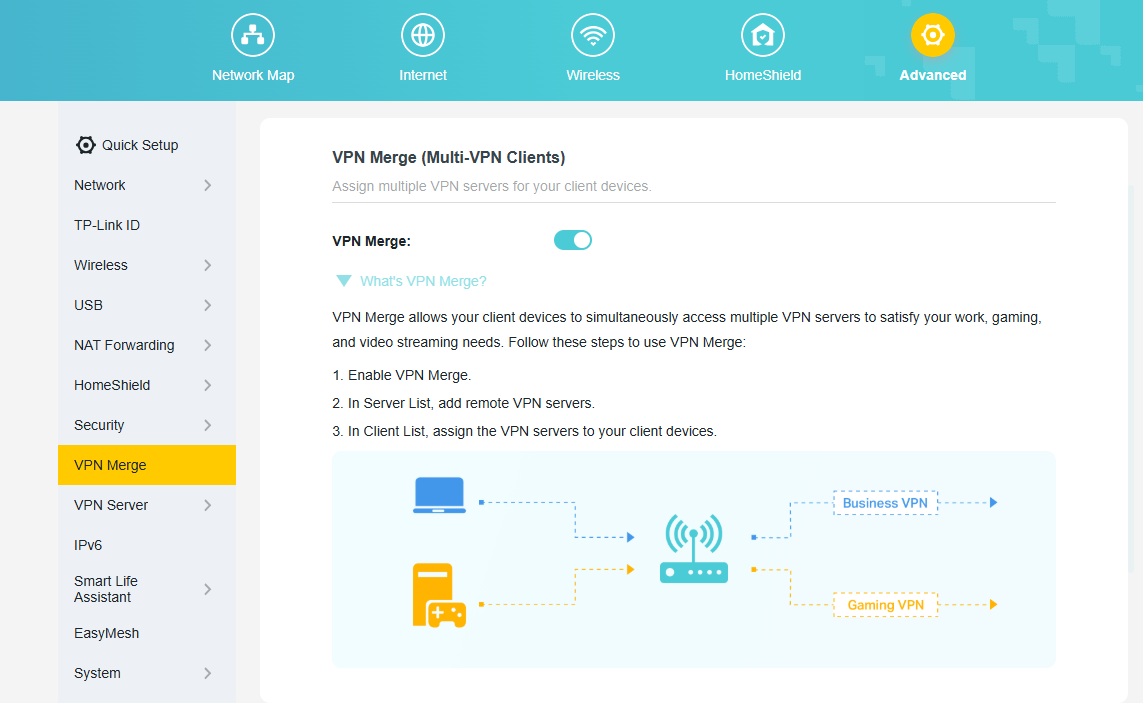
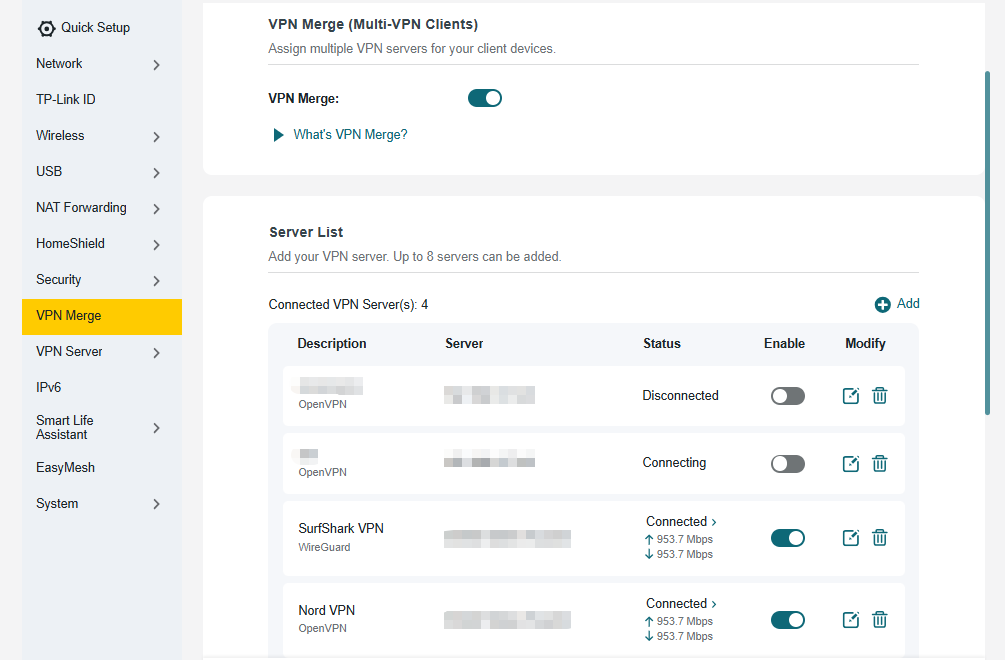
We have officially upgraded the previous VPN Client feature to the new, more powerful VPN Merge. This optimization significantly enhances the flexibility of your network. With VPN Merge, you can now connect different devices on your network to multiple VPN servers simultaneously. For example, your work laptop can connect to a corporate VPN while your smart TV uses another VPN for video streaming. To use this feature, simply enable VPN Merge, add your desired servers to the Server List, and assign them to specific devices in the Client List.
2. ECO Mode V2
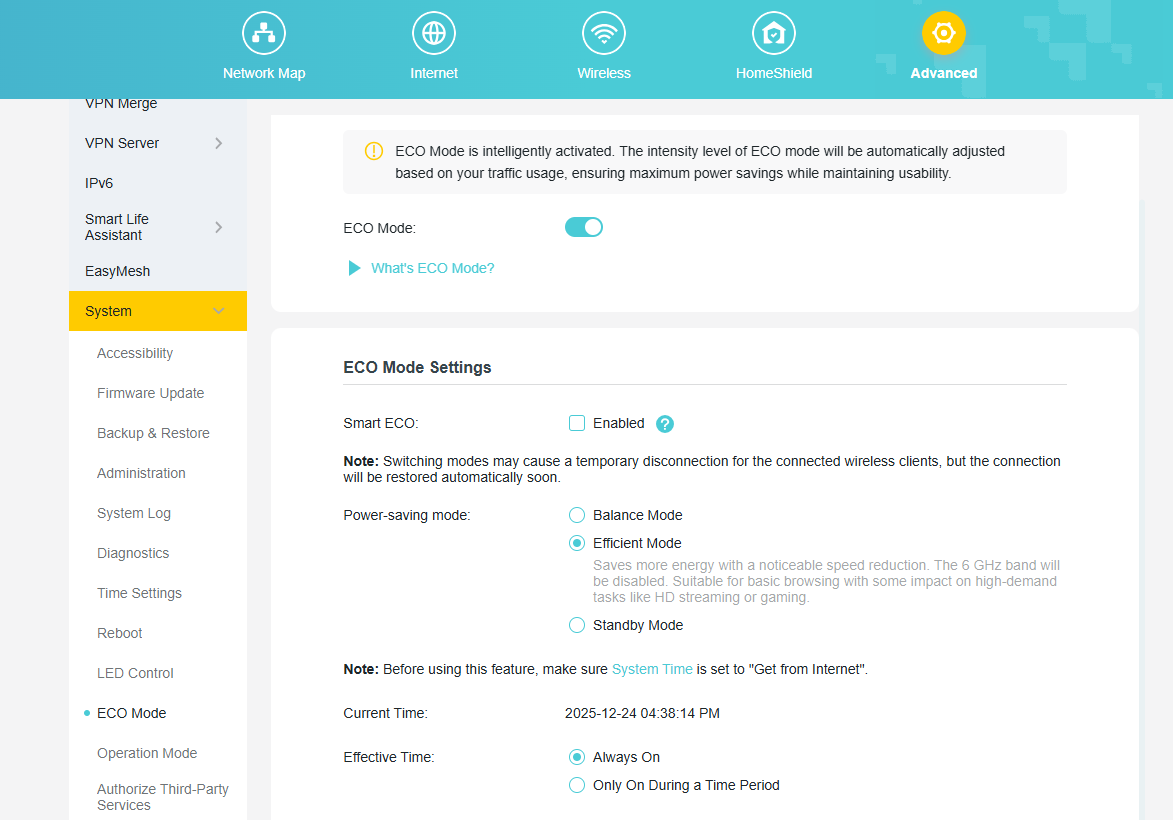
We've upgraded the new ECO Mode 2.0 feature, designed to help you save power intelligently. You can select the default Smart ECO mode, which automatically adjusts power consumption based on your real-time traffic usage and turns off the LEDs. This minimizes the impact on your regular internet activities while reducing energy use. For more personalized control, you can also choose from several other power-saving modes and even schedule them to be active only during a specific time period.
3. Admin Password Recovery
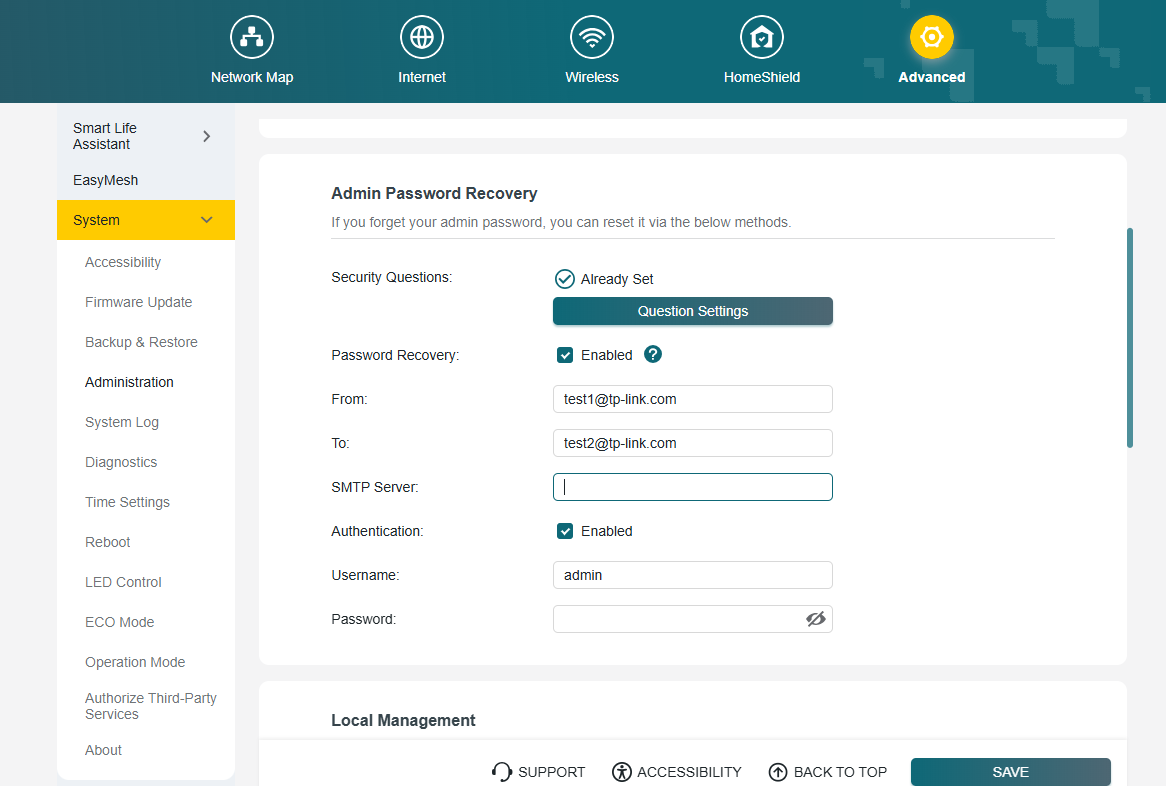
We have introduced new methods to recover your local administrator password, ensuring you never lose access to your router's settings. You can now choose between two secure recovery options. You can enable and configure these options under System > Administration.
Security Questions
Set up answers to predefined security questions. This allows you to verify your identity and reset your password quickly.
Email Recovery
Configure a designated email address and your own SMTP server to receive password recovery instructions directly to your inbox.
4. Advanced USB Feature
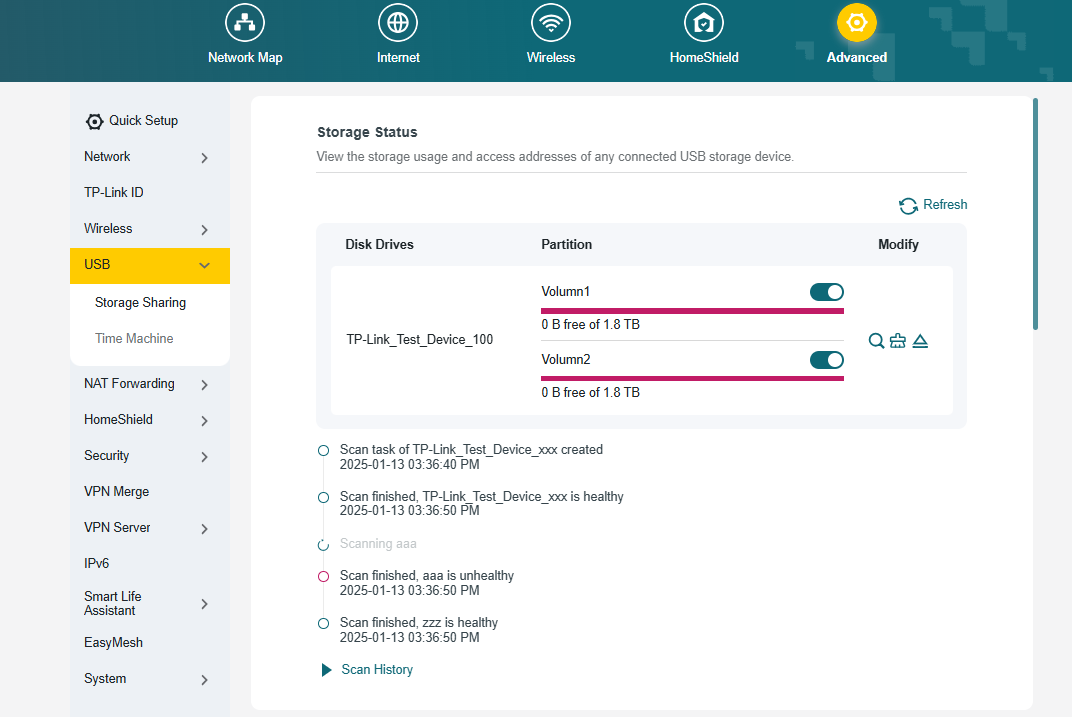
We have upgraded the USB Sharing feature with two powerful new management tools. First, you can now perform a Disk Scan to verify the health of your connected drive. This can be triggered manually or scheduled to run automatically at regular intervals for proactive data protection. Second, we have integrated a Format function, allowing you to format a USB drive directly from the router's interface without the need for a computer. These features provide greater convenience and control over your network storage.
5. Backup & Restore
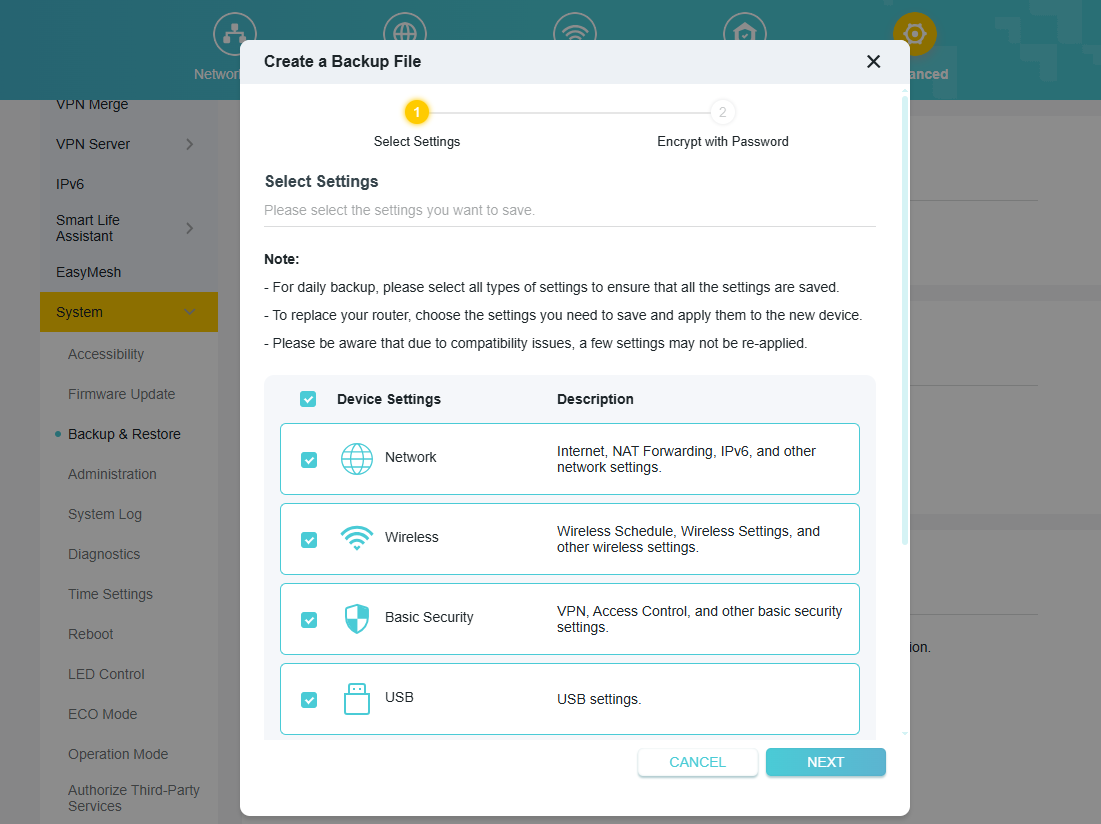
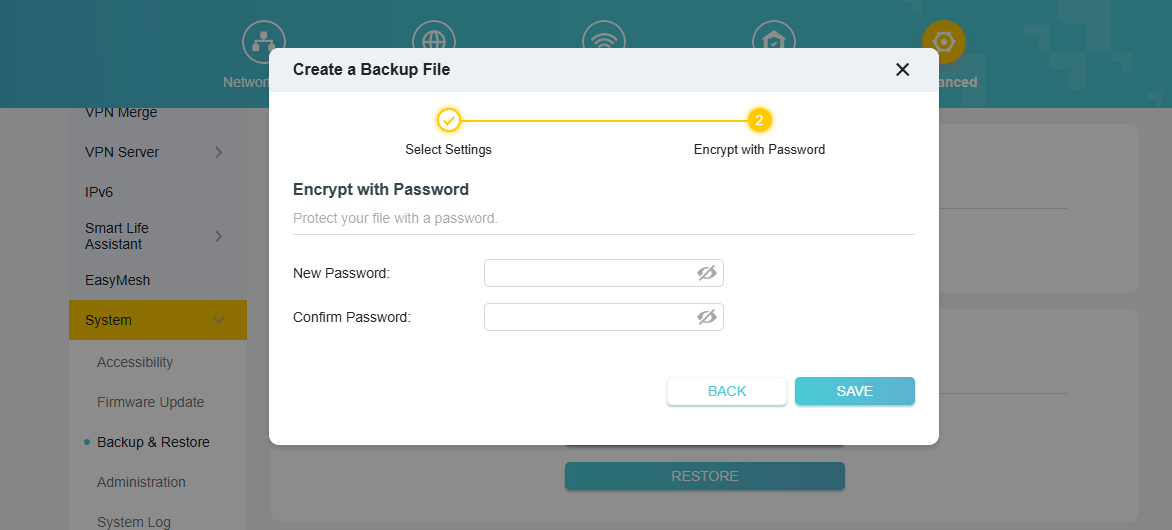
We have significantly upgraded the router's backup functionality for greater control and security. You can now perform a Selective Backup, allowing you to choose specific configuration modules to save, such as Network, Wireless, or Security settings. Additionally, you can now encrypt the backup file with a password, ensuring your sensitive configuration data is protected from unauthorized access.
6. DHCP Detection
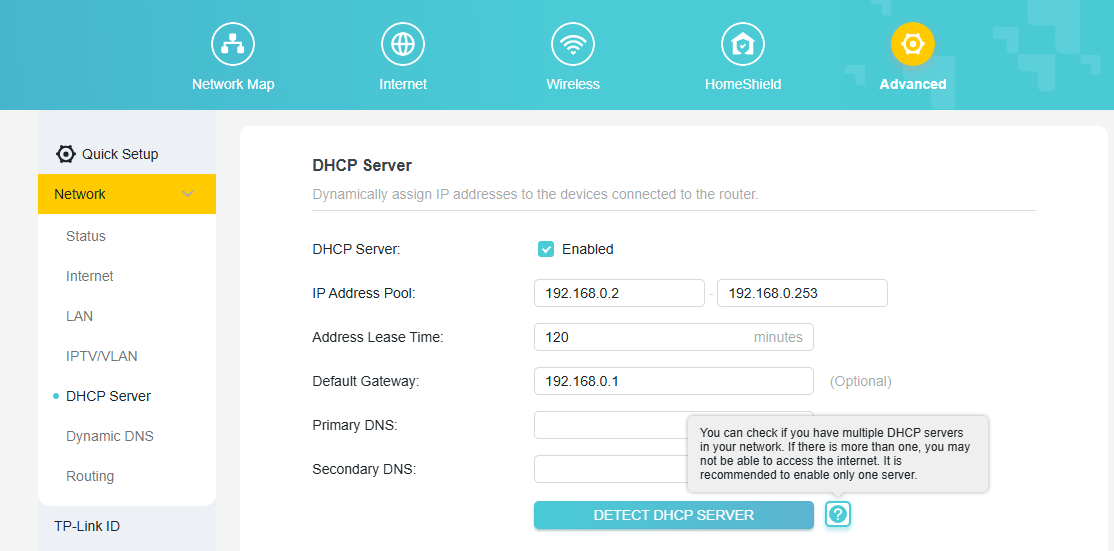
To help you troubleshoot common network issues, we have added a DHCP Server Detection tool. Having more than one DHCP server active on a network can cause IP address conflicts and prevent devices from accessing the internet. This new one-click tool allows you to scan your local network to easily identify any other active DHCP servers, helping you resolve conflicts to ensure a stable and reliable connection.
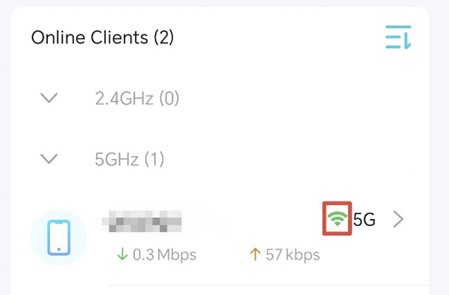
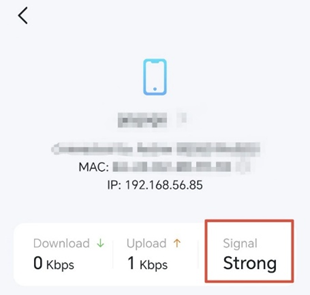
7. Tether App client list optimization
We have optimized the performance of the Tether app when accessing the client list, reducing the latency when retrieving the list. The app now also displays the signal strength of wireless clients, allowing you to easily understand the network status of your connected devices.
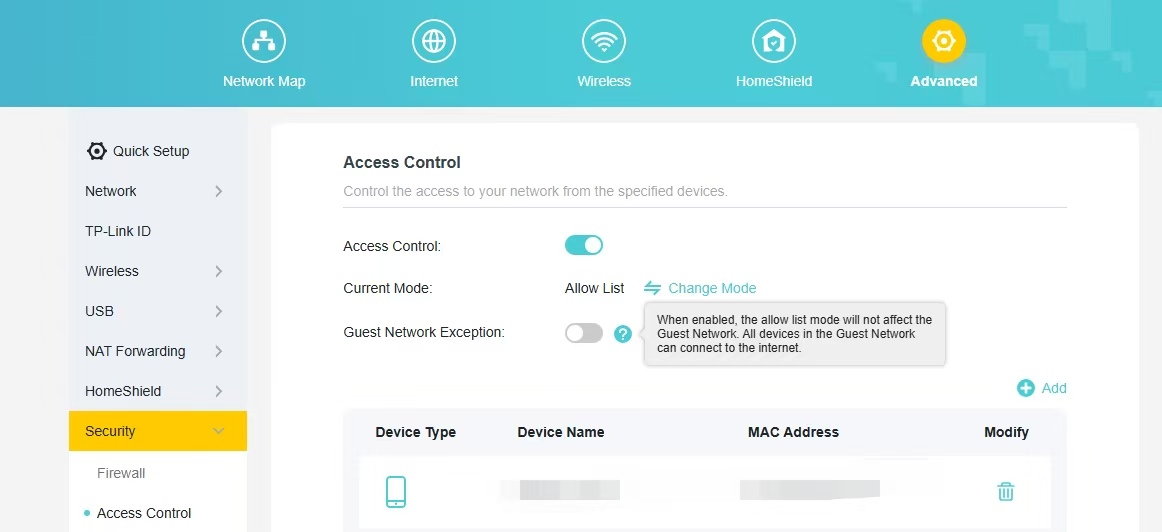
8. Guest Network Exception Button
Add a button to the Access Control whitelist that does not apply to the Guest Network. When enabled, the allow list mode will not affect the Guest Network. All devices in the Guest Network can connect to the internet.
Other Enhancements:
- Supports synchronization of DDNS during OPENVPN server configuration setup.
- Enhanced the safety of the device.
- Enhanced the wireless stability of the device.
Bug Fixes:
1. Fixed the issue that the connection to the Wireguard VPN Server failed under specific circumstances.
2. Fixed the issue that the “Hide SSID” setting in Tether APP configuration was not taking effect.
Firmware Download:
Before the Upgrade
(1) IMPORTANT! Once upgraded to 1.1.1 for Archer BE400/BE6100/BE6500, you CANNOT downgrade back to the 1.0.x version.
(2) Please be sure you have read the Beta Test Agreement before upgrading the Pre-Release firmware!
(3) For the sake of insurance, it's always recommended to save a copy of the router's Backup Config file before upgrading or downgrading.
(4) You may follow the guide to upgrade the firmware of your router. How to Upgrade the Firmware on TP-Link Wi-Fi Routers?
Direct Download Links
| Model | Download Link |
| Archer BE400_V1.0/V1.6 | Archer BE400_V1.0/V1.6_1.1.1 Build 20251225(Pre-release Firmware) |
| Archer BE400(EU)_V1.20 | Archer BE400(EU)_V1.20_1.1.1 Build 20251225(Pre-release Firmware) |
| Archer BE6100(USW)_V1.6 | Archer BE6100(USW)_V1.6_1.1.1 Build 20251225 (Pre-release Firmware) |
| Archer BE6500(US/JP/CA)_V1.0 | Archer BE6500(US/JP/CA)_V1.0_1.1.1 Build 20251225(Pre-release Firmware) |
| Archer BE260(US/JP) _V1.0/V1.6 | Archer BE260(US/JP) _V1.0/V1.6_1.0.5 Build20251224(Pre-release Firmware) |
| Archer BE5000(US/JP)_V1.0/V1.6 | Archer BE5000(US/JP)_V1.0/V1.6_1.0.5 Build20251224(Pre-release Firmware) |
Additional Information
If you encounter any issues during or after your router firmware upgrade, please leave a message below with the following information. Your feedback helps us continuously improve and provide you with better products and support. Please provide:
1. A detailed network layout diagram, including device connection methods, especially if you are using EasyMesh satellite devices.
2. A detailed description of the problem, providing more information about the specific circumstances that triggered it.
We always value your feedback highly. Thank you for your continued support and for being a member of our community.
Related Article:
- Copy Link
- Subscribe
- Bookmark
- Report Inappropriate Content
Hello @Reda_Otrosh ,
We would like to escalate your case to the support engineers, and they will follow up on it. If you are willing to conduct further analysis, please check your inbox and respond.
- Copy Link
- Report Inappropriate Content

@Joseph-TP
Any help with the character limit? this issue previously reported too.
- Copy Link
- Report Inappropriate Content
Hi @iAmSaugata ,
Before updating to this firmware, were you able to use the same settings to set up Admin Password Recovery?
What is the model and firmware of your router now?
- Copy Link
- Report Inappropriate Content
Firmware : 1.1.1 Build 20251224 rel.40744(5553)
No, it was reported long time back and you only asked me to use this beta firmware to see if the issue fixed. https://community.tp-link.com/en/home/forum/topic/842662?replyId=1638572
- Copy Link
- Report Inappropriate Content
@Joseph-TP
Another bug report, Dynamic DNS not working properly,
Additionally, could you please check with the development team whether they can implement Free Dynamic DNS for Cloudflare? The implementation is quite straightforward using their API and access tokens—even simpler than the NoIP configuration.
DNS API :
curl $CF_API_ENDPOINT/$ZONE_ID/dns_records/$DNS_RECORD_ID \
    -X PUT \
    -H 'Content-Type: application/json' \
    -H "Authorization: Bearer $CLOUDFLARE_API_TOKEN" \
    -d '{
          "name": "example.com",
          "ttl": 3600,
          "type": "A",
          "comment": "Domain verification record",
          "content": "198.51.100.4",
          "proxied": true
        }'
Logs:
2026-02-02 10:02:40 Network INFO [20732] Set WAN protocol to dhcp, operation is write
2026-02-02 10:02:02 MONIT NOTICE [17586] monit restart ledctrl
2026-02-02 10:01:46 Dynamic DNS INFO [24806] Dynamic dns noip connecting
2026-02-02 10:01:45 Dynamic DNS WARNING [24806] Dynamic dns noip server not work
2026-02-02 10:01:02 MONIT NOTICE [12190] monit restart ledctrl
2026-02-02 10:00:40 Dynamic DNS INFO [24806] Dynamic dns noip connecting
2026-02-02 10:00:40 Dynamic DNS WARNING [24806] Dynamic dns noip server not work
2026-02-02 10:00:02 MONIT NOTICE [6871] monit restart ledctrl
2026-02-02 09:59:34 Dynamic DNS INFO [24806] Dynamic dns noip connecting
2026-02-02 09:59:34 Dynamic DNS WARNING [24806] Dynamic dns noip server not work
2026-02-02 09:59:17 DHCP Server INFO [2756] Service start
2026-02-02 09:59:02 MONIT NOTICE [1495] monit restart ledctrl
2026-02-02 09:58:29 Dynamic DNS INFO [24806] Dynamic dns noip connecting
2026-02-02 09:58:29 Dynamic DNS WARNING [24806] Dynamic dns noip server not work
2026-02-02 09:58:01 MONIT NOTICE [28685] monit restart ledctrl
2026-02-02 09:57:23 Dynamic DNS INFO [24806] Dynamic dns noip connecting
2026-02-02 09:57:23 Dynamic DNS WARNING [24806] Dynamic dns noip server not work
2026-02-02 09:57:17 Dynamic DNS INFO [24806] Dynamic dns noip login start
2026-02-02 09:57:17 Dynamic DNS INFO [24726] Dynamic dns noip logout
2026-02-02 09:57:01 MONIT NOTICE [23432] monit restart ledctrl
2026-02-02 09:56:02 MONIT NOTICE [18666] monit restart ledctrl
2026-02-02 09:55:01 MONIT NOTICE [13851] monit restart ledctrl
2026-02-02 09:54:02 MONIT NOTICE [9085] monit restart ledctrl
2026-02-02 09:53:01 MONIT NOTICE [3955] monit restart ledctrl
2026-02-02 09:52:01 MONIT NOTICE [31249] monit restart ledctrl
2026-02-02 09:51:01 MONIT NOTICE [26158] monit restart ledctrl
2026-02-02 09:50:26 Dynamic DNS NOTICE [2672] Dynamic dns noip not launching
2026-02-02 09:50:26 Dynamic DNS INFO [2672] Dynamic dns noip connecting
2026-02-02 09:50:26 Dynamic DNS WARNING [2672] Dynamic dns noip server not work
2026-02-02 09:50:02 MONIT NOTICE [21118] monit restart ledctrl
2026-02-02 09:49:20 Dynamic DNS INFO [2672] Dynamic dns noip connecting
2026-02-02 09:49:20 Dynamic DNS WARNING [2672] Dynamic dns noip server not work
2026-02-02 09:49:01 MONIT NOTICE [15776] monit restart ledctrl
2026-02-02 09:48:15 Dynamic DNS INFO [2672] Dynamic dns noip connecting
2026-02-02 09:48:15 Dynamic DNS WARNING [2672] Dynamic dns noip server not work
2026-02-02 09:48:01 MONIT NOTICE [10461] monit restart ledctrl
2026-02-02 09:47:09 Dynamic DNS INFO [2672] Dynamic dns noip connecting
2026-02-02 09:47:09 Dynamic DNS WARNING [2672] Dynamic dns noip server not work
2026-02-02 09:47:02 MONIT NOTICE [5150] monit restart ledctrl
2026-02-02 09:46:03 Dynamic DNS INFO [2672] Dynamic dns noip connecting
2026-02-02 09:46:03 Dynamic DNS WARNING [2672] Dynamic dns noip server not work
2026-02-02 09:46:01 MONIT NOTICE [32248] monit restart ledctrl
2026-02-02 09:45:02 MONIT NOTICE [26734] monit restart ledctrl
2026-02-02 09:44:58 Dynamic DNS INFO [2672] Dynamic dns noip connecting
2026-02-02 09:44:58 Dynamic DNS WARNING [2672] Dynamic dns noip server not work
- Copy Link
- Report Inappropriate Content
Hi @iAmSaugata ,
I noticed your previous case has been escalated to an engineer with case ID TKID250959613. Did you receive any suggestions? You can also try replying to the engineer via email to get the latest updates.
- Copy Link
- Report Inappropriate Content
Joseph-TP wrote
Hi @iAmSaugata ,
I noticed your previous case has been escalated to an engineer with case ID TKID250959613. Did you receive any suggestions? You can also try replying to the engineer via email to get the latest updates.
@Joseph-TP
I have notified.
Could you please also check the other issue with Dynamic DNS and feasibility of adding CloudFlare as third provider for Dynamic DNS.
- Copy Link
- Report Inappropriate Content
Hi @iAmSaugata ,
As far as I know, TP-Link routers currently support DDNS with NO-IP, DynDNS, and TP-Link DDNS services. At this time, CloudFlare should not be listed as a supported DDNS provider.
For further questions and needs, please feel free to consult the engineer.
- Copy Link
- Report Inappropriate Content
Joseph-TP wrote
Hi @iAmSaugata ,
As far as I know, TP-Link routers currently support DDNS with NO-IP, DynDNS, and TP-Link DDNS services. At this time, CloudFlare should not be listed as a supported DDNS provider.
For further questions and needs, please feel free to consult the engineer.
It was just a suggestion to add Cloudflare as an additional Dynamic DNS service provider, since we are experiencing issues with No-IP. I couldn’t find any place in the community forum to submit suggestions or new product ideas, so I shared it here.
- Copy Link
- Report Inappropriate Content
Hi @iAmSaugata ,
I see. For your suggestions, you can send your feedback in Feature Request (Routers).
- Copy Link
- Report Inappropriate Content
Information
Helpful: 0
Views: 4700
Replies: 38
Voters 0
No one has voted for it yet.