
Wireguard connection from server to client router not working

Hello, today I bought a router and set up a VPN client on the router to a Wireguard server, which is in another location. I have a connection to all the devices that are on the router at the Wireguard server, but from the server to the BE3600 router I have no access to the devices.
TPLINK BE3600 ( 192.168.10.1 ) --> WG SERVER (192.168.0.1) (YES - ping, web access, all connections)
WG SERVER --> TPLINK BE3600 TPLINK (NO ping, NO web access, no connection)
I left Allowed IPs 0.0.0.0/0 everywhere, but I tried all sorts of other options.
- Copy Link
- Subscribe
- Bookmark
- Report Inappropriate Content


Hello @TsvetelinE ,
As Woozle mentioned, in our current implementation of the VPN Client on the Archer router, the tunnel is one-way, meaning that the client can actively access the server's network segment, but the server cannot access the client's LAN devices by default.
- Copy Link
- Report Inappropriate Content

Hi,
The VPNs provided on the current models of Archer routers are not designed to be used bidirectionally.
Most probably the firewall is not allowing inbound traffic on the network interface belonging to the VPN client.
- Copy Link
- Report Inappropriate Content
Maybe if this is changed to VPN it will work, but I don't have it as an option in interfaces
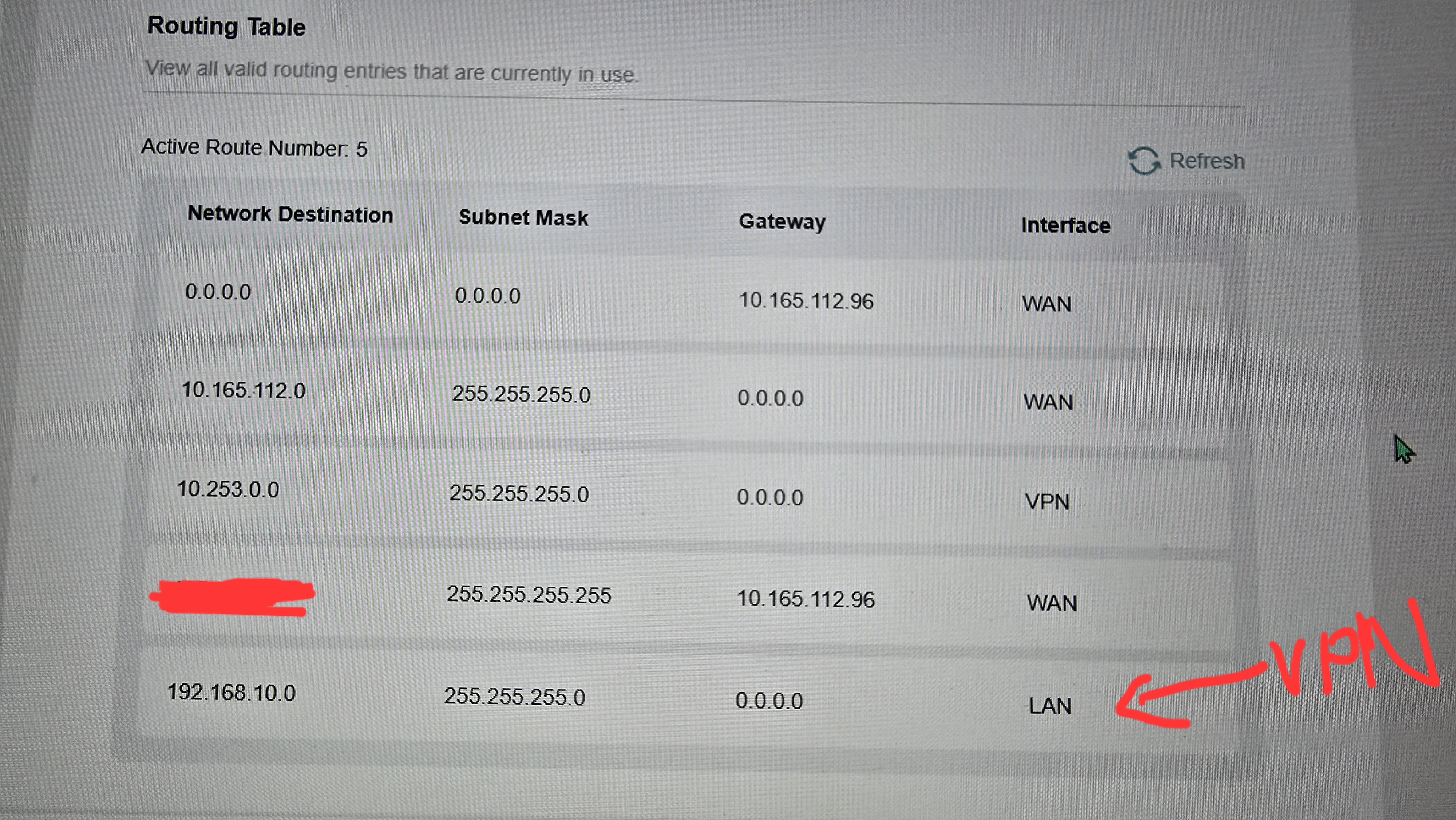
- Copy Link
- Report Inappropriate Content
Hello @TsvetelinE ,
As Woozle mentioned, in our current implementation of the VPN Client on the Archer router, the tunnel is one-way, meaning that the client can actively access the server's network segment, but the server cannot access the client's LAN devices by default.
- Copy Link
- Report Inappropriate Content

Hi - I am having similar communication issues (unable to ping the WG VPN server gateway) from my Archer AX55 (v1). I was able to ping the WG VPN server gateway (10.189.204.1) in a prior release for this wifi router - Archer AX55(US)_V1_1.3.5 Build 20241211 was working.
I noticed with this release that there were not "VPN" entries in the Routes table created once the WG VPN Client connection was established.
Also, no traffic is being sent over this connection once it is established.
Can I downgrade to this prior release or is this a known issue?
JB
- Copy Link
- Report Inappropriate Content
Hello@JohnB76 ,
Welcome to our community.
Is the firmware version of your Archer AX55 1.5.11 Build 20251119 rel.49503?
May I know your whole network topology diagram? For example:
ISP modem—router )))((( client devices
(Note: — stands for wired connection,)))((( stands for wireless connection )
Besides firmware updates, have you changed other settings?
- Copy Link
- Report Inappropriate Content
Information
Helpful: 0
Views: 1190
Replies: 5
Voters 0
No one has voted for it yet.