Deco XE75 Pro Ethernet Backhaul instability and roaming issues with TL-SG108 switch

Deco XE75 Pro Ethernet Backhaul instability and roaming issues with TL-SG108 switch

Deco XE75 Pro Ethernet Backhaul instability and roaming issues with TL-SG108 switch
Wednesday
Model: Deco XE75 Pro  
Hardware Version: V3
Firmware Version: 1.3.1

Dear TP-Link

I am experiencing significant network instability and "sticky client" behavior with my Deco XE75 Pro setup using an ethernet backhaul through a TP-Link TL-SG108 unmanaged switch. Although the Deco app confirms a "Strong" ethernet connection, devices on the Guest Network (VLAN 591) frequently lose internet access and fail to connect or to roam effectively between units. My diagnostic ping tests from a smartphone on the satellite Deco unit to the main Deco unit reveal severe jitter, with latency spikes jumping inconsistently between 4ms and 66ms, despite 0% packet loss. This suggests the unmanaged switch is struggling to efficiently process the 802.1Q VLAN tags and IEEE 1905.1 management traffic, leading to buffer delays that diminishes roaming performance and cause speed drops when multiple devices are active. I am planning to replace the TL-SG108 with a 2.5G managed switch like the Ubiquiti USW-Flex-2.5G to ensure full VLAN transparency and utilize the 2.5Gbps backhaul capacity. Can you confirm if this switch-induced jitter is a known limitation for Deco backhaul environments and if a managed switch is the recommended solution?

Kind Regards

Meridius

  2      
  2      
#1
Options
4 Reply
Re:Deco XE75 Pro Ethernet Backhaul instability and roaming issues with TL-SG108 switch
Thursday

  @Meridius66 

Hi, thank you very much for the feedback.

Have you run into a similar issue when the smartphone is connected to the Main WiFi network?

How about the model numbers of the Guest Network connected devices?

Can I also have some screenshots of the network map on the Deco App, such as:

It is usually recommended to use an unmanaged switch to establish Ethernet Backhaul among Deco units. There hasn't been such feedback before, so it is hard to give you any recommendations yet.

If you can consistently reproduce the issue on the Guest Network, the engineer would love to help us test further.

Wait for your reply.

Best regards.


  0  
  0  
#2
Options
Re:Deco XE75 Pro Ethernet Backhaul instability and roaming issues with TL-SG108 switch
Yesterday - last edited Yesterday

  @David-TP 


In a healthy wired backhaul environment, I would expect a stable latency of <2ms. The current spikes suggest that the switch's buffer or processing is struggling with the encapsulation of Deco's traffic (likely the IEEE 1905.1 management frames and the 802.1Q tags for the Guest Network). This jitter seems to be the root cause of the "sticky client" behavior, as the Deco units cannot communicate timing-sensitive roaming data efficiently.

I can consistently reproduce this.


As an answer to the other questions:

1. "Have you run into a similar issue when the smartphone is connected to the Main WiFi network?"

Yes, I have performed the same ping tests on the Main WiFi network, and the results are consistently unstable. I am seeing latency spikes jumping from 3ms up to 55ms and 66ms, similar to the Guest Network. The jitter is present across the entire Ethernet Backhaul.

2. "How about the model numbers of the Guest Network connected devices?"

- Samsung Galaxy S23
- Samsung Galaxy A52s 5G
- Apple Iphone 14
- Samsung Galaxy A34

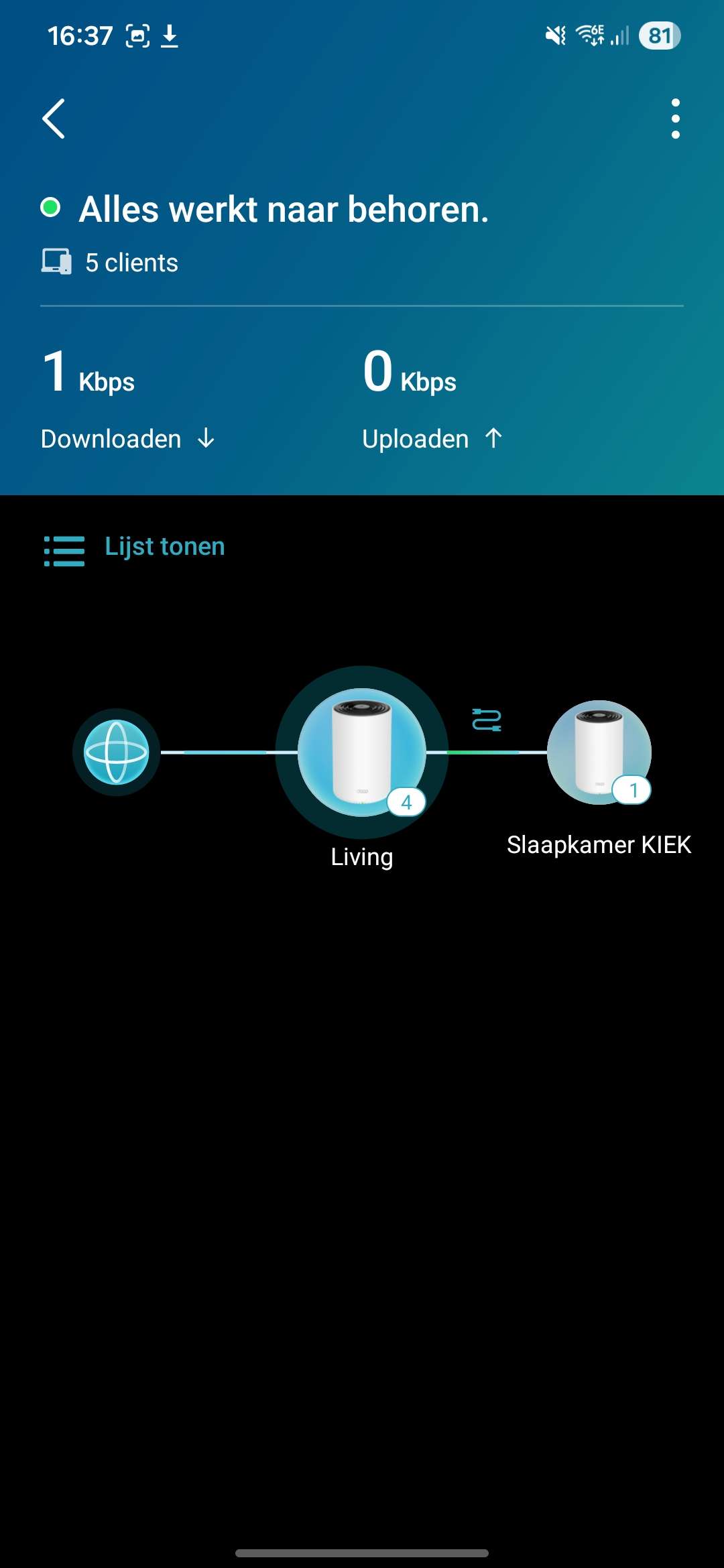
3. Screenshots & Network Map (ohter one added as a file cause it won't allow more than 1 of each per upload method):

File:
Screenshot_20260115_163600_Deco.jpgDownload
  0  
  0  
#3
Options
Re:Deco XE75 Pro Ethernet Backhaul instability and roaming issues with TL-SG108 switch
Yesterday - last edited Yesterday

  @Meridius66 

Hi, thank you very much for the update.

If possible, can you help me run a further test:

  • Remove TL-SG108 from the Mesh network, and connect the satellite Deco XE75 Pro directly via an Ethernet cable to the main Deco.
  • Then test the ping latency on the satellite Deco XE75 pro again.


Wait for your reply.

Best regards.

  0  
  0  
#4
Options
Re:Deco XE75 Pro Ethernet Backhaul instability and roaming issues with TL-SG108 switch
Yesterday - last edited Yesterday

  @David-TP 

I have completed the direct connection test using multiple new Ethernet cables to bypass the TL-SG108 switch entirely and also positioned the phone as close to the unit as possible. Surprisingly, the results remain identical. Even with a direct cable between the Main and Satellite Deco over a short distance, the ping latency fluctuates wildly between 15ms and 85ms. This persistent jitter and the "sticky client" behavior occur regardless of the switch, ruling it out as the primary cause. This clearly points to an issue within the Deco XE75 Pro units or the firmware handling of the Ethernet Backhaul. How can we explain these high latency spikes on a direct connection, and what are the next steps for diagnosing the Deco hardware itself?

Kind regards

Meridius

  1  
  1  
#5
Options