Early Access New Firmware for Archer BE800 V1 to Support VPN Merge,Guest/IoT Network Extend in EasyMesh, and More


Hello everyone!
We are pleased to announce the latest firmware update for the Archer BE800 V1, which introduces a range of new features, especially significant enhancements to the VPN Feature and EasyMesh Network usage.
We encourage all users to upgrade to the latest firmware and share your feedback with us. Your valuable opinions are crucial to our continued product improvement! We look forward to your experience!
Download the update now and experience your router's new features!
New Features/Enhancements:
1. Enhanced VPN feature
(1) VPN Merge
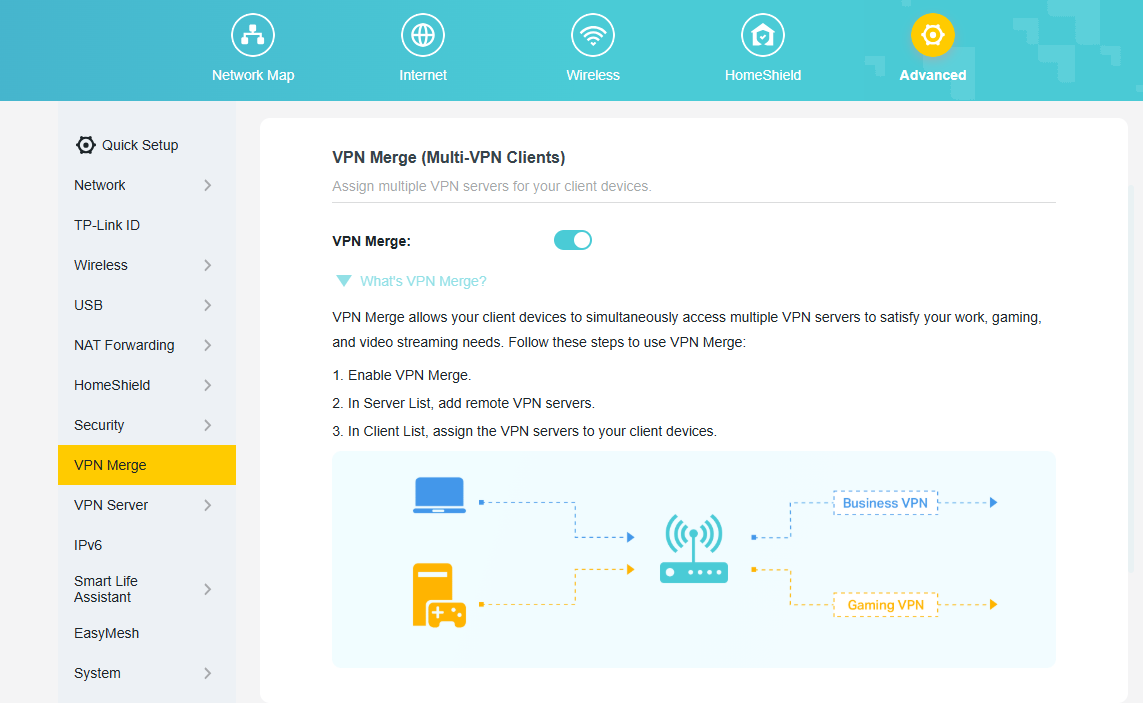
We have officially upgraded the previous VPN Client feature to the new, more powerful VPN Merge. This optimization significantly enhances the flexibility of your network. With VPN Merge, you can now connect different devices on your network to multiple VPN servers simultaneously. For example, your work laptop can connect to a corporate VPN while your smart TV uses another VPN for video streaming. To use this feature, simply enable VPN Merge, add your desired servers to the Server List, and assign them to specific devices in the Client List.
(2) VPN Kill Switch
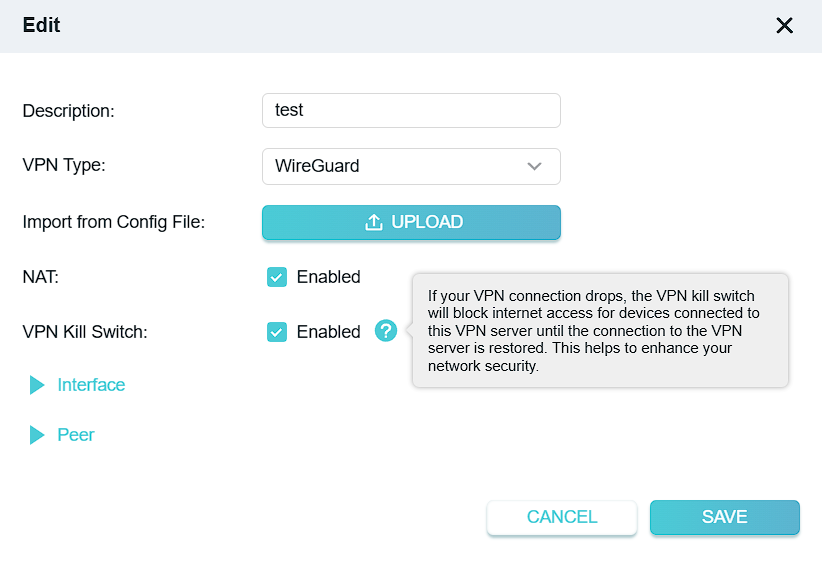
The VPN Kill Switch to improve your network security. When you enable this feature for a VPN server, it will continuously monitor the connection status. If your VPN connection drops unexpectedly, the Kill Switch will immediately block internet access for all devices using that VPN. This protection remains active until the connection to the VPN server is safely restored, preventing potential data leaks.
(3) Other Enhancements:
- Supports DDNS synchronization during OpenVPN server configuration.
- Add third-party VPN support when configuring the VPN Client: IPVanish, PureVPN.
2. Enhanced EasyMesh Network
(1) EasyMesh Traffic Separation (*Extend Guest Network)
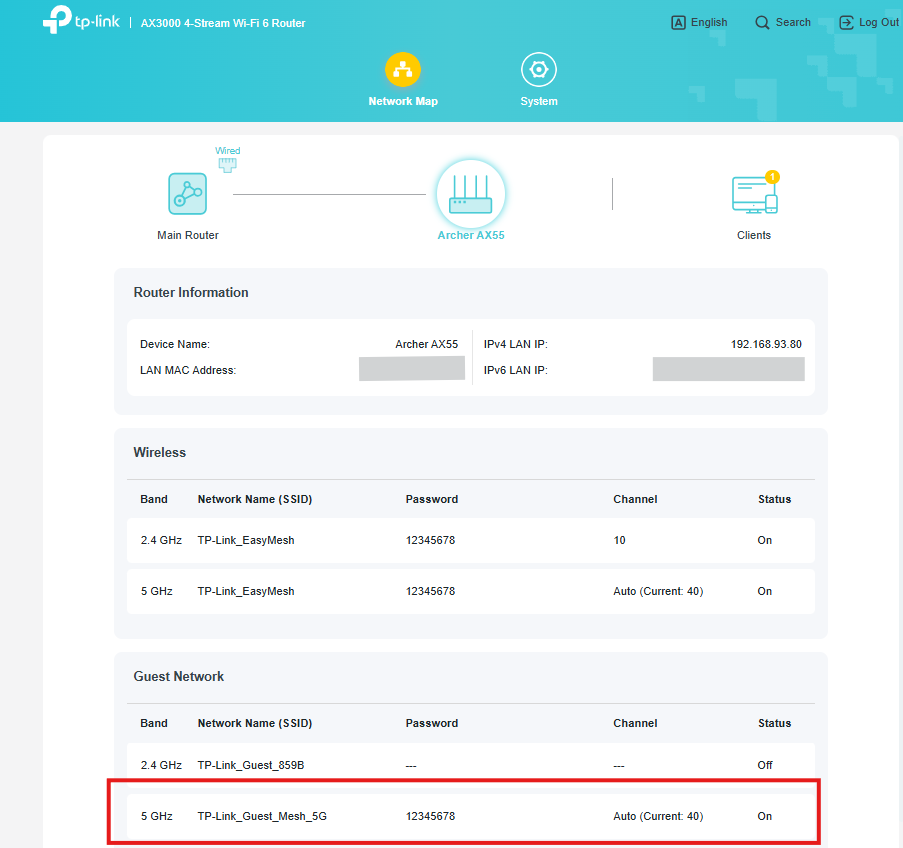
We have introduced the Traffic Separation feature within the EasyMesh R3 protocol, enabling the synchronous extension of the main router's Guest Network capabilities to satellite devices. This enhances the security of your main network.
(2) IoT Network configuration synchronization
We have introduced the capability to synchronize certain IoT Network configurations from the main router to satellite devices, further enhancing the performance of EasyMesh satellite units.
(3) EasyMesh Client Binding
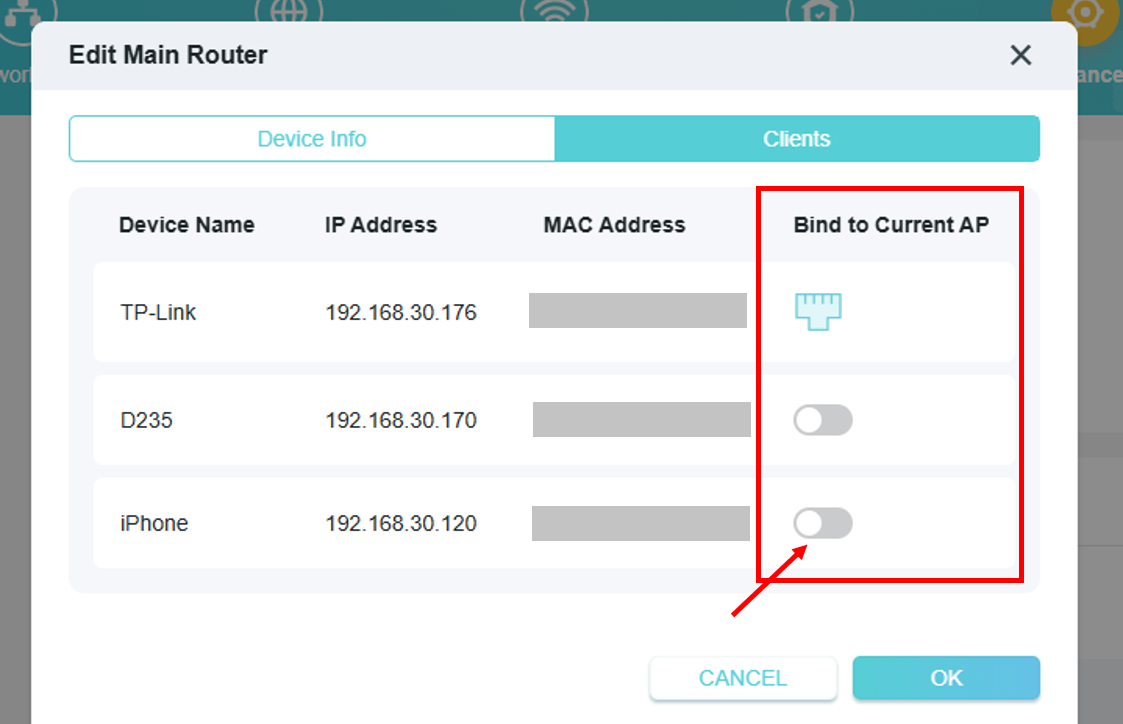
EasyMesh Client Binding allows you to pin specific devices (e.g., smart TVs or IoT sensors) to a designated EasyMesh node, preventing unnecessary roaming and improving connection stability for latency-sensitive or stationary clients.
(4) EasyMesh Satellite Node Binding
EasyMesh Satellite Node Binding allows you to manually specify which upstream node a satellite should connect to.
3. ECO Mode V2
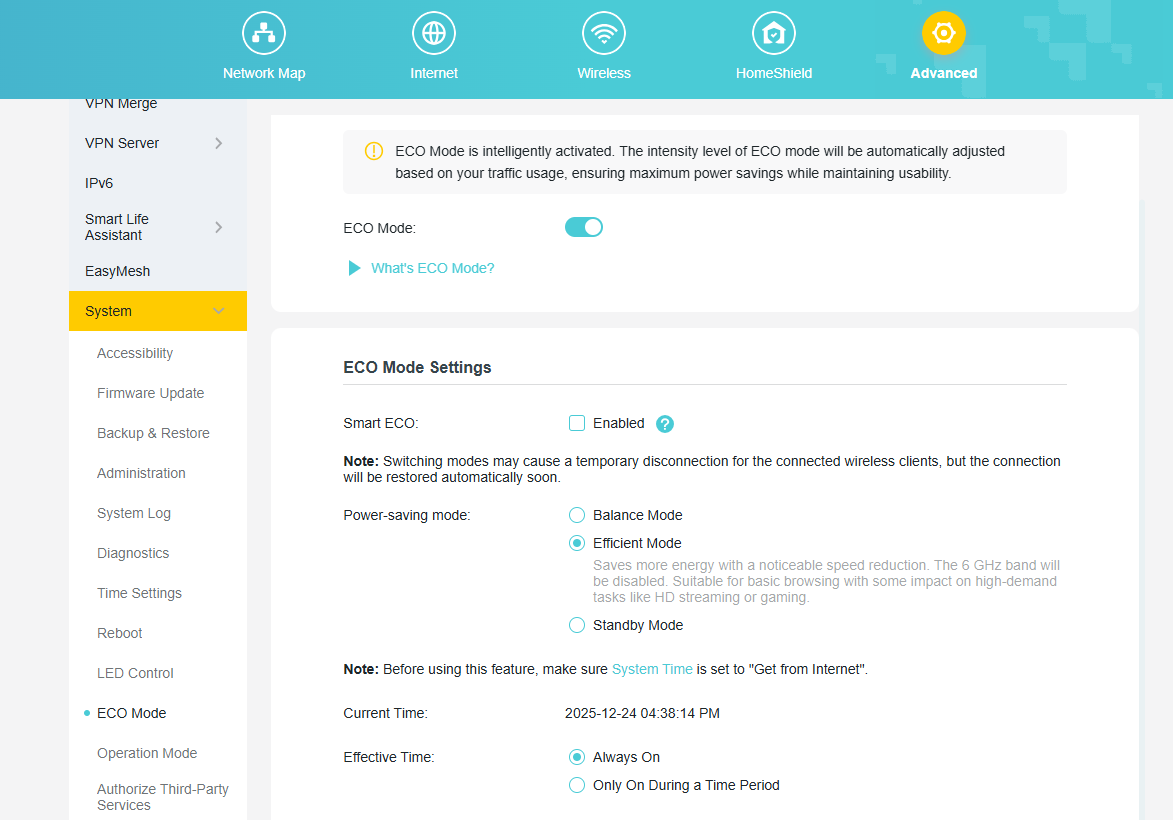
The new ECO Mode Feature is designed to help you save power intelligently. You can select the default Smart ECO mode, which automatically adjusts power consumption based on your real-time traffic usage and turns off the LEDs. This minimizes the impact on your regular internet activities while reducing energy use. For more personalized control, you can also choose from several other power-saving modes and even schedule them to be active only during a specific time period.
4. Admin Password Recovery
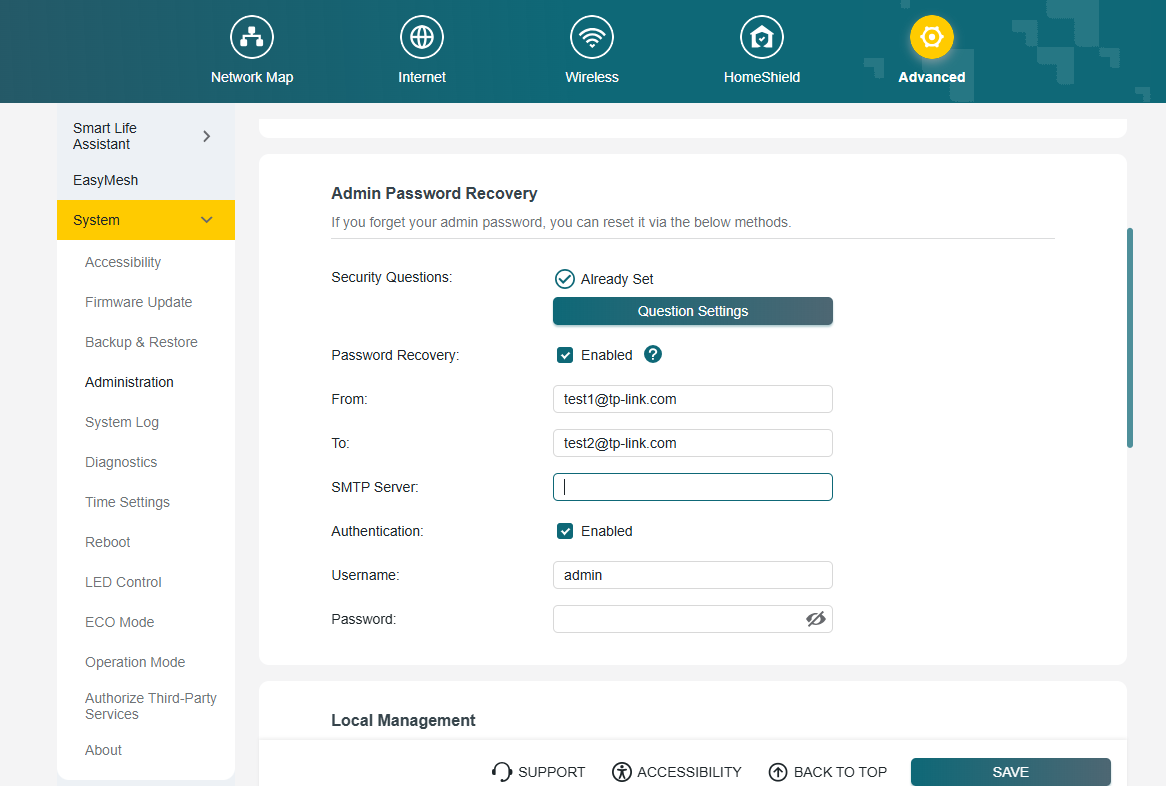
We have introduced new methods to recover your local administrator password, ensuring you never lose access to your router's settings. You can now choose between two secure recovery options. You can enable and configure these options under System > Administration.
(1) Security Questions
Set up answers to predefined security questions. This allows you to verify your identity and reset your password quickly.
(2) Email Recovery
Configure a designated email address and your own SMTP server to receive password recovery instructions directly to your inbox.
5. Advanced USB Feature
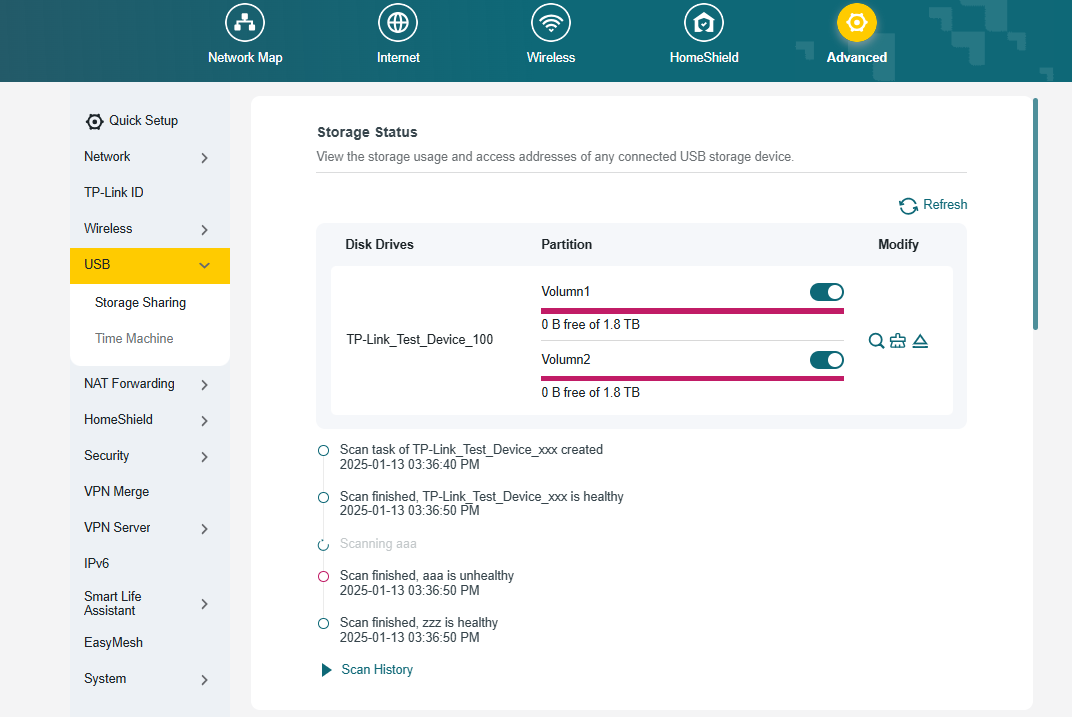
We have upgraded the USB Sharing feature with two powerful new management tools. First, you can now perform a Disk Scan to verify the health of your connected drive. This can be triggered manually or scheduled to run automatically at regular intervals for proactive data protection. Second, we have integrated a Format function, allowing you to format a USB drive directly from the router's interface without the need for a computer. These features provide greater convenience and control over your network storage.
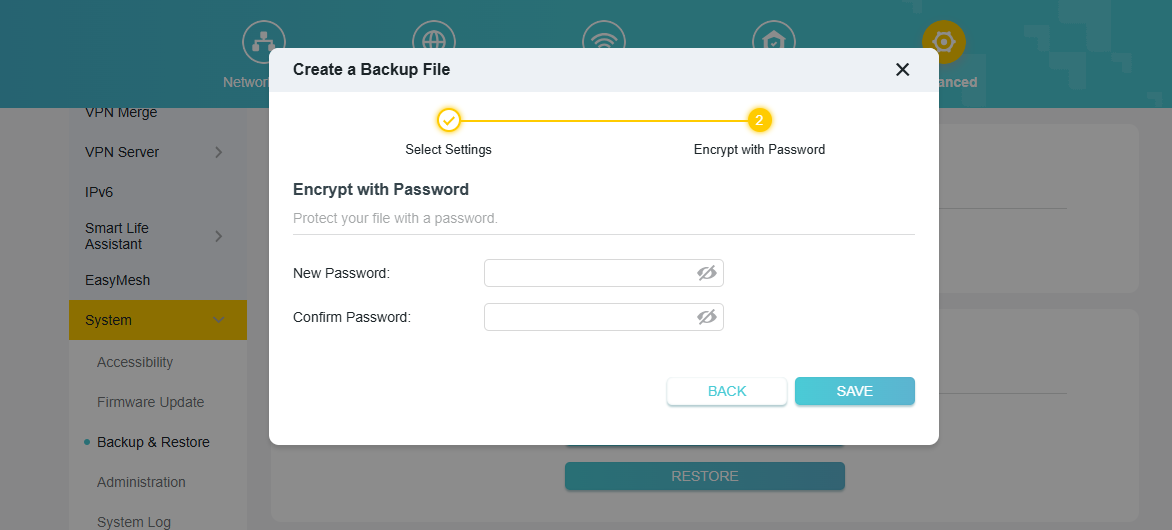
6. Backup & Restore
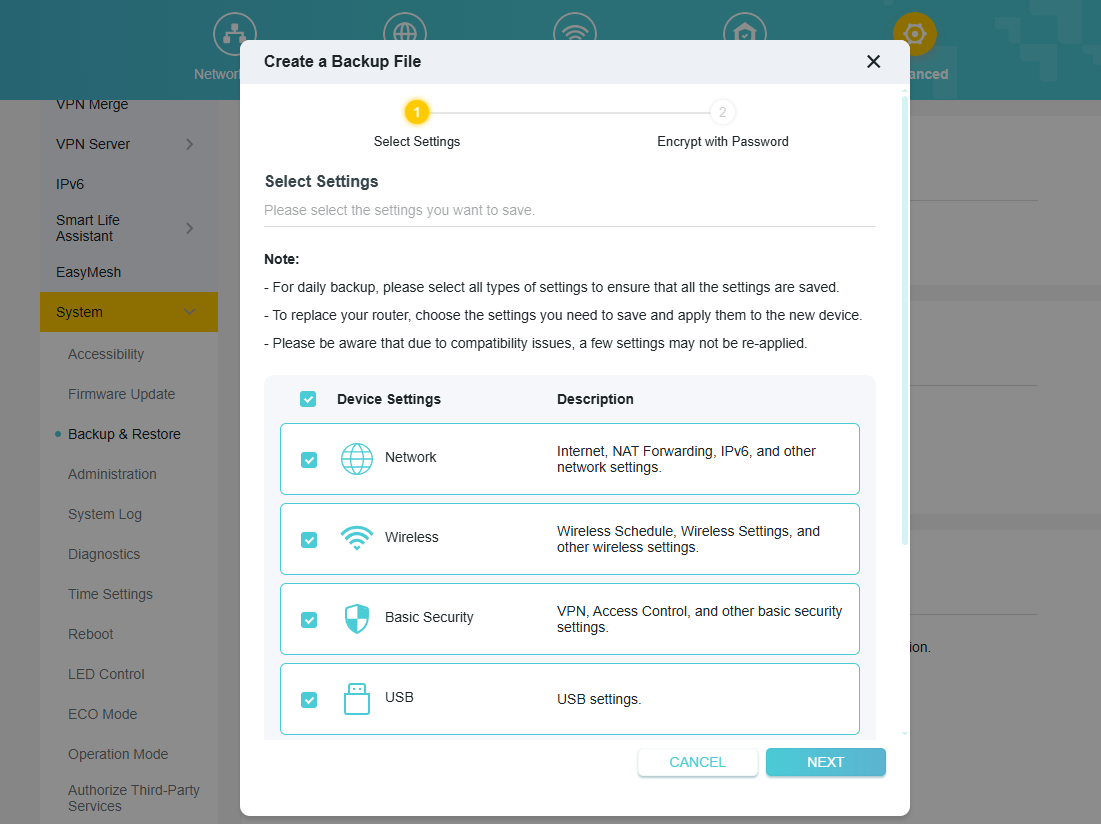
We have significantly upgraded the router's backup functionality for greater control and security. You can now perform a Selective Backup, allowing you to choose specific configuration modules to save, such as Network, Wireless, or Security settings. Additionally, you can now encrypt the backup file with a password, ensuring your sensitive configuration data is protected from unauthorized access.
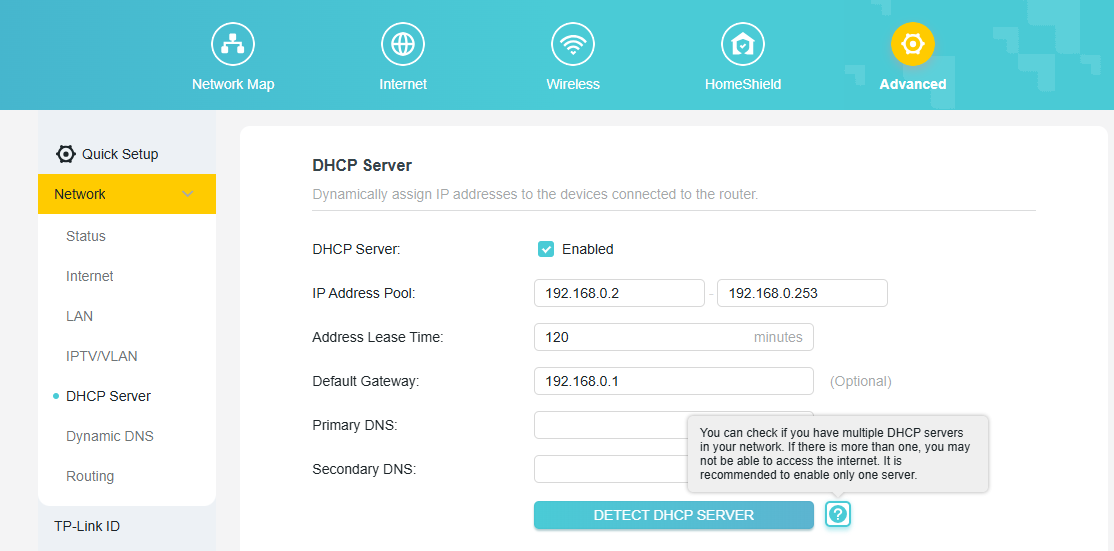
7. DHCP Detection
To help you troubleshoot common network issues, we have added a DHCP Server Detection tool. Having more than one DHCP server active on a network can cause IP address conflicts and prevent devices from accessing the internet. This new one-click tool allows you to scan your local network to easily identify any other active DHCP servers, helping you resolve conflicts to ensure a stable and reliable connection.
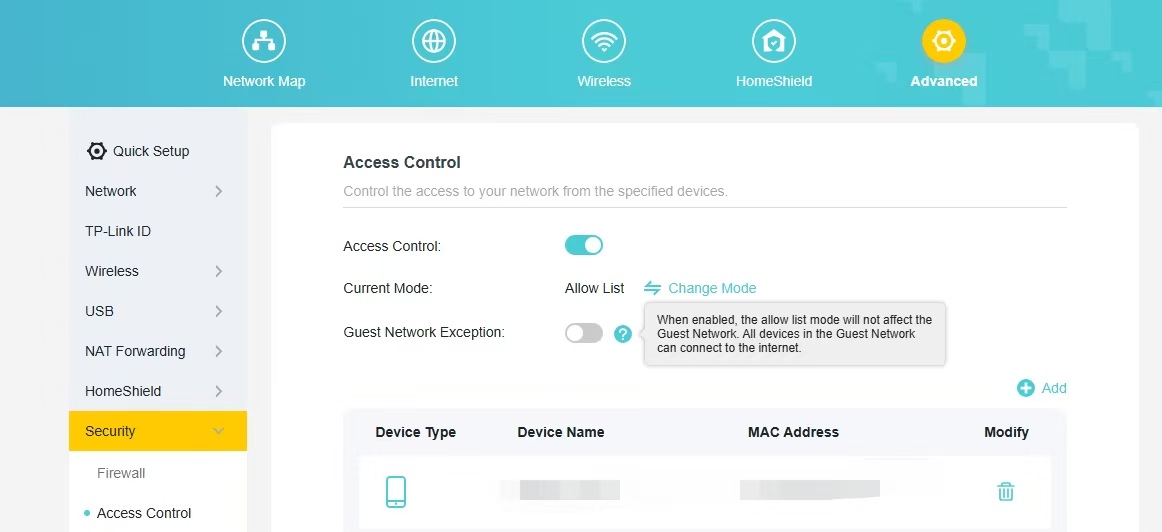
8. Guest Network Exception Button
Add a button to the Access Control whitelist that does not apply to the Guest Network. When enabled, the allow list mode will not affect the Guest Network. All devices in the Guest Network can connect to the internet.
9. New features on Tether App
(1) Added support for TSS (TP-Link Simple Setup) Auto Discovery & Quick Configuration of Tether APP.
(2) Added support for QoS (Quality of Service) configuration within the Tether App.
Other Enhancements/Bug Fixes:
(1) Optimizations of IPv6 Dial-Up Methods and Functional Experience.
(2) Enhanced system security, stability, and performance.
Firmware Download:
Before the Upgrade
(1) Please be sure you have read the Beta Test Agreement before upgrading the pre-release firmware!
(2) For the sake of insurance, it's always recommended to save a copy of the router's Backup Config file before upgrading or downgrading.
(3) This pre-release firmware for Archer BE800 V1 is available for all versions (EU/US/AU/CA/etc).
(4) You may follow the guide to upgrade the firmware of your router. How to Upgrade the Firmware on the TP-Link Wi-Fi Routers.
(5) This version of the software can't be degraded to the previous official version.
Direct Firmware Download Link
| Archer BE800_V1 | Archer BE800_V1_1.4.1 Build 20260313 (Pre-Release Firmware) |
Additional Information
As always, we value your feedback. If you happen to encounter any concerns during or after the router firmware upgrade, please leave a message below and provide the following information. Your feedback helps us continuously improve and provide you with better products and support.
Please provide detailed information, including but not limited to:
- A complete network topology diagram.
- The device's connection method, and whether EasyMesh networking is enabled.
- Screenshots of relevant error messages, etc.
Thank you for your continued support and for being a member of our community.
Updated Log:
Updated to Build 20260130 Pre-Release Firmware (Feb 3rd);
Updated to Build 20260313 Pre-Release Firmware (Mar 19th).
- Copy Link
- Subscribe
- Bookmark
- Report Inappropriate Content

Hereby confirm that weather x bug persists. It's not resolved. I believe the user reported resolving the bug is mistaken, as when you restart the router, initially it is showing some random weather data not corresponding with the real one, which never changes(never get weather updates). Once you go in router weather display settings and select your current location, or any other city in the world, then you get the weather x bug.
- Copy Link
- Report Inappropriate Content

A quick question
is there a newer build such as Firmware Version: 1.4.1 Build 20260203 Pre-release version ?
the download link points and install version 1.4.1 Build 20260130 rel.33187(4555) which seems to be a january release .
where can the Firmware Version: 1.4.1 Build 20260203 Pre-release version be downloaded ?
Best regards.
Side advise for your Amazon shop handlers ... tell them please to specify on hardware version ... if is V1 or V2 ... it is very confusing ... wanted to order be550 V2 ... amazon germany sent me V1 .
- Copy Link
- Report Inappropriate Content

@marto74bg Thank you for your answer and I confirm, I did not pay attention if what was displayed is correct , then went to the weather , tried to set location and yes, problem is still there. Sorry.
- Copy Link
- Report Inappropriate Content
@Joseph-TP Hi
the Archer BE800)))((( Archer BE550 Pro, the easy mesh works for all modes wirelessly EXCEPT if I set the BE800 to BE mode.
I used the pre release firmware: 1.4.1 Build 20260130 rel.33187(4555)
Also, I was wrong about the weather, problem still persist.
Thank you
- Copy Link
- Report Inappropriate Content
We have a newer firmware, and the tech team will likely reach out to you via email. Please check your email inbox and confirm.
Please let us know if the new firmware can help.
Hi @marto74bg & @Bluefish91 , may I know whether weather x persists? The user mentioned that it had resolved itself.
- Copy Link
- Report Inappropriate Content
Hello @abasoufiane ,
I noticed your case has been transferred to an engineer, ID TKID260300271. Keep an eye on the engineer's reply; you should also receive the new firmware.
- Copy Link
- Report Inappropriate Content
Hello @Ovidiuss ,
The version you can currently download is 1.4.1 Build 20260130 rel.33187, so your download is correct.
The 1.4.1 Build 20260203 Pre-release version has been corrected to 1.4.1 Build 20260130 Pre-release version.
A newer firmware version is planned to replace 1.4.1 Build 20260130. I will update this page with any process.
Thank you for your feedback on our product. If you received the wrong product, please explain and contact Amazon Store Support for a replacement as soon as possible.
Ovidiuss wrote
A quick question
is there a newer build such as Firmware Version: 1.4.1 Build 20260203 Pre-release version ?
the download link points and install version 1.4.1 Build 20260130 rel.33187(4555) which seems to be a january release .
where can the Firmware Version: 1.4.1 Build 20260203 Pre-release version be downloaded ?
Best regards.
Side advise for your Amazon shop handlers ... tell them please to specify on hardware version ... if is V1 or V2 ... it is very confusing ... wanted to order be550 V2 ... amazon germany sent me V1 .
- Copy Link
- Report Inappropriate Content
Latest firmware 1.4.1 Build 20260313 rel.47813(4555) fixes the weather x bug.
Many thanks!
- Copy Link
- Report Inappropriate Content
@marto74bg
Where this new version? I still see only the old beta...
- Copy Link
- Report Inappropriate Content
I've received link with the new firmware on my e-mail. After testing it for few hours it appears that the weather bug is not fixed. Now there is some weather info on the display, but it never get updated. Displayed temperature is always the same. I've reported above to the support team, so waiting for their reply and potentially new firmware update.
- Copy Link
- Report Inappropriate Content
Information
Helpful: 1
Views: 36482
Replies: 237
Voters 1