
Early Access New Firmware for Archer BE800 V1 to Support VPN Merge,Guest/IoT Network Extend in EasyMesh, and More


Hello everyone!
We are pleased to announce the latest firmware update for the Archer BE800 V1, which introduces a range of new features, especially significant enhancements to the VPN Feature and EasyMesh Network usage.
We encourage all users to upgrade to the latest firmware and share your feedback with us. Your valuable opinions are crucial to our continued product improvement! We look forward to your experience!
Download the update now and experience your router's new features!
New Features/Enhancements:
1. Enhanced VPN feature
(1) VPN Merge
We have officially upgraded the previous VPN Client feature to the new, more powerful VPN Merge. This optimization significantly enhances the flexibility of your network. With VPN Merge, you can now connect different devices on your network to multiple VPN servers simultaneously. For example, your work laptop can connect to a corporate VPN while your smart TV uses another VPN for video streaming. To use this feature, simply enable VPN Merge, add your desired servers to the Server List, and assign them to specific devices in the Client List.
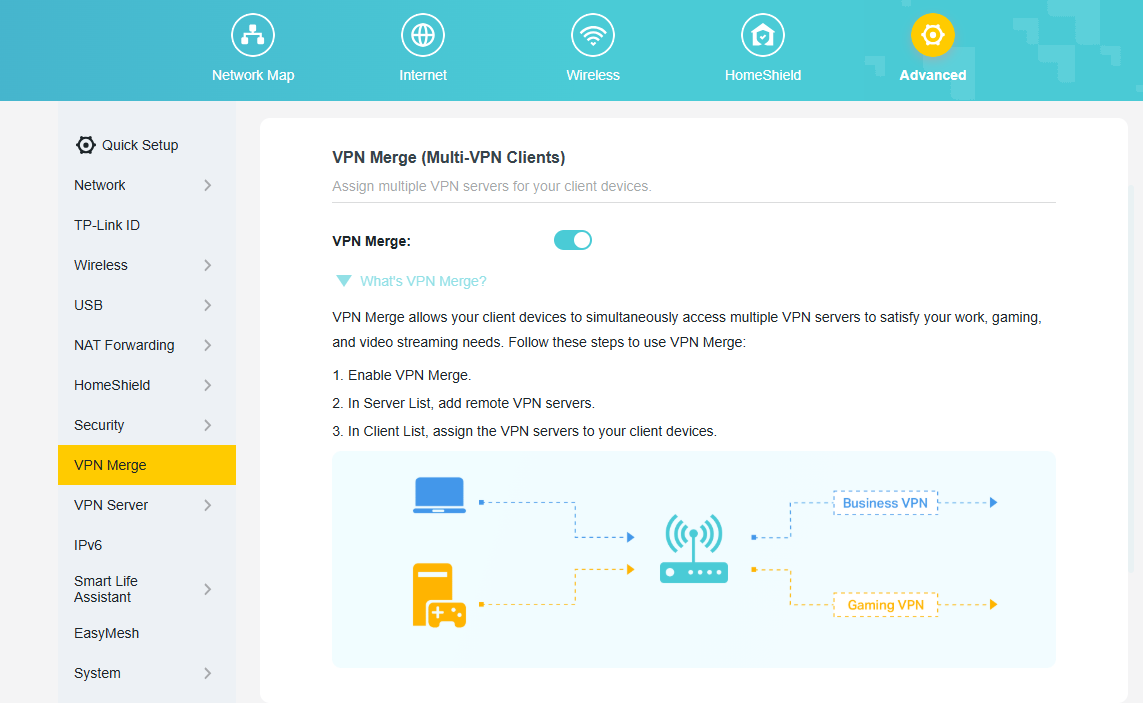
(2) VPN Kill Switch
The VPN Kill Switch to improve your network security. When you enable this feature for a VPN server, it will continuously monitor the connection status. If your VPN connection drops unexpectedly, the Kill Switch will immediately block internet access for all devices using that VPN. This protection remains active until the connection to the VPN server is safely restored, preventing potential data leaks.
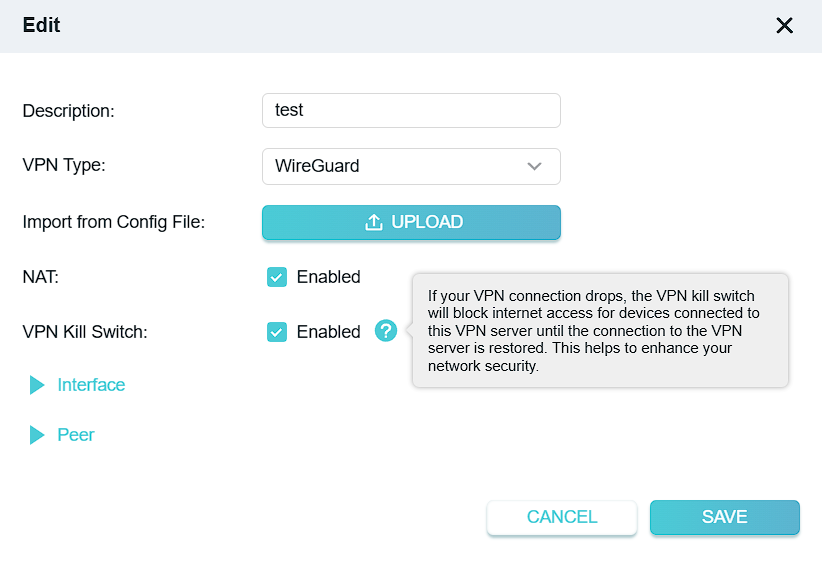
(3) Other Enhancements:
- Supports DDNS synchronization during OpenVPN server configuration.
- Add third-party VPN support when configuring the VPN Client: IPVanish, PureVPN.
2. Enhanced EasyMesh Network
(1) EasyMesh Traffic Separation (*Extend Guest Network)
We have introduced the Traffic Separation feature within the EasyMesh R3 protocol, enabling the synchronous extension of the main router's Guest Network capabilities to satellite devices. This enhances the security of your main network.
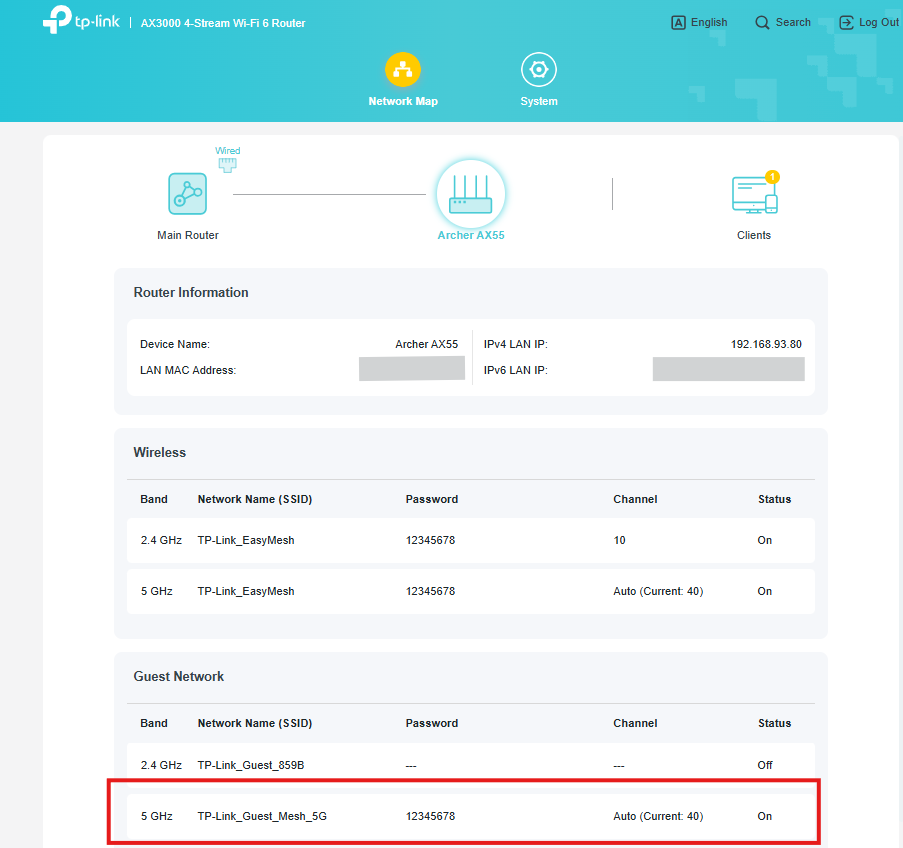
(2) IoT Network configuration synchronization
We have introduced the capability to synchronize certain IoT Network configurations from the main router to satellite devices, further enhancing the performance of EasyMesh satellite units.
(3) EasyMesh Client Binding
EasyMesh Client Binding allows you to pin specific devices (e.g., smart TVs or IoT sensors) to a designated EasyMesh node, preventing unnecessary roaming and improving connection stability for latency-sensitive or stationary clients.
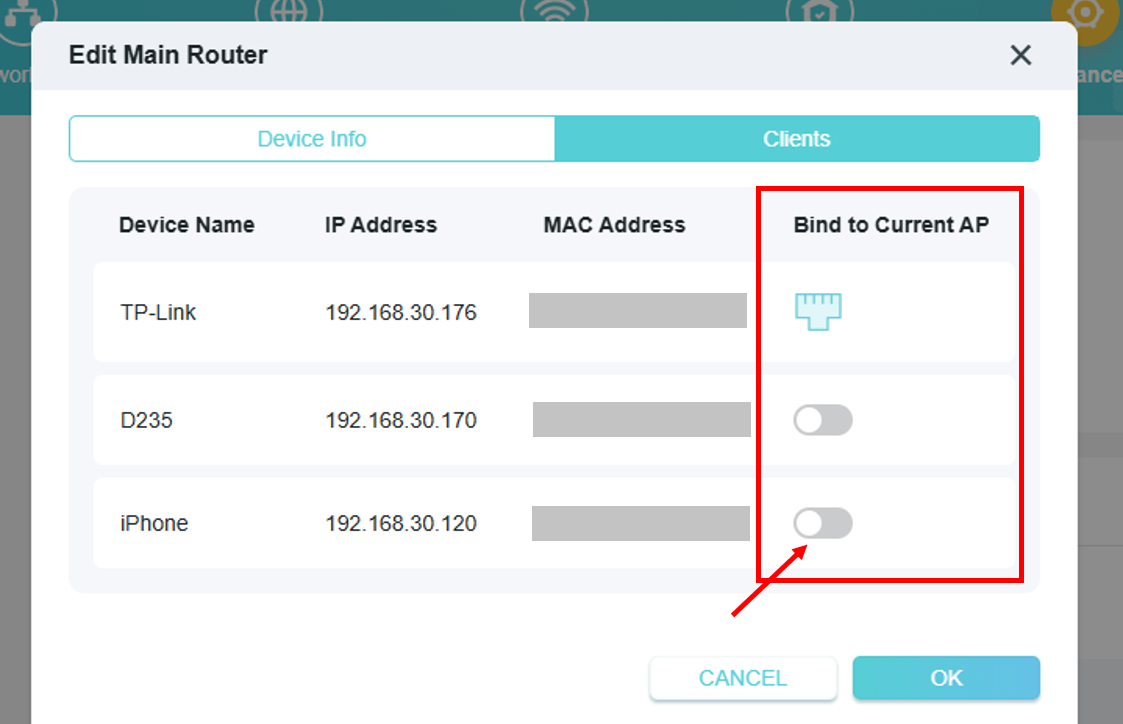
(4) EasyMesh Satellite Node Binding
EasyMesh Satellite Node Binding allows you to manually specify which upstream node a satellite should connect to.
3. ECO Mode V2
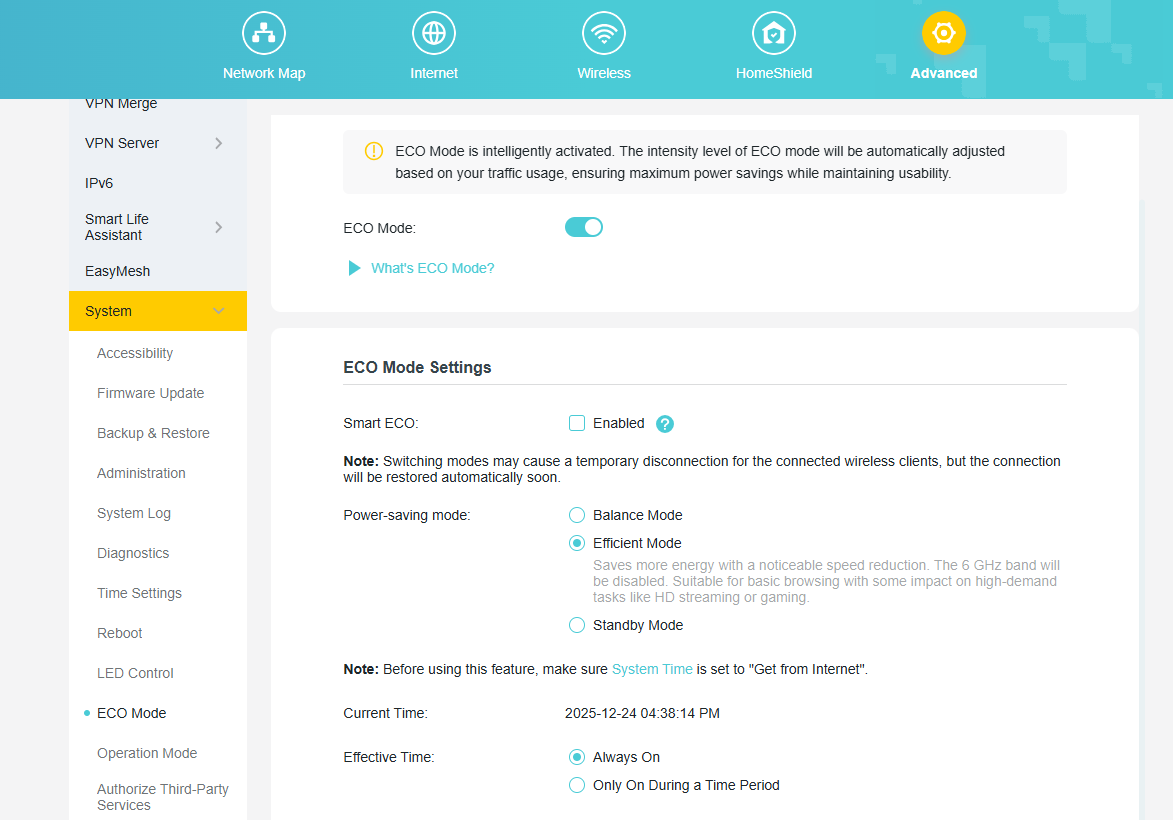
The new ECO Mode Feature is designed to help you save power intelligently. You can select the default Smart ECO mode, which automatically adjusts power consumption based on your real-time traffic usage and turns off the LEDs. This minimizes the impact on your regular internet activities while reducing energy use. For more personalized control, you can also choose from several other power-saving modes and even schedule them to be active only during a specific time period.
4. Admin Password Recovery
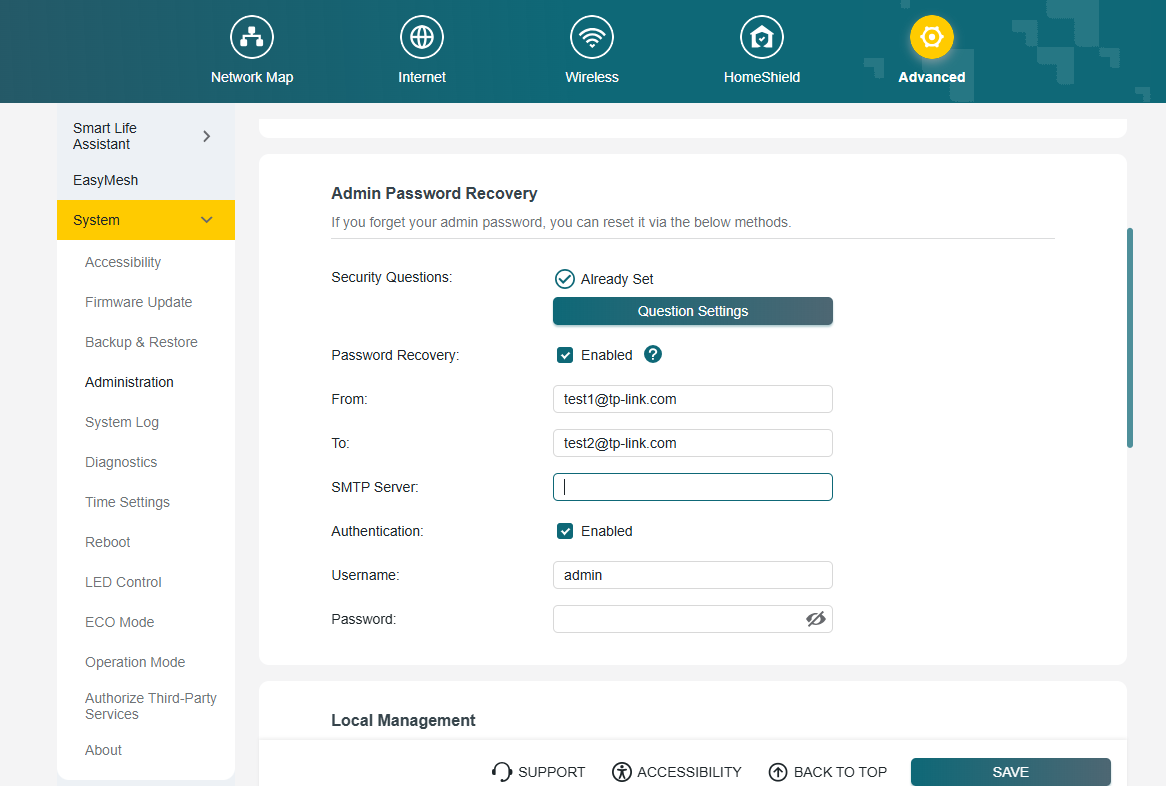
We have introduced new methods to recover your local administrator password, ensuring you never lose access to your router's settings. You can now choose between two secure recovery options. You can enable and configure these options under System > Administration.
(1) Security Questions
Set up answers to predefined security questions. This allows you to verify your identity and reset your password quickly.
(2) Email Recovery
Configure a designated email address and your own SMTP server to receive password recovery instructions directly to your inbox.
5. Advanced USB Feature
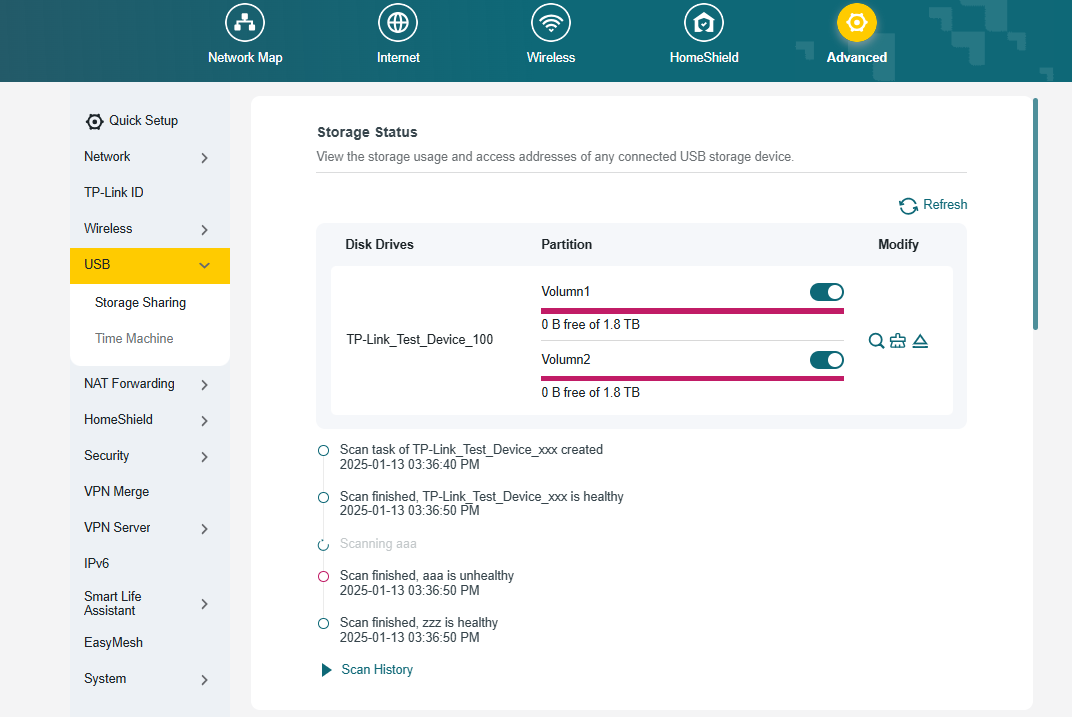
We have upgraded the USB Sharing feature with two powerful new management tools. First, you can now perform a Disk Scan to verify the health of your connected drive. This can be triggered manually or scheduled to run automatically at regular intervals for proactive data protection. Second, we have integrated a Format function, allowing you to format a USB drive directly from the router's interface without the need for a computer. These features provide greater convenience and control over your network storage.
6. Backup & Restore
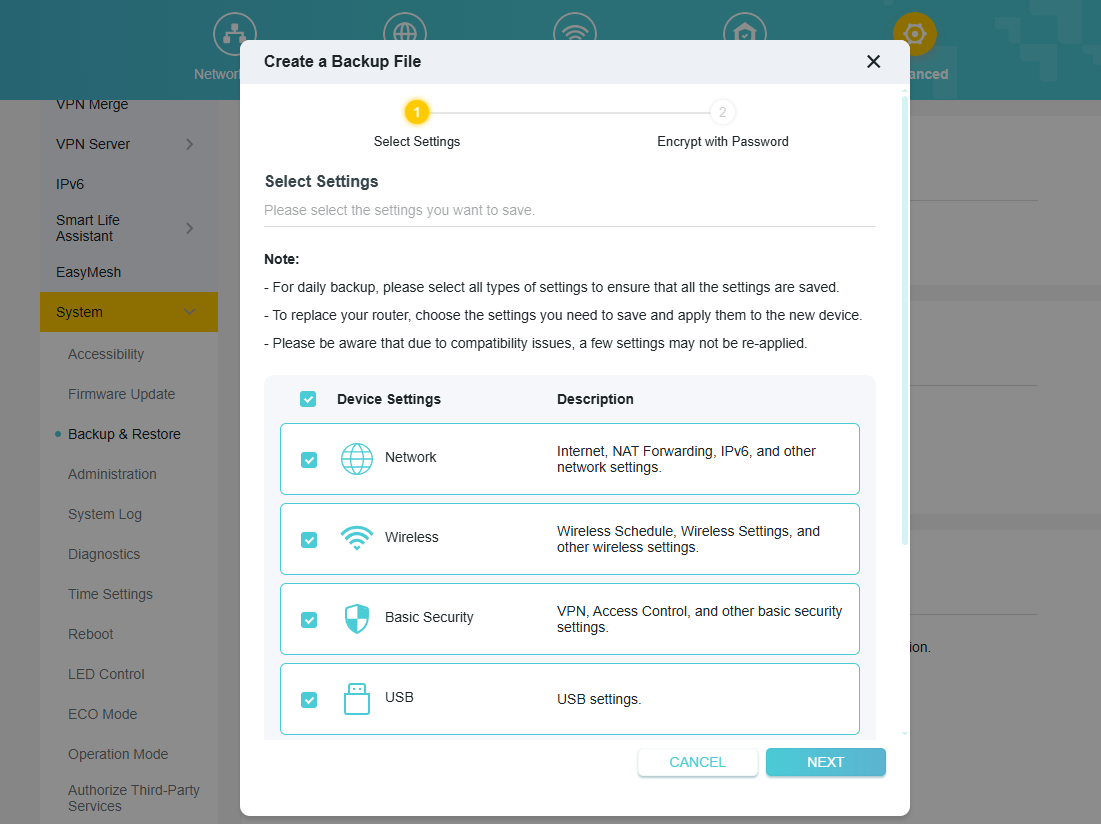
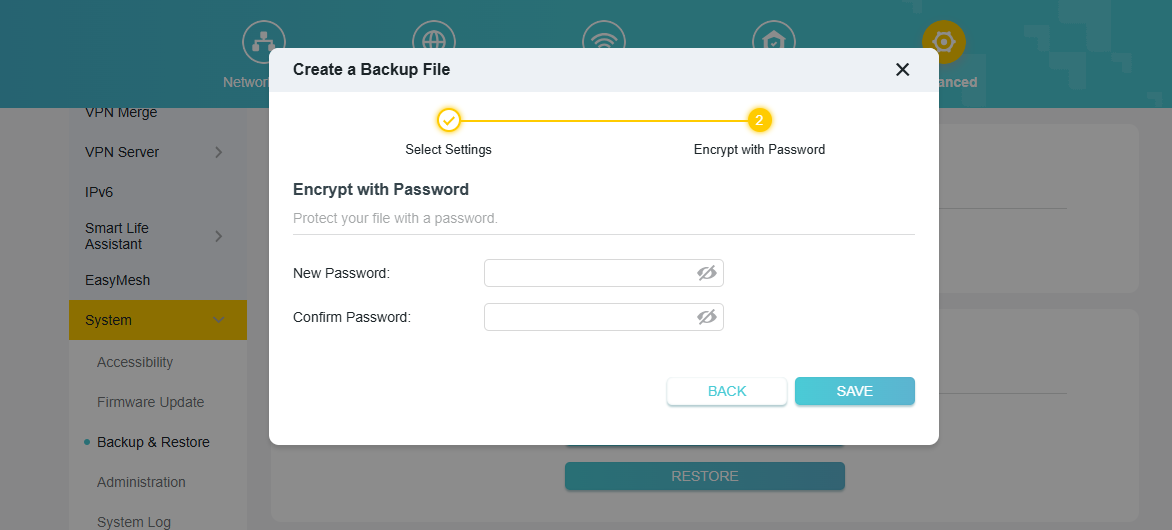
We have significantly upgraded the router's backup functionality for greater control and security. You can now perform a Selective Backup, allowing you to choose specific configuration modules to save, such as Network, Wireless, or Security settings. Additionally, you can now encrypt the backup file with a password, ensuring your sensitive configuration data is protected from unauthorized access.
7. DHCP Detection
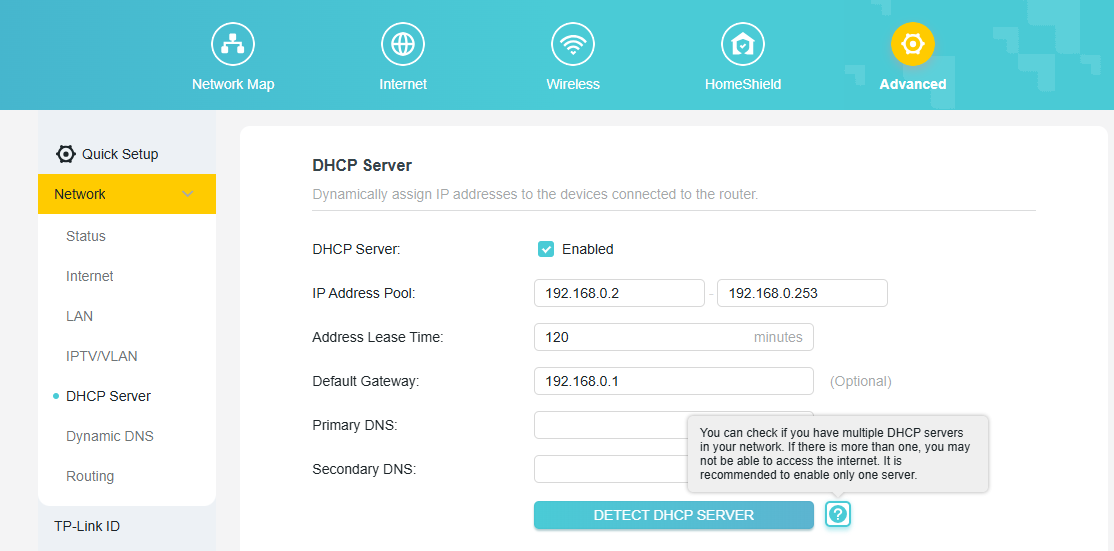
To help you troubleshoot common network issues, we have added a DHCP Server Detection tool. Having more than one DHCP server active on a network can cause IP address conflicts and prevent devices from accessing the internet. This new one-click tool allows you to scan your local network to easily identify any other active DHCP servers, helping you resolve conflicts to ensure a stable and reliable connection.
8. Guest Network Exception Button
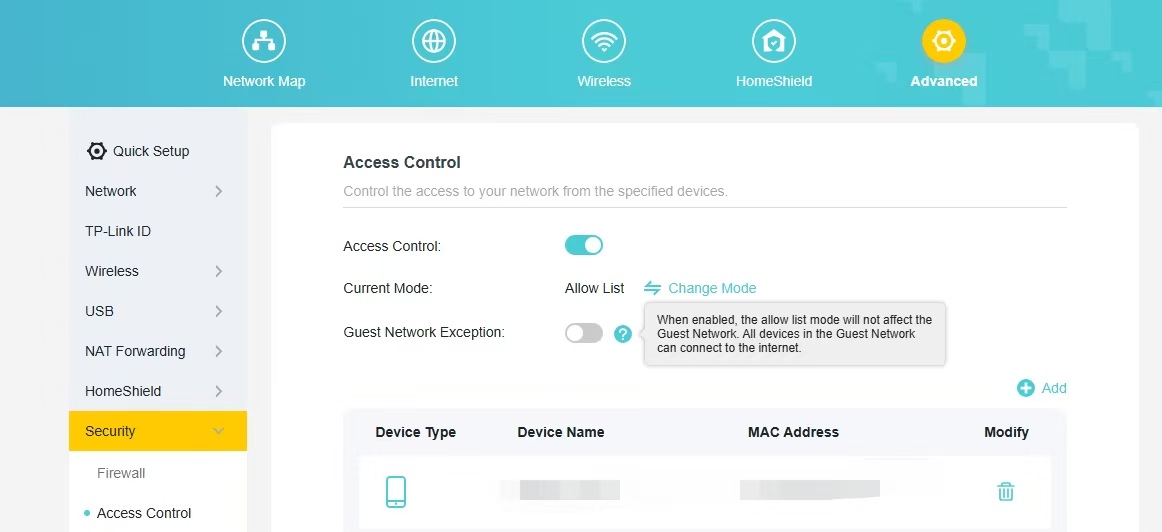
Add a button to the Access Control whitelist that does not apply to the Guest Network. When enabled, the allow list mode will not affect the Guest Network. All devices in the Guest Network can connect to the internet.
9. New features on Tether App
(1) Added support for TSS (TP-Link Simple Setup) Auto Discovery & Quick Configuration of Tether APP.
(2) Added support for QoS (Quality of Service) configuration within the Tether App.
Other Enhancements/Bug Fixes:
(1) Optimizations of IPv6 Dial-Up Methods and Functional Experience.
(2) Enhanced system security, stability, and performance.
Firmware Download:
Before the Upgrade
(1) Please be sure you have read the Beta Test Agreement before upgrading the pre-release firmware!
(2) For the sake of insurance, it's always recommended to save a copy of the router's Backup Config file before upgrading or downgrading.
(3) This pre-release firmware for Archer BE800 V1 is available for all versions (EU/US/AU/CA/etc).
(4) You may follow the guide to upgrade the firmware of your router. How to Upgrade the Firmware on the TP-Link Wi-Fi Routers.
(5) This version of the software can't be degraded to the previous official version.
Direct Firmware Download Link
| Archer BE800_V1 | Archer BE800_V1_1.4.1 Build 20260313 (Pre-Release Firmware) |
Additional Information
As always, we value your feedback. If you happen to encounter any concerns during or after the router firmware upgrade, please leave a message below and provide the following information. Your feedback helps us continuously improve and provide you with better products and support.
Please provide detailed information, including but not limited to:
- A complete network topology diagram.
- The device's connection method, and whether EasyMesh networking is enabled.
- Screenshots of relevant error messages, etc.
Thank you for your continued support and for being a member of our community.
Updated Log:
Updated to Build 20260130 Pre-Release Firmware (Feb 3rd);
Updated to Build 20260313 Pre-Release Firmware (Mar 19th).
- Copy Link
- Subscribe
- Bookmark
- Report Inappropriate Content
Hello
Thank you both for your feedback. I have reported your situation to the relevant department, but it seems we are unable to fully reproduce these anomalies.
Therefore, we may need to collect more information to facilitate more accurate reproduction and further analysis:
- During the configuration process, did you modify any settings?
- Did you receive any error messages during the update process?
- Before upgrading to these two firmware versions, specifically Archer BE800_V1_1.4.1 Build 20260313 and Archer BE550_V2_1.3.1 Build 20251229, which firmware version were you using on your routers (including BE800 and BE550)?
- Please send the whole network topology here. For example, ISP modem—router )))((( client devices
(Note: — stands for wired connection,)))((( stands for wireless connection )
- If convenient, we would like to collect backup files and attempt to reproduce these anomalies again. The tech team will likely reach out to you via email to continue troubleshooting. Please check your email inbox and confirm.
- Copy Link
- Report Inappropriate Content
@Joseph-TP
Seems I have problems after the new firmware with the connection to my nas from my phone... Strangely its worked before but seems now somehow cant reach the 443 outside from the lan...
- Copy Link
- Report Inappropriate Content
Hi @Joseph-TP,
Thank you for the quick response. Here are the details regarding my setup and the issues I’m facing:
1. Network Topology:
-
Internet Source: Fiber SFP+ Stick ("XGSPON ONT SC/APC XGSPON SSH STICK ONU SFP+ 10G") inserted directly into the SFP+ WAN/LAN port of the main router.
-
Main Router: Archer BE800 V1.
-
Satellites: Two Archer BE550 V2 connected via Wi-Fi Mesh.
-
Topology Layout: ISP Fiber (SFP+ Stick) — Archer BE800 (Main) )))((( 2x Archer BE550 V2 (Satellites).
2. Previous Firmware Versions:
-
Archer BE800 V1: I was using a custom beta firmware previously provided by your support team in this thread: https://community.tp-link.com/en/home/forum/topic/851572.
-
Archer BE550 V2: Currently running on 1.3.1 Build 20251229.
3. Configuration & Issues:
-
Settings: No settings were modified during the process.
-
Update Process: No error messages were received during the firmware update.
-
The Problem: After the update, the Guest Network is not extending to the satellite nodes. I have tried restarting the routers and even re-configuring the Mesh from scratch, but the issue persists.
-
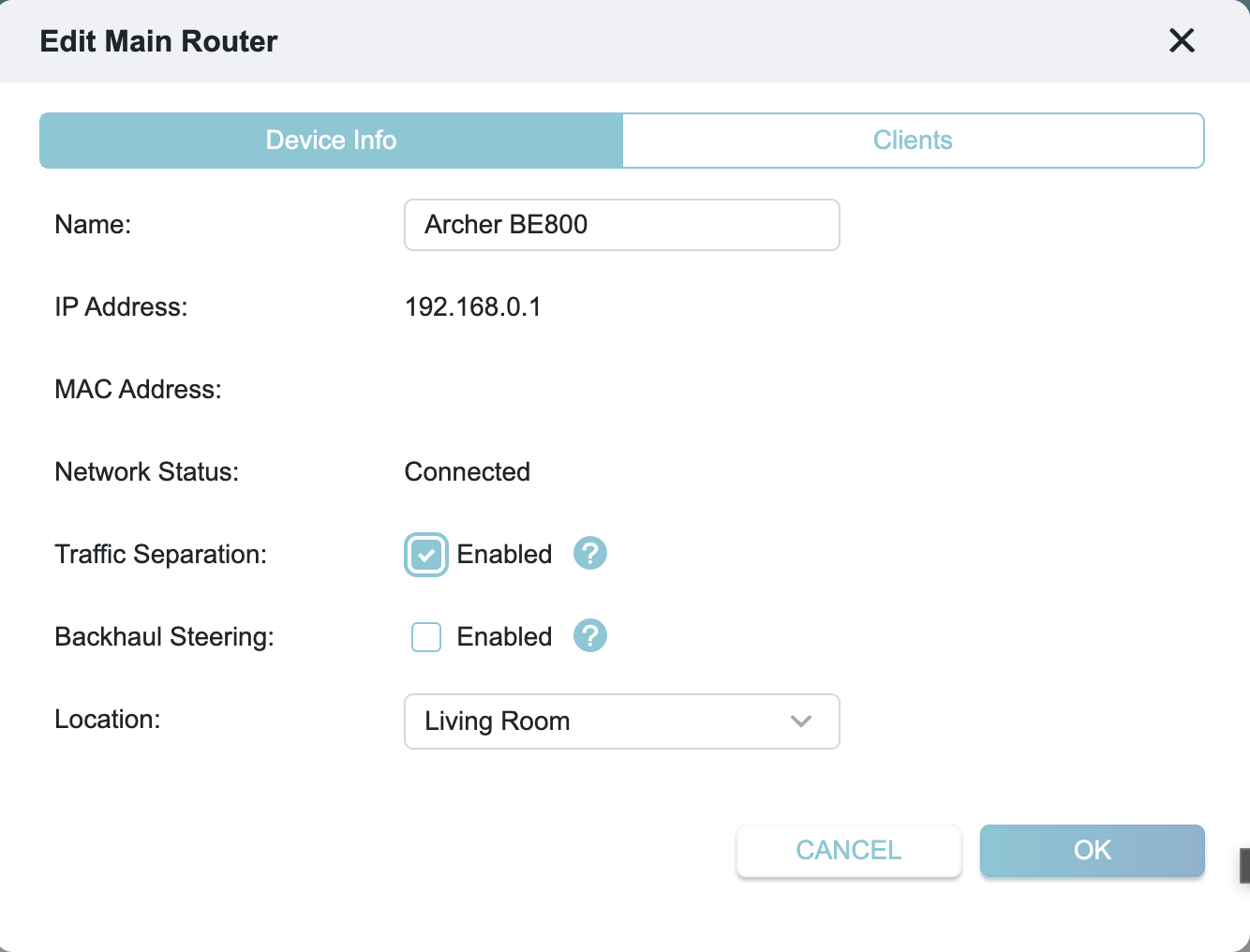
Traffic Separation Bug: As seen in the attached screenshot, I attempted to manually enable Traffic Separation on the main router, but the setting does not save. After clicking "OK" or refreshing the page, it reverts or fails to apply effectively.
I am checking my email for further instructions from the tech team and I'm ready to provide the backup files and system logs.
Thank you for your help!
- Copy Link
- Report Inappropriate Content
Hi @raq50 ,
Thanks for your reply.
The ticket ID is TKID260345096. You can send the system log and backup file via email. We will then escalate your case to the engineer for further analysis. 
- Copy Link
- Report Inappropriate Content
@raq50 ,
Thanks for your reply.
You downloaded the BE800 firmware twice in total, right? That is, the first version and the latest version.
- Copy Link
- Report Inappropriate Content
Hi @Joseph-TP,
Yes, that is correct. I only downloaded the firmware twice: first the special SFP beta from the previous thread (Build 202511xx), and then this latest Build 20260313. I upgraded directly from the SFP beta to the current one.
- Copy Link
- Report Inappropriate Content
Hi @Joseph-TP,
I found another critical bug in this beta version. I am unable to save any changes in the Wireless Settings menu (even simple things like changing Transmit Power).
Whenever I try to click "Save", I get two errors:
-
A popup saying: "The name already exists, please set a different network name."
-
A top bar notification: "Operation failed."
It seems the firmware's validation logic is conflicting with itself because I use the same SSID ("BACKBONE") for Main, 6GHz, and MLO networks (which worked perfectly in previous versions). Currently, the router is "locked" and won't allow any configuration updates.
I have attached screenshots of these errors. This is making further testing very difficult as I cannot adjust the network parameters.
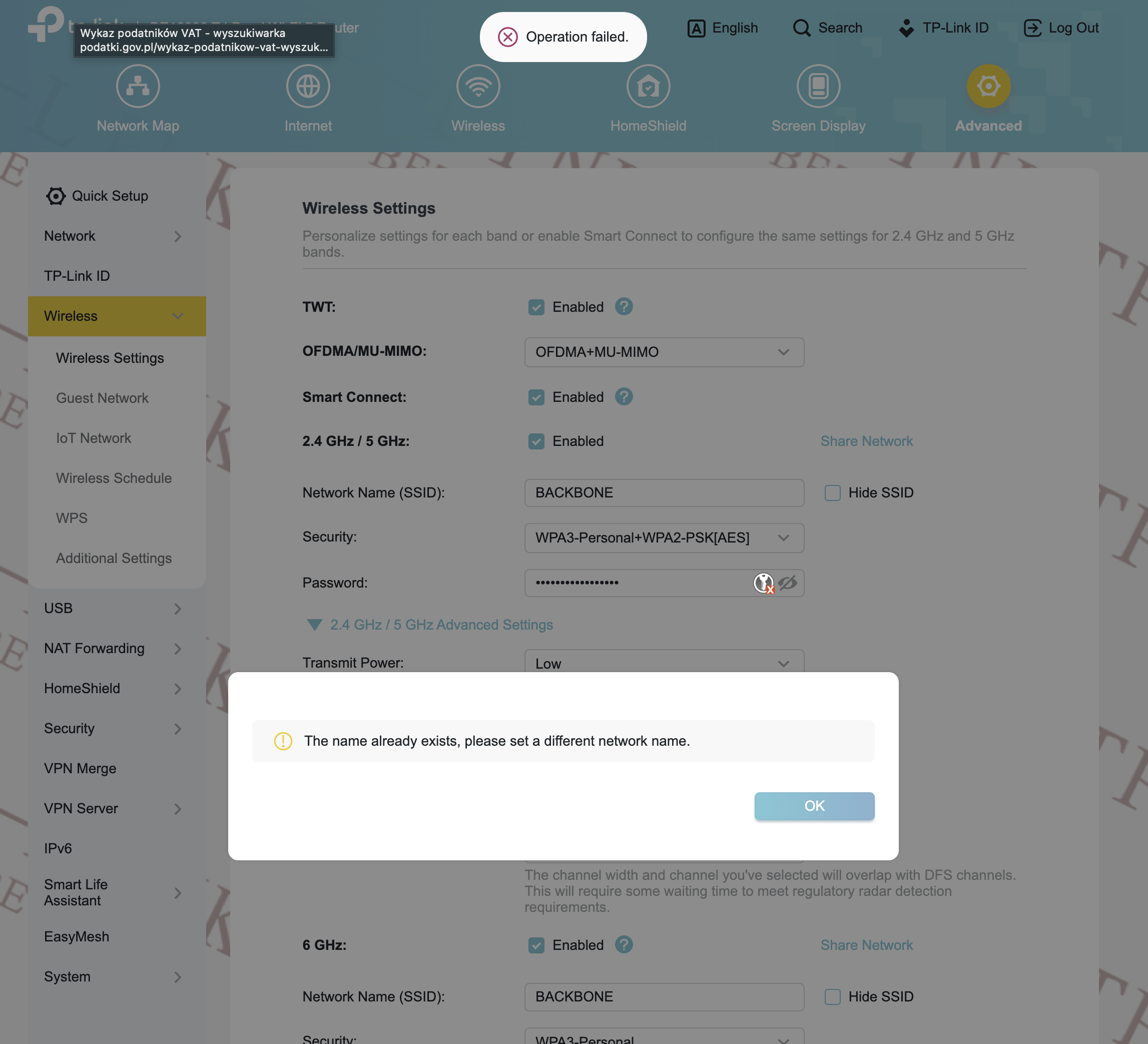
I found a workaround for the saving issue. It turns out that having the same SSID ("BACKBONE") for both the Main Network and the MLO Network causes a validation error: "The name already exists, please set a different network name."
After changing the MLO SSID to something different (e.g., "BACKBONE_MLO"), I am finally able to save wireless settings again. This seems to be a bug in the SSID validation logic of the current beta build.
Please investigate why the firmware no longer allows unified SSIDs across MLO and Main networks, as this worked in previous versions.
- Copy Link
- Report Inappropriate Content
I have confirmed that the "Traffic Separation" setting can be saved ONLY IF the MLO Network SSID is different from the Main Network SSID.
It appears the firmware has a validation bug that blocks all "Save" operations if there is an SSID name conflict, even though it doesn't explicitly highlight the MLO field as the cause.
However, even after successfully saving "Traffic Separation" with the workaround, I still need to verify if the Guest Network is correctly reaching the BE550 satellites.
I have successfully resolved the issue! It turns out there is a UI Validation Bug in the BE800 Build 20260313.
The Problem: > When the Main Network SSID and the MLO Network SSID are identical (e.g., both named "BACKBONE"), the router throws an "Operation failed" error and blocks all wireless settings from being saved. This also prevented the "Traffic Separation" toggle from working.
The Solution/Workaround: > I changed the MLO Network SSID to a different name (e.g., "BACKBONE_MLO"). After this change, the router allowed me to save settings.
The Result: > Once "Traffic Separation" was successfully saved, the Guest Network immediately started working on the Archer BE550 V2 satellites without any issues!
Please ask the engineers to fix the SSID validation logic so that we can use unified SSIDs for both Main and MLO networks again, as we could in previous versions.
- Copy Link
- Report Inappropriate Content

I think it could also help if the router shows more detailed system logs for connection drops. Right now it is hard to understand if the issue is from firmware, interference, or device behavior. Even a simple timeline of events (like reconnects, DHCP renew, or band switching) would make troubleshooting much easier for users.
- Copy Link
- Report Inappropriate Content
Hi @raq50
Thank you so much for your feedback.
I will sync all your test results to the engineer.
@Bluefish91 Have you set MLO Network SSID to the same as the Main network SSID? Would you mind testing whether changing the MLO SSID to a different one can help?
raq50 wrote
I have confirmed that the "Traffic Separation" setting can be saved ONLY IF the MLO Network SSID is different from the Main Network SSID.
It appears the firmware has a validation bug that blocks all "Save" operations if there is an SSID name conflict, even though it doesn't explicitly highlight the MLO field as the cause.
However, even after successfully saving "Traffic Separation" with the workaround, I still need to verify if the Guest Network is correctly reaching the BE550 satellites.
I have successfully resolved the issue! It turns out there is a UI Validation Bug in the BE800 Build 20260313.
The Problem: > When the Main Network SSID and the MLO Network SSID are identical (e.g., both named "BACKBONE"), the router throws an "Operation failed" error and blocks all wireless settings from being saved. This also prevented the "Traffic Separation" toggle from working.
The Solution/Workaround: > I changed the MLO Network SSID to a different name (e.g., "BACKBONE_MLO"). After this change, the router allowed me to save settings.
The Result: > Once "Traffic Separation" was successfully saved, the Guest Network immediately started working on the Archer BE550 V2 satellites without any issues!
Please ask the engineers to fix the SSID validation logic so that we can use unified SSIDs for both Main and MLO networks again, as we could in previous versions.
- Copy Link
- Report Inappropriate Content
Information
Helpful: 1
Views: 36506
Replies: 237
Voters 1
