Parental control is not working properly.

Parental control is not working properly.

Parental control is not working properly.
a week ago
Model: Deco X50  
Hardware Version: V1
Firmware Version: 1.8.0 Build 25102213 Rel.43970

Hi Experts, Last week I noticed significant network problems. I decided for the factory reset of all my X50 and since then I've had problems with parental controls.

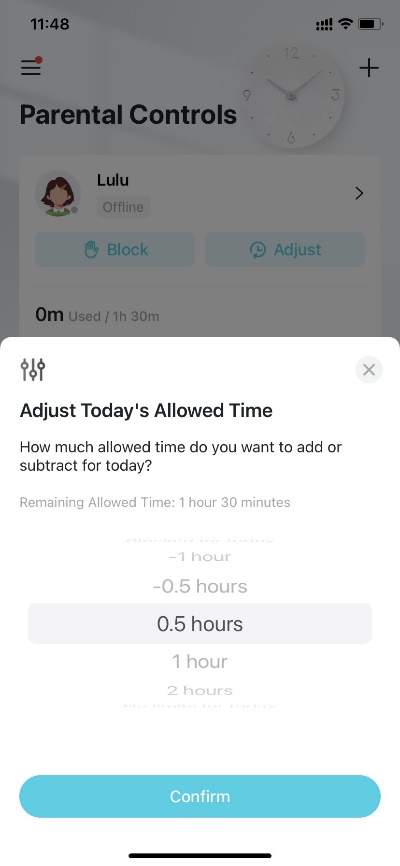
I have 2 profiles for my children with a limit of 2 hours/weekday. If this time is exceeded, I was previously able to add additional time via CHANGE button ( if they needed more time for school, for example) . However, since the upgrade, it stopped working. I can still add the additional time via button in child profile, but this change is not saved and after a short time (few sec) the original time from general time settings is displayed again and wifi is blocked for children's devices .

I tried to change it with a connection to the WIFI network and also via mobile data, I deleted the profiles and created new ones, checked Timezone, nothing helped.

  0      
  0      
#1
Options
2 Reply
Re:Parental control is not working properly.
a week ago

  @RadoMa 

Hi, welcome to the community.

Have you tried to manually restart the Deco hardware once to see whether it helps?

If it was still the same, could you please refer to this link to help me submit the Deco App log:

How to submit Deco APP log


By the way, did you add extra time via the "Award" feature here:

Parental controls interface with "Adjust Today's Allowed Time" pop-up, showing time adjustment options and a "Confirm" button.

Best regards.

  0  
  0  
#2
Options
Re:Parental control is not working properly.
a week ago

  @David-TP  thanks for the answer.

I manually restarted the router several times but it didn't help.

The problem is exactly with the "Adjust" button from your picture (Award feature).

I have already submitted the app log.

Thank you in advance for your help and willingness

  0  
  0  
#3
Options