X55 five unit mesh massive oddities since last firmware update

I have a five unit X55 (v1.6) mesh that's been in place for going on 4-years. Overall, it has worked reasonably well. ...until, that last firmware update. Since then, it has become increasingly problematic, including not being able to log in via browser on any local wired or wirelessly attached computer. The Android app has become increasingly useless, as well.
1 - When I attempt to log in via local computer browser by connecting directly to the local IP address (192.168.XXX.XXX), eventually the webpages/index.html page loads. When I input the correct password for the unit and login, and click the Log In button, it turns gray for several seconds, then reverts to blue. Regardless of what I enter into the login for a password, the same thing happens. No error. No password incorrect notification. No feedback, whatsoever. This behavior is the same on multiple wire connected computers, and utilizing Firefox, Edge, Chrome, Brave, and DuckDuckGo browsers. This is my preferred method of working with the system, the only method for some operations and functions, so this is a massive sore spot for me.
2 - The Android app has become increasingly buggy, I believe, because of the issues the main X55 is experiencing. While it will report 100% CPU and 75%-85% Memory usage, beginning almost immediately after a soft or hard reboot, most other functions stall, or simply time-out and give up, leaving me with a pittance of control, or information about the units. I believe this max out of CPU and Memory load may be part of the issue with logging in via the web interface. Prior to the last firmware update to all 5 units, initiated via the web interface, CPU and Memory loads rarely topped 70%.
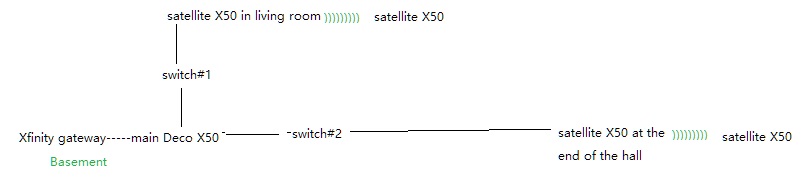
I have an Xfinity gigabit connection with the modem in gateway mode, making the main Deco the control unit for the network, and internet connectivity. The main Deco is about 18" from the cable modem, wired via CAT6 cable. Both are in my basement office. The output cables from the Deco run to two gigabit switches, one connecting office devices, and cabling up through the floor to the living room above. The other connecting to another gigabit switch, feeding up to the opposite side of the house. Two of the remote Deco units are attached to these switches via CAT6 cables, one in the living room, and one at the end of the hall, at the opposite end of the house. The other two Decos connect to these through wireless backhaul, providing full coverage of the house, garage, and a fair distance into the surrounding grounds. The house is in the middle of 14 acres of Tennessee mountainside, so interference from outside sources is minimal.
I have several Blink cameras monitoring the property, and a Ring doorbell. While these do, in aggregate, trigger somewhat regularly, they don't result in a significant load on the system. And, like most modern homes, there are smart TV's or IPTV sticks throughout, but rarely more than one active at any given time. There are three Tivo's, but they're not used for streaming, so their only load is the daily connection to update their TV guide menus. A few Alexa devices, and Alexa enabled smart devices are in place. And, the typical phones, tablets, computers, games, etc., of the modern household, that typically add load in bits and blips, except when someone's playing an online game.
So, while I do have a typically 60'ish devices connected to the network, the vast majority of them utilize very little bandwidth or resources at any given time.
Which leads me back to the question of how I could possibly be using virtually all of the Deco's resources, all the time? And, if I can't log in to get realistic data from the unit, how am I supposed to troubleshoot to figure out what the issue is? I'm reasonably certain it's not the number of devices, or any single device on the network, as I've unplugged the other 4 units, and turned off the switches to prevent connection in several areas of the home, and little has changed in the behavior of the main unit.
I really don't want to go through factory resetting everything, and starting over, particularly without knowing doing so will end the issue(s). So, If anyone has suggestions, I'm all ears.
Thanks!
Doc