
Deco PX50 - Deco iOS App Warning Message (!)
Deco PX50 - Deco iOS App Warning Message (!)

I have a pair of Deco PX50's providing my home WiFi from a 250mbs Virgin Media connection.
The satellite PX50 is in my sons bedroom and is using powerline backhaul ( strong ) with WiFi backup.
The whole setup works pretty well with very good coverage and speeds. We have a variety of mainly Apple devices ( oldest is original Homepod ) and Tapo cameras ( approx a year old ).
After the Deco app update today however I noticed an exclamation mark (!) against the satellite. It may have been there before and I hadn't noticed it though.
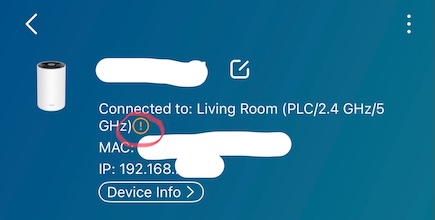
Pressing the exclamation (!) produces and strange explanation and recommendation.
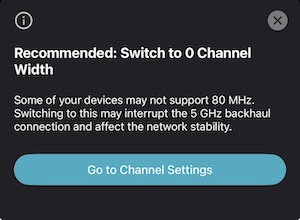
This is is after I had a similar message earlier regarding the 160MHz channel width ( which seems enabled by default ) not being supported by some devices and which I changed to 80MHz at the suggestion of the prompt. It's now set to 80 as I have only 3 devices that supports 160 ( M4 MacBook Airs ) plus I've read that 160MHz is as blessed as it is cursed for coverage and interference.
Can anyone tell me whats going on? Is it an app bug? What on earth is 0 channel width? Should I just leave it set to 80MHz, which seems fine, and forget about it.
Any help appreciated.
Radar
- Copy Link
- Subscribe
- Bookmark
- Report Inappropriate Content
It's one step forward then another back with the app.
There's zero explaination of what any of the messages really mean.
I also use powerline backhaul so whilst the messages are confusing there are likely irrelevant in my configuration.
I hate the 'some devices may' part of the message. Which devices specifically? And why do they not support channel with 80?
I appreciate that client devices vary quite considerably but all my kit is either TP-Link or very widely available Apple stuff.
The PX50 is a consumer level device. Consumer level messages and advice should really be presented rather than quite ambiguous, technical ones.
I just wish there was some consistency. The PX50 is now not available anymore so why do things have to keep changing.
Disappointing customer experience.
- Copy Link
- Report Inappropriate Content

@Radar68 Yeah my read on it is the same. Do not present these types of messages unless you have to, and if you insist, make them make sense. Meanwhile, we can't even get the ability to manually set a WiFi channel, even buried so deep in the settings that no one would ever find it unless they were looking for it specifically.
- Copy Link
- Report Inappropriate Content


@Radar68 @stncttr908
Hi,
Thank you for your feedback regarding the Deco app. I'll log them and forward them to the relevant team to improve our Deco app.
The latest iOS Deco app version is v3.10.384. Please update the Deco app to the latest version and check if the error message disappears. If not, please refer to the instructions below to send us the Deco app log for analysis. After that, please attach your email reference number (e.g., TKIDXXXX) to this thread, or reply to us after you send the app log.
How to Get and Send Deco System Logs to TP-Link Support
Btw, you can refer to the following instructions to change the Deco's channel and channel width if it supports this feature.
How to change Channel and Channel Width on Deco APP
Best Regards
- Copy Link
- Report Inappropriate Content
It may possibly have helped your reply if you'd followed the whole thread.
This is not an error message. It is an internal app message that is giving false and misleading information/errors. What even is Channel 0 width?!
I'm using the latest app version. It's this one that broke the fix that the previous one corrected.
I do not send logs without knowing their contents and given I posted here for advice from the manufacturer of my product, having a reply that's says 'if it supports this feature' is both baffling and disappointing.
Please just fix the app ( again ) and advise whoever writes it to perhaps make the messages a bit more meaningful in future rather than assuming all users know what such technical terms mean. Provide help and advice rather than ambiguous messages with words like 'some' and 'may'. Be specific!
- Copy Link
- Report Inappropriate Content
Hi,
After confirming with the relevant team, the content of the message "Recommended: Switch to 0 Channel Width" is incorrect. I have sent you a link to download the new Deco app(v3.10.404) via a private message. You can uninstall the Deco app from your phone, then reinstall the new app to see if the message will disappear. If you don't want to try it, please wait some time; the new Deco app will be officially released on the App Store.
Best Regards
- Copy Link
- Report Inappropriate Content
Thank you for the reply.
That version has appeared in the app store already and I have updated.
I'm pleased to say the issues has gone away again.
Hopefully future app updates will not break it.
Many thanks
NIALL8-)
- Copy Link
- Report Inappropriate Content
@Radar68 Hi, thank you for the updates, and glad to hear your case is resolved.
- Copy Link
- Report Inappropriate Content
Information
Helpful: 1
Views: 770
Replies: 17
Voters 1
