
Early Access Deco X50/X55 V1/V1.6 Pre-Release Firmware 1.10.0 Enhanced Network Stability & Client Identification


Hello Everyone,
Another exciting news! We're pleased to announce a new pre-release firmware for Deco X50/X55 models (V1.0/V1.6). This update greatly improved the system stability and accuracy of Client Identification in the Deco App. This firmware is currently in beta; however, your testing and feedback may help accelerate its official release!
This Article Applied to:
Deco X50(EU/US/JP/CA)/ Deco X55(EU/US/CA)_V1.0/V1.6
Firmware Medications:
- Added WOL and IP&MAC binding.
- Add Flow Control on the web UI to effectively prevent packet loss caused by network congestion.
- Optimized Client Identification.
- Improved 2.4GHz Wi-Fi stability.
- Improved IPv6 firewall functionality.
- Improved system stability and reliability.
Firmware Download Link:
| Deco X50/X55_V1.0/V1.6 | 1.10.0_Build 26033014_Rel.79940_Beta |
Update Notice:
- Please be sure you have read the Beta Test Agreement before upgrading the Pre-release firmware!
- Please make sure the Deco APP is up-to-date.
- This firmware can’t be degraded directly to the 1.8.0 version.
- How to manually update the firmware via web UI.
As always, we value your feedback. If you happen to encounter any concerns during or after the firmware upgrade, please feel free to comment below with the following information. Your input helps us continue to improve and provide the best possible products and support.
- Provide a detailed network layout, including how the devices are connected.
- Include a detailed description of the issue and as much information as possible regarding the specific conditions that seem to trigger the behavior.
Thank you for your continued support and for being part of our community.
- Copy Link
- Subscribe
- Bookmark
- Report Inappropriate Content

@David-TP Just to confirm? So has the Deco X50-5G been quietly pushed to end of life?
Stability issues still persists and we have not seen any firmware updates or continuous improvements been provided to users.
Are we even getting this update that X50 is getting too?
- Copy Link
- Report Inappropriate Content
Interesting to hear the X50-5G still has issues. I returned mine long since because TP-Link could not resolve its inherent instability despite having an engineer on the case for several days. There was no way I was going to pay that amount of money for a product that wasn't actually fit for purpose (unstable 4G/5G connection).
Once again TP-Link fail to keep a range on track.
X50-5G
X50 PoE
X50-Outdoor
All forgotten about.
I had to remove the X50-Outdoor from my system as it was so hopelessly out of date. It wasn't until I replaced it with an EAP110-Outdoor that I also realised how poor the wifi range was on it. A product at a third the cost has significantly more range than the X50-Outdoor, it's just a shame I cannot return that too.
- Copy Link
- Report Inappropriate Content

Hi,
If you have problems with the Deco X50-5G or X50-Outdoor, it's recommended to start a new thread here to describe the phenomenon you are experiencing for further assistance.
Best Regards
- Copy Link
- Report Inappropriate Content
No point, I long since gave up on the X50-5G and returned it to the seller after a week of pointless tweaking and setting changes.
The point that was being made by me was the state of the range and TP-Link's inability to ensure compatibility across variants showing the same model numbers (X50-Outdoor, PoE, 5G)
Additionally, communications are just as bad as the products themselves. I asked around 6 months ago for information on the X50-Outdoor pertaining to whether or not it would ever see compatibility with the X50/55 insofar as features were concerned or if we were wasting our time waiting. The response was fast, that they would ask the question and revert, but the answer never came despite chasing several times aross several threads.
As a result, I also dumped the X50-Outdoor on the assumption its EOL, it was replaced with an outdoor access point which has far superior reach and stability.
I will soon be replacing the X-series (50/55/60) units that I still wrestle with almost daily with wifi7 products in the not too distant future, but I can absolutely guarantee it will not be with Deco as I am afraid to say all faith is lost in the brand and the range. manufacturers have become way too reliant on their customers as beta testers, it's unaccepable and I'm no longer in a position to tolerate it. I'd rather go back to carrier pigeons.
- Copy Link
- Report Inappropriate Content

@David-TP thank you! Love my X50 :) I'm on version 1.8.0, but some client identifications were causing problems. I'm going to test this firmware.
- Copy Link
- Report Inappropriate Content

The update does not work for me. It continues with the message "Uploading". Nothing happens. I've tried to restart. Same thing. Running on 1.8.0 rel 43970. The X50 is wired - not main - together with two BE65.
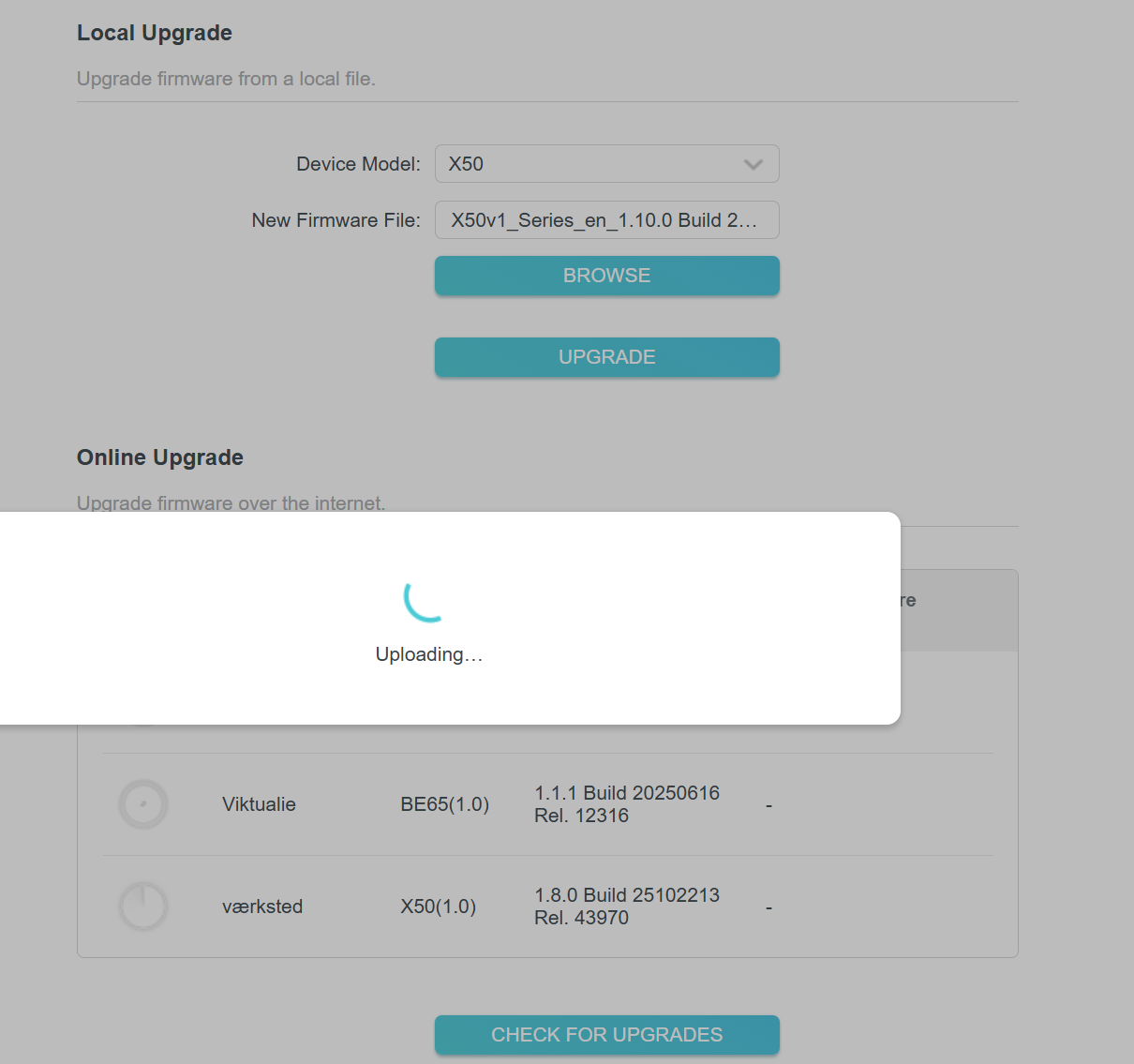
Cheers
Jacob
- Copy Link
- Report Inappropriate Content

Do you have any browser extensions installed in Edge/Brave, such as ad blockers, that might be interfering with the upgrade? In the past I had a beta fail to upgrade due to a browser extension installed by my anti virus. As soon as I turned it off and restarted the computer it worked fine
This last time it was a program running on my computer that i had to disable it's services reboot and then the patch installed fine.
You can also try (if your on a windows pc) to boot the pc into windows safe mode with networking which "should" bypass all security on your pc and try to install the patch that way.
This video walks you thru the process of getting into safe mode if your running windows 11
https://www.youtube.com/watch?v=HIdmYtun6jI&t=11s
- Copy Link
- Report Inappropriate Content

Hi TP-Link Team,
I am writing to report significant stability issues with the recent firmware updates for the Deco X50 V1. Unfortunately, each recent update seems to be introducing more bugs than it fixes, forcing me to roll back to older versions just to have a usable network.
Current Issues Found:
Firmware 1.10: The internet connection frequently drops for a few seconds at a time. Interestingly, the PPPoE session remains online and active, but data flow stops. This suggests a routing or internal processing glitch rather than an ISP issue.
Firmware 1.8: The system completely hangs/freezes once the client count reaches 30–40 devices. When this happens, the Deco app becomes unresponsive and can no longer manage the network.
Current Status:
Because of these issues, I have been forced to downgrade back to Firmware 1.7, which is the last stable version for my environment.
It is frustrating to see the performance of the device degrade with every "update." Please investigate these stability bugs, specifically regarding high device loads and the intermittent "ghost" disconnects on 1.10.
Looking forward to a fix that actually improves the device.
- Copy Link
- Report Inappropriate Content

@David-TP with this firmware , enabling IPV6 PPPoE makes the device not responding after some days .Deco x50 using a WAN interface with PPPoE , 2x Deco X50 as satellites, 1x Deco x60 as satellite. Router mode configuration on main Deco. Also the check update is not working after some days .
- Copy Link
- Report Inappropriate Content
Hi,
Regarding the reported phenomenon, please provide the following information.
1. Are the Deco nodes connected wirelessly? When they are working, please log in to the Deco app and send us a screenshot of the network map.
2. If you do not enable IPv6, do the Deco nodes work fine all the time? What's the LED status on the main Deco when it does not respond? How do you restore the Deco network to normal?
3. When the issue occurs, do you have internet on the client devices? Can you log in to the web UI of the Deco nodes?
Best Regards
- Copy Link
- Report Inappropriate Content
Information
Helpful: 5
Views: 3421
Replies: 27
Voters 1
