
Why do I have to approve devices that want to connect to the guest network?

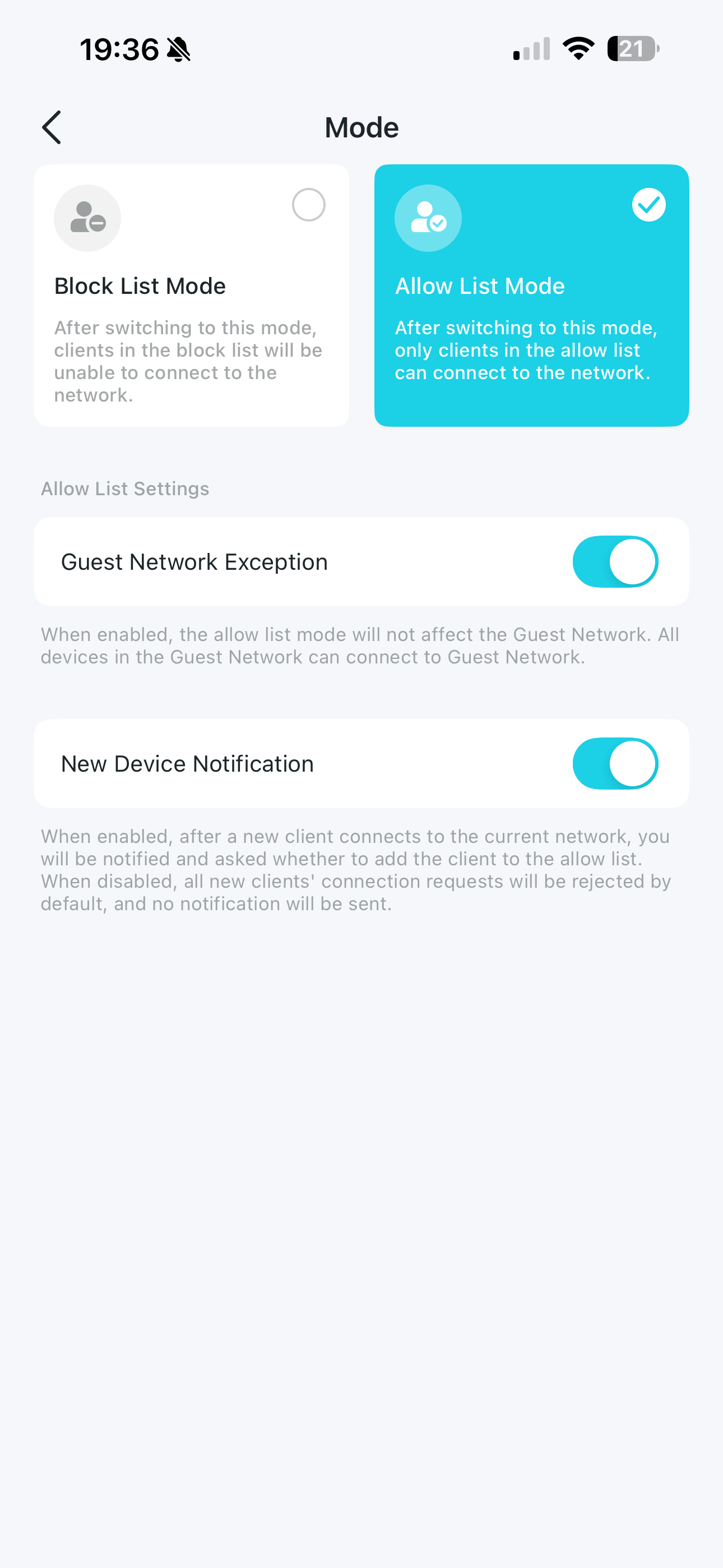
I have set up my network to work on Allow List Mode and have enabled Guest Network Exception but every time a device wants to connect to the guest network I have to approve it.
This is my current configuration and if I understand correctly, shouldn't guest network access not need approval to connect?
I want that if someone wants to connect to guest network, they can without me approving.
- Copy Link
- Subscribe
- Bookmark
- Report Inappropriate Content


Hi, welcome to the community.
Usually, with your settings, the client device connected to the guest network won't ask for approval.
Please ensure the main and guest networks have different SSIDs, and the client device is connected to the guest network rather than the main network.
If the problem is reproduced, please follow the instructions below to send us the Deco app log, and let us know once you have sent it.
How to Get and Send Deco App Log to TP-Link Support
Best regards.
- Copy Link
- Report Inappropriate Content

@Joseagaleanoc Does it happen when a new device try to join the guest network, or any whitelisted device?
Do you have a password set for the guest network?
I think the "new device notification" is clashing with the whitelist feature
- Copy Link
- Report Inappropriate Content
- Copy Link
- Report Inappropriate Content
@ImtiazAli Yes, I have a password set for the guest network.
And the notification only happens when a device wants to connect for the first time to the guest network.
- Copy Link
- Report Inappropriate Content
Hi,
Thank you for the updated information.
I have escalated your case to our tech team, and they will contact you via email to assist you further. Please wait patiently.
Best Regards
- Copy Link
- Report Inappropriate Content
Similar case here. Deco BE63, latest firmware (1.3.5 Build 26071712 Release. 18941).
Right after enabling "Guest Network Exception" it works well. Access to guest wifi is auto-approved, access to non-guest requries approval.
All good... until a reboot happens (for example, the last one was the firmware auto-update).
Right after the DECOs get rebooted any attempt to connect to the guest network asks for approval.
I had to go to settings, disable and re-enable "Guest Network Exception" to get it to work again.
- Copy Link
- Report Inappropriate Content
Information
Helpful: 0
Views: 946
Replies: 6
Voters 0
No one has voted for it yet.