
Can't add port forwarding

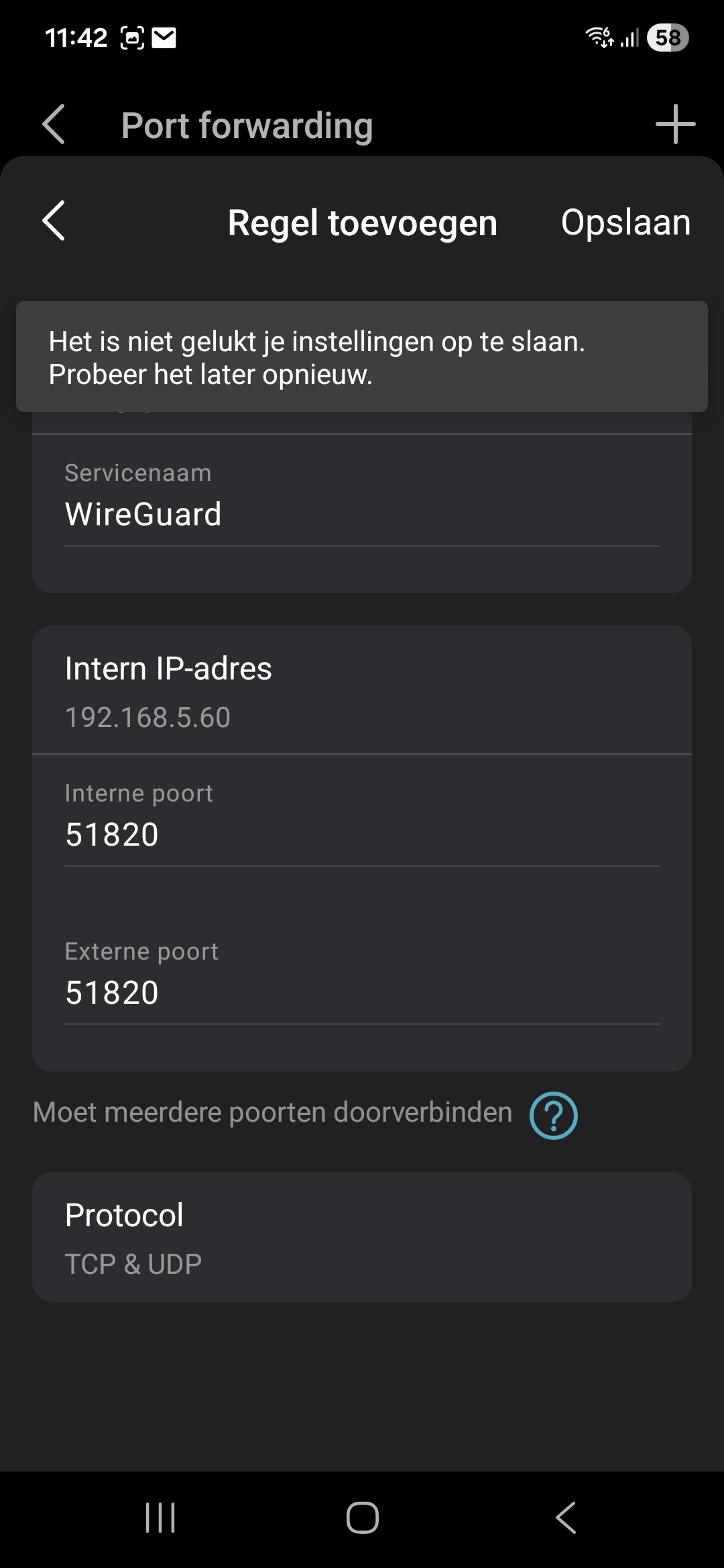
I have a Deco BE3600 for half a year now. Initial setup went well, but now, when I want to modify a address reservation I can't, nor can I add a new port for port forwarding. The app always says it failed.
I've restarted a few times already, but it doesn't make a difference.
Any ideas if I can do something?
TIA,
Alain
- Copy Link
- Subscribe
- Bookmark
- Report Inappropriate Content
Putting the things together, I tried something else ... I could remove the current address reservation, and then when adding the port forwarding, the app added the address by itself, and now it was added. I'll try if that works for a address reservation as well... remove and add
EDIT:
That seems to work as well. Remove the entry, add it again, and change next.
My thought on the origin of the bug:
* I modified DHCP range after the initial setup (address and netmask).
* I saw that the reservations also change to the new range, which was a bit of a surprise to me. But addresses are given out like this.
* But in the background, the old range is still the base for the saved data
- Copy Link
- Report Inappropriate Content

Welcome to the community. See if the following FAQ helps you sort out your port forwarding issues. If you still have issues please reply back to this post.
Thanks
- Copy Link
- Report Inappropriate Content
@HelpFixDecoApp
The problems mentioned there are when it's not working ... not when the app doesn't allow changes. So it's an app thing ...
The deco itself doesn't have a public address, but I can forward to Deco as well. It worked for the original setting.. And this shouldn't have effect on the fact that I can't modify address reservations.
I also tried uninstalling and installing the app on the phone ; via the web-access there are really no options to do something.
BR
Alain
- Copy Link
- Report Inappropriate Content
What deco app version are you running?
Any ideas on why the port fowarding can't be set up via the app?
Please advise
- Copy Link
- Report Inappropriate Content
- Copy Link
- Report Inappropriate Content
I would check the playstore to see if there is a new version. Also are you running your deco's in access point mode?
- Copy Link
- Report Inappropriate Content
The app is reinstalled this evening, it seems to be one from a month ago... Maybe I should be able to do a rollback to an earlier version (but I don't know how that would be done).
The Deco's are in Wifi Router mode (which is required for DHCP and NAT)
- Copy Link
- Report Inappropriate Content


Hi,
Regarding the reported phenomenon, please provide the following information for further analysis.
1. How many port forwarding entries have you added?
2. Please send us the screenshots of the error message that appears in the Deco app when you modify the address reservation entry or add a port forwarding entry.
3. Please refer to the instructions below to send us the Deco app log after the issue occurs. After that, please attach the email reference number (e.g., TKIDXXXX) to this thread, or reply to us after you send the app log.
How to Get and Send Deco System Logs to TP-Link Support
Best Regards
- Copy Link
- Report Inappropriate Content
I made the upload and I got a reply that the ticket is received by TP Link NL, but there is no ticket ID. The subject of the mail is: Ticket Ontvangen - [Deco App Feedback] 00+Configuration Issue+BE3600(1.0)+BE
I had one port-forwarding rule at the moment, I wanted to add 1 more.
FYI: I tried to resize the picture, but than I couldn't upload ...
The message is saying:
Saving the settings did not succeed. Try it again later.
- Copy Link
- Report Inappropriate Content
Putting the things together, I tried something else ... I could remove the current address reservation, and then when adding the port forwarding, the app added the address by itself, and now it was added. I'll try if that works for a address reservation as well... remove and add
EDIT:
That seems to work as well. Remove the entry, add it again, and change next.
My thought on the origin of the bug:
* I modified DHCP range after the initial setup (address and netmask).
* I saw that the reservations also change to the new range, which was a bit of a surprise to me. But addresses are given out like this.
* But in the background, the old range is still the base for the saved data
- Copy Link
- Report Inappropriate Content
Hi,
Thank you for sharing your experience, and I'm glad to hear that your case has been resolved.
Best Regards
- Copy Link
- Report Inappropriate Content
Information
Helpful: 0
Views: 371
Replies: 10
Voters 0
No one has voted for it yet.