
Firmware problems

I updated the firmware on my DECO BE 63 V2.60 system, specifically Deco BE63(US)_V2.6_1.3.2 Build 26040912, and since then it's been terrible. The devices disconnect constantly, the WAN connection is unstable, and in short, my mesh system is broken in practically every way. I even had to remove the decoders from my house and use an old router until the problem is fixed. I think TP-LINK employees made a mistake when they released the firmware because when I unzipped the file, the name is BE65V2_BE65V3_multi_v2_SP1_V2-up-ver1-3-2-P1[26040912-rel40631]_2026-04-09_12.02.33.
I need a solution soon, please.
- Copy Link
- Subscribe
- Bookmark
- Report Inappropriate Content


Hi,
The firmware version 1.3.2 you download and use on the BE63 should be the correct one.
If your situation, please try the following steps and check if the Deco works properly.
1. Power on the main Deco only, press the reset button on it for one second to factory reset it.
2. Connect the main Deco to the old router's LAN port, set up the Deco in the Deco app, and then check if you have a stable connection. If so, factory reset the satellite Deco and add it to the Deco network for a try.
3. If the main Deco has an unstable connection, please confirm the LED status on the main Deco when the issue occurs. Test if changing the ethernet cable between the old router and the main deco helps.
Best Regards
- Copy Link
- Report Inappropriate Content
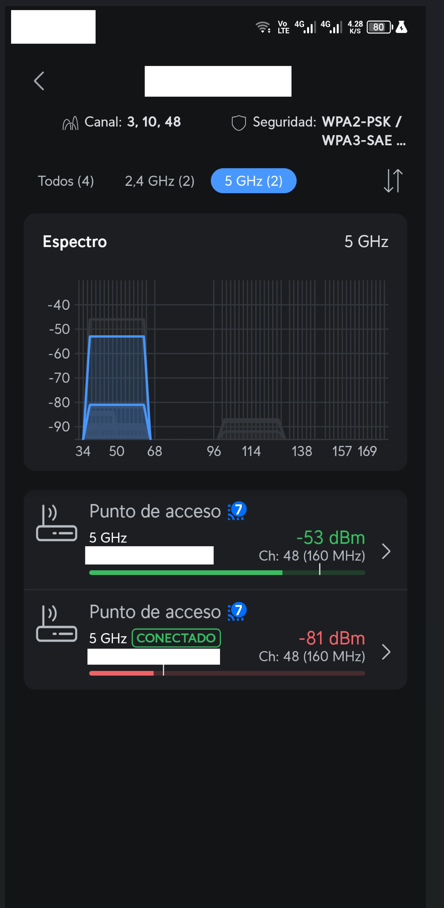
Good morning.
Yesterday I did exactly what you suggested, however, the Wi-Fi connection is still terrible. The devices aren't roaming, band steering is useless, and the client devices keep disconnecting—it's a complete mess.
I've already deleted the Wi-Fi connection on all the client devices and reconfigured it, but I'm still having the same problems.
The image shows that the DECO is not managing roaming well; it has been in that state for more than 10 minutes.
- Copy Link
- Report Inappropriate Content
Hi,
Usually, Deco helps client devices discover nearby Deco nodes and suggests that they roam to a better Deco. However, whether or not to roam is determined by the device itself.
If your device disconnects from Wi-Fi and reconnects to the same Deco's Wi-Fi even when the signal is weak, please refer to the instructions below to check whether connection preference settings are configured for your clients. If so, remove these settings for a try.
Connection Preference on the Deco App: Set Your Signal Source
Please provide the following information for further analysis.
1. When the disconnect issue occurs, what's the LED status on the Deco nodes? Do the wireless devices disconnect from Wi-Fi, or connected to Wi-Fi but have no internet access? Do the devices restore connection automatically?
2. If you connect a wired device to the Deco, such as a laptop, is the connection stable?
3. Do all client devices have the disconnect issue? Do they disconnect simultaneously?
Best Regards
- Copy Link
- Report Inappropriate Content
Good morning
On January 13, 2026, TP-Link released firmware Deco BE63(US)_V2.6_1.2.10 Build 20251229 for the Deco BE63 system. This was the best update I've ever had; my network worked wonderfully, it was super stable, and the roaming and band steering were incredible.
I have two Deco BE63 units, named LIVING ROOM and BEDROOM.
Using the following two scenarios with the Deco BE63(US)_V2.6_1.2.10 Build 20251229 update:
Scenario 1:
Deco LIVING ROOM: -51 dBm
Deco BEDROOM: -48 dBm
My devices connected to the Deco BEDROOM instantly; it was truly fantastic.
Scenario 2:
Deco LIVING ROOM: -40 dBm
Deco BEDROOM: -44 dBm
My devices connected to the Deco BEDROOM instantly.
What I mean is that before, my Deco system helped clients roam phenomenally well. If there was a difference of at least -3 dBm between the two Deco units, it would automatically and very quickly switch between them.
The band steering was equally good. The frequencies changed dynamically according to the distance. For example, if I moved too far away from the Deco units, it would use the 2.4 GHz frequency, and as I got closer, it would automatically switch to 5 GHz. It was spectacular; the change was incredibly fast.
With the Deco BE63(US)_V2.6_1.3.2 Build 26040912 update, everything has gone terribly wrong, just awful in every way.
- Band Steering and Roaming seem to be nonexistent, as devices remain connected to the worst frequency and the worst Deco node, even though they have better options. This connection persists indefinitely, so I constantly have to turn Wi-Fi on and off to connect to the best node and frequency.
- The WAN connection is terrible. I lose the connection constantly; the LED on the Deco devices turns red and stays that way until I have to restart them. Sometimes it works, sometimes it doesn't. The connection drops on both Wi-Fi and wired clients. Because of this, I've had to buy a router and put it on my LAN. The Deco receivers are currently in Access Point mode (at least the wired devices connected to the router I just bought have internet access).
What I'm trying to say is that the connection problems I'm having are due to the latest Deco BE63(US)_V2.6_1.3.2 Build 26040912 update. All my Wi-Fi and wired devices are the same; nothing has changed.
I tried to revert to the previous firmware version, but it's not possible.
I've tried everything. After updating and noticing these errors, I factory reset all the Deco receivers and reconfigured them, but I'm still having the same problems.
- Copy Link
- Report Inappropriate Content
Hi,
Thank you for the information provided. I have escalated your case to our tech team, and they will contact you via email to assist you further. Please wait patiently.
Best Regards
- Copy Link
- Report Inappropriate Content

I have the exact same issue as Kevin. I've wasted hours troubleshooting this, including factory resetting all nodes. It's still dropping devices on the network. Internet connection stability is horrendous.
The hardware is essentially junk with this latest firmware update. And we can roll back to the last one which was perfect.
- Copy Link
- Report Inappropriate Content

@Michael63729298 , @Kevin123456789
If you desperately need the new features of the new firmware, you have to wait for a fix.
When not , follow this procedure to get back to the old firmware: Deco Bricked? How to Use Firmware Recovery to Restore Your TP-Link Deco
I reverted 3 Deco's with success.
- Copy Link
- Report Inappropriate Content
Hi,
Sorry for any inconvenience caused. Regarding the drop phenomenon you are experiencing, if you'd like to perform further troubleshooting, please provide the following information for further analysis.
1. How many Deco BE63 units do you have? Please describe your network topology. Or you can go to the Deco app, tap a Deco, and send us screenshots of the Show Map and Show List pages.
2. Please describe the phenomenon you are experiencing in detail. For instance:
a. What was the status and color of the LED indicator on the main Deco unit when the issue occurred?
b. Are your client devices failing to roam to a Deco unit with a significantly stronger signal?
c. How many devices are currently connected to your network? Are all of your devices experiencing the drop phenomenon?
d. Does the drop phenomenon refer to being connected to the Wi-Fi network but having no internet access? Is the drop phenomenon occurring simultaneously across all of your devices?
Best Regards
- Copy Link
- Report Inappropriate Content
Information
Helpful: 0
Views: 312
Replies: 8
Voters 0
No one has voted for it yet.